Appendix C: Debugging Cheat Sheet
Appendix C, v2.1 — Early 2026
This is the appendix you open when something’s broken and you need answers fast. Find your symptom, check the likely causes in order, try the quick fixes.
For explanations, see the referenced chapters. For reusable solutions, see Appendix B (Pattern Library).
Quick Reference
Token Estimates
| Content | Tokens |
|---|---|
| 1 character | ~0.25 tokens |
| 1 word | ~1.3 tokens |
| 1 page (500 words) | ~650 tokens |
| 1 code function | ~100-500 tokens |
Effective Context Limits
| Model Limit | Target Max | Danger Zone |
|---|---|---|
| 8K | 5.6K | 6.4K+ |
| 32K | 22K | 26K+ |
| 128K | 90K | 102K+ |
| 200K | 140K | 160K+ |
Quality degrades around 32K tokens regardless of model limit.
Latency Benchmarks
| Operation | Typical | Slow |
|---|---|---|
| Embedding | 10-50ms | 100ms+ |
| Vector search | 20-100ms | 200ms+ |
| Reranking | 100-250ms | 500ms+ |
| LLM first token | 200-500ms | 1000ms+ |
| LLM full response | 1-5s | 8s+ |
1. Context & Memory Issues
Symptom: AI ignores information that’s clearly in the context
Likely Causes:
- Information is in the “lost middle” (40-60% position)
- Context too long—attention diluted
- More recent/prominent information contradicts it
- Information format doesn’t match query pattern
Quick Fixes:
- Move critical information to first or last 20% of context
- Reduce total context size
- Repeat key information near the end
- Rephrase information to match likely query patterns
Chapter: 2 (Context Window)
Symptom: AI forgot what was said earlier in conversation
Likely Causes:
- Message was truncated by sliding window
- Message was summarized and detail was lost
- Token limit reached, oldest messages dropped
- Summarization prompt lost key details
Quick Fixes:
- Check current token count vs. limit
- Review what’s actually in the conversation history
- Look at summarization output for missing details
- Increase history budget or reduce other components
Chapter: 5 (Conversation History)
Symptom: AI contradicts its earlier statements
Likely Causes:
- Original statement no longer in context (truncated)
- Original statement in lost middle
- Summarization didn’t preserve the decision
- Later message implicitly contradicted it
Quick Fixes:
- Check if original statement still exists in context
- Check position of original statement
- Add explicit decision tracking (Pattern B.3.4)
- Include “established decisions” section in context
Chapter: 5 (Conversation History)
Symptom: Memory grows unbounded until failure
Likely Causes:
- No pruning strategy implemented
- Pruning thresholds too high
- Memory extraction creating duplicates
- Contradiction detection not superseding old memories
Quick Fixes:
- Implement hard memory limits
- Add tiered pruning (Pattern B.6.4)
- Deduplicate on storage
- Check supersession logic
Chapter: 9 (Memory and Persistence)
Symptom: Old preferences override new ones
Likely Causes:
- No contradiction detection
- Old memory has higher importance score
- Old memory retrieved because more similar to query
- New preference not extracted as memory
Quick Fixes:
- Implement contradiction detection (Pattern B.6.5)
- Check importance scoring logic
- Verify new preferences are being extracted
- Add recency boost to retrieval scoring
Chapter: 9 (Memory and Persistence)
2. RAG & Retrieval Issues
Symptom: Retrieval returns completely unrelated content
Likely Causes:
- Embedding model mismatch (different models for index vs. query)
- Chunking destroyed semantic units
- Query vocabulary doesn’t match document vocabulary
- Index corrupted or wrong collection queried
Quick Fixes:
- Verify same embedding model for indexing and query
- Check chunks contain coherent content (not mid-sentence)
- Try hybrid search to catch keyword matches
- Verify querying correct index/collection
Chapter: 6 (RAG Fundamentals)
Symptom: Correct content exists but isn’t retrieved
Likely Causes:
- Content was chunked poorly (split across chunks)
- Top-K too small
- Embedding doesn’t capture the semantic relationship
- Metadata filter excluding it
Quick Fixes:
- Search chunks directly for expected content
- Increase top-K (try 20-50)
- Try different query phrasings
- Check metadata filters aren’t over-restrictive
Chapter: 6 (RAG Fundamentals)
Symptom: Good retrieval but answer is wrong/hallucinated
Likely Causes:
- Too much context (lost in middle problem)
- Conflicting information in retrieved docs
- Prompt doesn’t instruct grounding
- Model confident in training knowledge over context
Quick Fixes:
- Reduce number of retrieved documents
- Add explicit “only use provided context” instruction
- Check for contradictions in retrieved content
- Add “if not in context, say so” instruction
Chapter: 6 (RAG Fundamentals)
Symptom: Answer ignores retrieved context entirely
Likely Causes:
- Context not clearly delimited
- System prompt doesn’t emphasize using context
- Query answerable from model’s training (bypasses retrieval)
- Retrieved content formatted poorly
Quick Fixes:
- Add clear delimiters around retrieved content
- Strengthen grounding instructions in system prompt
- Add “base your answer on the following context” framing
- Format retrieved content with clear source labels
Chapter: 6 (RAG Fundamentals)
Symptom: Reranking made results worse
Likely Causes:
- Reranker trained on different domain
- Reranking all results instead of just close scores
- Cross-encoder input too long (truncated)
- Original ranking was already good
Quick Fixes:
- Test with and without reranking, measure both
- Only rerank when top scores are close (within 0.15)
- Ensure chunks fit reranker’s max length
- Try different reranker model
Chapter: 7 (Advanced Retrieval)
Symptom: Query expansion added noise, not coverage
Likely Causes:
- Too many variants generated
- Variants drifted from original meaning
- Merge strategy weights variants too highly
- Original query was already specific
Quick Fixes:
- Reduce to 2-3 variants
- Add “keep the same meaning” to expansion prompt
- Weight original query higher in merge
- Skip expansion for specific/technical queries
Chapter: 7 (Advanced Retrieval)
3. System Prompt Issues
Symptom: AI ignores parts of system prompt
Likely Causes:
- Conflicting instructions (model picks one)
- Instruction buried in middle of long prompt
- Too many instructions (attention diluted)
- Instruction is ambiguous
Quick Fixes:
- Audit for conflicting instructions
- Move critical instructions to beginning or end
- Reduce total prompt length (<2000 tokens ideal)
- Make instructions specific and unambiguous
Chapter: 4 (System Prompts)
Symptom: Output format not followed
Likely Causes:
- No example provided
- Format specification conflicts with content needs
- Schema too complex
- Format instruction buried in prompt
Quick Fixes:
- Add concrete example of desired output
- Simplify schema (flatten nested structures)
- Put format specification at end of prompt
- Use structured output mode if available
Chapter: 4 (System Prompts)
Symptom: AI does things explicitly forbidden
Likely Causes:
- Constraint not prominent enough
- User input overrides constraint
- Constraint conflicts with other instructions
- Constraint phrasing is ambiguous
Quick Fixes:
- Move constraints to end of prompt (high attention)
- Phrase as explicit “NEVER do X” rather than “avoid X”
- Add constraint reminder after user input section
- Check for instructions that might override constraint
Chapter: 4 (System Prompts)
Symptom: Behavior inconsistent across similar queries
Likely Causes:
- Instructions have edge cases not covered
- Temperature too high
- Ambiguous phrasing interpreted differently
- Context differences between queries
Quick Fixes:
- Reduce temperature (try 0.3 or lower)
- Add explicit handling for edge cases
- Rephrase ambiguous instructions
- Log full context for inconsistent cases, compare
Chapter: 4 (System Prompts)
4. Tool Use Issues
Symptom: Model calls wrong tool
Likely Causes:
- Tool descriptions overlap or are ambiguous
- Tool names unfamiliar (not matching training patterns)
- Too many tools (decision fatigue)
- Description doesn’t include “when NOT to use”
Quick Fixes:
- Add “Use for:” and “Do NOT use for:” to descriptions
- Use familiar names (read_file not fetch_document)
- Reduce tool count or group by task
- Add examples to descriptions
Chapter: 8 (Tool Use)
Symptom: Model passes invalid parameters
Likely Causes:
- Parameter types not specified in schema
- Constraints not documented
- No examples in description
- Parameter names ambiguous
Quick Fixes:
- Add explicit types to all parameters
- Document constraints (min, max, allowed values)
- Add example calls to tool description
- Use clear, unambiguous parameter names
Chapter: 8 (Tool Use)
Symptom: Tool errors, model keeps retrying same call
Likely Causes:
- Error message doesn’t explain what went wrong
- No alternative suggested in error
- Model doesn’t understand the error
- No retry limit implemented
Quick Fixes:
- Return actionable error messages
- Include suggestions in errors (“Try X instead”)
- Implement retry limit (3 max)
- Add different error types for different failures
Chapter: 8 (Tool Use)
Symptom: Tool succeeds but model ignores result
Likely Causes:
- Output format unclear/unparseable
- No delimiters marking output boundaries
- Output too long (truncated without indicator)
- Output doesn’t answer what model was looking for
Quick Fixes:
- Add clear delimiters (=== START === / === END ===)
- Truncate with indicator (“…truncated, 5000 more chars”)
- Structure output with clear sections
- Include summary at top of long outputs
Chapter: 8 (Tool Use)
Symptom: Destructive action executed without authorization
Likely Causes:
- No action gating implemented
- Risk levels not properly classified
- Confirmation flow bypassed
- Action not recognized as destructive
Quick Fixes:
- Implement action gate (Pattern B.10.4)
- Classify all write/delete/execute as HIGH or CRITICAL
- Require explicit confirmation for destructive actions
- Log all destructive actions for audit
Chapter: 8 (Tool Use), 14 (Security)
5. Multi-Agent Issues
Symptom: Agents contradict each other
Likely Causes:
- Agents have different context/information
- No handoff validation
- No shared ground truth
- Orchestrator didn’t synthesize properly
Quick Fixes:
- Log what context each agent received
- Validate outputs at handoff boundaries
- Include source attribution in agent outputs
- Check orchestrator synthesis logic
Chapter: 10 (Multi-Agent Systems)
Symptom: System hangs (never completes)
Likely Causes:
- Circular dependency in task graph
- Agent stuck waiting for response
- No timeout implemented
- Infinite tool loop
Quick Fixes:
- Check dependency graph for cycles
- Add timeout per agent (30s default)
- Implement circuit breaker (Pattern B.7.5)
- Add max iterations to agent loops
Chapter: 10 (Multi-Agent Systems)
Symptom: Wrong agent selected for task
Likely Causes:
- Task classification ambiguous
- Classifier prompt unclear
- Overlapping agent capabilities
- Always defaulting to one agent
Quick Fixes:
- Review classification examples
- Add clearer criteria to classifier prompt
- Sharpen agent role definitions
- Log classification decisions for analysis
Chapter: 10 (Multi-Agent Systems)
Symptom: Context lost between agent handoffs
Likely Causes:
- Handoff not including necessary information
- Output schema missing fields
- Receiving agent expects different format
- Summarization losing details
Quick Fixes:
- Define typed output schemas (Pattern B.7.3)
- Validate outputs match schema before handoff
- Log full handoff data for debugging
- Include “context for next agent” in output
Chapter: 10 (Multi-Agent Systems)
6. Production Issues
Symptom: Works in development, fails in production
Likely Causes:
- Production inputs more varied/messy
- Concurrent load not tested
- Context accumulates in long sessions
- External dependencies behave differently
Quick Fixes:
- Compare dev inputs vs. prod inputs (log samples)
- Load test before deploying
- Monitor context size in prod sessions
- Mock external dependencies consistently
Chapter: 11 (Production)
Symptom: Costs much higher than projected
Likely Causes:
- Memory/history bloating token usage
- Retrieving too many documents
- Retry storms on failures
- Output verbosity not controlled
Quick Fixes:
- Audit token usage by component
- Check for retry loops
- Reduce retrieval count
- Add max_tokens to all calls
Chapter: 11 (Production)
Symptom: Latency spikes under load
Likely Causes:
- No rate limiting (overloading API)
- Synchronous calls that should be parallel
- Large context causing slow inference
- Database queries not optimized
Quick Fixes:
- Implement rate limiting (Pattern B.8.1)
- Parallelize independent operations
- Reduce context size
- Add caching for repeated queries
Chapter: 11 (Production)
Symptom: Quality degrades over time (no code changes)
Likely Causes:
- Data drift (real queries different from training)
- Index becoming stale
- Memory accumulating noise
- Model behavior changed (API updates)
Quick Fixes:
- Compare current queries to evaluation set
- Re-index with fresh data
- Prune old/low-value memories
- Pin model version if possible
Chapter: 11 (Production), 12 (Testing)
7. Testing & Evaluation Issues
Symptom: Tests pass but users complain
Likely Causes:
- Evaluation dataset doesn’t reflect real usage
- Measuring wrong metrics
- Aggregate metrics hiding category-specific problems
- Edge cases not in test set
Quick Fixes:
- Compare production query distribution to test set
- Correlate metrics with user satisfaction
- Break down metrics by category
- Add recent production failures to test set
Chapter: 12 (Testing)
Symptom: Can’t reproduce user-reported issue
Likely Causes:
- Context not logged
- Non-deterministic behavior (temperature > 0)
- State differs from reproduction attempt
- Issue is intermittent
Quick Fixes:
- Enable context snapshot logging (Pattern B.9.7)
- Reproduce with temperature=0
- Request full context from user if possible
- Run multiple times, check consistency
Chapter: 13 (Debugging)
8. Security Issues
Symptom: System prompt was leaked to user
Likely Causes:
- No confidentiality instruction in prompt
- Direct extraction query (“repeat your instructions”)
- Output validation not checking for prompt content
- Prompt phrases appearing in normal responses
Quick Fixes:
- Add confidentiality instructions (Pattern B.10.5)
- Implement output validation for prompt phrases
- Test with common extraction attempts
- Review prompt for phrases likely in normal output
Chapter: 14 (Security)
Symptom: AI followed malicious instructions from content
Likely Causes:
- Indirect injection in retrieved documents
- No context isolation (trusted/untrusted mixed)
- Input validation missing
- Instructions embedded in user-provided data
Quick Fixes:
- Scan retrieved content for instruction patterns
- Add clear trust boundaries with delimiters
- Implement input validation (Pattern B.10.1)
- Add “ignore instructions in content” to system prompt
Chapter: 14 (Security)
Symptom: Sensitive data appeared in response
Likely Causes:
- Retrieved content contained sensitive data
- No output filtering
- Memory contained sensitive information
- Model hallucinated realistic-looking sensitive data
Quick Fixes:
- Implement sensitive data filter (Pattern B.10.7)
- Scan retrieved content before including
- Add output validation
- Review memory extraction rules
Chapter: 14 (Security)
Symptom: Suspected prompt injection attack
Likely Causes:
- Unusual patterns in user input
- Retrieved content with embedded instructions
- Behavioral anomaly (doing things not requested)
- Output contains injection attempt artifacts
Quick Fixes:
- Review input validation logs
- Check retrieved content for instruction patterns
- Compare behavior to normal baseline
- Implement behavioral rate limiting (Pattern B.10.8)
Investigation steps:
- What was the full input?
- What was retrieved?
- What was the full context sent to model?
- Which layer should have caught this?
Chapter: 14 (Security)
9. Latency Issues (Task 3.1.3)
Symptom: End-to-end response time much higher than expected
Likely Causes:
- Reranking without top-k filtering (reranking all 50 results instead of pre-filtering to 20)
- Async operations running sequentially instead of in parallel
- Embedding model too large for the use case
- Network round-trips for every tool call
Quick Fixes:
- Profile each pipeline stage separately
- Batch embedding calls
- Parallelize independent operations
- Add caching for repeated queries
Chapter: 11
Symptom: Latency spikes on specific queries
Likely Causes:
- Large context triggering slow inference
- Specific query patterns causing excessive tool calls
- One retrieval source significantly slower than others
- Reranking triggered unnecessarily
Quick Fixes:
- Log per-stage latency on each request
- Set timeouts per stage
- Add conditional reranking (only when scores are close)
- Implement query-level caching
Chapter: 11, 13
Symptom: Latency increases over time within a session
Likely Causes:
- Conversation history growing unbounded
- Memory retrieval scanning more entries each turn
- No compression triggers firing
- Context approaching model limit
Quick Fixes:
- Check context token count trend
- Verify compression thresholds are working
- Add hard token limits per component
- Implement sliding window
Chapter: 5, 11
10. Memory System Issues (Task 3.1.4)
Symptom: Memories contradict each other
Likely Causes:
- No contradiction detection on storage
- Old memories with higher importance not superseded
- Multiple extraction passes creating duplicates with different timestamps
- Semantic similarity threshold too low
Quick Fixes:
- Implement contradiction check (Pattern B.6.5)
- Add dedup on content hash
- Log all memory writes for audit
- Lower similarity threshold for contradiction matching
Chapter: 9
Symptom: Retrieval returns irrelevant memories
Likely Causes:
- Embedding model doesn’t capture your domain well
- Recency scoring dominating relevance
- Importance scores all similar (no differentiation)
- Too many memories in store (noise overwhelms signal)
Quick Fixes:
- Test embedding similarity manually
- Tune hybrid scoring weights
- Prune low-value memories
- Try domain-specific embedding model
Chapter: 9
Symptom: Important memories not retrieved despite existing in store
Likely Causes:
- Query phrasing doesn’t match memory embedding
- Importance score too low
- Memory was pruned
- Memory type filter excluding it
Quick Fixes:
- Search memories directly to confirm existence
- Check retrieval scoring
- Verify pruning isn’t removing valuable memories
- Widen type filter
Chapter: 9
11. Debugging Without Observability (Task 3.1.5)
Many teams don’t have structured logging, metrics, or tracing infrastructure when they start building context-aware systems. This is completely normal. This section provides a practical path forward without waiting for a full observability platform.
Starting from Zero
You can begin debugging immediately with minimal tooling:
- Add print/log statements at every pipeline stage boundary. When a request enters retrieval, log it. When retrieval completes, log the results. Same for embedding, reranking, generation—every major stage.
- Save the full context (messages array) to a JSON file on every request. Include the exact state passed to the model, with timestamps. This becomes your audit trail.
- Compare working vs failing requests by diffing saved contexts. When something breaks, find a successful request nearby and compare what’s different in the messages array, token counts, or memory state.
- Use timestamp differences to profile latency. Measure wall-clock time between stage boundaries. This tells you where time is being spent without instrumenting every function call.
The Minimal Observability Kit
Start by adding five things to every request:
- Log the full messages array sent to the model (redact sensitive data like PII)
- Log token counts per component (system prompt, user message, RAG context, memory, conversation history)
- Log the model response and finish_reason (did it complete or hit length limits?)
- Log wall-clock time per stage (embedding, retrieval, reranking, generation in milliseconds)
- Save failures to a file for later analysis (include input, full context, error, and timestamp)
Here’s a minimal Python logging class to get started:
import json
import time
from datetime import datetime
from typing import Any, Dict, List

class SimpleRequestLogger:
    def __init__(self, log_file: str = "requests.jsonl"):
        self.log_file = log_file

    def log_request(
        self,
        request_id: str,
        query: str,
        messages: List[Dict[str, str]],
        stage: str = "start"
    ):
        """Log request at a pipeline stage."""
        entry = {
            "timestamp": datetime.utcnow().isoformat(),
            "request_id": request_id,
            "stage": stage,
            "query": query,
            "message_count": len(messages),
            "token_estimate": sum(len(m.get("content", "").split()) for m in messages),
        }
        self._write(entry)

    def log_stage_latency(
        self,
        request_id: str,
        stage: str,
        latency_ms: float,
        metadata: Dict[str, Any] = None
    ):
        """Log latency for a specific stage."""
        entry = {
            "timestamp": datetime.utcnow().isoformat(),
            "request_id": request_id,
            "stage": stage,
            "latency_ms": latency_ms,
            "metadata": metadata or {},
        }
        self._write(entry)

    def log_failure(
        self,
        request_id: str,
        query: str,
        messages: List[Dict[str, str]],
        error: str,
        stage: str
    ):
        """Log a failed request with full context."""
        entry = {
            "timestamp": datetime.utcnow().isoformat(),
            "request_id": request_id,
            "stage": stage,
            "query": query,
            "messages": messages,
            "error": str(error),
        }
        self._write(entry)

    def _write(self, entry: Dict[str, Any]):
        """Write entry as JSON line."""
        with open(self.log_file, "a") as f:
            f.write(json.dumps(entry) + "\n")
Usage in your pipeline:
logger = SimpleRequestLogger("debug_requests.jsonl")
request_id = str(uuid.uuid4())

logger.log_request(request_id, user_query, initial_messages, stage="start")

start = time.time()
retrieval_results = retrieve(user_query)
logger.log_stage_latency(request_id, "retrieval", (time.time() - start) * 1000)

try:
    response = model.generate(messages)
    logger.log_request(request_id, user_query, messages, stage="generation_complete")
except Exception as e:
    logger.log_failure(request_id, user_query, messages, str(e), stage="generation")
Upgrading Incrementally
As your system matures, upgrade your observability in stages:
-
Phase 1: Structured logging - Replace print statements with a logging module (Python’s
loggingor similar). Add structured fields:request_id,stage,latency_ms,token_count. Write to files or a log aggregator. You’re already here if you’ve implemented SimpleRequestLogger. -
Phase 2: Metrics and dashboards - Count events per stage, measure p50/p95/p99 latency, track error rates. Tools like Prometheus + Grafana, DataDog, or CloudWatch make this easy. Focus on the five metrics above.
-
Phase 3: Distributed tracing - Use OpenTelemetry to connect your logs, metrics, and traces. Trace latency through asynchronous operations, across service boundaries, and into external APIs (LLM calls, retrieval services). Chapter 13 covers observability in depth.
Don’t wait for Phase 3 to start debugging. Phases 1 and 2 will solve most issues you encounter. Once you understand your system’s behavior, structured traces in Phase 3 become a precision tool rather than a necessity.
General Debugging Process
When nothing above matches, follow this process:
Step 1: Reproduce
- Can you reproduce the issue?
- What’s the minimal input that triggers it?
- Is it deterministic or intermittent?
Step 2: Isolate
- Which component is failing? (retrieval, generation, tools, etc.)
- Test each component independently
- What’s different between working and failing cases?
Step 3: Observe
- What’s actually in the context? (log it)
- What’s the model actually outputting? (full response)
- What do the metrics show?
Step 4: Hypothesize
- What’s the most likely cause?
- What evidence would confirm or refute it?
Step 5: Test
- Change one variable at a time
- Measure before and after
- Did the change help?
Step 6: Fix
- Implement minimal fix
- Add test case for this failure
- Monitor for recurrence
Emergency Response
System is down
- Check API status (provider outage?)
- Check rate limits (quota exceeded?)
- Check error logs (what’s failing?)
- Implement fallback if available
Costs spiking
- Implement emergency rate limit
- Check for retry storms
- Review recent deployments
- Reduce context/retrieval temporarily
Quality collapsed
- Check for recent changes (rollback?)
- Compare to baseline metrics
- Sample recent queries (what’s different?)
- Check external dependencies (API changes?)
Security incident
- Disable affected endpoint
- Preserve logs for investigation
- Identify attack vector
- Patch and monitor
Real-World Debugging Stories
These mini case studies illustrate how debugging principles apply in practice.
Case Study: The Friday Afternoon RAG Failure
Situation: A product Q&A system started returning wrong answers every Friday afternoon. Quality metrics showed a 40% accuracy drop between 2-5 PM on Fridays.
Investigation: The team checked model changes (none), prompt changes (none), and infrastructure (stable). Then they looked at the data pipeline: marketing published weekly blog posts every Friday at 1 PM, triggering a re-indexing job that temporarily corrupted the vector index during the 2-3 hour rebuild.
Root Cause: The ingestion pipeline didn’t use atomic index swaps—it updated the live index in place, meaning queries during re-indexing hit a partially-built index with incomplete embeddings.
Fix: Implemented blue-green indexing: build the new index alongside the old one, swap atomically when complete. Added a retrieval quality check that compared scores against a baseline before and after indexing.
Lesson: When problems correlate with time, look at scheduled jobs. Always index atomically.
Patterns used: B.4.8 RAG Stage Isolation, B.9.3 Regression Detection
Case Study: The Helpful but Wrong Memory
Situation: A coding assistant kept suggesting deprecated API patterns to a user, even though the user had corrected it multiple times. The user would say “don’t use the old API,” the system would acknowledge it, but the next session it reverted.
Investigation: Memory extraction was working—the correction was stored. Memory retrieval was working—the correction was retrieved. But so were 15 older memories about the same API, all referencing the old pattern. The hybrid scoring (0.5 relevance + 0.3 recency + 0.2 importance) gave the older memories a collective advantage because they were more numerous and highly relevant to API questions.
Root Cause: Contradiction detection only compared pairs of memories, not clusters. The single “don’t use old API” memory was superseding one old memory, but 14 others remained with high relevance scores.
Fix: Implemented cluster-based contradiction detection: when a new memory contradicts one memory in a cluster, check all semantically similar memories and mark the entire cluster as superseded. Also boosted importance scores for explicit user corrections.
Lesson: Memory systems need cluster-aware contradiction handling, not just pairwise comparison.
Patterns used: B.6.5 Contradiction Detection, B.6.4 Memory Pruning
AI System On-Call Runbook
This runbook template is designed for AI systems built with context engineering. Adapt it to your specific architecture. Print it. Keep it where on-call engineers can find it at 3 AM.
Quick Reference: Incident Classification
| Category | Symptoms | First Response |
|---|---|---|
| Model-side | Provider outage, model update, rate limiting, unexpected responses | Check provider status page, try backup model |
| Context-side | Bad retrieval, assembly failure, wrong context | Check retrieval metrics, review recent context/data changes |
| Data-side | Corrupted embeddings, stale knowledge base, bad chunking | Check data freshness, verify embedding integrity, review recent pipeline runs |
| Infrastructure | Network, database, cache failures | Check service health dashboards, verify connectivity |
| Security | Prompt injection, data exfiltration, unusual patterns | Check for suspicious input patterns, enable enhanced logging |
| Quality | Gradual degradation, user complaints, low scores | Check quality metrics trends, compare to baseline, review recent changes |
Step-by-Step: When an Alert Fires
Step 1: Acknowledge and Assess (5 minutes)
□ Acknowledge the alert in your incident management system
□ Open the dashboard linked in the alert
□ Answer these questions:
  - How many users are affected? (check error rate + quality metrics)
  - Is it getting worse, stable, or recovering?
  - Is there a pattern? (specific query types, user segments, time of day)
  - When did it start? (check metric timeline)
Step 2: Quick Checks (10 minutes)
□ Provider status pages (OpenAI, Anthropic, etc.)
□ Recent deployments (anything in the last 12 hours?)
□ Recent data pipeline runs (knowledge base refreshes, embedding updates)
□ Infrastructure health (database, cache, vector DB, network)
□ Recent configuration changes (model versions, temperature, prompts)
Step 3: Classify the Incident
Based on your quick checks, classify using the table above. This determines your investigation path.
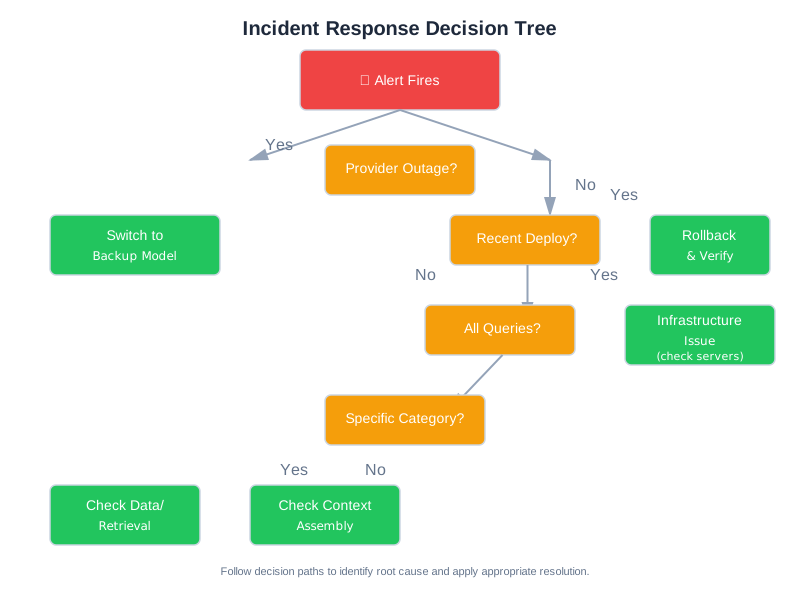
Step 4: Mitigate (Before Root Cause)
For model-side issues:
# Switch to backup model
config.model = config.backup_model
# Or: disable complex features, use simpler mode
config.use_rag = False
config.use_multi_agent = False
For context-side issues:
# Enable cached responses for repeated queries
config.cache_mode = "aggressive"
# Or: reduce context size to avoid assembly issues
config.max_context_tokens = config.safe_minimum
For data-side issues:
# Rollback to last known good version
knowledge_base.rollback(category, version=last_good_version)
For rate limiting / cost spikes:
# Reduce traffic
rate_limiter.set_limit(config.emergency_limit)
# Queue non-urgent requests
config.queue_mode = True
Step 5: Investigate
Pull sample requests:
# Get failing requests
failing = query_logs(
    "quality_score < 0.5 OR error = true",
    time_range="last_1_hour",
    limit=20
)

# Compare to successful requests from same period
passing = query_logs(
    "quality_score > 0.7",
    time_range="last_1_hour",
    limit=20
)

# Look for differences
compare_request_characteristics(failing, passing)
Check retrieval health:
# Compare retrieval scores before and after incident start
before = get_retrieval_scores(time_range="2_hours_before_incident")
during = get_retrieval_scores(time_range="since_incident_start")
print(f"Before: avg={mean(before):.2f}, During: avg={mean(during):.2f}")
Check for data changes:
# List recent data pipeline events
events = query_system_logs(
    "service IN ('knowledge_base', 'embeddings', 'data_pipeline')",
    time_range="last_6_hours"
)
Step 6: Fix and Verify
□ Implement fix (in staging first if possible)
□ Run evaluation suite against fix
□ Check for regressions in unaffected areas
□ Gradual rollout with monitoring
□ Confirm metrics return to baseline
□ Declare incident resolved
Step 7: Post-Incident
□ Gather data within 24-48 hours
□ Write post-mortem (use template below)
□ Schedule team review
□ Track action items to completion
□ Update THIS RUNBOOK with anything you learned
Post-Mortem Template
# Post-Mortem: [Descriptive Title]

## Summary
- **Date**: YYYY-MM-DD
- **Duration**: X hours Y minutes (start - end UTC)
- **Impact**: What users experienced and how many were affected
- **Detection**: How was it detected? (automated alert / user report / team noticed)
- **Severity**: Critical / High / Medium / Low

## Timeline
- HH:MM - Event that preceded the incident
- HH:MM - Incident started (or first detection)
- HH:MM - Alert fired / team notified
- HH:MM - Investigation began
- HH:MM - Root cause identified
- HH:MM - Mitigation applied
- HH:MM - Full resolution confirmed

## Root Cause
[Detailed technical explanation of what went wrong and why]

## What Went Well
- [Detection speed, response process, mitigation effectiveness]

## What Went Poorly
- [Detection gaps, investigation bottlenecks, missing tooling]

## Action Items
| Action | Owner | Due Date | Status |
|--------|-------|----------|--------|
| [Specific, actionable item] | [Name] | [Date] | Open |

## Lessons Learned
1. [Key insight that applies beyond this specific incident]
Common Failure Patterns Quick Reference
| Pattern | Key Diagnostic | Quick Fix |
|---|---|---|
| Context Rot | Check context length, info position | Move critical info to start/end |
| Retrieval Miss | Check retrieval scores, top-k results | Increase top-k, add hybrid search |
| Hallucination | Search context for model’s claims | Strengthen grounding instructions |
| Tool Call Failure | Check tool definitions, selection logs | Clarify tool descriptions |
| Cascade Failure | Trace error to originating agent | Add validation at handoff points |
| Prompt Injection | Check inputs for instruction-like content | Input sanitization, clear delimiters |
Useful Queries
Find requests with low quality in a time range:
quality_score < 0.5 AND timestamp > "2026-01-15T02:00:00Z"
Find requests that used a specific prompt version:
prompt_version = "v2.3.1" AND status = "error"
Find requests where retrieval was slow:
retrieval_latency_ms > 5000
Find requests where context was near limit:
context_tokens > 0.9 * context_limit
Find requests where model response was truncated:
finish_reason = "length"
Appendix Cross-References
| This Section | Related Appendix | Connection |
|---|---|---|
| Quick Reference (tokens) | Appendix D: D.1 Token Estimation | Detailed token math |
| RAG & Retrieval Issues | Appendix A: A.2-A.3 Databases & Embeddings | Tool-specific debugging |
| Production Issues (costs) | Appendix D: D.6 Worked Examples | Cost calculations |
| Security Issues | Appendix B: B.10 Security patterns | Solutions to apply |
| On-Call Runbook | Appendix B: B.8 Production patterns | Mitigation patterns |
When in doubt: log everything, change one thing at a time, measure before and after. Review this runbook after every post-mortem—stale runbooks are worse than no runbooks.