Appendix A: Tool and Framework Reference
Appendix A, v2.1 — Early 2026
This appendix reflects the tool and pricing landscape as of early 2026. Specific versions, pricing, and feature sets will change. The decision frameworks and evaluation criteria remain relevant.
This appendix is your field guide for choosing tools. Throughout the book, we’ve focused on principles and patterns that transfer regardless of which tools you use. But eventually, you need to pick something—and the landscape is overwhelming.
The LLM tooling ecosystem changes faster than any book can track. New frameworks appear monthly. Vector databases add features quarterly. Pricing models shift. What I can give you is something more durable: decision frameworks for evaluating tools, honest assessments of trade-offs, and practical guidance based on production experience.
This appendix covers the major categories you’ll need to decide on:
- Orchestration frameworks: LangChain, LlamaIndex, Semantic Kernel—or nothing at all
- Vector databases: Where your embeddings live and how to choose
- Embedding models: Converting text to vectors
- Model Context Protocol (MCP): The industry standard for tool integration
- Evaluation frameworks: Measuring RAG quality
What this appendix does not cover: LLM providers (the field moves too fast, and the choice is often made for you by your organization), cloud infrastructure (too variable), or fine-tuning frameworks (outside our scope).
One principle before we begin: start simple. Chapter 10’s engineering habit applies here—“Simplicity wins. Only add complexity when simple fails.” Many production systems use far less tooling than tutorials suggest. A direct API call to an LLM, a basic vector database, and well-designed prompts can take you surprisingly far.
A.1 Orchestration Frameworks
Orchestration frameworks promise to simplify building LLM applications. They provide abstractions for common patterns: chains of prompts, retrieval pipelines, agent loops, memory management. They can genuinely help—but they can also add complexity you don’t need.
The question isn’t “which framework is best?” It’s “do I need a framework at all?”
When to Use a Framework
Use a framework when:
- You need multiple retrieval sources with different strategies
- You’re building complex multi-step workflows with branching logic
- You want built-in tracing and debugging tools
- Your team lacks LLM-specific experience and needs guardrails
- You need rapid prototyping before committing to production architecture
Skip the framework when:
- Your use case is straightforward (single retrieval source, single model call)
- You need maximum control over every step of the pipeline
- You’re optimizing for latency (frameworks add overhead, typically 10-50ms)
- You have strong opinions about implementation details
- You’re building something the framework wasn’t designed for
The 80/20 observation: Many production systems use frameworks for prototyping, then partially or fully migrate to custom implementations for performance-critical paths. The framework helps you learn what you need; then you build exactly that.
LangChain
LangChain is the most popular LLM orchestration framework, with the largest ecosystem and community. It provides modular components for building chains, agents, retrieval systems, and memory—plus integrations with nearly every LLM provider, vector database, and tool you might want.
Strengths:
- Largest ecosystem: 100+ vector store integrations, 50+ LLM providers
- LangSmith provides excellent tracing and debugging for development
- Comprehensive documentation and tutorials
- Active development and responsive maintainers
- LCEL (LangChain Expression Language) enables composable pipelines
Weaknesses:
- Abstraction overhead can obscure what’s actually happening
- Breaking changes between versions require migration effort
- Can encourage over-engineering simple problems
- Debugging complex chains requires understanding LangChain internals
- The “LangChain way” may not match your preferred architecture
Best for: Rapid prototyping, teams new to LLM development, projects needing many integrations, and situations where LangSmith tracing provides value.
Basic RAG example:
from langchain.chains import RetrievalQA
from langchain_community.vectorstores import Chroma
from langchain_openai import OpenAIEmbeddings, ChatOpenAI

# Initialize components
embeddings = OpenAIEmbeddings(model="text-embedding-3-small")
vectorstore = Chroma(
    collection_name="documents",
    embedding_function=embeddings,
    persist_directory="./chroma_data"
)
llm = ChatOpenAI(model="gpt-4", temperature=0)

# Create retrieval chain
qa_chain = RetrievalQA.from_chain_type(
    llm=llm,
    chain_type="stuff",  # Stuffs all retrieved docs into context
    retriever=vectorstore.as_retriever(search_kwargs={"k": 3}),
    return_source_documents=True
)

# Query
result = qa_chain.invoke({"query": "What is context engineering?"})
print(result["result"])
print(f"Sources: {[doc.metadata for doc in result['source_documents']]}")
When to migrate away: When you need sub-100ms latency and the framework overhead matters. When debugging becomes harder than building from scratch. When LangChain’s abstractions fight your architecture rather than supporting it.
LlamaIndex
LlamaIndex focuses specifically on connecting LLMs to data. Where LangChain is a general-purpose framework, LlamaIndex excels at document processing, indexing strategies, and retrieval—the core of RAG systems.
Strengths:
- Best-in-class document processing (PDF, HTML, code, structured data)
- Sophisticated indexing strategies (vector, keyword, tree, knowledge graph)
- Query engines that intelligently combine multiple retrieval strategies
- Strong TypeScript support alongside Python
- Cleaner abstractions for data-focused work than LangChain
Weaknesses:
- Smaller ecosystem than LangChain
- Less flexible for non-retrieval use cases (agents, complex workflows)
- Can be heavyweight for simple applications
- Documentation assumes some familiarity with RAG concepts
Best for: Document-heavy applications, complex retrieval strategies, knowledge bases, and teams that have some LLM experience and want specialized tools.
Multi-index query example:
from llama_index.core import VectorStoreIndex, KeywordTableIndex
from llama_index.core.retrievers import RouterRetriever
from llama_index.core.selectors import LLMSingleSelector
from llama_index.core.tools import RetrieverTool

# Create specialized indexes
vector_index = VectorStoreIndex.from_documents(documents)
keyword_index = KeywordTableIndex.from_documents(documents)

# Router selects best index per query
retriever = RouterRetriever(
    selector=LLMSingleSelector.from_defaults(),
    retriever_tools=[
        RetrieverTool.from_defaults(
            retriever=vector_index.as_retriever(),
            description="Best for semantic similarity and conceptual queries"
        ),
        RetrieverTool.from_defaults(
            retriever=keyword_index.as_retriever(),
            description="Best for specific keyword and terminology lookups"
        ),
    ]
)

# Query - router picks appropriate index
nodes = retriever.retrieve("authentication flow diagram")
When to choose over LangChain: When your primary challenge is getting the right documents into context, especially with complex document structures or multiple data sources.
Semantic Kernel
Semantic Kernel is Microsoft’s SDK for integrating LLMs into applications. It’s enterprise-focused, with first-class support for C#, Python, and Java—and deep Azure integration.
Strengths:
- First-class Azure OpenAI integration
- Strong typing and enterprise design patterns
- Excellent for C#/.NET development teams
- Plugins architecture for extending capabilities
- Good fit for existing Microsoft ecosystem
Weaknesses:
- Smaller community than LangChain or LlamaIndex
- Python version less mature than C#
- Examples tend toward Azure (though it works with any LLM)
- Enterprise patterns may be overkill for small projects
Best for: .NET/C# teams, Azure-first organizations, enterprise environments, and teams that prefer strongly-typed approaches.
Basic example:
import semantic_kernel as sk
from semantic_kernel.connectors.ai.open_ai import OpenAIChatCompletion

# Initialize kernel
kernel = sk.Kernel()

# Add LLM service
kernel.add_service(
    OpenAIChatCompletion(
        service_id="chat",
        ai_model_id="gpt-4",
        api_key=api_key
    )
)

# Create semantic function
summarize = kernel.create_function_from_prompt(
    prompt="Summarize this text concisely: {{$input}}",
    function_name="summarize",
    plugin_name="text"
)

# Use
result = await kernel.invoke(summarize, input="Long text here...")
print(result)
The “No Framework” Option
For many production systems, the right answer is: build it yourself.
This sounds like more work, but consider what a “framework-free” RAG system actually requires:
from openai import OpenAI
from your_vector_db import VectorDB  # Whatever you chose

class SimpleRAG:
    def __init__(self, collection: str):
        self.db = VectorDB(collection)
        self.client = OpenAI()

    def query(self, question: str, top_k: int = 3) -> dict:
        # Retrieve
        docs = self.db.search(question, limit=top_k)
        context = "\n\n".join([
            f"Source: {d.metadata['source']}\n{d.text}"
            for d in docs
        ])

        # Generate
        response = self.client.chat.completions.create(
            model="gpt-4",
            messages=[
                {
                    "role": "system",
                    "content": f"Answer based on this context:\n\n{context}"
                },
                {"role": "user", "content": question}
            ]
        )

        return {
            "answer": response.choices[0].message.content,
            "sources": [d.metadata for d in docs],
            "tokens_used": response.usage.total_tokens
        }
That’s a working RAG system in under 30 lines. You have complete visibility into what’s happening. Debugging is straightforward. Latency is minimal. You can add exactly the features you need.
Advantages of no framework: Full control, minimal dependencies, easier debugging, lower latency, no breaking changes from upstream, exact behavior you want.
Disadvantages: More code to maintain, reinventing common patterns, no built-in tracing, slower initial development.
When this makes sense: You have specific performance requirements. Your use case is well-defined. You want maximum observability. Your team understands LLM fundamentals (which, having read this book, you do).
Framework Comparison
| Aspect | LangChain | LlamaIndex | Semantic Kernel | No Framework |
|---|---|---|---|---|
| Primary strength | Ecosystem | Document processing | Enterprise/.NET | Control |
| Learning curve | Medium | Medium | Medium-Low | Low (if you know LLMs) |
| Abstraction level | High | High | Medium | None |
| Community size | Largest | Large | Medium | N/A |
| Best language | Python | Python/TS | C# | Any |
| Debugging tools | LangSmith | LlamaTrace | Azure Monitor | Your own |
| Latency overhead | Medium-High | Medium | Low-Medium | None |
| When to use | Prototyping, many integrations | Complex retrieval | .NET shops | Production optimization |
A.2 Vector Databases
Vector databases store embeddings and enable similarity search. They’re the backbone of RAG systems—when you retrieve documents based on semantic similarity, a vector database is doing the work.
The choice matters for latency, cost, and operational complexity. But here’s the honest truth: for most applications, most choices will work. The differences matter at scale or for specific requirements.
Decision Framework
Before evaluating databases, answer these questions:
1. Scale: How many vectors?
- Under 1 million: Most options work fine
- 1-100 million: Need to consider performance and sharding
- Over 100 million: Requires distributed architecture
2. Deployment: Where will it run?
- Managed cloud: Zero ops, higher cost
- Self-hosted: More control, operational burden
- Embedded: Simplest, limited scale
3. Hybrid search: Do you need keyword + semantic?
- If yes: Weaviate, Qdrant, or Elasticsearch
- If no: Any option works
4. Latency: What’s your p99 target?
- Under 50ms: Pinecone or Qdrant
- Under 150ms: Any option
- Flexible: Optimize for cost instead
5. Budget: What can you afford?
- Significant budget: Pinecone (managed, fast)
- Moderate budget: Qdrant Cloud, Weaviate Cloud
- Minimal budget: Self-hosted options
Pinecone
Pinecone is a fully managed vector database—you don’t run any infrastructure. It focuses on performance and simplicity.
Strengths:
- Lowest latency at scale (p99 around 47ms)
- Zero operational overhead
- Automatic scaling and replication
- Excellent documentation
- Generous free tier for development
Weaknesses:
- No native hybrid search (dense vectors only)
- Higher cost at scale versus self-hosted
- Vendor lock-in (no self-hosted option)
- Limited filtering compared to some alternatives
Pricing (2026):
- Serverless: ~$0.10 per million vectors/month + query costs
- Pods: Starting around $70/month for dedicated capacity
Best for: Teams that want zero ops, need best-in-class latency, and don’t require hybrid search.
from pinecone import Pinecone

pc = Pinecone(api_key="your-key")
index = pc.Index("documents")

# Upsert vectors
index.upsert(vectors=[
    {
        "id": "doc-1",
        "values": embedding,  # Your 768-dim vector
        "metadata": {"source": "docs/intro.md", "category": "overview"}
    }
])

# Query with metadata filter
results = index.query(
    vector=query_embedding,
    top_k=10,
    include_metadata=True,
    filter={"category": {"$eq": "overview"}}
)

for match in results.matches:
    print(f"{match.id}: {match.score:.3f}")
Weaviate
Weaviate is an open-source vector database with native hybrid search—combining BM25 keyword search with vector similarity in a single query.
Strengths:
- Native hybrid search (BM25 + vector)
- GraphQL API for flexible querying
- Multi-tenancy support
- Self-hosted or Weaviate Cloud
- Active community and good documentation
Weaknesses:
- Higher latency than Pinecone (p99 around 123ms)
- More operational complexity if self-hosted
- GraphQL has a learning curve
- Resource-intensive for large deployments
Pricing:
- Self-hosted: Free (pay for infrastructure)
- Weaviate Cloud: Starting around $25/month
Best for: Teams needing hybrid search, comfortable with self-hosting, or wanting flexible query capabilities.
import weaviate

client = weaviate.Client("http://localhost:8080")

# Hybrid search combines keyword and vector
result = (
    client.query
    .get("Document", ["text", "source", "category"])
    .with_hybrid(
        query="authentication best practices",
        alpha=0.5  # 0 = pure keyword, 1 = pure vector
    )
    .with_limit(10)
    .do()
)

for doc in result["data"]["Get"]["Document"]:
    print(f"{doc['source']}: {doc['text'][:100]}...")
Chroma
Chroma is an open-source, embedded-first vector database. It’s designed to be the simplest way to get started—pip install chromadb and you’re running.
Strengths:
- Zero setup for development
- Embedded mode runs in-process
- Simple, intuitive Python API
- Automatic embedding (pass text, get vectors)
- Good for prototyping and small datasets
Weaknesses:
- Not designed for production scale (struggles above 1M vectors)
- Limited cloud offering
- Fewer advanced features
- Performance degrades at scale
Pricing: Free for self-hosted; Chroma Cloud pricing varies.
Best for: Prototyping, local development, tutorials, and small production deployments (under 100K vectors).
import chromadb

# In-memory for development
client = chromadb.Client()

# Or persistent
client = chromadb.PersistentClient(path="./chroma_data")

collection = client.create_collection(
    name="documents",
    metadata={"hnsw:space": "cosine"}
)

# Add documents (auto-embeds if you configure an embedding function)
collection.add(
    documents=["First document text", "Second document text"],
    ids=["doc-1", "doc-2"],
    metadatas=[{"source": "a.md"}, {"source": "b.md"}]
)

# Query
results = collection.query(
    query_texts=["search query"],
    n_results=5,
    where={"source": "a.md"}  # Optional filter
)
Qdrant
Qdrant is an open-source vector database written in Rust, focusing on performance and advanced filtering. It offers a good balance between features and speed.
Strengths:
- Fast performance (p99 around 60ms)
- Advanced filtering capabilities
- Hybrid search support
- Self-hosted or Qdrant Cloud
- Efficient Rust implementation
- Good balance of features and performance
Weaknesses:
- Smaller community than Weaviate
- Documentation less comprehensive
- Fewer third-party integrations
Pricing:
- Self-hosted: Free
- Qdrant Cloud: Starting around $25/month
Best for: Teams wanting a balanced option—good performance, hybrid search capability, reasonable cost.
from qdrant_client import QdrantClient
from qdrant_client.models import (
    VectorParams, Distance, Filter,
    FieldCondition, MatchValue
)

client = QdrantClient("localhost", port=6333)

# Create collection
client.create_collection(
    collection_name="documents",
    vectors_config=VectorParams(size=768, distance=Distance.COSINE)
)

# Search with filter
results = client.search(
    collection_name="documents",
    query_vector=embedding,
    query_filter=Filter(
        must=[
            FieldCondition(
                key="category",
                match=MatchValue(value="code")
            )
        ]
    ),
    limit=10
)
pgvector (PostgreSQL Extension)
pgvector adds vector similarity search to PostgreSQL. If you’re already running PostgreSQL, you can add vector search without new infrastructure.
Strengths:
- Uses existing PostgreSQL infrastructure
- Full SQL capabilities alongside vectors
- Transactional consistency with your other data
- Familiar tooling (backups, monitoring, replication)
- No new database to learn or operate
Weaknesses:
- Slower than purpose-built vector databases
- Limited to PostgreSQL
- Scaling requires PostgreSQL scaling expertise
- Less sophisticated vector operations
Best for: Teams already using PostgreSQL who want vector search without adding infrastructure complexity.
-- Enable extension
CREATE EXTENSION vector;

-- Create table with vector column
CREATE TABLE documents (
    id SERIAL PRIMARY KEY,
    content TEXT,
    source VARCHAR(255),
    embedding vector(768)
);

-- Create index for fast search
CREATE INDEX ON documents
USING ivfflat (embedding vector_cosine_ops)
WITH (lists = 100);

-- Search (using cosine distance)
SELECT content, source, 1 - (embedding <=> $1) as similarity
FROM documents
ORDER BY embedding <=> $1
LIMIT 10;
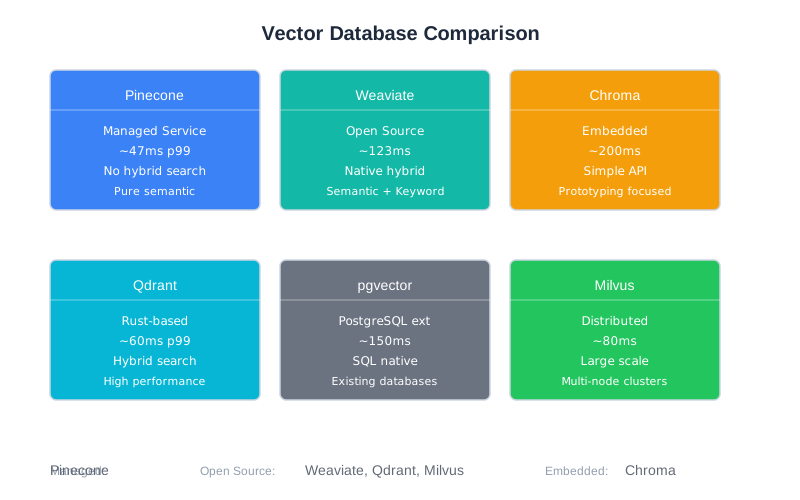
Vector Database Comparison
| Database | Latency (p99) | Hybrid Search | Deployment | Cost (1M vectors) | Best For |
|---|---|---|---|---|---|
| Pinecone | ~47ms | No | Managed | ~$100/mo | Zero ops, max speed |
| Weaviate | ~123ms | Yes (native) | Both | ~$50-100/mo | Hybrid search |
| Chroma | ~200ms | No | Embedded/Cloud | Free-$50/mo | Prototyping |
| Qdrant | ~60ms | Yes | Both | ~$25-75/mo | Balanced choice |
| pgvector | ~150ms | Via SQL | Self-hosted | Infra only | PostgreSQL shops |
| Elasticsearch | ~150ms | Yes (robust) | Both | Varies | Full-text + vector |
| Milvus | ~80ms | No | Self-hosted | Infra only | Large scale |
Practical Recommendations
Just starting out? Use Chroma locally, then migrate to Qdrant or Pinecone for production.
Need hybrid search? Weaviate or Qdrant. Both handle BM25 + vector well.
Have PostgreSQL already? pgvector avoids adding infrastructure. Performance is good enough for many use cases.
Need maximum performance? Pinecone, but be prepared for the cost at scale.
Cost-sensitive at scale? Self-hosted Qdrant or Milvus with your own infrastructure.
A.3 Embedding Models
Embedding models convert text into vectors—the dense numerical representations that enable semantic search. Your choice affects retrieval quality, latency, and cost.
The good news: most modern embedding models are good enough. The difference between a good model and a great model is often smaller than the difference between good and bad chunking strategies (Chapter 6).
The bad news: switching embedding models later requires re-embedding all your documents. Choose thoughtfully, but don’t overthink it.
Decision Framework
Key trade-offs:
- Quality vs. latency: Larger models produce better embeddings but run slower
- Cost structure: API models charge per token; self-hosted has infrastructure costs
- Language support: Some models are English-only; others handle 100+ languages
- Dimensions: Higher dimensions capture more nuance but use more storage
Quick guidance:
| Situation | Recommendation |
|---|---|
| Starting out | OpenAI text-embedding-3-small |
| Cost-sensitive | all-MiniLM-L6-v2 (free, fast) |
| Highest quality | OpenAI text-embedding-3-large or E5-Mistral-7B |
| Multilingual | BGE-M3 or OpenAI models |
| Latency-critical | all-MiniLM-L6-v2 (10ms) |
OpenAI Embedding Models
OpenAI’s embedding models are the most commonly used in production. They’re managed (no infrastructure), high-quality, and reasonably priced.
text-embedding-3-small (Recommended starting point)
- Dimensions: 512-1536 (configurable)
- Cost: $0.02 per million tokens
- Latency: ~20ms
- Quality: Excellent for most use cases
- Languages: Multilingual
text-embedding-3-large
- Dimensions: 256-3072 (configurable)
- Cost: $0.13 per million tokens
- Latency: ~50ms
- Quality: Best available from OpenAI
- Use when: Quality is critical and cost isn’t a constraint
from openai import OpenAI

client = OpenAI()

def get_embedding(text: str, model: str = "text-embedding-3-small") -> list[float]:
    response = client.embeddings.create(
        model=model,
        input=text,
        dimensions=768  # Optional: reduce for efficiency
    )
    return response.data[0].embedding

# Single text
embedding = get_embedding("What is context engineering?")

# Batch for efficiency
def get_embeddings_batch(texts: list[str]) -> list[list[float]]:
    response = client.embeddings.create(
        model="text-embedding-3-small",
        input=texts
    )
    return [item.embedding for item in response.data]
Open-Source Models
Open-source models run on your infrastructure—free per-token, but you pay for compute.
all-MiniLM-L6-v2 (sentence-transformers)
The workhorse of open-source embeddings. Fast, free, good quality.
- Dimensions: 384
- Cost: Free (self-hosted)
- Latency: ~10ms on CPU
- Quality: Good for most applications
- Languages: Primarily English
from sentence_transformers import SentenceTransformer

model = SentenceTransformer('all-MiniLM-L6-v2')

# Single embedding
embedding = model.encode("What is context engineering?")

# Batch (more efficient)
embeddings = model.encode([
    "First document",
    "Second document",
    "Third document"
])
E5-Mistral-7B
A larger model that approaches OpenAI quality while remaining self-hostable.
- Dimensions: 768
- Cost: Free (requires GPU)
- Latency: ~40ms on GPU
- Quality: Excellent, competitive with OpenAI
- Languages: Multilingual
BGE-M3
Excellent multilingual model that also supports hybrid retrieval (dense + sparse vectors).
- Dimensions: 1024
- Cost: Free
- Latency: ~35ms
- Quality: Excellent for multilingual
- Unique feature: Outputs both dense and sparse representations
Embedding Model Comparison
| Model | Dimensions | Cost/1M tokens | Latency | Quality | Languages |
|---|---|---|---|---|---|
| text-embedding-3-small | 512-1536 | $0.02 | 20ms | Excellent | Multi |
| text-embedding-3-large | 256-3072 | $0.13 | 50ms | Best | Multi |
| all-MiniLM-L6-v2 | 384 | Free | 10ms | Good | EN |
| E5-Mistral-7B | 768 | Free | 40ms | Excellent | Multi |
| BGE-M3 | 1024 | Free | 35ms | Excellent | 100+ |
Practical Guidance
Don’t overthink embedding choice. For most applications, text-embedding-3-small or all-MiniLM-L6-v2 is sufficient. The chunking strategy (Chapter 6) and reranking (Chapter 7) matter more.
When to invest in better embeddings:
- Your domain has highly specialized terminology
- Retrieval quality is demonstrably the bottleneck (measure first!)
- You’ve already optimized chunking and added reranking
Dimension trade-offs:
- 384 dimensions: Fast, low storage, slightly lower quality
- 768 dimensions: Good balance (most common)
- 1024+ dimensions: Higher quality, more storage and compute
- 3072 dimensions: Maximum quality, 3x the cost
Migration warning: Changing embedding models means re-embedding all documents. For a million documents at $0.02/1M tokens with 500 tokens each, that’s about $10—not terrible. But the pipeline work and testing take time. Plan for this if you start simple.
A.4 Model Context Protocol (MCP)
MCP standardizes how LLMs connect to tools and data sources. Rather than each application implementing custom function-calling logic, MCP provides a protocol that tools can implement once and any MCP-compatible client can use.
Chapter 8 covers tool use in depth. This section provides practical resources for implementing MCP.
What MCP Provides
Core capabilities:
- Standardized tool definitions with JSON Schema
- Server-client architecture for hosting tools
- Transport options (stdio for local, HTTP for remote)
- Type-safe request/response handling
- Built-in error handling patterns
Why it matters:
- Write a tool once, use it with any MCP client
- Growing ecosystem of pre-built servers
- Standardized patterns reduce bugs
- Easier to share tools across projects and teams
Official Resources
Specification and documentation:
- Spec: https://modelcontextprotocol.io
- Concepts: https://modelcontextprotocol.io/docs/concepts
SDKs:
- Python:
pip install mcp - TypeScript:
npm install @modelcontextprotocol/sdk
Pre-built servers (official and community):
- File system operations
- Database queries (PostgreSQL, SQLite)
- Git operations
- GitHub, Slack, Notion integrations
- Web browsing and search
Building a Custom MCP Server
Here’s a minimal MCP server that provides codebase search:
from mcp.server import Server
from mcp.types import Tool, TextContent
import asyncio

server = Server("codebase-search")

@server.tool()
async def search_code(
    query: str,
    file_pattern: str = "*.py",
    max_results: int = 10
) -> list[TextContent]:
    """
    Search the codebase for code matching a query.

    Args:
        query: Search term or pattern
        file_pattern: Glob pattern for files to search
        max_results: Maximum results to return
    """
    # Your search implementation
    results = await do_search(query, file_pattern, max_results)

    return [
        TextContent(
            type="text",
            text=f"File: {r.file}\nLine {r.line}:\n{r.content}"
        )
        for r in results
    ]

@server.tool()
async def read_file(path: str) -> list[TextContent]:
    """
    Read a file from the codebase.

    Args:
        path: Relative path to the file
    """
    # Validate path is within allowed directory
    if not is_safe_path(path):
        raise ValueError(f"Access denied: {path}")

    content = await read_file_content(path)
    return [TextContent(type="text", text=content)]

if __name__ == "__main__":
    # Run with stdio transport (for local use)
    asyncio.run(server.run_stdio())
Best Practices for MCP Tools
Keep tools focused. One clear responsibility per tool. “search_and_summarize” should be two tools.
Write clear descriptions. The LLM reads these to decide when to use the tool:
@server.tool()
async def search_code(query: str) -> list[TextContent]:
    """
    Search for code in the repository using semantic search.

    Use this when the user asks about:
    - Finding where something is implemented
    - Locating specific functions or classes
    - Understanding how features work

    Do NOT use for:
    - Reading specific files (use read_file instead)
    - Running code (use execute_code instead)
    """
Handle errors gracefully. Return helpful error messages, not stack traces:
@server.tool()
async def read_file(path: str) -> list[TextContent]:
    try:
        content = await read_file_content(path)
        return [TextContent(type="text", text=content)]
    except FileNotFoundError:
        return [TextContent(
            type="text",
            text=f"File not found: {path}. Use search_code to find the correct path."
        )]
    except PermissionError:
        return [TextContent(
            type="text",
            text=f"Access denied: {path} is outside the allowed directory."
        )]
Include examples in descriptions when the usage isn’t obvious.
MCP vs. Direct Function Calling
Use MCP when:
- You want reusable tools across projects
- You need to share tools with your team
- You want standardized error handling
- You’re building for multiple LLM providers
Use direct function calling when:
- Maximum simplicity is the goal
- Tools are project-specific and won’t be reused
- You’re optimizing for minimal latency
- The MCP overhead isn’t worth it for your use case
For CodebaseAI, we used direct function calling because the tools are tightly integrated with the application. For a general-purpose coding assistant, MCP would make more sense.
Streaming Response Handling
Long-running MCP tools should stream intermediate results back to the client rather than blocking until completion. This is especially important for LLM interactions where users expect progressive feedback.
MCP supports streaming through the TextContent type with incremental updates. Here’s how to implement a tool that streams results:
from mcp.server import Server
from mcp.types import TextContent
import asyncio

server = Server("streaming-tools")

@server.tool()
async def analyze_large_dataset(file_path: str):
    """
    Analyze a large dataset, streaming results as they're computed.

    Args:
        file_path: Path to the dataset file
    """
    results = []

    # Simulate processing chunks of a dataset
    async def stream_analysis():
        for i in range(10):
            # Process chunk i
            chunk_result = await process_chunk(file_path, i)

            # Stream intermediate result
            yield TextContent(
                type="text",
                text=f"Chunk {i}: {chunk_result}\n"
            )

            # Small delay to simulate work
            await asyncio.sleep(0.1)

    # Collect and return streamed results
    all_results = []
    async for result in stream_analysis():
        all_results.append(result)

    return all_results

@server.tool()
async def search_and_analyze(query: str, file_pattern: str = "*.txt"):
    """Search files and stream analysis results as they arrive."""

    async def search_stream():
        files = await find_files(file_pattern)

        for file_path in files:
            # Search file
            matches = await search_file(file_path, query)

            if matches:
                # Stream result for this file
                yield TextContent(
                    type="text",
                    text=f"File: {file_path}\n"
                           f"Found {len(matches)} matches\n"
                           f"Preview: {matches[0][:100]}...\n\n"
                )

    results = []
    async for chunk in search_stream():
        results.append(chunk)

    return results
Key patterns:
- Use
async defandyieldto stream results incrementally - Each yielded
TextContentrepresents an update sent to the client - The LLM sees results in real-time, enabling progressive reasoning
- Large operations become more responsive and user-friendly
When to use streaming:
- Operations taking more than 1 second
- Data analysis or processing pipelines
- Search operations across multiple sources
- Any task where intermediate results are useful to the LLM
Error Recovery Patterns
Real MCP servers encounter failures: network issues, tool bugs, downstream service outages. Production systems need recovery strategies.
Retry with exponential backoff:
from mcp.server import Server
from mcp.types import TextContent
import asyncio
import random

server = Server("resilient-tools")

async def call_with_retry(
    func,
    *args,
    max_retries: int = 3,
    base_delay: float = 1.0,
    **kwargs
):
    """
    Call a function with exponential backoff retry.

    Args:
        func: Async function to call
        max_retries: Maximum retry attempts
        base_delay: Initial delay in seconds (doubles on each retry)
    """
    last_error = None

    for attempt in range(max_retries):
        try:
            return await func(*args, **kwargs)
        except Exception as e:
            last_error = e

            if attempt < max_retries - 1:
                # Exponential backoff with jitter to prevent thundering herd
                delay = base_delay * (2 ** attempt)
                jitter = random.uniform(0, delay * 0.1)
                await asyncio.sleep(delay + jitter)

    raise last_error

@server.tool()
async def query_database(query: str, table: str):
    """Query a database with automatic retry on transient failures."""

    async def do_query():
        # Your database query logic
        return await db.execute(f"SELECT * FROM {table} WHERE {query}")

    try:
        result = await call_with_retry(do_query, max_retries=3)
        return [TextContent(type="text", text=f"Result: {result}")]
    except Exception as e:
        return [TextContent(
            type="text",
            text=f"Query failed after retries: {str(e)}"
        )]
Circuit breaker for unreliable services:
from enum import Enum
from datetime import datetime, timedelta

class CircuitState(Enum):
    CLOSED = "closed"      # Normal operation
    OPEN = "open"          # Failing, reject requests
    HALF_OPEN = "half_open"  # Testing if recovered

class CircuitBreaker:
    """Prevents cascading failures by stopping calls to failing services."""

    def __init__(self, failure_threshold: int = 5, timeout: int = 60):
        self.failure_threshold = failure_threshold
        self.timeout = timeout
        self.failure_count = 0
        self.state = CircuitState.CLOSED
        self.last_failure_time = None

    async def call(self, func, *args, **kwargs):
        """Execute func, managing circuit state."""

        if self.state == CircuitState.OPEN:
            # Check if timeout has passed
            if datetime.now() - self.last_failure_time > timedelta(seconds=self.timeout):
                self.state = CircuitState.HALF_OPEN
            else:
                raise Exception("Circuit breaker is OPEN - service unavailable")

        try:
            result = await func(*args, **kwargs)
            # Success - reset on recovery
            if self.state == CircuitState.HALF_OPEN:
                self.state = CircuitState.CLOSED
                self.failure_count = 0
            return result
        except Exception as e:
            self.failure_count += 1
            self.last_failure_time = datetime.now()

            if self.failure_count >= self.failure_threshold:
                self.state = CircuitState.OPEN

            raise e

# Usage
breaker = CircuitBreaker(failure_threshold=3, timeout=30)

@server.tool()
async def call_external_api(endpoint: str, params: dict):
    """Call external API with circuit breaker protection."""

    async def do_call():
        return await httpx.get(endpoint, params=params)

    try:
        result = await breaker.call(do_call)
        return [TextContent(type="text", text=f"Response: {result.json()}")]
    except Exception as e:
        return [TextContent(
            type="text",
            text=f"External service unavailable: {str(e)}"
        )]
Graceful degradation when a tool fails:
@server.tool()
async def get_user_info(user_id: str):
    """
    Get user information from the primary service.
    Falls back to cache if primary is unavailable.
    """

    try:
        # Try primary service
        return await primary_user_service.get(user_id)
    except Exception as e:
        # Fall back to cache
        cached = await cache.get(f"user:{user_id}")
        if cached:
            return [TextContent(
                type="text",
                text=f"User info (from cache, may be stale): {cached}\n"
                     f"Note: Primary service unavailable, using cached data."
            )]
        else:
            return [TextContent(
                type="text",
                text=f"User info unavailable: {str(e)}\n"
                     f"The primary service is down and no cached data exists."
            )]

@server.tool()
async def search_documents(query: str, use_semantic: bool = True):
    """
    Search documents, degrading gracefully if semantic search fails.
    """

    try:
        if use_semantic:
            # Try semantic search first
            return await semantic_search(query)
    except Exception as e:
        # Fall back to keyword search
        results = await keyword_search(query)
        return [TextContent(
            type="text",
            text=f"Results (keyword search, not semantic): {results}\n"
                 f"Note: Semantic search unavailable."
        )]
Error recovery best practices:
- Retry transient errors (timeouts, connection resets), not permanent errors (bad auth, invalid input)
- Use exponential backoff with jitter to avoid overwhelming recovering services
- Implement circuit breakers to prevent cascading failures
- Provide graceful degradation when critical services fail
- Always include error context so the LLM understands what went wrong
Testing MCP Servers Without a Full Client
You can test MCP tool functions directly without standing up a full LLM client. This is crucial for rapid iteration and validating error handling.
Minimal test harness:
import pytest
import asyncio
from mcp.server import Server
from mcp.types import TextContent

# Your MCP server
server = Server("testable-tools")

@server.tool()
async def process_text(text: str, transform: str = "upper") -> list[TextContent]:
    """
    Process text with specified transformation.

    Args:
        text: Input text
        transform: 'upper', 'lower', or 'reverse'
    """
    if not text:
        raise ValueError("text cannot be empty")

    if transform == "upper":
        result = text.upper()
    elif transform == "lower":
        result = text.lower()
    elif transform == "reverse":
        result = text[::-1]
    else:
        raise ValueError(f"Unknown transform: {transform}")

    return [TextContent(type="text", text=result)]

# Tests
class TestProcessText:

    @pytest.mark.asyncio
    async def test_uppercase_transformation(self):
        """Test uppercase transformation."""
        result = await process_text("hello world", transform="upper")
        assert result[0].text == "HELLO WORLD"

    @pytest.mark.asyncio
    async def test_lowercase_transformation(self):
        """Test lowercase transformation."""
        result = await process_text("HELLO WORLD", transform="lower")
        assert result[0].text == "hello world"

    @pytest.mark.asyncio
    async def test_reverse_transformation(self):
        """Test reverse transformation."""
        result = await process_text("hello", transform="reverse")
        assert result[0].text == "olleh"

    @pytest.mark.asyncio
    async def test_empty_input_raises_error(self):
        """Test that empty input raises ValueError."""
        with pytest.raises(ValueError, match="text cannot be empty"):
            await process_text("", transform="upper")

    @pytest.mark.asyncio
    async def test_invalid_transform_raises_error(self):
        """Test that invalid transform raises ValueError."""
        with pytest.raises(ValueError, match="Unknown transform"):
            await process_text("hello", transform="unknown")

    @pytest.mark.asyncio
    async def test_returns_text_content_type(self):
        """Test that result is proper TextContent."""
        result = await process_text("test")
        assert len(result) == 1
        assert isinstance(result[0], TextContent)
        assert result[0].type == "text"
Schema validation:
import json
from jsonschema import validate, ValidationError

def validate_tool_schema(tool_func, test_cases: list[dict]):
    """
    Validate that a tool's inputs match its defined schema.
    """
    # Get tool schema (implementation-specific)
    schema = get_tool_schema(tool_func)

    for case in test_cases:
        try:
            validate(instance=case, schema=schema)
            print(f"✓ Valid: {case}")
        except ValidationError as e:
            print(f"✗ Invalid: {case} - {e.message}")

# Usage
test_inputs = [
    {"text": "hello", "transform": "upper"},
    {"text": "world"},  # transform is optional
    {"text": ""},  # Empty but valid schema-wise
    {"transform": "upper"},  # Missing required field
]

validate_tool_schema(process_text, test_inputs)
Integration testing with mock client:
class MockMCPClient:
    """
    Minimal MCP client for testing servers.
    Calls tools directly without network.
    """

    def __init__(self, server: Server):
        self.server = server
        self.tools = {}

    async def get_tools(self):
        """Get available tools from server."""
        # This depends on your server implementation
        return self.server.tools

    async def call_tool(self, tool_name: str, **kwargs):
        """Call a tool by name with arguments."""
        tool_func = getattr(self.server, tool_name, None)
        if not tool_func:
            raise ValueError(f"Tool not found: {tool_name}")

        return await tool_func(**kwargs)

@pytest.mark.asyncio
async def test_with_mock_client():
    """Test server tools using mock client."""
    client = MockMCPClient(server)

    # Get tools
    tools = await client.get_tools()
    assert "process_text" in tools

    # Call tool
    result = await client.call_tool("process_text", text="hello", transform="upper")
    assert result[0].text == "HELLO"

    # Test error handling
    with pytest.raises(ValueError):
        await client.call_tool("process_text", text="", transform="upper")
Performance testing:
import time
import statistics

@pytest.mark.asyncio
async def test_tool_performance():
    """Verify tool meets latency requirements."""
    latencies = []
    iterations = 100

    for _ in range(iterations):
        start = time.time()
        result = await process_text("test" * 100)
        latencies.append((time.time() - start) * 1000)  # Convert to ms

    avg_latency = statistics.mean(latencies)
    p99_latency = sorted(latencies)[int(len(latencies) * 0.99)]

    print(f"Average latency: {avg_latency:.2f}ms")
    print(f"P99 latency: {p99_latency:.2f}ms")

    # Assert performance targets
    assert avg_latency < 50, f"Average latency too high: {avg_latency:.2f}ms"
    assert p99_latency < 100, f"P99 latency too high: {p99_latency:.2f}ms"
Testing strategy:
- Unit test each tool function in isolation
- Validate inputs against schema
- Test both happy paths and error cases
- Use mock clients for integration testing
- Measure performance against targets
- Keep tests fast (no external services)
A.5 Evaluation Frameworks
You can’t improve what you don’t measure. Chapter 12 covers testing AI systems in depth. This section provides practical guidance on evaluation tools.
RAGAS
RAGAS (Retrieval-Augmented Generation Assessment) is the industry standard for evaluating RAG systems. It provides metrics that measure both retrieval quality and generation quality.
Core metrics:
| Metric | What it measures | Target |
|---|---|---|
| Context Precision | Are retrieved docs ranked correctly? | > 0.7 |
| Context Recall | Did we retrieve all needed info? | > 0.7 |
| Faithfulness | Is the answer grounded in context? | > 0.8 |
| Answer Relevancy | Does the answer address the question? | > 0.8 |
Installation: pip install ragas
Basic usage:
from datasets import Dataset
from ragas import evaluate
from ragas.metrics import (
    context_precision,
    context_recall,
    faithfulness,
    answer_relevancy
)

# Prepare evaluation dataset
eval_data = {
    "question": ["What is RAG?", "How does chunking work?"],
    "answer": ["RAG is...", "Chunking splits..."],
    "contexts": [["Retrieved doc 1", "Retrieved doc 2"], ["Doc A", "Doc B"]],
    "ground_truth": ["RAG retrieves...", "Chunking divides..."]
}

dataset = Dataset.from_dict(eval_data)

# Run evaluation
result = evaluate(
    dataset,
    metrics=[
        context_precision,
        context_recall,
        faithfulness,
        answer_relevancy
    ]
)

print(result)
# {'context_precision': 0.82, 'context_recall': 0.75, ...}
Interpreting results:
- 0.9+: Production ready
- 0.7-0.9: Good, worth optimizing
- 0.5-0.7: Significant issues to investigate
- Below 0.5: Fundamental problems
Custom Evaluation
For domain-specific needs, build evaluators tailored to your requirements:
from openai import OpenAI

class CodeAnswerEvaluator:
    """Evaluates answers about code for technical accuracy."""

    def __init__(self):
        self.client = OpenAI()

    def evaluate(
        self,
        question: str,
        answer: str,
        context: str,
        reference_code: str = None
    ) -> dict:
        prompt = f"""Evaluate this answer about code.

Question: {question}
Answer: {answer}
Context provided: {context}
{f"Reference code: {reference_code}" if reference_code else ""}

Rate each dimension 0-1:
1. Technical accuracy: Are code references correct?
2. Completeness: Does it fully answer the question?
3. Groundedness: Is everything supported by context?
4. Clarity: Is the explanation clear?

Return JSON: {{"accuracy": X, "completeness": X, "groundedness": X, "clarity": X}}
"""

        response = self.client.chat.completions.create(
            model="gpt-4",
            messages=[{"role": "user", "content": prompt}],
            response_format={"type": "json_object"}
        )

        return json.loads(response.choices[0].message.content)
Evaluation Strategy
Tiered evaluation (from Chapter 12):
| Tier | Frequency | Metrics | Dataset size |
|---|---|---|---|
| 1 | Every commit | Latency, error rate, basic quality | 50 examples |
| 2 | Weekly | Full RAGAS, category breakdown | 200 examples |
| 3 | Monthly | Human evaluation, edge cases | 500+ examples |
Building evaluation datasets:
- Start with 50-100 examples covering core use cases
- Add production queries that revealed problems
- Include edge cases and adversarial examples
- Expand to 500+ for statistical significance
- Maintain category balance (don’t over-index on easy cases)
A.6 Quick Reference
“I Need to Choose…” Decision Guide
| If you need… | Choose… | Why |
|---|---|---|
| Fastest prototyping | LangChain + Chroma | Largest ecosystem, simplest setup |
| Best RAG quality | LlamaIndex + Pinecone | Document-focused + fastest retrieval |
| Hybrid search | Weaviate or Qdrant | Native BM25 + vector |
| Zero operations | Pinecone | Fully managed |
| Lowest cost | Self-hosted Qdrant + MiniLM | No API costs |
| .NET environment | Semantic Kernel | First-class C# support |
| Existing PostgreSQL | pgvector | No new infrastructure |
| Maximum control | No framework | Build exactly what you need |
Cost Estimation
Monthly costs for 1M documents, 1000 queries/day:
| Setup | Embedding | Storage | Generation | Total |
|---|---|---|---|---|
| OpenAI + Pinecone | ~$20 | ~$100 | ~$150 | ~$270/mo |
| OpenAI + Qdrant Cloud | ~$20 | ~$50 | ~$150 | ~$220/mo |
| OpenAI + self-hosted Qdrant | ~$20 | ~$30 (infra) | ~$150 | ~$200/mo |
| Self-hosted everything | $0 | ~$50 | ~$50 | ~$100/mo |
Generation costs assume GPT-4 with ~2K tokens per query. Adjust for your model and usage.
Chapter Cross-References
| This Appendix Section | Related Chapter | Key Concepts |
|---|---|---|
| A.1 Orchestration Frameworks | Ch 8: Tool Use | When tools need coordination |
| A.2 Vector Databases | Ch 6: RAG Fundamentals | Retrieval infrastructure |
| A.3 Embedding Models | Ch 6: RAG Fundamentals | Semantic representation |
| A.3 Embedding Models | Ch 7: Advanced Retrieval | Quality vs. cost trade-offs |
| A.4 MCP | Ch 8: Tool Use | Tool architecture patterns |
| A.5 Evaluation | Ch 12: Testing AI Systems | Metrics and methodology |
Version Note
Tool versions and pricing in this appendix reflect the state as of early 2026. The principles and decision frameworks are designed to remain useful even as specific tools evolve. When in doubt, check official documentation for current details.
Appendix Cross-References
| This Section | Related Appendix | Connection |
|---|---|---|
| A.2 Vector Databases | Appendix E: pgvector, Vector Database | Glossary definitions |
| A.3 Embedding Models | Appendix D: D.3 Embedding Cost Calculator | Cost implications |
| A.4 MCP | Appendix B: B.5 Tool Use patterns | Implementation patterns |
| A.5 Evaluation Frameworks | Appendix B: B.9 Testing & Debugging | Evaluation patterns |
| A.6 Quick Reference | Appendix D: D.7 Quick Reference | Cost estimates |
Remember: the best tool is the one you understand deeply enough to debug at 3 AM. Fancy abstractions that obscure behavior aren’t helping you—they’re hiding problems until the worst possible moment. Start simple, add complexity only when you’ve hit real limits, and always maintain the ability to see what’s actually happening.