Chapter 2: The Context Window
Your AI assistant just contradicted itself.
Five messages ago, it confidently explained that your function should use a dictionary for fast lookups. Now, without any prompting from you, it’s suggesting a list instead. When you point out the contradiction, it apologizes and switches back—but you’ve lost confidence. Does it actually remember what was discussed? Does it understand the context?
The answer is both simpler and more interesting than you might expect. Your AI doesn’t “remember” anything in the way humans do. It has no persistent memory between requests. What it has is a context window—a fixed-size buffer that holds everything it can see when generating a response. And that window has properties that shape everything about how AI systems behave.
Understanding the context window is like understanding RAM in a computer. You can write working software without knowing exactly how memory works. But when things start failing in strange ways—when your system slows down, crashes, or behaves inconsistently—understanding memory is what lets you diagnose and fix the problem.
This chapter will give you that understanding for AI systems.
What Is a Context Window?
A context window is the fixed-size input capacity of a language model. Everything the model can “see” when generating a response must fit within this window. If you’ve ever wondered why your AI seems to forget things, why it struggles with very long documents, or why adding more information sometimes makes things worse—the context window is the answer.
Think of it like a desk. You can only work with the papers currently on your desk. Documents in your filing cabinet exist, but you can’t reference them until you pull them out. And your desk has a fixed size—pile too much on it, and things start falling off or getting buried.
Tokens: The Unit of Context
Before we go further, we need to understand tokens. Language models don’t process text character by character or word by word. They process tokens—chunks of text that might be words, parts of words, or punctuation.
A rough rule of thumb for English text: one token equals approximately four characters, or about 0.75 words. So:
- “Hello” = 1 token
- “Understanding” = 2-3 tokens
- “Context engineering is fascinating” = ~5 tokens
Code tends to be less token-efficient than prose. A line of Python might be 15-20 tokens even if it’s only a dozen words. JSON and structured data can be particularly token-hungry because of all the punctuation and formatting.
This matters because your context window is measured in tokens, not words or characters. A 200,000-token context window holds roughly 150,000 words of prose—but might hold significantly less code or structured data.
Current Context Window Sizes (2026)
Different models have different window sizes:
| Model | Context Window | Rough Equivalent |
|---|---|---|
| Claude 4.5 Sonnet | 200,000 tokens | ~150,000 words / ~300 pages |
| GPT-5 | 400,000 tokens | ~300,000 words / ~600 pages |
| Gemini 3 Pro | 1,500,000 tokens | ~1,000,000 words / ~2,000 pages |
Note: Context window sizes change frequently as models evolve. The specific numbers above reflect early 2026. The principles and techniques in this chapter apply regardless of the exact sizes—larger windows don’t eliminate the need for context engineering; they just move the constraints.
These numbers sound enormous. A 200,000-token context window can hold the equivalent of a decent-length novel. Surely that’s enough for any practical purpose?
Not quite. And understanding why is crucial.
Window Size ≠ Usable Capacity
Here’s what the marketing doesn’t tell you: the theoretical window size and the effective window size are different things.
A 200,000-token context window doesn’t mean you should use 200,000 tokens. Research and production experience consistently show that model performance degrades well before you hit the theoretical limit. Most practitioners find that 60-70% of the theoretical window is the practical maximum before quality starts declining noticeably.
For a 200,000-token model, that means roughly 120,000-140,000 tokens of effective capacity. Still substantial—but a meaningful difference when you’re designing systems.
We’ll explore why this happens in the section on context rot. For now, the key insight is: treat the context window as a budget with constraints, not a bucket to fill.
The Cost Dimension
The Real Cost of Context
Every token costs money. Typical pricing: $0.50–$15 per million input tokens (as of early 2026).
Example: A 100,000-token context at $3/million = $0.30 per request. At 10,000 requests/day, that’s $90,000/month.
The trade-off is real: more context can improve quality, but directly increases operating costs. Context size is one of the largest cost drivers in production AI systems.
→ Chapter 11 covers production cost management strategies. Appendix D provides detailed budgeting formulas.
What Fills the Window?
In Chapter 1, we introduced the five components of context. Now let’s look at how they actually consume your token budget in practice.
A Typical Production Allocation
Here’s how a real production system—a customer support agent with retrieval capabilities—might allocate its 200,000-token context window:
| Component | Tokens | Percentage | Purpose |
|---|---|---|---|
| System prompt | 4,000 | 2% | Role, rules, output format |
| Conversation history | 60,000 | 30% | Recent exchanges (last 15-20 turns) |
| Retrieved documents | 50,000 | 25% | Knowledge base results |
| Tool definitions | 6,000 | 3% | Available actions |
| Examples | 10,000 | 5% | Few-shot demonstrations |
| Current query | 2,000 | 1% | User’s actual question |
| Buffer | 68,000 | 34% | Room for response + safety margin |
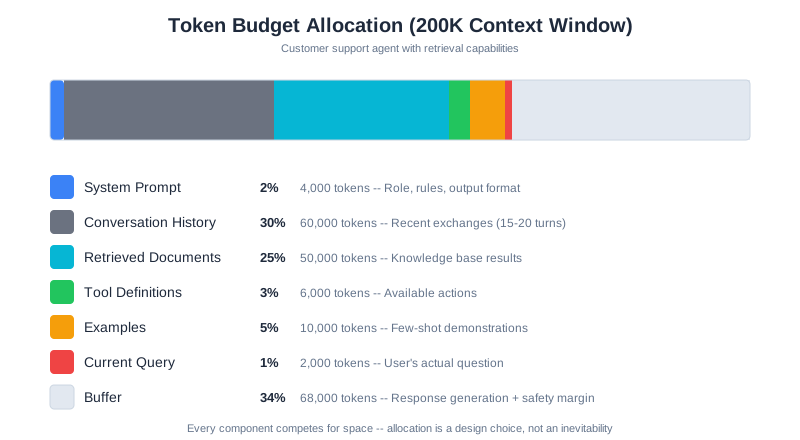
That buffer is important. The model needs room to generate its response, and you want margin for unexpected situations—a longer-than-usual query, extra retrieved documents, or a conversation that runs longer than typical.
Context Allocation Is a Design Choice
Looking at this breakdown, something should be clear: context allocation is a design choice, not an inevitable consequence.
That 30% for conversation history? You could allocate 10% if conversations are typically short, or 50% if they’re long and complex. Those 6,000 tokens for tools? You could have 20 tools or 5, depending on your architecture.
Every choice has trade-offs:
- More conversation history = better coherence in long sessions, but less room for retrieved knowledge
- More retrieved documents = more knowledge available, but higher risk of including irrelevant information
- More tools = more capabilities, but each tool definition consumes tokens even when not used
- Larger buffer = safer operation, but less capacity for actual content
This is engineering: making deliberate trade-offs based on your specific requirements. There’s no universally correct allocation—only allocations that work well for specific use cases.
How Components Actually Scale
Different components scale differently as your application grows:
System prompts tend to be stable. Once you’ve written a good system prompt, it stays roughly the same size regardless of how many users you have or how long conversations run. This is a fixed cost.
Conversation history grows linearly with conversation length. A 10-message conversation might be 5,000 tokens. A 50-message conversation might be 25,000 tokens. Without management, this will eventually consume your entire window.
Retrieved documents scale with query complexity. A simple question might need one document. A complex research question might need ten. And each document might be hundreds or thousands of tokens.
Tool definitions scale with capability. A simple assistant with 3 tools might use 500 tokens for definitions. A powerful assistant with 20 tools might use 5,000. Every tool you add has a cost, even when it’s not used.
Understanding these scaling patterns helps you predict where problems will emerge as your system grows.
Watching Your Context Fill Up
Let’s make this concrete with CodebaseAI. Here’s code to analyze how your context is being consumed:
class ContextAnalyzer:
    """Analyze context window consumption."""

    def __init__(self, window_size: int = 200_000):
        self.window_size = window_size

    def analyze(self, system_prompt: str, messages: list,
                retrieved_docs: list, tools: list) -> dict:
        """Break down token usage by component."""

        components = {
            "system_prompt": self._count_tokens(system_prompt),
            "conversation": sum(self._count_tokens(m["content"]) for m in messages),
            "retrieved_docs": sum(self._count_tokens(doc) for doc in retrieved_docs),
            "tools": sum(self._count_tokens(str(tool)) for tool in tools),
        }

        total = sum(components.values())
        remaining = self.window_size - total

        return {
            "components": components,
            "total_used": total,
            "remaining": remaining,
            "usage_percent": (total / self.window_size) * 100,
            "warning": total > self.window_size * 0.7
        }

    def _count_tokens(self, text: str) -> int:
        """Count tokens in text.

        The quick estimate (len // 4) works for prototyping. For production,
        use the actual tokenizer — the difference matters at scale.
        """
        try:
            # Production approach: use Anthropic's token counter
            import anthropic
            client = anthropic.Anthropic()
            return client.count_tokens(text)
        except (ImportError, Exception):
            # Quick estimate: 1 token ≈ 4 characters for English text
            return len(text) // 4

# Example output from a real conversation:
# {
#     "components": {
#         "system_prompt": 3200,
#         "conversation": 45000,
#         "retrieved_docs": 28000,
#         "tools": 4500
#     },
#     "total_used": 80700,
#     "remaining": 119300,
#     "usage_percent": 40.35,
#     "warning": False
# }
When you run this on a real conversation, you’ll often be surprised. That “short” conversation history? Might be 40% of your budget. Those “few” retrieved documents? Could be pushing you toward the danger zone.
Visibility into context consumption is the first step toward managing it effectively.
Where You Put Information Matters
Here’s something that surprises most developers: the position of information in the context window affects how well the model uses it.
The Lost in the Middle Problem
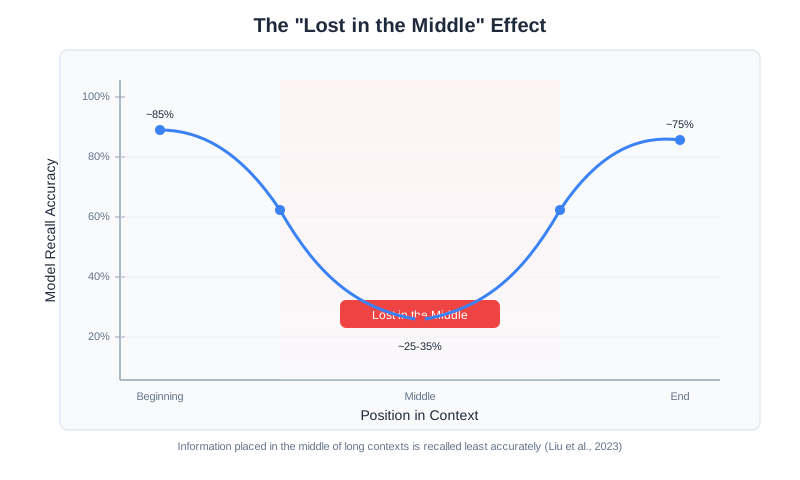
Researchers have documented a consistent pattern across language models. When you place information in different positions within the context:
- Beginning (first 10-20%): ~80% accuracy in using that information
- End (last 10-20%): ~75% accuracy
- Middle (40-60% position): ~20-40% accuracy
Read that again. Information placed in the middle of the context is used with less than half the accuracy of information at the beginning or end.
This is called the “lost in the middle” phenomenon (Liu et al., “Lost in the Middle: How Language Models Use Long Contexts,” 2023), and it’s not a bug in specific models—it’s a consistent property across different architectures and training approaches. It appears in GPT models, Claude models, Gemini models, and open-source alternatives. It’s fundamental to how transformer-based language models process information.
Why This Happens
Technical note: This section explains the underlying mechanism. If you prefer the practical takeaways, skip to “Practical Implications” below.
Think of it this way: when you read a long document, your attention naturally gravitates toward the opening and the conclusion. The middle sections get skimmed. Language models have a similar bias, baked in by their architecture and training.
The transformer architecture that powers modern LLMs uses an “attention” mechanism to determine which parts of the input are relevant to each part of the output. In theory, every token can attend to every other token equally. In practice, attention patterns cluster around certain positions.
Models are trained on data where important information tends to appear at the beginning (introductions, topic sentences, headers) and end (conclusions, questions, calls to action). The training process reinforces these patterns. When processing new input, models allocate more attention to the positions where important information typically appeared during training.
The middle becomes a kind of attention dead zone—not completely ignored, but processed with less focus.
Primacy and Recency Effects
Two specific effects are at play:
Primacy effect: Information at the beginning of the context gets more attention. This is where the model forms its initial understanding of the task, the rules, and the key constraints. First impressions matter, even for AI.
Recency effect: Information at the end of the context also gets elevated attention. This is often where the actual question or task appears, so the model is primed to focus there. What comes last stays freshest.
The middle: Gets the least attention. Information here isn’t ignored, but it’s more likely to be overlooked or used incorrectly. Important details can slip through the cracks.
Practical Implications
This has immediate practical implications for how you structure context:
Put critical instructions at the beginning. Your system prompt, the most important rules, the key constraints—these should come first. The model will establish its approach based on what it sees early.
Put the actual question at the end. The user’s query, the specific task to accomplish—this should come last. The recency effect ensures it’s fresh when the model generates its response.
Be careful what goes in the middle. Retrieved documents, conversation history, examples—these often end up in the middle. If something is truly critical, repeat it near the beginning or end.
Repeat important information strategically. If a constraint is critical, state it in the system prompt AND repeat it just before the question. This redundancy isn’t wasteful—it’s insurance against position effects.
Here’s a practical structure:
[BEGINNING - High attention]
System prompt with critical rules
Most important context
Key facts that must be used

[MIDDLE - Lower attention]
Conversation history
Retrieved documents
Supporting examples
Background information

[END - High attention]
Re-statement of key constraints
The actual question/task
Output format requirements
Testing Position Effects in Your System
Don’t just take this on faith—measure it in your own system:
def test_position_effect(ai, fact: str, query: str, filler_text: str):
    """Test how fact position affects model's use of that fact."""

    results = {}

    # Fact at beginning
    context_start = f"{fact}\n\n{filler_text}\n\nQuestion: {query}"
    results["beginning"] = check_fact_used(ai.ask(context_start), fact)

    # Fact in middle
    half = len(filler_text) // 2
    context_middle = f"{filler_text[:half]}\n\n{fact}\n\n{filler_text[half:]}\n\nQuestion: {query}"
    results["middle"] = check_fact_used(ai.ask(context_middle), fact)

    # Fact at end (just before question)
    context_end = f"{filler_text}\n\n{fact}\n\nQuestion: {query}"
    results["end"] = check_fact_used(ai.ask(context_end), fact)

    return results

# Typical results from testing:
# {"beginning": True, "middle": False, "end": True}
#
# The middle placement frequently fails to use the fact correctly,
# while beginning and end positions succeed reliably.
Run this with facts relevant to your use case. You’ll see the pattern emerge: beginning and end consistently outperform middle placement for fact recall and usage.
Context Rot: When More Becomes Less
Here’s the counterintuitive truth that separates context engineering from vibe coding: adding more context can make your AI perform worse.
This phenomenon is called “context rot,” and understanding it is essential for building reliable AI systems.
What Context Rot Looks Like
Context rot manifests in several ways:
- Declining accuracy: The model starts making more mistakes as context grows
- Hallucination increase: The model invents information rather than using what’s in the context
- Instruction forgetting: The model stops following rules established in the system prompt
- Coherence breakdown: Responses become less logically connected
- Slower responses: Latency increases as the model processes more tokens
You might think you’re helping by providing more information. Instead, you’re degrading performance.
Why Context Rot Happens
The transformer architecture that powers modern language models creates attention relationships between every token and every other token. That’s n² relationships—quadratic growth.
At 1,000 tokens, that’s 1 million relationships. At 10,000 tokens, it’s 100 million. At 100,000 tokens, it’s 10 billion relationships the model needs to manage.
As this number grows, several things happen:
Attention dilution: The model has a finite amount of “attention” to allocate. As context grows, each token gets a smaller share. Important information competes with noise for the model’s focus.
Signal degradation: Important information becomes harder to distinguish from less important information. The relevant needle is buried in an ever-growing haystack.
Computation strain: Processing more relationships takes more time and compute. Latency increases, and the quality of processing per token decreases.
The fundamental constraint is architectural: the transformer’s self-attention mechanism requires every token to attend to every other token, creating n² pairwise relationships that stretch thin as context grows longer. The NoLiMa benchmark (Modarressi et al., “NoLiMa: Long-Context Evaluation Beyond Literal Matching,” ICML 2025, arXiv:2502.05167) demonstrated this concretely: at 32K tokens, 11 of 13 evaluated models dropped below 50% of their short-context baselines—even though all claimed to support contexts of at least 128K tokens. This is not a limitation that can be easily engineered away; it’s fundamental to how these models process information.
The Inflection Point
Research has identified that most models show measurable performance degradation well before their theoretical maximum—often starting around 60,000-80,000 tokens for retrieval tasks, though the exact threshold varies by model and task type. A model with a 200,000-token window will still show performance decline well before that limit.
Why the Inflection Point Varies
That 60K-80K range is a guideline, not a universal constant. The actual inflection point for your system depends on several factors.
Task type matters most. Simple needle-in-a-haystack retrieval (finding a specific fact in a large context) degrades earlier than reasoning tasks where the model synthesizes information across the context. Fact retrieval depends heavily on attention precision; synthesis can tolerate more attention spread because it draws on distributed signals.
Content homogeneity shifts the threshold. A context filled with highly similar documents (ten product specifications with overlapping fields) degrades faster than a context with clearly distinct sections. Similar content creates more competition for the model’s attention—it’s harder to distinguish the relevant specification from nine near-duplicates than to find a code snippet embedded in prose.
The model architecture plays a role. Models trained with longer-context objectives (like those using techniques such as RoPE scaling or ALiBi positional encoding) tend to push the inflection point higher. Gemini’s long-context models, for instance, sustain performance at token counts where earlier architectures would have degraded significantly.
Finding your inflection point. The most reliable approach is empirical testing against your specific workload. Use a fixed set of 20-30 test queries that represent your actual use cases, then measure accuracy at increasing context sizes (10K, 25K, 50K, 75K, 100K, 150K tokens). Plot accuracy against context size. The inflection point is where the curve bends—where each additional 10K tokens of context costs you more than 2-3 percentage points of accuracy. This measurement takes a few hours to run but saves you from either under-utilizing your context window (leaving performance on the table) or over-filling it (degrading quality without knowing why).
The performance curve typically looks like this:
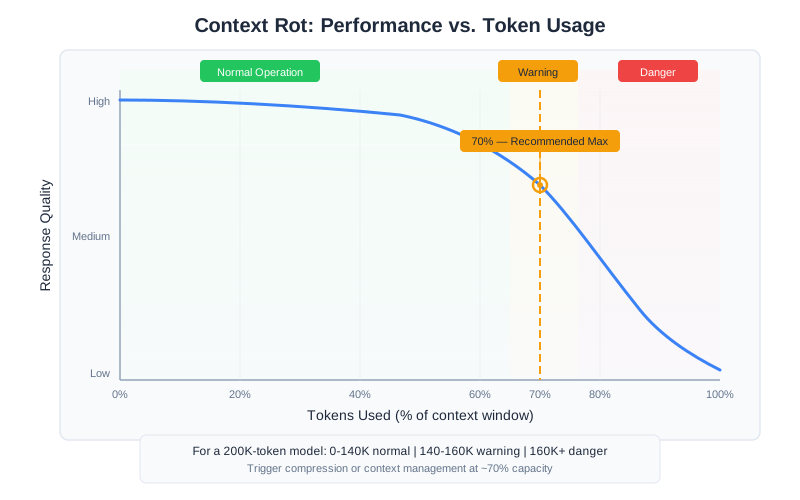
The exact inflection point varies by model and task, but the pattern is consistent: performance is relatively stable up to a point, then declines. The decline isn’t sudden—it’s gradual but measurable. And it continues as context grows. (Chapter 7 covers advanced techniques—reranking, compression, and hybrid retrieval—that help you get more value from less context.)
The 70% Rule
Production practitioners have converged on a rule of thumb: trigger compression or context management when you hit 70-80% of your context window.
For a 200,000-token model:
- 0-140,000 tokens: Normal operation, quality should be stable
- 140,000-160,000 tokens: Warning zone, consider compression or trimming
- 160,000+ tokens: Danger zone, quality degradation likely, intervention needed
This isn’t a precise threshold—it varies by use case and model. But treating 70% as a soft limit gives you a reasonable safety margin before context rot becomes noticeable.
Measuring Context Rot in Your System
Don’t rely solely on general guidelines. Measure context rot in your specific application:
def measure_context_rot(ai, test_cases: list, context_sizes: list):
    """Measure how performance degrades with increasing context."""

    results = []

    for size in context_sizes:
        # Generate filler context to reach target size
        filler = generate_filler(target_tokens=size)

        correct = 0
        for question, expected_answer in test_cases:
            full_context = filler + f"\n\n{question}"
            response = ai.ask(full_context)
            if verify_answer(response, expected_answer):
                correct += 1

        accuracy = correct / len(test_cases)
        results.append({
            "context_size": size,
            "accuracy": accuracy,
            "degradation": results[0]["accuracy"] - accuracy if results else 0
        })

    return results
Test with context sizes of 10K, 25K, 50K, 75K, 100K, and 150K tokens. Plot the results. You’ll see where your specific model starts degrading for your specific tasks. That’s your actual inflection point—more useful than any general guideline. (Chapter 13 covers how to build production monitoring that tracks context health continuously, including alert design for detecting quality degradation before users notice.)
Software Engineering Principles
Every engineering discipline is defined by its constraints. Structural engineers work with material strength limits. Software engineers work with computational complexity. Context engineers work with window size, position effects, and context rot.
These constraints aren’t obstacles to work around—they’re the foundation of good design.
Constraints Shape Design
The constraints we’ve discussed—window size, position effects, context rot—should shape your architecture from the start.
If you know conversations will be long, design for it: implement summarization, use sliding windows, or split into multiple sessions. Don’t discover this need when users complain about quality degradation.
If you know you’ll need lots of retrieved documents, design for it: implement aggressive ranking, use compression, or build a multi-stage retrieval system. Don’t stuff everything in and hope.
If you know certain instructions are critical, design for it: position them strategically, repeat them, and verify they’re being followed.
The best designs embrace constraints rather than fighting them.
The Resource Management Mindset
Treat your context window like any other computational resource:
Budget allocation: Just as you’d plan memory usage for a system, plan context usage. Know how many tokens each component needs. Set limits. Have a budget that adds up to less than 100%.
Monitoring: Track actual consumption in production. Alert when approaching limits. Have dashboards that show context health. You can’t manage what you don’t measure.
Graceful degradation: What happens when you exceed your budget? Crash? Silent failure? Controlled compression? Design for this explicitly. The worst answer is “I don’t know.”
Optimization: Regularly review allocation. Are you spending tokens on components that don’t improve outcomes? Can you achieve the same quality with less? Efficiency matters.
Trade-offs Are Features, Not Bugs
Every context allocation decision involves trade-offs:
| More of… | Means less of… | Trade-off |
|---|---|---|
| Conversation history | Retrieved documents | Memory vs. knowledge |
| Retrieved documents | Response buffer | Knowledge vs. thoroughness |
| System prompt detail | Everything else | Control vs. capacity |
| Tools | Content | Capability vs. context |
| Examples | Live context | Guidance vs. content |
There’s no free lunch. Engineering is making these trade-offs explicitly, based on what your specific application needs. Document your choices. Know why you made them.
Beyond Text: Multimodal Context
This book focuses on text-based context engineering, but modern models increasingly process images, audio, structured data, and even video. Multimodal context introduces unique challenges:
Token costs vary dramatically by modality. A single high-resolution image can consume 1,000-2,000+ tokens—equivalent to several pages of text. Video frames multiply this further. Budget accordingly.
Positional effects still apply. Images placed in the middle of a long context receive less attention than those placed near the beginning or end, just like text. The “Lost in the Middle” phenomenon extends to all modalities.
Cross-modal reasoning is harder. Asking a model to relate information from an image to information in a text document requires more careful context assembly than single-modality tasks. Explicit instructions about how modalities relate improve results significantly.
Structured data needs formatting decisions. Tables can be represented as markdown, CSV, JSON, or HTML. Each format tokenizes differently—JSON is typically 20-30% more expensive than equivalent markdown tables. Choose the format your model handles best for your use case.
The principles in this chapter—attention budgets, positional priority, the 70% rule—apply regardless of modality. As multimodal applications become more common, context engineers will need to develop modality-specific intuitions alongside these text-focused fundamentals.
For current multimodal capabilities and pricing, check your model provider’s documentation. This is one of the fastest-evolving areas in the field.
CodebaseAI Evolution
Let’s add context awareness to CodebaseAI. The Chapter 1 version was simple: paste code, ask a question. But it had no awareness of context limits or consumption.
Here’s an enhanced version with context monitoring:
class ContextAwareCodebaseAI:
    """CodebaseAI with context window management."""

    WINDOW_SIZE = 200_000
    WARNING_THRESHOLD = 0.7  # Warn at 70%

    def __init__(self, config=None):
        self.config = config or load_config()
        self.client = anthropic.Anthropic(api_key=self.config.anthropic_api_key)
        self.system_prompt = self._load_system_prompt()

    def ask(self, question: str, code: str = None,
            conversation_history: list = None) -> Response:
        """Ask a question with context awareness."""

        # Analyze context before sending
        context_check = self._check_context(
            question, code, conversation_history or []
        )

        if context_check["warning"]:
            print(f"⚠️  Context at {context_check['usage_percent']:.1f}% capacity")
            print(f"   Consider: {context_check['recommendation']}")

        # Build and send the request
        user_message = self._build_message(question, code)
        messages = (conversation_history or []) + [
            {"role": "user", "content": user_message}
        ]

        response = self.client.messages.create(
            model=self.config.model,
            max_tokens=self.config.max_tokens,
            system=self.system_prompt,
            messages=messages
        )

        return Response(
            content=response.content[0].text,
            model=response.model,
            input_tokens=response.usage.input_tokens,
            output_tokens=response.usage.output_tokens,
            context_usage=context_check
        )

    def _check_context(self, question, code, history) -> dict:
        """Analyze context consumption and provide warnings."""

        components = {
            "system_prompt": self._count_tokens(self.system_prompt),
            "conversation": sum(self._count_tokens(m["content"]) for m in history),
            "code": self._count_tokens(code or ""),
            "question": self._count_tokens(question),
        }

        total = sum(components.values())
        usage_pct = total / self.WINDOW_SIZE

        # Generate specific recommendations based on what's consuming space
        recommendation = None
        if usage_pct > self.WARNING_THRESHOLD:
            if components["conversation"] > total * 0.4:
                recommendation = "Conversation history is large. Consider summarizing older exchanges."
            elif components["code"] > total * 0.5:
                recommendation = "Code context is large. Consider focusing on relevant sections."

        return {
            "components": components,
            "total_tokens": total,
            "usage_percent": usage_pct * 100,
            "warning": usage_pct > self.WARNING_THRESHOLD,
            "recommendation": recommendation
        }
Now when you use CodebaseAI with a large file or long conversation, you’ll see warnings when approaching context limits—before things start breaking mysteriously.
Debugging Focus: Why Did My AI Forget?
The problem that opened this chapter—an AI contradicting itself—usually comes down to context window issues. Here’s a systematic debugging approach:
Step 1: Check What’s Actually in the Context
The most common issue is simpler than you’d think: the information isn’t in the context at all. In chat interfaces, conversation history might be truncated by the application. In retrieval systems, the relevant document might not have been retrieved.
Before assuming context rot or position effects, verify the information is actually present.
Step 2: Check Token Consumption
Are you near your limit? Use context analysis code to see your actual consumption. If you’re at 80%+, context rot is a likely culprit.
Step 3: Check Position
Where is the critical information placed? If it’s buried in the middle of a long context, position effects might be causing it to be overlooked.
Step 4: Test with Reduced Context
Remove components and see if performance improves. If cutting your conversation history in half makes the model more accurate, you’ve found your problem—and your solution.
Step 5: Test with Explicit Repetition
Repeat critical information near the end of your context, just before the question. If this fixes the issue, position effects were the problem.
The Engineering Habit
Know your constraints before you design.
Before building any AI feature, ask:
- What’s my effective context window? (Not theoretical—effective)
- What components must be present? What’s optional?
- Where’s my inflection point for context rot?
- What’s my strategy when I approach limits?
Vibe coders discover constraints through failures. Engineers discover them through analysis, then design around them.
Context Engineering Beyond AI Apps
Your AI development tools have context windows too. Cursor, Claude Code, Copilot—they all operate within finite context when generating code. Geoffrey Huntley, creator of the Ralph Loop methodology, observed that even a 200K token context window, after tool harnesses and system overhead, leaves you with surprisingly little usable capacity. This is why project structure matters: not every file can fit in your AI tool’s working memory.
The context window constraints from this chapter apply directly to how effectively AI coding tools work with your codebase. When Cursor indexes your project, it faces the same trade-offs: what files to include, how to handle large codebases, where to position the most important information. When you open specific files before asking a question, you’re making context allocation decisions — the same decisions you’d make designing a RAG pipeline.
Understanding context windows changes how you organize projects. Smaller, well-named files are easier for AI tools to retrieve than massive monolithic files. Clear module boundaries help tools find relevant code. Documentation that lives close to the code it describes is more likely to land in the context window when it matters. These aren’t just good engineering practices—they’re context engineering for your development workflow. Every concept from this chapter applies: position effects (the file you have open gets recency priority), context rot (a cluttered session degrades tool performance), and the 70% rule (your tool’s effective capacity is less than advertised).
Summary
Key Takeaways
- The context window is a fixed-size input buffer; effective capacity is 60-70% of theoretical maximum
- Position matters: beginning and end get ~80% attention, middle gets ~20-40%
- Context rot causes performance degradation as context grows—more isn’t always better
- The 70% rule: consider intervention when approaching 70% of window capacity
- Context allocation is a design choice with explicit trade-offs
Concepts Introduced
- Tokens as the unit of context
- Context window size vs. effective capacity
- Primacy and recency effects
- Lost in the middle phenomenon
- Context rot and inflection points
- Token budget allocation
CodebaseAI Status
Added context awareness: the system now tracks token consumption, warns when approaching limits, and provides recommendations for managing context.
Engineering Habit
Know your constraints before you design.
In Chapter 3, we’ll develop the engineering mindset—systematic debugging, reproducibility, and the practices that separate professionals from hobbyists.