Chapter 3: The Engineering Mindset
You can build an impressive AI application in a weekend.
Go to a hackathon, wire up an API call, craft a clever prompt, add a slick interface. By Sunday night, you’ll have something that makes people say “wow.” Maybe you’ll even win a prize. Maybe you’ll ship it to real users. That’s not a small thing—you’ve created something that works.
But running it in production for a month reveals a different kind of challenge.
The “wow” moments get punctuated by mysterious failures. The prompt that worked perfectly in demos produces garbage for certain users. Quality drifts over time. A small change to fix one problem breaks three other things. You don’t know why because the system wasn’t built to tell you.
This is the gap between a working demo and a reliable product. And the gap isn’t closed by writing better prompts or using fancier models. It’s closed by adding an engineering mindset to the creative process you already know.
This chapter teaches a single core practice: debug systematically, not randomly. Every technique that follows—logging, version control, testing, documentation—serves this principle. By the end, you’ll have the tools to turn “it’s broken” into “I know exactly why it’s broken and how to fix it.”
The Demo-to-Production Gap
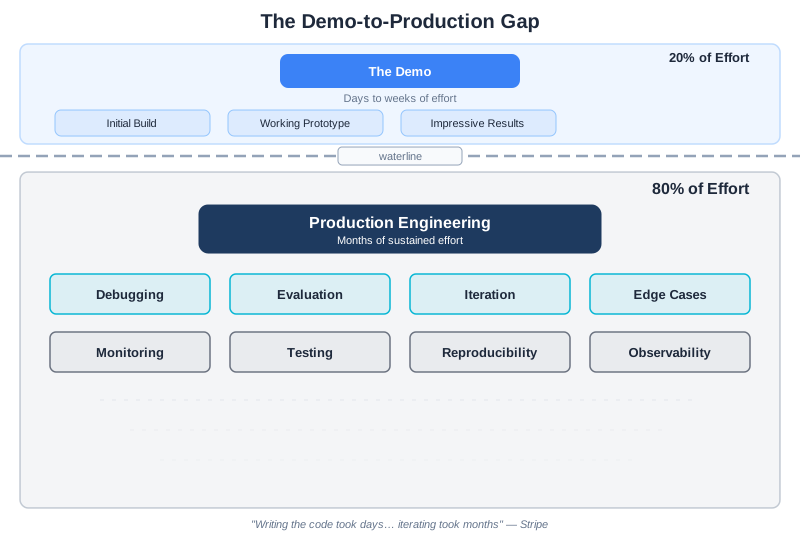
Here’s a statistic that should make you pause: experienced practitioners report that 80% of the effort in production AI systems goes to debugging, evaluation, and iteration. Not the initial build—that’s the easy 20%.
Sophie Daley, a data scientist at Stripe, described their experience building an LLM-powered support response system: “Writing the code for this LLM framework took a matter of days or weeks, whereas iterating on the dataset to train these models took months” (Daley, “Lessons Learned Productionising LLMs for Stripe Support,” MLOps Community, 2024).
This isn’t because AI is inherently difficult. It’s because AI systems are probabilistic—they work most of the time, but you don’t know which times they’ll fail until they do. And when they fail, you need tools and practices to understand why.
The engineering mindset is what gives you those tools.
What Engineering Mindset Means
Engineering isn’t about writing code. It’s about building systems you can understand, debug, and improve over time.
For AI systems, this means:
Reproducibility: Given the same inputs, you should be able to reproduce the same outputs. If you can’t reproduce a problem, you can’t debug it.
Observability: You should be able to see what your system is doing. What went into the model? What came out? How long did it take? What did it cost?
Testability: You should be able to verify that your system works correctly—and detect when it breaks.
Systematic debugging: When something goes wrong, you should have a process for finding the root cause, not just trial-and-error until something sticks.
These aren’t advanced practices reserved for large teams. They’re foundational practices that make everything else possible.
Why LLM Debugging Is Different
Traditional software debugging follows a predictable pattern: something breaks, you find the bug, you fix it, it stays fixed. The system is deterministic—same inputs produce same outputs.
LLM systems are different. They’re probabilistic. The same input might produce slightly different outputs. A prompt that works 95% of the time still fails 5% of the time—and you don’t know which 5% until it happens.
This creates debugging challenges that vibe coders rarely anticipate:
The failure isn’t consistent. The same query might work on retry. This makes it tempting to just retry failures rather than investigate them. But the underlying problem persists.
Multiple variables interact. The model, the prompt, the context, the temperature setting, the conversation history—all of these interact in complex ways. Changing one can affect the others.
Quality is a distribution, not a boolean. Your system doesn’t simply work or not work. It works with some quality level, on some percentage of inputs. Debugging means understanding and improving that distribution.
Root causes are often invisible. A bad output might result from context rot, position effects, a model update, or something entirely unexpected. You can’t see these causes without proper observability.
The engineering mindset is how you handle this complexity systematically rather than thrashing randomly.
Reproducibility: The Foundation
Nothing in engineering works without reproducibility. If you can’t reproduce a problem, you can’t debug it. If you can’t reproduce a success, you can’t build on it.
For LLM systems, reproducibility means capturing everything that affects output:
What You Need to Track
The prompt version. Not just the current prompt—the exact version that was used for a specific request. Prompts evolve over time. You need to know which version produced which results.
The model version. Models get updated. A query that worked last week might fail this week if the underlying model changed. Always log which model served which request.
The full context. What exactly went into the context window? The system prompt, the conversation history, any retrieved documents, tool definitions. All of it.
Configuration parameters. Temperature, max tokens, top-p—these affect output. Log them.
Timestamps. When did this request happen? This helps correlate with other events (deployments, model updates, traffic patterns).
Version Control for Prompts
Treat prompts like production code. They should be:
- Versioned: Every change creates a new version with semantic versioning (v1.0.0, v1.1.0, v2.0.0)
- Tracked: Git or equivalent, with commit messages explaining what changed and why
- Reviewed: Changes should be reviewed before deployment, just like code changes
- Tested: Every version should be tested against a regression suite before deployment
Note: If you’re unfamiliar with git, it’s a version control system that tracks changes to files. The key concept for prompts: each change is recorded as a “commit” with a message explaining what changed. This creates an audit trail you can review and roll back if needed.
Here’s a practical pattern:
class PromptVersionControl:
    """Manage prompt versions like production code."""

    def __init__(self, prompts_dir: str):
        self.prompts_dir = Path(prompts_dir)

    def save_version(self, name: str, prompt: str, metadata: dict):
        """Save a new prompt version with metadata."""
        version_data = {
            "prompt": prompt,
            "version": metadata["version"],
            "timestamp": datetime.utcnow().isoformat(),
            "author": metadata["author"],
            "reason": metadata["reason"],
            "test_results": metadata.get("test_results"),
        }

        version_file = self.prompts_dir / f"{name}_{metadata['version']}.json"
        with open(version_file, 'w') as f:
            json.dump(version_data, f, indent=2)

    def load_version(self, name: str, version: str) -> dict:
        """Load a specific prompt version."""
        version_file = self.prompts_dir / f"{name}_{version}.json"
        with open(version_file) as f:
            return json.load(f)

    def compare_versions(self, name: str, v1: str, v2: str) -> dict:
        """Compare two prompt versions."""
        old = self.load_version(name, v1)
        new = self.load_version(name, v2)
        return {
            "prompt_changed": old["prompt"] != new["prompt"],
            "old_reason": old.get("reason"),
            "new_reason": new.get("reason"),
        }
When something breaks, you can immediately answer: “What changed?” That’s the foundation of debugging.
Observability: Seeing What’s Happening
You can’t debug what you can’t see. For every LLM request, capture what went in (prompt version, user input, context size, model), what came out (response, token usage, latency, cost), and the metadata to tie it together (request ID, timestamp, session ID). This is the minimum viable investment—and we’ll implement the complete observability stack in Chapter 13. For now, the key insight: observability isn’t optional infrastructure you add later. It’s the foundation that makes systematic debugging possible.
Systematic Debugging
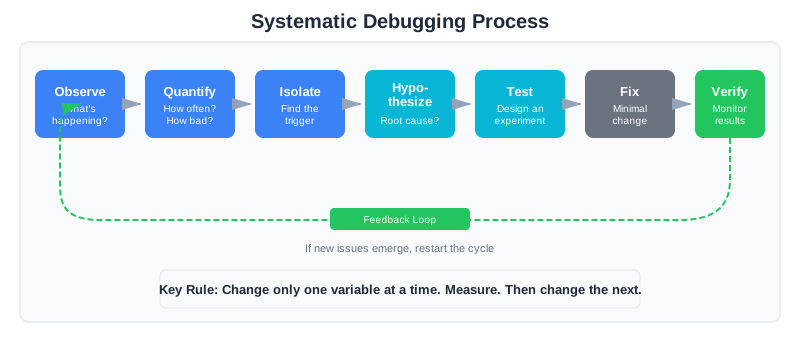
When something goes wrong, you have two choices: guess randomly until something works, or debug systematically.
The engineering mindset chooses systematic debugging every time.
The Debugging Process
Step 1: Observe the symptom
What exactly is happening? Not “it’s broken” but specifically: “For queries about X, the model returns Y instead of Z.” Be precise.
Step 2: Quantify the problem
How bad is it? 5% of requests affected? 50%? Is it getting worse over time? Has it always been this way or did it start recently?
Step 3: Isolate the trigger
Which inputs trigger the problem? Is it specific query types? Certain users? Long conversations? Find the pattern.
Step 4: Form a hypothesis
Based on what you’ve observed, what do you think is causing this? Context rot? Position effects? A recent prompt change? Model update?
Step 5: Test the hypothesis
Design an experiment that would confirm or refute your hypothesis. If you think it’s context rot, test with shorter context. If you think it’s a prompt change, test with the previous version.
Step 6: Apply minimal fix
Once you’ve identified the root cause, make the smallest change that fixes it. Don’t rewrite everything—targeted fixes are easier to verify and safer to deploy.
Step 7: Verify and monitor
Confirm the fix works. Monitor to ensure it doesn’t cause new problems. Update your test suite to catch this issue in the future.
Change One Thing at a Time
This is the most important debugging rule: change only one variable at a time.
When you change multiple things simultaneously, you can’t know what helped and what hurt. If you update the prompt AND change the temperature AND add more context AND switch models—and quality improves—which change was responsible? You have no idea.
Worse, you might have made one change that helped a lot and another that hurt a little. The net improvement masks the regression hiding inside.
Change one thing. Measure. Then change the next thing. Measure again.
Binary Search for Prompt Problems
When a prompt isn’t working and you don’t know why, use binary search:
def binary_search_prompt_issue(prompt: str, test_cases: list):
    """Isolate which part of a prompt is causing problems."""

    # Split prompt into sections
    sections = split_into_sections(prompt)  # role, task, format, constraints

    results = {}
    for section_name in sections:
        # Test with this section removed
        modified = remove_section(prompt, section_name)
        score = evaluate(modified, test_cases)
        results[section_name] = score

    # If removing a section improves score, that section is problematic
    baseline = evaluate(prompt, test_cases)
    problems = [
        section for section, score in results.items()
        if score > baseline * 1.05  # >5% improvement when removed
    ]

    return problems
This is faster than trial-and-error and gives you specific, actionable results.
Debugging Diary: A Worked Example
Let’s walk through a real debugging journey to see these principles in action.
The Symptom
A customer support bot has been giving wrong answers about refund policies. Users complain that the bot says “no refunds after 30 days” when the actual policy is 60 days. The team’s first instinct: update the system prompt to emphasize the correct policy.
Day 1: Observe Before Fixing
Instead of immediately changing prompts, we check the logs. The structured logging we set up shows exactly what’s happening:
request_id: a3f2c891
input_tokens: 145,231
output_tokens: 847
prompt_version: v2.1.0
conversation_length: 47 messages
That input token count jumps out: 145,231 tokens. We’re at 72% of our 200K context window. And 47 messages in the conversation—that’s a long session.
Day 2: Quantify the Problem
We query the logs to see if there’s a pattern:
SELECT
  CASE WHEN conversation_length > 20 THEN 'long' ELSE 'short' END AS length_bucket,
  COUNT(*) AS total,
  SUM(CASE WHEN feedback = 'incorrect' THEN 1 ELSE 0 END) AS incorrect,
  ROUND(
    SUM(CASE WHEN feedback = 'incorrect' THEN 1 ELSE 0 END) * 100.0 / COUNT(*), 1
  ) AS error_rate_pct,
  AVG(input_tokens) AS avg_tokens
FROM requests
WHERE topic = 'refund_policy'
GROUP BY CASE WHEN conversation_length > 20 THEN 'long' ELSE 'short' END
ORDER BY avg_tokens
Results:
- Short conversations (≤20 messages): 4% error rate, avg 45K tokens
- Long conversations (>20 messages): 23% error rate, avg 128K tokens
The pattern is clear: long conversations have nearly 6x the error rate.
Day 3: Form and Test a Hypothesis
Hypothesis: Context rot is causing the model to miss the refund policy information in the system prompt.
Test: We check where the refund policy sits in the context. It’s in the system prompt—at the beginning. Good position. But by message 47, that system prompt is followed by 140K tokens of conversation history. The policy is now in the “lost in the middle” zone relative to the total context.
We run a quick experiment: for 100 refund policy questions with long conversations, we repeat the key policy information just before the user’s question.
Result: Error rate drops from 23% to 6%.
Day 4: Implement a Targeted Fix
The root cause is confirmed: in long conversations, the system prompt’s policy information gets diluted. Our fix:
def _build_context(self, question, history):
    # For long conversations, repeat key policies near the question
    if len(history) > 20:
        policy_reminder = self._get_key_policies_summary()
        question = f"{policy_reminder}\n\nUser question: {question}"
    return question
We also implement a sliding window that summarizes older conversation turns rather than keeping them verbatim, reducing the average token count for long conversations from 128K to 65K.
Day 5: Verify and Monitor
We deploy the fix and watch the metrics. Over the next week:
- Error rate on refund policy questions: 4.2% (down from 23%)
- No increase in errors on other topics
- Average token usage for long conversations: down 49%
The fix worked. We add a regression test case for “refund policy question after 30+ messages” to our test suite.
What Made This Work
Notice what we didn’t do: we didn’t immediately rewrite the system prompt. We didn’t try random changes hoping something would stick. We didn’t blame the model.
Instead, we:
- Observed: Checked the logs to see what was actually happening
- Quantified: Found the pattern (long conversations = high error rate)
- Hypothesized: Context rot was diluting critical information
- Tested: Verified the hypothesis with a controlled experiment
- Fixed: Made a targeted change addressing the root cause
- Verified: Confirmed the fix worked without causing regressions
This took five days. A vibe coder might have “fixed” it in five minutes by adding “IMPORTANT: Our refund policy is 60 days!” to the prompt. But that fix wouldn’t have addressed the root cause. When the next long conversation came along with a different policy question, the same problem would reappear.
Systematic debugging takes longer the first time. But it builds understanding that compounds.
Testing AI Systems
Traditional testing asks: “Does this work?” AI testing asks: “How well does this work, and on what percentage of inputs?” The engineering mindset treats this as solvable, not impossible: build a regression test suite from real examples (starting with known failures), define expected behavior, and run the suite before every deployment. When you fix a bug, add the test case that would have caught it. Your test suite grows from your failures—a record of every lesson learned.
We’ll build the complete testing framework in Chapter 12: evaluation datasets, automated evaluation pipelines, LLM-as-Judge patterns, and CI integration. For now, the principle is what matters: if you’re changing your system without measuring whether you made it better or worse, you’re not engineering—you’re gambling.
CodebaseAI Evolution: Adding Engineering Practices
Let’s trace CodebaseAI’s evolution. In Chapter 1, we had the simplest possible version: paste code, ask a question. In Chapter 2, we added context awareness—the system could track its token consumption and warn when approaching limits.
Both versions worked. But they were flying blind.
When something went wrong, we had no way to investigate. What was in the context when that bad response was generated? What prompt version was active? How long did the request take? We’d have to guess, tweak, and hope—exactly the vibe coding pattern this book is helping you escape.
This version adds the infrastructure that makes systematic debugging possible: structured logging, prompt version tracking, and the data you need to reproduce and investigate any failure.
import uuid
import json
from datetime import datetime
from pathlib import Path

class EngineeredCodebaseAI:
    """CodebaseAI with production engineering practices."""

    VERSION = "0.3.0"
    PROMPT_VERSION = "v1.0.0"

    def __init__(self, config=None, prompts_dir="prompts", logs_dir="logs"):
        self.config = config or load_config()
        self.client = anthropic.Anthropic(api_key=self.config.anthropic_api_key)

        # Prompt version control
        self.prompts_dir = Path(prompts_dir)
        self.prompts_dir.mkdir(exist_ok=True)

        # Logging setup
        self.logs_dir = Path(logs_dir)
        self.logs_dir.mkdir(exist_ok=True)
        self._setup_logging()

        # Load current prompt version
        self.system_prompt = self._load_prompt(self.PROMPT_VERSION)

    def ask(self, question: str, code: str = None,
            conversation_history: list = None) -> Response:
        """Ask a question with full observability."""

        request_id = str(uuid.uuid4())[:8]
        start_time = datetime.utcnow()

        # Log the request
        self._log_request(request_id, question, code, conversation_history)

        try:
            # Build and send request
            messages = self._build_messages(question, code, conversation_history)
            response = self.client.messages.create(
                model=self.config.model,
                max_tokens=self.config.max_tokens,
                system=self.system_prompt,
                messages=messages
            )

            # Calculate metrics
            latency_ms = (datetime.utcnow() - start_time).total_seconds() * 1000
            cost = self._calculate_cost(
                response.usage.input_tokens,
                response.usage.output_tokens
            )

            # Log the response
            self._log_response(
                request_id,
                response.content[0].text,
                response.usage.input_tokens,
                response.usage.output_tokens,
                latency_ms,
                cost
            )

            return Response(
                content=response.content[0].text,
                model=response.model,
                input_tokens=response.usage.input_tokens,
                output_tokens=response.usage.output_tokens,
                request_id=request_id,
                latency_ms=latency_ms,
                cost=cost
            )

        except Exception as e:
            self._log_error(request_id, type(e).__name__, str(e), {
                "question": question[:100],
                "code_length": len(code) if code else 0,
            })
            raise

    def _log_request(self, request_id, question, code, history):
        """Log request with full context for reproducibility."""
        self.logger.info(json.dumps({
            "event": "request",
            "request_id": request_id,
            "timestamp": datetime.utcnow().isoformat(),
            "prompt_version": self.PROMPT_VERSION,
            "model": self.config.model,
            "question_preview": question[:100],
            "code_tokens": len(code) // 4 if code else 0,
            "history_length": len(history) if history else 0,
        }))

    def _log_response(self, request_id, output, in_tokens, out_tokens,
                      latency_ms, cost):
        """Log response with metrics."""
        self.logger.info(json.dumps({
            "event": "response",
            "request_id": request_id,
            "timestamp": datetime.utcnow().isoformat(),
            "output_preview": output[:100],
            "input_tokens": in_tokens,
            "output_tokens": out_tokens,
            "latency_ms": round(latency_ms, 2),
            "cost_dollars": round(cost, 6),
        }))

    def _log_error(self, request_id, error_type, message, context):
        """Log errors with full context."""
        self.logger.error(json.dumps({
            "event": "error",
            "request_id": request_id,
            "timestamp": datetime.utcnow().isoformat(),
            "error_type": error_type,
            "message": message,
            "context": context,
        }))
Now every request is logged with enough information to reproduce it later. When something goes wrong, you can find the exact request, see what went in, and understand what happened.
The Engineering Habit
Debug systematically, not randomly.
When your AI produces a bad output, resist the urge to immediately start tweaking. Instead:
- Observe: What exactly went wrong?
- Quantify: How often? How bad?
- Hypothesize: What might cause this?
- Test: Design an experiment to verify
- Fix: Make a targeted change
- Verify: Confirm it worked without breaking other things
This takes longer than random tweaking—the first time. But it builds understanding. It creates a test case that prevents future regressions. It produces knowledge you can share with your team.
Vibe coding is fast for the first fix and slow for every fix after. Engineering is slow for the first fix and fast for every fix after.
Choose the approach that compounds.
Why Both Diagnosis and Engineering Matter
The debugging diary and case study that follow illustrate two complementary skills in the engineering mindset. The debugging diary teaches the diagnostic process—how to systematically identify and isolate what went wrong in a specific failure. The Stripe case study demonstrates engineering decisions—how to architect a system for continuous improvement, measure impact, and iterate toward better outcomes. The first gets you from “broken” to “I understand the root cause.” The second gets you from understanding individual failures to designing for systematic improvement. Both skills are essential: without diagnosis, you can’t understand what’s happening; without architecture for iteration, fixing one problem just reveals the next.
Debugging Diary: Diagnosing a Specific Failure
The debugging diary that precedes this case study walked through a real diagnostic journey: following a seven-step process (observe, quantify, isolate, hypothesize, test, fix, verify) to root-cause a specific customer support bot failure. That worked example teaches the discipline of systematic investigation—how to replace “I’ll try changing the prompt” with “I know exactly why this is failing and here’s the minimal fix.”
Case Study: The 80/20 Rule in Practice
Let’s look at how a real team—Stripe’s AI support team—applied engineering practices not just to fix individual failures, but to architect a system for continuous improvement.
The Problem
Stripe built an LLM-based assistant to help support agents respond to customers. The initial version worked well in demos, but production quality was inconsistent. Some responses were excellent; others missed important context or gave generic answers.
The team had two choices: keep tweaking prompts until things seemed better, or build the infrastructure for systematic improvement.
They chose engineering.
The Approach: Measurement-Driven Architecture
The key difference from ad-hoc debugging: Stripe didn’t just fix problems as they found them. They architected the entire system around the ability to measure, compare, and iterate.
Step 1: Define a measurable metric
They created a “match rate” metric: how similar is the LLM’s suggested response to what the human agent actually sent? They used a combination of string matching and embedding similarity—cheap to compute, good enough to track progress.
This metric did two things: it quantified the problem (62% baseline match rate), and it gave them a target to improve toward.
Step 2: Log everything
Every request got logged: the customer query, the context provided, the LLM’s response, the agent’s actual response, and the match rate. This created a dataset they could analyze.
The logging wasn’t an afterthought—it was foundational to the architecture. Without it, they couldn’t have seen patterns or measured improvements.
Step 3: Identify failure patterns
With data in hand, they could see patterns. Certain query types had low match rates. Certain context combinations caused problems. They weren’t guessing anymore—they were seeing.
This is where the diagnostic skills from the debugging diary shine: once you have data, systematic diagnosis becomes tractable.
Step 4: Iterate systematically
For each failure pattern, they formed a hypothesis, made a targeted change, measured the impact. One change at a time. Some changes helped; some didn’t. The ones that helped went to production. The ones that didn’t got documented and abandoned.
Crucially: they had the infrastructure to measure each change. Not “I think this helps” but “here’s the before metric, here’s the after, here’s the statistical confidence.”
The Results: Engineering Compounds
Over six months:
- Match rate improved from 62% to 78%
- Evaluation cost dropped 90% versus full human review
- They went from weekly iterations to daily iterations
The biggest insight? “Writing the code for the LLM framework took days or weeks, while iterating on the training data and context took months.”
The 80/20 rule wasn’t a figure of speech. It was their literal experience: 20% of effort on initial build, 80% on systematic iteration.
The Key Difference from Vibe Coding
A vibe coder, faced with the same inconsistent quality, would have:
- Added more instructions to the prompt
- Tweaked things until they felt better
- Shipped it and hoped
- When problems persisted, added more instructions
- Ended up with a bloated, untestable prompt
Stripe did something radically different:
- Built infrastructure to measure (structured logging, match rate metric)
- Made visible what was failing (data analysis)
- Tested hypotheses one at a time (diagnostic discipline)
- Iterated on the right variables (context, data, architecture—not just prompt words)
- Captured knowledge from each iteration (every change tested, documented, kept or abandoned)
The infrastructure is what allows daily iteration instead of weekly. The discipline is what makes each iteration actually improve things instead of just changing them.
Documentation as Debugging Infrastructure
In traditional software, the code is the source of truth. In AI systems, the prompt is only part of the story—two prompts might look similar but behave very differently because of subtle wording differences. The reasoning behind the prompt matters as much as the prompt itself.
For every prompt version, document: what it does (intended behavior), why it’s written this way (design reasoning), known limitations, test results against your regression suite, and what changed from the previous version. For the system as a whole, capture architecture decisions, known failure modes, a debugging guide, and metric definitions.
This documentation is as important as the prompt itself. Without it, future you (or your teammates) will make changes without understanding the consequences. In Chapter 4, we’ll see how system prompts become the primary design artifact, and we’ll develop a concrete prompt documentation template that puts these principles into practice.
Common Anti-Patterns
As you adopt engineering practices, watch for these traps:
“It Works on My Machine”: Your demo environment isn’t production. User inputs are weirder than your test cases, and model updates happen without warning. Fix: test with real (anonymized) production data and monitor production metrics separately.
Prompt Hoarding: Keeping prompts in private notebooks or Slack threads where no one can find or reproduce them. Fix: centralized prompt storage with version control. Single source of truth.
Metrics Theater: Tracking metrics that don’t connect to actual quality—dashboards that look good but don’t drive decisions. Fix: start with metrics that matter to users, then work backward from outcomes to measurements.
Debugging by Hope: Making changes and hoping they help, without measuring before and after. Fix: define success criteria before making changes. Every change gets measured.
Overtesting: Perfect test coverage that takes hours to run, slowing iteration to a crawl. Fix: tiered testing—fast automated checks on every change, deeper evaluation less frequently.
Building Your Engineering Culture
If you’re on a team, the engineering mindset is as much about culture as practice. Start with observability—get everyone comfortable with logs and metrics (Chapter 13 builds this out fully). Make reproducibility the default: every prompt in version control, every change documented, every deployment trackable. Treat failures as learning opportunities rather than blame events—every failure is a chance to add a test case and close a blind spot. Most importantly, invest in test infrastructure that makes the right thing easy (Chapter 12).
Context Engineering Beyond AI Apps
The engineering mindset isn’t just essential for building AI applications — it’s what closes the gap between a vibe-coded prototype and production software, regardless of what you’re building.
The data makes this concrete. CodeRabbit’s “State of AI vs Human Code Generation” report (December 2025, https://www.coderabbit.ai/blog/state-of-ai-vs-human-code-generation-report), analyzing 470 GitHub pull requests, found that AI-authored code contained 1.7x more issues than human-written code, with XSS vulnerabilities appearing 2.74x more often and critical issues rising roughly 40%. A separate study (He, Miller, Agarwal, Kästner, and Vasilescu, “Speed at the Cost of Quality: How Cursor AI Increases Short-Term Velocity and Long-Term Complexity in Open-Source Projects,” MSR ’26, arXiv:2511.04427) found that Cursor adoption increases short-term development velocity but creates “substantial and persistent increases in static analysis warnings and code complexity” — increases that eventually slow teams down.
Vibe coding gets you 80-90% of the way to working software. The engineering mindset — systematic debugging, reproducibility, observability, testing — is what gets you the remaining 10-20%. That last stretch is where production reliability, security, and long-term maintainability live. It’s also where most AI-generated code falls short.
This isn’t an argument against using AI tools for development. Anthropic’s CPO Mike Krieger noted in early 2026 that Claude Code’s own codebase is now predominantly written by Claude itself—AI writing the AI. But that’s only possible because of rigorous engineering discipline—testing, review, architectural planning. The AI writes the code; the engineering mindset ensures it works.
Summary
Key Takeaways
- The demo-to-production gap is real: 80% of effort goes to debugging, evaluation, and iteration
- Reproducibility requires tracking: prompt version, model version, full context, configuration
- Observability means structured logging of inputs, outputs, and metrics (built fully in Chapter 13)
- Testing AI systems requires statistical thinking: pass rates and distributions, not just pass/fail (built fully in Chapter 12)
- Systematic debugging follows a process: observe, quantify, hypothesize, test, fix, verify
- Change one variable at a time—this is the most important debugging rule
- Documentation captures knowledge that would otherwise be lost
Concepts Introduced
- Version control for prompts
- Structured logging for LLM systems
- Regression testing for AI
- Binary search debugging
- The testing pyramid for AI systems
- Quality metrics vs. system metrics
- The 80/20 rule in production AI
- Debugging diary (worked example methodology)
CodebaseAI Status
Added production engineering practices: structured logging with request IDs, prompt version tracking, error logging with context, cost calculation, and latency measurement.
Engineering Habit
Debug systematically, not randomly.
In Chapter 4, we’ll turn to system prompts—the most underutilized component of context engineering. You’ll learn to design system prompts as API contracts that make your AI predictable and debuggable.