Chapter 4: System Prompts That Actually Work
Your system prompt is an API contract.
Most developers don’t think of it that way. They treat the system prompt as a suggestion, a vague set of instructions that the model might follow if it’s in the mood. They write things like “Be helpful and concise” and wonder why the model’s behavior is inconsistent.
But consider what a system prompt actually does: it defines inputs the model should expect, processing rules it should follow, outputs it should produce, and error conditions it should handle. That’s not a suggestion. That’s a specification.
The difference between a vibe-coded prompt and an engineered system prompt is the same difference between a verbal agreement and a written contract. Both express intent. Only one is reliable.
This chapter teaches you to write system prompts that actually work—prompts that produce consistent, predictable behavior you can debug when things go wrong. The core insight: system prompts have four components, and most failures happen because one component is missing or malformed.
By the end, you’ll have a template for production-grade system prompts and the diagnostic skills to fix prompts that aren’t working.
Why System Prompts Fail
Here’s a system prompt I see constantly in the wild:
You are a helpful coding assistant. Help the user with their programming questions.
Be concise but thorough. Use best practices.
This prompt will “work” in demos. The model will respond to questions, write code, and generally behave like a coding assistant. Ship it to production and watch what happens.
Some users get great responses. Others get garbage. The model sometimes writes tests; sometimes it doesn’t. It follows certain coding conventions inconsistently. When asked about architecture, it sometimes asks clarifying questions and sometimes makes assumptions. The behavior is unpredictable—not wrong exactly, just inconsistent.
The developer’s instinct is to add more instructions: “Always write tests. Always ask clarifying questions. Always follow PEP 8.” The prompt grows. The inconsistency persists. Now they’re debugging a 2,000-token prompt with no idea which instruction is being ignored or why.
The problem isn’t that the model is unreliable. The problem is that the prompt is underspecified. It’s the equivalent of an API with no documentation, no schema, and no error handling. Of course it behaves unpredictably.
The Four Components
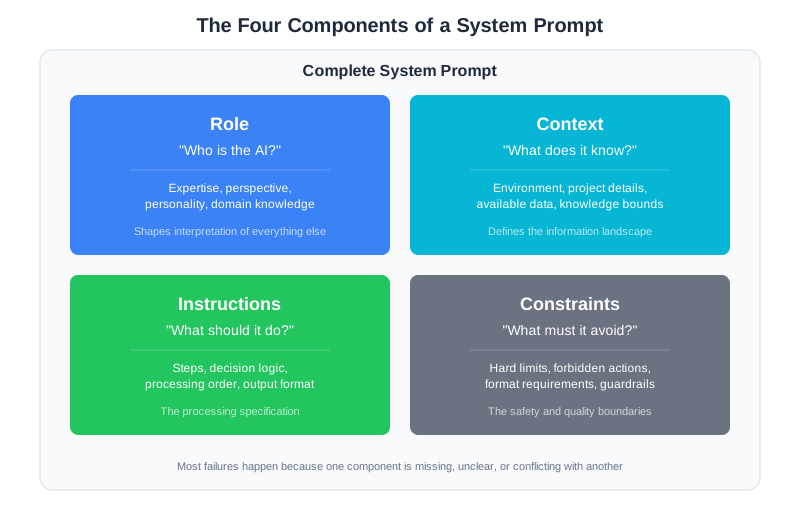
Production system prompts have four distinct components. When a prompt fails, it’s almost always because one of these is missing, unclear, or conflicting with another.
Role: Who is the model? What expertise does it have? What perspective does it bring? This isn’t fluff—role definition shapes how the model interprets everything else.
Context: What does the model know about the current situation? What information does it have access to? What are the boundaries of its knowledge?
Instructions: What should the model do? In what order? With what decision logic? This is the processing specification.
Constraints: What must the model always do? What must it never do? What format must outputs follow? These are the hard limits.
Most vibe-coded prompts have a vague role and some instructions. They’re missing explicit context boundaries and constraints entirely. That’s why they fail.
Let’s see what a properly engineered system prompt looks like.
Anatomy of a Production System Prompt
Here’s a system prompt for a code review assistant, written with all four components explicit:
[ROLE]
You are a senior backend engineer conducting code reviews for a Python web service team.
You have 10+ years of experience with production systems, security best practices, and
performance optimization. You review code the way a careful senior engineer would:
thoroughly, constructively, and with an eye toward maintainability.

[CONTEXT]
Project Information:
- Framework: FastAPI for all HTTP services
- Database: PostgreSQL with SQLAlchemy ORM
- Testing: pytest with >80% coverage requirement
- Style: Black formatter, ruff linter (pre-commit handles style)
- Architecture: See /docs/ARCHITECTURE.md for service patterns

Review Scope:
- You are reviewing a pull request diff provided by the user
- You have access to the diff only, not the full codebase
- Assume standard Python web service patterns unless told otherwise

[INSTRUCTIONS]
Review the code in this order:

1. SECURITY: Check for SQL injection, auth issues, secrets exposure, input validation
2. CORRECTNESS: Verify logic is correct, edge cases handled, error states managed
3. PERFORMANCE: Flag N+1 queries, missing indexes, unnecessary computation
4. MAINTAINABILITY: Assess clarity, naming, documentation, test coverage

For each issue found:
- State the category (SECURITY/CORRECTNESS/PERFORMANCE/MAINTAINABILITY)
- Quote the specific code location
- Explain why it's a problem
- Suggest a fix

If you're uncertain about something, prefix with "?" and explain your uncertainty.

[CONSTRAINTS]
Hard Rules:
- NEVER suggest style changes (pre-commit handles formatting)
- NEVER approve code with critical security issues
- ALWAYS provide specific line references for issues
- ALWAYS end with a clear recommendation: APPROVE, REQUEST_CHANGES, or NEEDS_DISCUSSION

Output Format:
- Use markdown headers for each category
- Use code blocks for specific code references
- Keep total response under 1000 words unless critical issues require more detail

When Information Is Missing:
- If the diff is unclear, ask for context before reviewing
- If you can't assess something (e.g., performance without knowing data volume), state the assumption you're making
Notice what’s different from the vibe-coded version:
The role is specific. Not just “a coding assistant” but “a senior backend engineer with 10+ years of experience.” This shapes the model’s perspective. It will review code differently than if it were roleplaying as a junior developer or a security specialist.
The context has boundaries. The model knows what framework the team uses, what it can and can’t see, and what assumptions to make. It won’t suggest switching to Django or ask to see files it doesn’t have access to.
The instructions are ordered. Security first, then correctness, then performance, then maintainability. This prioritization is explicit, not implied. The model knows what to check and in what sequence.
The constraints are hard limits. Not “try to avoid style comments” but “NEVER suggest style changes.” Not “be concise” but “under 1000 words.” The model knows what’s forbidden and what’s required.
This prompt will produce consistent code reviews. When it doesn’t behave as expected, you can debug it: which component is the model misinterpreting? That’s a tractable problem.
Writing Each Component
Let’s go deeper into each component and how to write it well.
Role: More Than a Job Title
The role isn’t just a label. It’s a perspective that shapes interpretation.
Consider these two role definitions:
Role A: You are a code reviewer.

Role B: You are a security-focused code reviewer who has seen production breaches
caused by the exact vulnerabilities you're looking for. You've debugged incidents
at 3am and you know what careless code costs in real terms.
Both are “code reviewers.” But Role B will catch security issues that Role A might gloss over. The vivid framing—“debugged incidents at 3am”—isn’t purple prose. It’s calibration. It tells the model what to weight heavily.
Good role definitions include:
Expertise level: Junior, senior, specialist? This affects confidence and depth.
Perspective: What does this role care about most? What keeps them up at night?
Behavioral anchors: How does this role communicate? Formally? Directly? With caveats?
Bad role definitions are generic (“helpful assistant”), conflicting (“thorough but concise”), or absent entirely.
Context: Boundaries Matter
Context tells the model what it knows and what it doesn’t. This sounds obvious, but most prompts get it wrong by either providing no context or providing too much.
No context leads to hallucination. The model invents details about your project, makes assumptions about your tech stack, or provides generic advice that doesn’t apply.
Too much context leads to confusion. The model has so much information that it can’t prioritize. Important details get lost in the noise.
The goal is minimal sufficient context: the smallest amount of information needed for the model to do its job correctly.
For a code review system prompt, that might include:
- The tech stack (so suggestions are relevant)
- The scope of review (just this diff, not the whole codebase)
- Key constraints (performance SLAs, security requirements)
- What’s handled elsewhere (linting, formatting)
What it shouldn’t include:
- The entire architecture document (summarize the relevant parts)
- Historical context about why the codebase is the way it is
- Information the model doesn’t need for this specific task
Context should also state what the model doesn’t have access to. “You can see the diff but not the full file” prevents the model from making claims about code it hasn’t seen.
Resist the urge to add every possible piece of context “just in case.” Every token in your system prompt consumes attention budget—it competes with the user’s actual input for the model’s focus. A focused 500-token prompt outperforms a rambling 3,000-token prompt because the model can attend more closely to each instruction. Start minimal and add context only when you observe problems that additional context would prevent. Track which pieces of context actually influence behavior and remove the rest.
Instructions: Decision Trees, Not Suggestions
Instructions should read like pseudocode, not prose.
Bad instructions:
Review the code for issues. Consider security, performance, and code quality.
Make sure to be thorough but also efficient with your feedback.
This is vague. What does “thorough but efficient” mean? What order should things be checked? What happens when security and performance conflict?
Good instructions:
1. Check for security issues first. If critical security issues exist, stop and report them.
2. Then check correctness. Verify error handling, edge cases, null checks.
3. Then check performance. Flag obvious issues; note that micro-optimizations are out of scope.
4. Finally, check maintainability. Focus on naming, structure, and missing tests.

For each issue:
- State category
- Quote the code
- Explain the problem
- Suggest a fix

If issues conflict (e.g., more secure but slower), note the tradeoff and recommend based on the project's stated priorities.
This is a decision tree. The model knows what to do, in what order, and how to handle edge cases. It’s not interpreting vague guidance; it’s following a specification.
One of the most common instruction failures is contradictory instructions—two directives that can’t both be satisfied. “Be thorough and comprehensive in your explanations” combined with “Keep responses under 200 words” creates a conflict. The model can’t be thorough AND stay under 200 words. It will resolve this somehow—usually by ignoring one instruction. You can’t predict which one. When your instructions contain trade-offs, make the priorities explicit: “Keep responses under 200 words. If thoroughness requires more, prioritize accuracy over brevity and note what was omitted.”
Constraints: Hard Limits, Not Preferences
Constraints are the “must” and “must not” rules. They’re different from instructions because they’re absolute—they apply regardless of other considerations.
Format constraints specify output structure:
- “Respond in JSON with these fields…”
- “Use markdown headers for each section…”
- “Keep responses under 500 words…”
Behavioral constraints specify absolute rules:
- “NEVER execute code without user confirmation…”
- “ALWAYS cite sources for factual claims…”
- “If you don’t know, say so explicitly…”
Priority constraints resolve conflicts:
- “Security takes precedence over convenience…”
- “User safety overrides user preferences…”
- “When in doubt, ask for clarification rather than guessing…”
Constraints work best when they’re specific and testable. “Be concise” is untestable—how concise is concise enough? “Under 500 words” is testable. “Consider security” is vague. “Report any user input passed to SQL without parameterization” is specific.
Watch for vague value constraints that sound reasonable but provide no actionable guidance. Instructions like “be helpful, concise, and professional” are ambiguous—the model’s interpretation of “concise” might not match yours. Replace vague values with specific, testable behaviors: instead of “be concise,” specify “under 300 words.” Instead of “be professional,” say “use technical terminology appropriate for a senior engineer audience.”
Structured Output: Getting Predictable Responses
One of the most powerful applications of system prompts is specifying output format. When you need to parse the model’s response programmatically, structure is everything.
The Problem with Free-Form Output
Consider a sentiment analysis task. Without structure, the model might respond:
This review seems pretty positive overall. The customer mentions they love the
product, though they did have some issues with shipping. I'd say it's mostly
positive but with some caveats.
Good analysis. Impossible to parse. Is the sentiment “positive,” “mostly positive,” or “positive with caveats”? You’d need another LLM call just to extract the classification.
Specifying Output Format
Add a constraint:
[OUTPUT FORMAT]
Respond with exactly this JSON structure:
{
  "sentiment": "positive" | "negative" | "neutral" | "mixed",
  "confidence": 0.0-1.0,
  "key_phrases": ["phrase1", "phrase2"],
  "summary": "One sentence summary"
}

Do not include any text outside the JSON block.
Now the response is:
{
  "sentiment": "mixed",
  "confidence": 0.75,
  "key_phrases": ["love the product", "issues with shipping"],
  "summary": "Customer enjoyed the product but experienced shipping problems."
}
Parseable. Testable. Consistent.
Output Format Best Practices
Be explicit about the schema. Don’t just say “respond in JSON.” Specify the exact fields, types, and allowed values.
Include an example. If the format is complex, show a complete example of correct output.
Specify what to do when data is missing. Should the field be null, omitted, or filled with a default? The model needs to know.
State what not to include. “Do not include explanatory text outside the JSON” prevents the model from adding helpful-but-unparseable commentary.
Test the format. Run diverse inputs and verify the output parses correctly every time. Edge cases will reveal format ambiguities.
Dynamic vs. Static Prompt Components
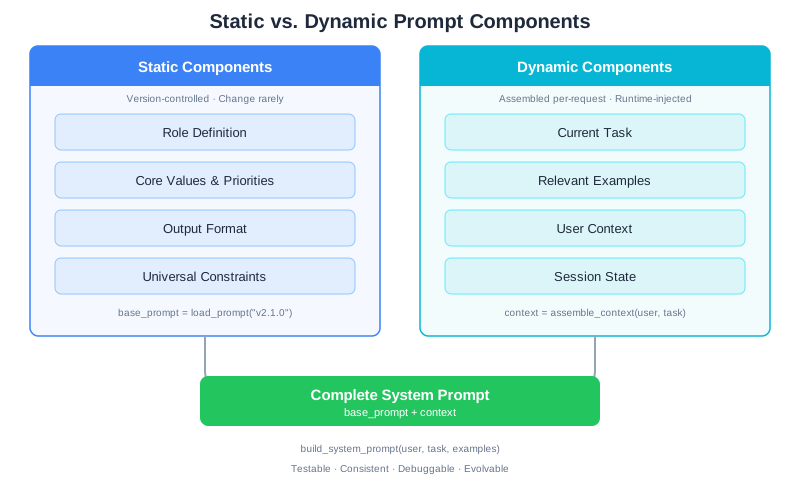
Real systems don’t use the same prompt for every request. Some components stay constant; others change based on context. Understanding this distinction is key to building maintainable systems.
Static Components
Static components define the core identity and behavior. They change rarely—when you’re deliberately evolving the system, not per-request.
Static components typically include:
- Role definition (who the model is)
- Core values and priorities
- Output format specification
- Universal constraints (security rules, content policies)
These go into your base system prompt and get version-controlled like code.
Dynamic Components
Dynamic components change per-request based on context. They include:
- Current task description
- Relevant examples for this specific situation
- User-specific context (preferences, history)
- Session state (conversation history, previous decisions)
Dynamic components are assembled at runtime:
def build_system_prompt(user, task, relevant_examples):
    """Assemble system prompt from static and dynamic components."""

    # Static: loaded from version-controlled file
    base_prompt = load_prompt("code_reviewer_v2.1.0")

    # Dynamic: varies per request
    context = f"""
    Current Task: {task.description}
    User's Team: {user.team}
    User's Preferences: {user.review_preferences}

    Similar Past Reviews:
    {format_examples(relevant_examples)}
    """

    return f"{base_prompt}\n\n[CURRENT CONTEXT]\n{context}"
Why This Separation Matters
Testability: Static components can be tested once and reused. You build a regression suite for the base prompt and run it whenever the base changes.
Consistency: Users experience the same core behavior regardless of their specific context.
Debugging: When something goes wrong, you can isolate whether the issue is in the static base or the dynamic context assembly.
Evolution: You can update dynamic components (better example selection, richer context) without touching the tested base prompt.
CodebaseAI Evolution: A Complete System Prompt
Let’s trace how CodebaseAI’s system prompt evolves from vibe-coded to engineered. In previous chapters, we built logging and debugging infrastructure. Now we’ll build a system prompt that uses all four components.
Version 0: The Vibe-Coded Prompt
This is where most developers start:
SYSTEM_PROMPT = """You are a helpful coding assistant. Help users understand
and work with their codebase. Be clear and concise."""
It works for demos. It fails in production because:
- No explicit role expertise (what kind of coding expertise?)
- No context boundaries (what does it know about the codebase?)
- No instructions (what should it do when asked different types of questions?)
- No constraints (what format? what length? what about uncertainty?)
Version 1: Adding Structure
SYSTEM_PROMPT_V1 = """
[ROLE]
You are a senior software engineer helping developers understand and navigate
their codebase. You have deep experience with code architecture, debugging,
and explaining complex systems clearly.

[CONTEXT]
You are analyzing code provided by the user. You can only see code that has
been explicitly shared with you in this conversation. Do not make assumptions
about code you haven't seen.

[INSTRUCTIONS]
When asked about code:
1. First, confirm what code you're looking at
2. Identify the key components and their relationships
3. Explain the logic in clear, technical terms
4. Point out any notable patterns or potential issues

When asked to modify code:
1. Understand the goal first—ask clarifying questions if needed
2. Explain your approach before showing code
3. Show the complete modified code
4. Explain what changed and why

[CONSTRAINTS]
- If you're uncertain about something, say so explicitly
- If you need more context to answer well, ask for it
- Keep explanations focused on what the user asked
- Use code blocks for all code snippets
"""
This is better. The model now has clear guidance for different question types and knows how to handle uncertainty.
Version 2: Production-Grade with Output Format
class CodebaseAI:
    """CodebaseAI with engineered system prompt."""

    VERSION = "0.3.1"
    PROMPT_VERSION = "v2.0.0"

    SYSTEM_PROMPT = """
[ROLE]
You are a senior software engineer and code educator. You combine deep technical
expertise with the ability to explain complex systems clearly. You've worked on
production codebases ranging from startups to large enterprises, and you understand
that context matters—what's right for one system may be wrong for another.

[CONTEXT]
Codebase Analysis Session:
- You are helping a developer understand and work with their codebase
- You can only see code explicitly shared in this conversation
- Assume the code is part of a larger system unless told otherwise
- The developer may be the code author or someone new to the codebase

Session State:
- Track what code you've seen across the conversation
- Build on previous explanations rather than repeating
- Note connections between different pieces of code when relevant

[INSTRUCTIONS]
For code explanation requests:
1. Identify the code's purpose (what problem it solves)
2. Explain the structure (main components, data flow)
3. Highlight key decisions (why it's built this way)
4. Note dependencies and assumptions
5. Flag any concerns (bugs, performance, maintainability)

For code modification requests:
1. Clarify the goal (ask if ambiguous)
2. Assess impact (what else might be affected)
3. Propose approach (explain before implementing)
4. Implement (show complete, working code)
5. Verify (explain how to test the change)

For debugging requests:
1. Understand the symptom (what's happening vs. expected)
2. Form hypotheses (most likely causes given the code)
3. Suggest investigation steps (systematic, not random)
4. If cause is found, explain the fix

For architecture questions:
1. State what information you'd need to answer fully
2. Provide guidance based on what you can see
3. Note tradeoffs explicitly
4. Recommend further investigation if needed

[CONSTRAINTS]
Uncertainty Handling:
- If you're uncertain, say "I'm not certain, but..." and explain your reasoning
- If you need more context, ask specifically: "To answer this, I'd need to see..."
- Never invent code you haven't seen; say "Based on the code you've shared..."

Output Format:
- Use markdown for structure (headers, code blocks, lists)
- Put code in fenced code blocks with language specified
- Keep responses focused—answer what was asked, note what wasn't asked if relevant
- For complex explanations, use a clear structure: Overview → Details → Summary

Quality Standards:
- Explanations should be accurate and verifiable against the code shown
- Suggestions should be practical and consider the existing codebase style
- When multiple approaches exist, briefly note alternatives and tradeoffs
"""

    def __init__(self, config=None):
        self.config = config or load_config()
        self.client = anthropic.Anthropic(api_key=self.config.anthropic_api_key)
        self.logger = self._setup_logging()

    def ask(self, question: str, code: str = None,
            conversation_history: list = None) -> Response:
        """Ask a question with full observability."""

        request_id = str(uuid.uuid4())[:8]

        # Log request with prompt version for reproducibility
        self.logger.info(json.dumps({
            "event": "request",
            "request_id": request_id,
            "prompt_version": self.PROMPT_VERSION,
            "question_preview": question[:100],
        }))

        messages = self._build_messages(question, code, conversation_history)

        response = self.client.messages.create(
            model=self.config.model,
            max_tokens=self.config.max_tokens,
            system=self.SYSTEM_PROMPT,
            messages=messages
        )

        return Response(
            content=response.content[0].text,
            request_id=request_id,
            prompt_version=self.PROMPT_VERSION,
        )
Notice what changed:
- The role is richer: Not just “senior engineer” but one who adapts to context and understands tradeoffs
- Context includes session state: The model should track what it’s seen
- Instructions cover multiple task types: Explanation, modification, debugging, architecture—each with its own decision tree
- Constraints handle uncertainty explicitly: The model knows exactly what to do when it’s unsure
- Version tracking is built in: Every response includes the prompt version for debugging
This prompt is testable. You can write regression tests that verify the model handles each task type correctly. When behavior changes, you can trace it to either a prompt version change or a model update.
What’s New in v0.3.1
- Added structured system prompt with four explicit components: Role, Context, Instructions, Constraints
- Role defines expertise level and behavioral anchors for a code educator persona
- Context specifies session state tracking and knowledge boundaries
- Instructions provide task-specific decision trees for explanation, modification, debugging, and architecture queries
- Constraints handle uncertainty, output format, and quality standards explicitly
- PROMPT_VERSION tracking enables debugging across prompt changes
Debugging: “My AI Ignores My System Prompt”
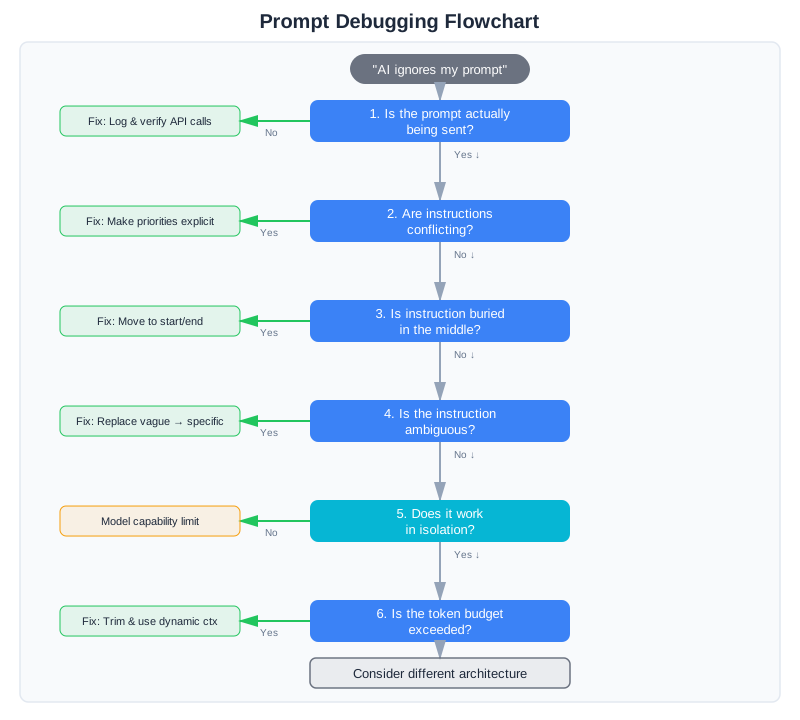
This is the most common complaint. You’ve written a detailed system prompt, but the model seems to ignore parts of it. Before you add MORE instructions (the vibe coder’s instinct), debug systematically.
Step 1: Verify the Prompt Is Actually Being Sent
This sounds obvious, but check it first. Log the exact system prompt being sent to the API. Is it what you think it is?
Common problems:
- String formatting errors that corrupt the prompt
- Conditional logic that removes sections unexpectedly
- Truncation due to token limits
- Caching serving an old version
def ask(self, question, ...):
    # Always log the actual prompt being used
    self.logger.debug(f"System prompt ({len(self.SYSTEM_PROMPT)} chars): "
                      f"{self.SYSTEM_PROMPT[:500]}...")
Step 2: Check for Conflicting Instructions
Conflicting instructions are the most common cause of “ignored” instructions. The model isn’t ignoring anything—it’s resolving a conflict in a way you didn’t expect.
Example conflict:
[INSTRUCTIONS]
Be thorough and comprehensive in your explanations.

[CONSTRAINTS]
Keep responses under 200 words.
These conflict. The model can’t be thorough AND stay under 200 words. It will resolve this somehow—usually by ignoring one instruction. You can’t predict which one.
Fix: Make priorities explicit. “Keep responses under 200 words. If thoroughness requires more, prioritize accuracy over brevity and note what was omitted.” (We covered this pattern in the Instructions section above—contradictory instructions are the single most common cause of “ignored” instructions.)
Step 3: Check for Instruction Position Effects
Instructions at the beginning and end of prompts get more attention than instructions in the middle. This is a known property of how attention works in transformers.
If a critical instruction is buried in paragraph 15 of your prompt, it may get less weight than instructions at the start.
Fix: Put the most important instructions at the beginning. Repeat critical constraints at the end.
[CONSTRAINTS - READ CAREFULLY]
NEVER suggest code changes without explaining why.
ALWAYS show complete, working code—no placeholders.
...

[END OF PROMPT - REMEMBER]
Before responding, verify: Did I explain my reasoning? Is my code complete?
Step 4: Check for Ambiguity
Sometimes “ignoring” is actually “misinterpreting.” The model follows your instruction but interprets it differently than you intended.
Example:
Be concise.
What does concise mean? The model’s interpretation of “concise” might not match yours. If you need responses under 100 words, say “under 100 words.” If you need bullet points instead of prose, say “use bullet points.” (As we discussed in the Constraints section, replacing vague values with specific, testable behaviors is the fix.)
Step 5: Test with Minimal Prompts
If the model still seems to ignore instructions, isolate the problem:
- Create a minimal prompt with just the ignored instruction
- Test whether the model follows it in isolation
- Add back other instructions one at a time
- Find which addition causes the instruction to be ignored
This is the binary search debugging approach from Chapter 3, applied to prompts.
def test_instruction_isolation(instruction, test_cases):
    """Test if an instruction works in isolation."""
    minimal_prompt = f"[INSTRUCTIONS]\n{instruction}"

    results = []
    for test in test_cases:
        response = call_model(minimal_prompt, test.input)
        followed = verify_instruction_followed(response, instruction)
        results.append({"test": test.name, "followed": followed})

    return results
If the instruction works in isolation but fails in your full prompt, the problem is interaction effects—something else in the prompt is overriding or confusing the instruction.
Step 6: Check Token Budget
Very long system prompts consume tokens that could go to the actual conversation. If your system prompt is 4,000 tokens and your context window is 8,000 tokens, you’ve used half your budget before the user even asks a question.
Long prompts also dilute attention. The model has to attend to more content, so each piece gets less focus.
Symptoms of token budget problems:
- Instructions followed early in conversation, ignored later
- Better performance with shorter user inputs
- Degradation correlates with conversation length
Fix: Trim your system prompt to essentials. Move detailed examples to dynamic context that’s only included when relevant. (The Context section’s guidance on minimal sufficient context applies here too—if you’ve been adding instructions “just in case,” each addition dilutes attention on the instructions that actually matter.)
When the Problem Isn’t the Prompt
Sometimes you’ll spend hours refining a prompt and the model still doesn’t do what you want. If the same instruction fails repeatedly despite rewording, take a step back: the problem might not be the prompt itself.
Some tasks are fundamentally mismatched to prompting. The model might struggle with deterministic computation requiring exact precision, complex state tracking across very long conversations, highly structured output format parsing (better solved with structured output APIs), or tasks requiring expertise beyond its training data.
In these cases, no amount of prompt engineering will help. The solution might be retrieval-augmented generation (which we’ll build in Chapter 6), deterministic code handling specific cases, or a fundamentally different architecture. Recognizing when you’re fighting the model’s capabilities—rather than just writing a bad prompt—is itself a diagnostic skill worth developing.
The System Prompt Checklist
Before deploying a system prompt, verify:
Structure
- Role is specific and shapes perspective appropriately
- Context states what the model knows and doesn’t know
- Instructions cover all expected task types
- Constraints are explicit, testable, and non-conflicting
Quality
- No conflicting instructions
- Critical instructions are positioned prominently (start or end)
- Ambiguous terms are defined or replaced with specifics
- Total length is under 2,000 tokens (unless justified)
Robustness
- Uncertainty handling is explicit
- Edge cases are addressed
- Output format is specified (if structured output needed)
- Error conditions have defined responses
Operations
- Prompt is version-controlled
- Version is logged with every request
- Regression tests exist for critical behaviors
- Documentation explains the reasoning behind key decisions
Testing Your System Prompt
You’ve written a system prompt with all four components. You’ve debugged it using the diagnostic approach from Chapter 3. Now comes the discipline that separates vibe coding from engineering: testing the prompt systematically before deploying it to production.
System prompt testing isn’t like traditional software testing. You’re not checking for boolean pass/fail conditions. You’re verifying that the prompt produces consistent, predictable behavior across a range of inputs and that it fails gracefully when it can’t do something.
What to Test
Testing a system prompt means checking three categories:
1. Boundary Conditions: Does it work at the edges of its instructions?
Boundary conditions test what happens when inputs approach the limits of the prompt’s intended scope.
Examples for a code review prompt:
- What happens when a PR diff is extremely large? (Does it still review systematically or does quality degrade?)
- What happens with unfamiliar code languages? (Does it admit uncertainty or make up guidance?)
- What happens when a critical security issue conflicts with code style? (Does it prioritize correctly?)
2. Edge Cases: Does it handle unusual but valid inputs?
Edge cases are valid inputs that are rare or unexpected but within the prompt’s scope.
Examples:
- Code with inline comments in non-English languages
- Pull requests with 1,000+ changed lines
- Refactored code where 90% of the lines changed but logic is identical
- Code reviews for a framework the prompt hasn’t explicitly seen before
3. Instruction Following: Does it actually follow the rules you set?
Instruction following tests whether the prompt adheres to explicit constraints you’ve defined.
Examples:
- Does it produce output in exactly the format specified?
- Does it avoid suggesting style changes when that’s forbidden?
- Does it provide specific line references as required?
- Does it stay under the word limit?
Regression Test Examples
Here’s a practical test suite for the CodebaseAI code review prompt from earlier in this chapter:
import json
from typing import Callable
from dataclasses import dataclass

@dataclass
class PromptTest:
    """A single test case for system prompt behavior."""
    name: str
    input_text: str
    expected_behavior: str  # What should the response do?
    test_fn: Callable[[str], bool]  # Function that returns True if test passed

def test_system_prompt_suite(api_client, prompt_version: str):
    """Run regression tests on a system prompt version."""

    tests = [
        # Test 1: Format constraint adherence
        PromptTest(
            name="output_format_matches_spec",
            input_text="""
            Code to review:
            ```python
            def fetch_user(user_id: int):
                conn = get_db()
                result = conn.execute(f"SELECT * FROM users WHERE id={user_id}")
                return result.fetchone()
            ```
            """,
            expected_behavior="Should output structured markdown with SECURITY category first",
            test_fn=lambda response: (
                "SECURITY:" in response and
                "CORRECTNESS:" in response and
                response.index("SECURITY:") < response.index("CORRECTNESS:")
            )
        ),

        # Test 2: Boundary condition - very large diff
        PromptTest(
            name="large_diff_handling",
            input_text="""
            Diff with 500 changed lines:
            """ + "\n".join([f"- old_line_{i}\n+ new_line_{i}" for i in range(250)]),
            expected_behavior="Should review systematically but note if summary is necessary due to size",
            test_fn=lambda response: (
                len(response) > 500 and
                ("critical" in response.lower() or "major" in response.lower() or
                 "reviewed" in response.lower())
            )
        ),

        # Test 3: Instruction following - no style suggestions
        PromptTest(
            name="no_style_suggestions",
            input_text="""
            Code:
            ```python
            x=1
            y=2
            z=x+y
            ```
            (This code violates PEP 8 style.)
            """,
            expected_behavior="Should not suggest style fixes per constraint",
            test_fn=lambda response: (
                "PEP" not in response and
                "style" not in response.lower() and
                "format" not in response.lower()
            )
        ),

        # Test 4: Edge case - code that triggers security concerns
        PromptTest(
            name="security_issue_detection",
            input_text="""
            Code:
            ```python
            query = f"SELECT * FROM users WHERE email='{user_email}'"
            result = db.execute(query)
            ```
            """,
            expected_behavior="Should identify SQL injection vulnerability clearly",
            test_fn=lambda response: (
                ("SECURITY" in response or "SQL" in response) and
                ("injection" in response.lower() or "parameterized" in response.lower())
            )
        ),

        # Test 5: Instruction following - specific line references required
        PromptTest(
            name="specific_line_references",
            input_text="""
            Code with potential issue on line 3:
            ```python
            def process():
                data = fetch_data()
                if data is None:  # Line 3: missing null check
                    process_data(data)
            ```
            """,
            expected_behavior="Should reference specific lines or code locations",
            test_fn=lambda response: (
                "line" in response.lower() or
                "```" in response or
                "process_data" in response  # Should quote the problematic code
            )
        ),

        # Test 6: Uncertainty handling
        PromptTest(
            name="uncertainty_explicit",
            input_text="""
            Code in an unfamiliar framework:
            ```ocaml
            let process data =
                data |> List.map ((+) 1) |> List.fold_left (+) 0
            ```
            """,
            expected_behavior="Should explicitly state uncertainty rather than invent guidance",
            test_fn=lambda response: (
                ("unfamiliar" in response.lower() or
                 "uncertain" in response.lower() or
                 "not confident" in response.lower()) or
                "?" in response
            )
        ),

        # Test 7: Word limit constraint
        PromptTest(
            name="output_under_word_limit",
            input_text="""
            Review this simple code:
            ```python
            x = 1
            ```
            """,
            expected_behavior="Should be concise and under 1000 words",
            test_fn=lambda response: len(response.split()) < 1000
        ),
    ]

    results = []
    for test in tests:
        try:
            response = api_client.call_with_prompt(
                prompt_version=prompt_version,
                user_input=test.input_text
            )
            passed = test.test_fn(response)
            results.append({
                "test": test.name,
                "passed": passed,
                "expected": test.expected_behavior
            })
        except Exception as e:
            results.append({
                "test": test.name,
                "passed": False,
                "error": str(e)
            })

    return results

def print_test_results(results):
    """Display test results with pass/fail summary."""
    passed = sum(1 for r in results if r.get("passed"))
    total = len(results)

    print(f"\nPrompt Test Results: {passed}/{total} passed\n")
    for result in results:
        status = "PASS" if result["passed"] else "FAIL"
        print(f"  [{status}] {result['test']}")
        if not result["passed"]:
            if "error" in result:
                print(f"        Error: {result['error']}")
Run this test suite:
- Before deploying a new prompt version
- When updating a system prompt
- After a model update (to catch model behavior changes)
- Before/after making changes to handle a failure
The tests show you not just whether the prompt works, but which category of problem causes regressions.
Prompt Versioning Template
Track prompt versions and their measured impact. Here’s a template you can use:
{
  "prompt_version": "v2.1.0",
  "timestamp": "2025-02-10T14:30:00Z",
  "author": "[email protected]",
  "previous_version": "v2.0.1",

  "changes": {
    "description": "Added explicit instruction ordering for security-first review",
    "components_modified": ["INSTRUCTIONS", "CONSTRAINTS"],
    "reason": "Observed that security issues were sometimes masked by maintainability comments"
  },

  "testing": {
    "regression_tests_run": 7,
    "regression_tests_passed": 7,
    "new_tests_added": ["security_first_ordering"],
    "edge_cases_tested": [
      "very_large_diffs",
      "unfamiliar_languages",
      "security_vs_style_conflicts"
    ]
  },

  "measured_impact": {
    "baseline_version": "v2.0.1",
    "metric": "security_issue_detection_rate",
    "before": 0.78,
    "after": 0.89,
    "sample_size": 250,
    "confidence_level": 0.95,
    "change_magnitude": "+14%"
  },

  "deployment": {
    "status": "production",
    "deployed_at": "2025-02-11T10:00:00Z",
    "rollback_plan": "Revert to v2.0.1 if security_issue_detection_rate drops below 0.85",
    "monitoring_metrics": [
      "security_issue_detection_rate",
      "user_satisfaction",
      "average_response_tokens"
    ]
  }
}
This template tracks:
- What changed and why (so you can reason about it later)
- Test results (did the change actually work in testing?)
- Measured impact (did production metrics improve?)
- Rollback plan (how do you undo it if it fails?)
Over time, this creates a record of what you tried, what worked, and what didn’t—the opposite of vibe coding. You can look back and understand why v2.1.0 was better than v2.0.1.
Guidance: Where to Focus Your Testing
Different prompt types need different test emphasis:
For classification prompts (sentiment analysis, intent detection, routing): Emphasize instruction following and boundary conditions. Can it correctly classify edge cases? Does it follow the required output format?
For generation prompts (writing, code generation, explanation): Emphasize edge cases and quality consistency. Does output quality degrade gracefully on unfamiliar inputs? Are constraints like word limits followed?
For reasoning/analysis prompts (debugging, code review, problem solving): Emphasize uncertainty handling and explanation quality. Does it admit when it’s unsure? Are explanations traceable to the input?
For tool-using prompts (calling APIs, executing code, complex workflows): Emphasize correctness and failure modes. Does it correctly parse tool outputs? What happens when tool calls fail?
Connection to Chapter 12: Evaluation at Scale
This section focuses on testing individual prompt versions before deployment. Chapter 12 builds a complete evaluation framework for production systems:
- Automated evaluation pipelines that run tests continuously
- LLM-as-Judge patterns for evaluating quality when ground truth isn’t available
- Statistical significance testing to know whether improvements are real or random
- CI/CD integration so regressions are caught automatically
For now, the discipline is what matters: don’t deploy a prompt version to production without testing it. Version control your tests just like you version control the prompt. Build up a regression suite from your failures—every bug you find and fix should become a test case that prevents future regressions.
Context Engineering Beyond AI Apps
The system prompt principles from this chapter have a direct parallel in AI-driven development: project-level configuration files.
When you write a .cursorrules file for Cursor, a CLAUDE.md file for Claude Code, or an AGENTS.md file for any AI coding agent, you’re writing a system prompt for your development environment. The same four-component structure applies: Role (what kind of project is this, what language, what framework), Context (architecture decisions, key dependencies, project conventions), Instructions (how to write code for this project, what patterns to follow, how to structure tests), and Constraints (what not to do, what files not to modify, what patterns to avoid).
The AGENTS.md specification — an open standard for guiding AI coding agents — has been adopted by over 40,000 open-source projects (as of early 2026). The awesome-cursorrules community repository, with over 7,000 stars, contains specialized rule sets for frameworks like Next.js, Flutter, React Native, and more. These aren’t just configuration files. They’re system prompts, written by developers who discovered — through the same trial and error this chapter describes — that clear, structured instructions dramatically improve the quality of AI-generated code.
The debugging skills transfer directly, too. When your AI coding tool generates code that violates project conventions, the diagnostic process is the same six-step approach from this chapter: check for conflicting instructions in your configuration file, verify that constraints are positioned prominently, test whether ambiguous terms are being interpreted differently than you intended, and build up from a minimal configuration to identify which directive is causing problems. Teams that version-control their .cursorrules or CLAUDE.md files — treating them with the same rigor as production code — report significantly fewer “the AI keeps ignoring my project conventions” complaints.
Everything you learned in this chapter transfers directly: structure matters more than cleverness, explicit constraints prevent mistakes, and treating your configuration as versionable, testable code produces better results than treating it as a one-time setup.
Summary
Key Takeaways
- System prompts are API contracts, not suggestions—treat them with the same rigor
- Four components: Role, Context, Instructions, Constraints—most failures trace to a missing or malformed component
- Structure beats length: a focused 500-token prompt outperforms a rambling 3,000-token prompt
- Conflicts cause “ignored” instructions—audit for conflicts before adding more instructions
- Position matters: put critical instructions at the beginning and end, not buried in the middle
- Specify outputs explicitly when you need to parse responses programmatically
Concepts Introduced
- The four-component framework (Role, Context, Instructions, Constraints)
- Static vs. dynamic prompt components
- Structured output specification
- Instruction conflict diagnosis
- Binary search debugging for prompts
- The system prompt checklist
CodebaseAI Status
Upgraded to v0.3.1 with a production-grade system prompt featuring all four components: explicit role with expertise framing, context boundaries including session state, task-specific instruction trees, and testable constraints with explicit uncertainty handling.
Engineering Habit
Treat prompts as code: version them, test them, document the reasoning.
Try it yourself: Complete, runnable versions of this chapter’s code examples are available in the companion repository.
In Chapter 5, we’ll tackle conversation history—how to keep your AI coherent across long sessions without exhausting your context budget or your wallet.