Chapter 5: Managing Conversation History
Your chatbot has amnesia.
Not the dramatic kind where it forgets everything. The subtle kind where it starts strong, remembers the first few exchanges perfectly, then gradually loses the thread. By message twenty, it’s asking questions you already answered. By message forty, it contradicts advice it gave earlier. By message sixty, it’s forgotten what it’s supposed to be helping you with.
This isn’t a bug. It’s a fundamental constraint: conversation history grows linearly, but context windows are finite. Every message you add pushes older messages closer to irrelevance—or out of the window entirely.
The vibe coder’s solution is to dump the entire conversation into the context and hope for the best. This works until it doesn’t. Costs spike. Latency increases. Quality degrades. And then, suddenly, the context window overflows and the whole thing breaks.
This chapter teaches you to manage conversation history deliberately. The core practice: state is the enemy; manage it deliberately or it will manage you. Every technique that follows—sliding windows, summarization, hybrid approaches—serves this principle.
By the end, you’ll have strategies for keeping your AI coherent across long sessions without exhausting your context budget or your wallet. (This chapter focuses on managing conversation history within a single session. When the session ends and the user comes back tomorrow, you’ll need persistent memory—that’s Chapter 9’s territory.)
The Conversation History Problem
Let’s quantify the problem. A typical customer support conversation runs 15-20 exchanges. Each exchange (user message + assistant response) averages 200-400 tokens. That’s 3,000-8,000 tokens for a modest conversation.
Now consider a complex debugging session. A developer is working through a tricky problem with an AI assistant. They share code snippets, error messages, stack traces. The AI responds with explanations and suggestions. Twenty exchanges in, each message is getting longer as they dive deeper. You’re easily at 30,000 tokens—and climbing.
At some point, you hit a wall.
Three Ways Conversations Break
Token overflow: You exceed the context window. The API returns an error, or silently truncates your input. Either way, the conversation breaks.
Context rot: Even before overflow, quality degrades. As Chapter 2 explained, model attention dilutes as context grows. Information in the middle gets lost. The model starts ignoring things you told it earlier—not because they’re gone, but because they’re drowned out.
Cost explosion: Tokens cost money. A 100K-token context costs roughly 10x a 10K-token context. For high-volume applications, the difference between managed and unmanaged history is the difference between viable and bankrupt.
The Naive Approach Fails
The simplest approach is to concatenate everything:
def naive_history(messages):
    """Don't do this in production."""
    return "\n".join([
        f"{m['role']}: {m['content']}"
        for m in messages
    ])
This works for demos. It fails in production because:
-
Growth is unbounded. Every message makes the context larger. Eventually, you hit the wall.
-
Old information crowds out new. By the time you’re at message 50, the system prompt and early context compete with 49 messages for attention.
-
Costs scale linearly. Each message makes every future message more expensive—you’re paying for the entire history on every turn.
-
Latency increases. More tokens means slower responses. Users notice.
You need strategies that preserve what matters while discarding what doesn’t.
Strategy 1: Sliding Windows
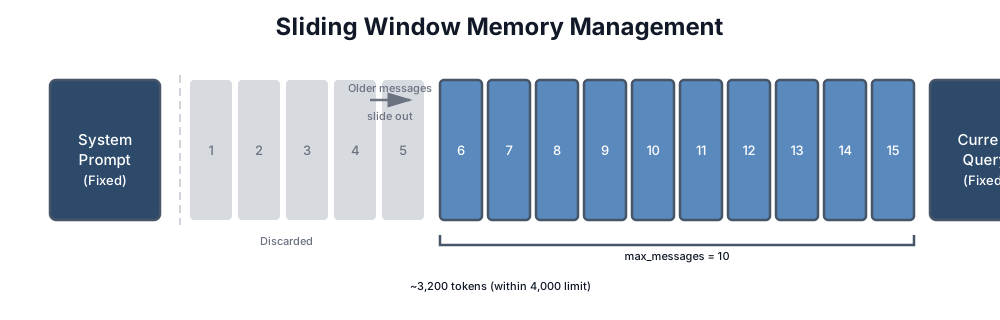
The simplest real strategy is a sliding window: keep the last N messages, discard the rest.
class SlidingWindowMemory:
    """Keep only recent messages in context."""

    def __init__(self, max_messages: int = 10, max_tokens: int = 4000):
        self.max_messages = max_messages
        self.max_tokens = max_tokens
        self.messages = []

    def add(self, role: str, content: str):
        """Add a message and enforce limits."""
        self.messages.append({"role": role, "content": content})
        self._enforce_limits()

    def _enforce_limits(self):
        """Keep conversation within bounds."""
        # First: message count limit
        if len(self.messages) > self.max_messages:
            self.messages = self.messages[-self.max_messages:]

        # Second: token limit (approximate)
        while self._estimate_tokens() > self.max_tokens and len(self.messages) > 2:
            self.messages.pop(0)

    def _estimate_tokens(self) -> int:
        """Rough token estimate (4 chars ≈ 1 token)."""
        return sum(len(m["content"]) // 4 for m in self.messages)

    def get_messages(self) -> list:
        """Return messages for API call."""
        return self.messages.copy()

    # Example usage output:
    # After 15 messages with max_messages=10:
    # - Messages 1-5: discarded
    # - Messages 6-15: retained
    # Token count: ~3,200 (within 4,000 limit)
Here’s what the sliding window looks like visually:
When Sliding Windows Work
Sliding windows work well when:
- Recent context is sufficient. The last few exchanges contain everything needed to continue.
- Conversations are short. Most interactions complete within the window size.
- Topics don’t reference old context. Users don’t say “remember what you said earlier about X.”
Typical applications: simple chatbots, Q&A systems, single-topic support conversations.
When Sliding Windows Fail
Sliding windows fail when:
- Users reference old context. “What was that command you suggested earlier?” If it’s been discarded, the model can’t answer.
- Decisions build on earlier discussions. In a debugging session, the error message from turn 3 might be critical in turn 30.
- The conversation has phases. Setup → exploration → resolution. The sliding window might discard the setup just when you need it for resolution.
For these cases, you need something smarter.
Strategy 2: Summarization
Instead of discarding old messages, compress them. A 10-message exchange becomes a 2-sentence summary. You preserve the essence while reclaiming tokens.
class SummarizingMemory:
    """Compress old messages into summaries."""

    def __init__(self, llm_client, active_window: int = 6, summary_threshold: int = 10):
        self.llm = llm_client
        self.active_window = active_window  # Keep this many recent messages
        self.summary_threshold = summary_threshold  # Summarize when exceeding this
        self.messages = []
        self.summaries = []

    def add(self, role: str, content: str):
        """Add message, compress if needed."""
        self.messages.append({"role": role, "content": content})

        if len(self.messages) >= self.summary_threshold:
            self._compress_old_messages()

    def _compress_old_messages(self):
        """Summarize older messages to reclaim tokens."""
        # Keep recent messages active
        to_summarize = self.messages[:-self.active_window]
        self.messages = self.messages[-self.active_window:]

        if not to_summarize:
            return

        # Format for summarization
        conversation = "\n".join([
            f"{m['role']}: {m['content'][:200]}..."
            if len(m['content']) > 200 else f"{m['role']}: {m['content']}"
            for m in to_summarize
        ])

        # Generate summary
        summary = self.llm.complete(
            f"Summarize this conversation segment concisely. "
            f"Preserve key facts, decisions, and any unresolved questions:\n\n"
            f"{conversation}\n\nSummary:"
        )

        self.summaries.append({
            "text": summary,
            "message_count": len(to_summarize),
            "timestamp": datetime.utcnow().isoformat()
        })

    def get_context(self) -> str:
        """Build context from summaries + active messages."""
        parts = []

        # Add summaries of older conversation
        if self.summaries:
            parts.append("=== Previous Discussion ===")
            # Keep last 3 summaries to bound growth
            for summary in self.summaries[-3:]:
                parts.append(summary["text"])
            parts.append("")

        # Add active messages
        if self.messages:
            parts.append("=== Recent Messages ===")
            for m in self.messages:
                parts.append(f"{m['role']}: {m['content']}")

        return "\n".join(parts)

    # Example context output:
    # === Previous Discussion ===
    # User asked about authentication options. Discussed JWT vs sessions.
    # Decided on JWT with refresh tokens. User concerned about security.
    #
    # === Recent Messages ===
    # user: How do I handle token expiration?
    # assistant: For JWT expiration, you have two main strategies...
The Summarization Trade-off
Summarization preserves meaning but loses detail. The model knows you “discussed authentication options” but not the specific code snippet you shared.
This trade-off is often acceptable. In a customer support conversation, knowing “user is frustrated about shipping delay” is more useful than retaining every word of their complaint. The summary captures what matters for continuing the conversation.
But for technical conversations—debugging, code review, architecture discussions—details matter. Losing the exact error message or the specific line of code can derail the conversation.
Summarization Quality
The quality of your summaries determines the quality of your long conversations. Bad summaries lose critical information. Good summaries capture:
- Key facts: Names, numbers, decisions made
- Unresolved questions: What’s still being worked on
- User state: Emotional tone, expertise level, preferences expressed
- Commitments: What the assistant promised or suggested
Test your summarization. Take real conversations, summarize them, then see if you can continue the conversation correctly from just the summary. If critical context is lost, improve your summarization prompt.
What to Preserve vs. Drop in Summaries
To write better summarization prompts, you need to be explicit about what information is critical and what’s noise.
Must preserve:
- Decisions made: “User chose PostgreSQL over MySQL because of JSON support”
- Factual assertions: “The error only occurs in production, not locally”
- User preferences: “Prefers brief explanations with code examples”
- Action items: “Need to refactor authentication before deploying to staging”
- Key constraints: “API calls limited to 1,000/day”, “Must support Python 3.8+”
Safe to drop:
- Greetings and meta-discussion: “Hi, can you help me with…”, “Thanks for your help”
- Filler and reformulations: Repeated explanations of the same thing, “uh”, “let me think”
- Irrelevant personal details: Weather, what they had for lunch (unless relevant to the problem)
- Duplicate information: If something was said three times, mention it once
Example of bad vs. good summarization:
Bad summary (loses critical information):
The user discussed pagination with the assistant. They talked about different approaches.
The user seems interested in performance.
Good summary (preserves decisions and constraints):
User implemented cursor-based pagination (not offset-based) because API handles 10K+ records.
Decided on keyset pagination using (created_at, id) compound key for sort stability.
Constraint: Must maintain compatibility with existing client code. Unresolved: How to handle deleted records in paginated results.
Summarization Prompt Template
Here’s a prompt template that extracts the right information:
def create_summarization_prompt(conversation_segment: str) -> str:
    """Create a prompt that extracts critical information from a conversation."""
    return f"""Summarize this conversation segment. Extract and preserve:

1. KEY DECISIONS: What did the user decide to do? Be specific.
   Format: "Decided to [action] because [reason]"

2. FACTUAL ASSERTIONS: What facts or constraints were established?
   Format: "System constraint: [constraint]" or "Problem: [fact]"

3. USER PREFERENCES: How does the user prefer responses or approaches?
   Format: "User prefers [preference] (reason: [why if stated])"

4. ACTION ITEMS: What work is pending or what was promised?
   Format: "TODO: [specific action]"

5. UNRESOLVED QUESTIONS: What's still being discussed or undecided?
   Format: "Open question: [question]"

Drop: greetings, meta-discussion, filler, off-topic details, repeated points.

Conversation segment:
---
{conversation_segment}
---

Provide the summary as a concise paragraph using the formats above. Be specific—use actual names, numbers, and technical details."""

# Usage in your summarization code
def improved_summarize(llm_client, conversation_segment: str) -> str:
    """Generate summary with structured prompt."""
    prompt = create_summarization_prompt(conversation_segment)
    summary = llm_client.complete(prompt)
    return summary
Testing Your Summarization
The ultimate test: can the conversation continue correctly from just the summary?
def test_summarization_quality(llm_client, original_conversation: list, question: str):
    """Test if a summary preserves enough context to answer follow-up questions.

    Args:
        original_conversation: Full conversation history
        question: A follow-up question that depends on earlier context
    """
    # Summarize the conversation
    segment = "\n".join([f"{m['role']}: {m['content']}" for m in original_conversation])
    summary = improved_summarize(llm_client, segment)

    # Try to answer a follow-up question using only the summary
    summary_based_answer = llm_client.complete(
        f"Summary of earlier conversation:\n{summary}\n\n"
        f"Follow-up question: {question}\n\n"
        f"Answer based only on the summary above:"
    )

    # Try to answer using the full conversation
    full_context_answer = llm_client.complete(
        f"Full conversation:\n{segment}\n\n"
        f"Follow-up question: {question}\n\n"
        f"Answer based on the full conversation:"
    )

    # Compare: were critical details preserved?
    print(f"Question: {question}")
    print(f"\nFrom summary: {summary_based_answer[:200]}...")
    print(f"From full context: {full_context_answer[:200]}...")
    print(f"\nSummary length: {len(summary)} chars (vs {len(segment)} full)")

    # If answers diverge significantly, your summarization is losing critical info
    if similarity(summary_based_answer, full_context_answer) < 0.7:
        print("⚠ WARNING: Summary loses critical information for follow-up questions")
        return False

    return True
This test catches the most important failure mode: when a summary is so compressed that following conversations can’t build on it correctly.
Strategy 3: Hybrid Approaches
Production systems rarely use a single strategy. They combine approaches based on message age and importance.
Tiered Memory
The most effective pattern is tiered memory: recent messages stay verbatim, older messages get summarized, ancient messages get archived or discarded.
class TieredMemory:
    """Three-tier memory: active, summarized, archived."""

    def __init__(self, llm_client):
        self.llm = llm_client

        # Tier 1: Active (full messages, ~10 most recent)
        self.active_messages = []
        self.active_limit = 10

        # Tier 2: Summarized (compressed batches)
        self.summaries = []
        self.max_summaries = 5

        # Tier 3: Key facts (extracted important information)
        self.key_facts = []

    def add(self, role: str, content: str):
        """Add message, manage tiers."""
        self.active_messages.append({"role": role, "content": content})

        # Promote to Tier 2 when Tier 1 overflows
        if len(self.active_messages) > self.active_limit:
            self._promote_to_summary()

        # Archive Tier 2 when it overflows
        if len(self.summaries) > self.max_summaries:
            self._archive_oldest_summary()

    def _promote_to_summary(self):
        """Move oldest active messages to summary tier."""
        # Take oldest half of active messages
        to_summarize = self.active_messages[:self.active_limit // 2]
        self.active_messages = self.active_messages[self.active_limit // 2:]

        # Summarize
        summary = self._summarize(to_summarize)
        self.summaries.append(summary)

    def _archive_oldest_summary(self):
        """Extract key facts from oldest summary, then discard it."""
        oldest = self.summaries.pop(0)

        # Extract any facts worth preserving permanently
        facts = self._extract_key_facts(oldest)
        self.key_facts.extend(facts)

        # Deduplicate and limit key facts
        self.key_facts = self._deduplicate_facts(self.key_facts)[-20:]

    def get_context(self, max_tokens: int = 4000) -> str:
        """Assemble context within token budget."""
        parts = []
        tokens_used = 0

        # Always include key facts (highest information density)
        if self.key_facts:
            facts_text = "Key facts: " + "; ".join(self.key_facts)
            parts.append(facts_text)
            tokens_used += len(facts_text) // 4

        # Add summaries if room
        summary_budget = (max_tokens - tokens_used) * 0.3
        for summary in reversed(self.summaries):  # Most recent first
            if tokens_used < summary_budget:
                parts.append(f"[Earlier]: {summary}")
                tokens_used += len(summary) // 4

        # Add active messages (always include most recent)
        parts.append("--- Recent ---")
        for m in self.active_messages:
            parts.append(f"{m['role']}: {m['content']}")

        return "\n".join(parts)

    def estimate_tokens(self) -> int:
        """Rough token estimate across all tiers."""
        total = sum(len(m["content"]) // 4 for m in self.active_messages)
        total += sum(len(s) // 4 for s in self.summaries)
        total += sum(len(f) // 4 for f in self.key_facts)
        return total

    def get_stats(self) -> dict:
        """Return memory statistics for monitoring."""
        return {
            "active_messages": len(self.active_messages),
            "summaries": len(self.summaries),
            "key_facts": len(self.key_facts),
            "estimated_tokens": self.estimate_tokens(),
        }

    def get_key_facts(self) -> list:
        """Return current key facts."""
        return self.key_facts.copy()

    def set_key_facts(self, facts: list):
        """Restore key facts after reset."""
        self.key_facts = facts

    def reset(self):
        """Clear all tiers."""
        self.active_messages = []
        self.summaries = []
        self.key_facts = []

    # Example stats output:
    # {"active_messages": 8, "summaries": 3, "key_facts": 12,
    #  "estimated_tokens": 2847}
Budget Allocation
A common pattern is 40/30/30 allocation:
- 40% for recent messages: The immediate context needs full fidelity
- 30% for summaries: Compressed but meaningful history
- 30% for retrieved/key facts: The most important information regardless of age
This ensures recent context gets priority while preserving access to older information.
When to Reset vs. Preserve
Not every conversation should be preserved. Sometimes the right answer is to start fresh. The decision depends on understanding what information is actually useful for the next part of the conversation.
Decision Framework: When to Reset Context
Use this checklist to determine whether to reset conversation history or preserve it:
1. Topic Change: Did the Subject Fundamentally Shift?
IF user explicitly requests topic change ("let's talk about X instead")
   OR query subject is completely unrelated to previous exchanges
   THEN: Strong signal to reset

IF user is exploring multiple related subtopics
   (e.g., "first, let's discuss indexing, then caching, then monitoring")
   THEN: Preserve context (all related to performance optimization)
Example: User spent 30 messages debugging a race condition in authentication. Then asks “how should I structure my logging?” This is a topic change—reset is appropriate.
Counterexample: User spent messages on “optimize database queries.” Now asks “what indexes would help here?” This is the same topic deepening, not changing—preserve context.
2. User Identity Change: Is This Still the Same User?
IF session token changes
   OR user authentication changes
   OR you have explicit evidence user switched
   THEN: Always reset for security

IF same user continues in same context
   THEN: Preserve
This is non-negotiable: never leak one user’s conversation into another user’s context, even if they’re discussing similar topics.
3. Error Recovery: Did the Model Give a Bad Response?
IF user says "that's wrong" or "try again"
   AND the previous response was based on misunderstanding
   THEN: Can reset + restate the problem more clearly
   (this often works better than trying to correct in-place)

IF user says "you contradicted yourself"
   THEN: Strong signal to reset (context has become confused)

IF user wants to continue from a different assumption
   THEN: Reset, then explicitly state the new constraint
Example: Model suggested using Redis for a use case. User says “no, we can’t add another infrastructure dependency.” Rather than trying to correct mid-conversation, reset and ask: “Given the constraint that we can’t add external infrastructure, what are our options?”
4. Session Timeout: Has Time Passed?
IF user returns after > 1 hour of inactivity
   THEN: Mild signal to reset (context may be stale)

IF user returns after > 4 hours
   THEN: Strong signal to reset (context is likely stale)

IF user was offline > 24 hours
   THEN: Always reset (context is definitely stale)

   NOTE: But preserve key facts (decisions made, constraints discovered)
The reasoning: conversation context makes sense while it’s fresh. After a break, the user’s mental model of the conversation has likely reset anyway, and restarting fresh is less disorienting.
5. Context Budget Exceeded: Are You Approaching the Limit?
IF memory.estimate_tokens() > ABSOLUTE_MAX_TOKENS * 0.7  # 70% threshold
   THEN: Proactive compression required

   IF compression would result in too much information loss
      THEN: Reset + preserve key facts
      AND: Inform user "conversation was getting long, I've captured the key decisions"

   ELSE:
      THEN: Compress (summarize old messages)
      AND: Continue conversation with compressed history
The 70% threshold is critical. Compress before you hit the wall, not after.
Decision Tree in Practice
Here’s the logic as a flowchart:
┌─ START: New message arrives
│
├─ Did user explicitly request reset?
│  YES → RESET
│  NO ↓
│
├─ Did user identity change?
│  YES → RESET (security)
│  NO ↓
│
├─ Is conversation context > 70% of token budget?
│  YES → Can we compress safely?
│       YES → COMPRESS & CONTINUE
│       NO → RESET + PRESERVE FACTS
│  NO ↓
│
├─ Did the topic fundamentally change?
│  YES → RESET (topic shift)
│  NO ↓
│
├─ Is this an error recovery ("that's wrong", "try again")?
│  YES → RESET + RESTATE PROBLEM
│  NO ↓
│
├─ Has > 4 hours passed since last message?
│  YES → RESET (but preserve key facts)
│  NO ↓
│
└─ PRESERVE & CONTINUE
Notice the order: explicit requests and security come first, then budget constraints, then topic/coherence issues, then time-based signals.
Implementing Smart Reset Logic
from datetime import datetime, timedelta

class SmartContextManager:
    """Decide whether to reset or preserve conversation context."""

    def __init__(self, memory, logger=None):
        self.memory = memory
        self.logger = logger
        self.last_message_time = None
        self.session_start = datetime.utcnow()

    def should_reset(self, new_message: str) -> tuple[bool, str]:
        """Determine if conversation should reset.

        Returns:
            (should_reset: bool, reason: str)
        """

        # 1. Explicit user request
        reset_phrases = ["start over", "forget that", "new topic", "let's reset",
                        "clear context", "begin fresh"]
        for phrase in reset_phrases:
            if phrase.lower() in new_message.lower():
                return True, f"User requested reset: '{phrase}'"

        # 2. Security: User identity change (you'd implement this based on auth)
        # (skipped here, but would check session tokens)

        # 3. Token budget exceeded
        current_tokens = self.memory.estimate_tokens()
        max_tokens = self.memory.ABSOLUTE_MAX_TOKENS
        if current_tokens > max_tokens * 0.7:
            can_compress = current_tokens < max_tokens * 0.85
            if can_compress:
                return False, "approaching_limit_but_can_compress"
            else:
                return True, "context_budget_exceeded_compression_insufficient"

        # 4. Major topic shift
        if self._detect_topic_shift(new_message):
            return True, "topic_shift_detected"

        # 5. Error recovery
        if self._detect_error_recovery(new_message):
            return True, "user_requesting_retry_after_error"

        # 6. Session timeout
        time_since_last = self._time_since_last_message()
        if time_since_last > timedelta(hours=4):
            return True, "session_timeout_4hours"
        elif time_since_last > timedelta(hours=1):
            return False, "soft_timeout_but_preserve"  # Compress instead

        return False, "no_reset_needed"

    def _detect_topic_shift(self, new_message: str) -> bool:
        """Detect if user is shifting to a fundamentally different topic.

        Simple implementation; production would use semantic similarity.
        """
        if not self.memory.messages:
            return False

        # Get the most recent user messages
        recent_topics = " ".join([
            m["content"] for m in self.memory.messages[-6:]
            if m["role"] == "user"
        ])

        # Check semantic distance (simplified version)
        from sentence_transformers import SentenceTransformer
        model = SentenceTransformer('all-MiniLM-L6-v2')

        recent_vec = model.encode(recent_topics)
        current_vec = model.encode(new_message)

        # Cosine similarity
        from sklearn.metrics.pairwise import cosine_similarity
        similarity = cosine_similarity([recent_vec], [current_vec])[0][0]

        # If similarity is very low, it's a topic shift
        return similarity < 0.4

    def _detect_error_recovery(self, new_message: str) -> bool:
        """Detect if user is asking to retry/correct."""
        error_phrases = ["that's wrong", "try again", "no that's not right",
                        "you contradicted", "that doesn't make sense",
                        "let me rephrase", "actually no"]
        return any(phrase.lower() in new_message.lower() for phrase in error_phrases)

    def _time_since_last_message(self) -> timedelta:
        """Return time elapsed since last message in conversation."""
        if not self.last_message_time:
            return timedelta(0)
        return datetime.utcnow() - self.last_message_time

    def handle_message(self, role: str, content: str):
        """Process message and apply reset logic if needed."""
        should_reset, reason = self.should_reset(content)

        if should_reset:
            key_facts = self.memory.get_key_facts()
            self.memory.reset()
            if key_facts:
                self.memory.set_key_facts(key_facts)

            if self.logger:
                self.logger.info(f"Reset conversation. Reason: {reason}")

        self.memory.add(role, content)
        self.last_message_time = datetime.utcnow()
What to Preserve When You Reset
When you reset, you’re not discarding everything—you’re moving important information to the key facts tier:
def reset_with_preservation(memory, reason: str):
    """Reset conversation but preserve key facts."""
    facts_to_preserve = {
        "decisions": [
            "Chose PostgreSQL for the primary database",
            "Decided against caching layer due to budget constraints"
        ],
        "constraints": [
            "Must support Python 3.8+",
            "API rate limit: 1000 calls/day",
            "Database schema cannot be modified"
        ],
        "user_preferences": [
            "User prefers concise explanations with code examples",
            "User wants to understand the 'why' behind recommendations"
        ]
    }

    # Preserve these before clearing conversation
    for fact in facts_to_preserve["decisions"]:
        memory.add_key_fact(fact)
    for constraint in facts_to_preserve["constraints"]:
        memory.add_key_fact(constraint)
    for pref in facts_to_preserve["user_preferences"]:
        memory.add_key_fact(pref)

    memory.reset()
    print(f"Reset: {reason}. Preserved {len(facts_to_preserve)} key facts.")
Notice that all of these preservation signals are about the current session—keeping context active while the conversation is live. This is different from extraction, where you identify key facts worth storing permanently for future sessions. Within-session preservation asks “should I keep this in the active window?” Cross-session extraction asks “is this worth remembering forever?” The criteria overlap but aren’t identical: you might preserve an entire debugging thread for the current session but only extract the final resolution for long-term memory.
Chapter 9 tackles the extraction problem: how to carry what matters into the next session. The tiered memory architecture and key fact extraction you’re learning here become the foundation for that persistent memory layer.
Implementing Reset Logic
class ConversationManager:
    """Manage conversation lifecycle including resets."""

    def __init__(self, memory):
        self.memory = memory
        self.topic_tracker = TopicTracker()

    def should_reset(self, new_message: str) -> bool:
        """Determine if conversation should reset."""

        # Explicit reset request
        reset_phrases = ["start over", "forget that", "new topic", "let's reset"]
        if any(phrase in new_message.lower() for phrase in reset_phrases):
            return True

        # Major topic shift
        if self.topic_tracker.is_major_shift(new_message):
            return True

        # Conversation too long with low coherence
        if (len(self.memory.messages) > 50 and
            self.topic_tracker.coherence_score < 0.3):
            return True

        return False

    def handle_message(self, role: str, content: str):
        """Process message with potential reset."""
        if self.should_reset(content):
            # Preserve key facts before reset
            preserved = self.memory.get_key_facts()
            self.memory.reset()
            self.memory.set_key_facts(preserved)

        self.memory.add(role, content)
        self.topic_tracker.update(content)
Streaming and Conversation History
Everything in this chapter assumes batch processing—you wait for the full response before updating conversation history. In production, most systems use streaming to deliver tokens as they’re generated. This creates specific challenges for conversation history management.
The Streaming History Problem
When streaming, you don’t have the complete assistant response when the user might interrupt or the connection might drop. This means:
- Partial responses in history: If the user disconnects mid-stream, do you save the partial response? A half-finished code example might be worse than no response at all.
- Summary timing: When do you trigger summarization? After each complete response? After a batch of exchanges? You can’t summarize a response that’s still generating.
- Memory extraction timing: Should you extract memories from partial responses? Generally no—wait for the complete response to avoid extracting incomplete or incorrect information.
Practical Patterns
Buffer-then-commit: Stream tokens to the user in real time, but buffer the full response before adding it to conversation history. If the stream is interrupted, discard the partial response from history (but optionally log it for debugging).
class StreamingHistoryManager:
    def __init__(self, history: ConversationHistory):
        self.history = history
        self.buffer = ""

    async def handle_stream(self, stream):
        self.buffer = ""
        try:
            async for chunk in stream:
                self.buffer += chunk.text
                yield chunk  # Forward to user
            # Stream complete — commit to history
            self.history.add_assistant_message(self.buffer)
        except ConnectionError:
            # Stream interrupted — don't commit partial response
            log.warning(f"Partial response discarded: {len(self.buffer)} chars")
            self.buffer = ""
Checkpoint summarization: For long-running sessions, summarize at natural breakpoints (topic changes, explicit “let’s move on” signals) rather than on a fixed token count. This avoids summarizing mid-thought.
Incremental memory extraction: Extract memories only from committed (complete) responses. Run extraction asynchronously after the response is fully committed to avoid blocking the next user interaction.
Streaming doesn’t change the fundamental principles of conversation history management—it just adds timing considerations around when to commit, summarize, and extract.
CodebaseAI Evolution: Adding Conversation Memory
Previous versions of CodebaseAI were stateless—each question was independent. Now we add the ability to have multi-turn conversations about code.
import anthropic
import json
import uuid
import logging
from datetime import datetime
from dataclasses import dataclass

@dataclass
class Response:
    content: str
    request_id: str
    prompt_version: str
    memory_stats: dict

class ConversationalCodebaseAI:
    """CodebaseAI with conversation memory.

    Extends the v0.3.1 system prompt architecture from Chapter 4
    with tiered conversation history management.
    """

    VERSION = "0.4.0"
    PROMPT_VERSION = "v2.1.0"

    # System prompt from Chapter 4 (abbreviated for clarity)
    SYSTEM_PROMPT = """You are a senior software engineer and code educator.
    [Full four-component prompt from Chapter 4, v2.0.0]"""

    def __init__(self, config=None):
        self.config = config or self._default_config()
        self.client = anthropic.Anthropic(api_key=self.config.get("api_key"))
        self.logger = logging.getLogger("codebase_ai")

        # Conversation memory with tiered approach
        self.memory = TieredMemory(
            active_limit=10,
            max_summaries=5,
            max_tokens=self.config.get("max_context_tokens", 16000) * 0.4  # 40% for history
        )

        # Track code files discussed
        self.code_context = {}  # filename -> content

    @staticmethod
    def _default_config():
        return {"api_key": "your-key", "model": "claude-sonnet-4-5-20250929",
                "max_tokens": 4096, "max_context_tokens": 16000}

    def ask(self, question: str, code: str = None) -> Response:
        """Ask a question in the context of ongoing conversation."""

        request_id = str(uuid.uuid4())[:8]

        # Update code context if new code provided
        if code:
            filename = self._extract_filename(question) or "current_file"
            self.code_context[filename] = code

        # Add user message to memory
        self.memory.add("user", question)

        # Build context: system prompt + history + code
        conversation_context = self.memory.get_context()
        code_context = self._format_code_context()

        # Log for debugging
        self.logger.info(json.dumps({
            "event": "request",
            "request_id": request_id,
            "memory_stats": {
                "active_messages": len(self.memory.active_messages),
                "summaries": len(self.memory.summaries),
                "key_facts": len(self.memory.key_facts),
            },
            "code_files": list(self.code_context.keys()),
        }))

        # Build messages for API
        messages = [{
            "role": "user",
            "content": f"{conversation_context}\n\n{code_context}\n\nCurrent question: {question}"
        }]

        response = self.client.messages.create(
            model=self.config.get("model", "claude-sonnet-4-5-20250929"),
            max_tokens=self.config.get("max_tokens", 4096),
            system=self.SYSTEM_PROMPT,
            messages=messages
        )

        # Add assistant response to memory
        assistant_response = response.content[0].text
        self.memory.add("assistant", assistant_response)

        return Response(
            content=assistant_response,
            request_id=request_id,
            prompt_version=self.PROMPT_VERSION,
            memory_stats=self.memory.get_stats()
        )

    def _format_code_context(self) -> str:
        """Format tracked code files for context."""
        if not self.code_context:
            return ""

        parts = ["=== Code Files ==="]
        for filename, content in self.code_context.items():
            # Truncate very long files
            if len(content) > 2000:
                content = content[:2000] + "\n... [truncated]"
            parts.append(f"--- {filename} ---\n{content}")

        return "\n".join(parts)

    def reset_conversation(self, preserve_code: bool = True):
        """Reset conversation memory."""
        key_facts = self.memory.get_key_facts()
        self.memory.reset()

        # Optionally preserve key facts
        if key_facts:
            self.memory.set_key_facts(key_facts)

        # Optionally clear code context
        if not preserve_code:
            self.code_context = {}

        self.logger.info(json.dumps({
            "event": "conversation_reset",
            "preserved_facts": len(key_facts),
            "preserved_code": preserve_code,
        }))

    def get_conversation_stats(self) -> dict:
        """Return memory statistics for monitoring."""
        return {
            "active_messages": len(self.memory.active_messages),
            "summaries": len(self.memory.summaries),
            "key_facts": len(self.memory.key_facts),
            "code_files_tracked": len(self.code_context),
            "estimated_tokens": self.memory.estimate_tokens(),
        }
What Changed
Before: Each ask() call was independent. No memory of previous questions.
After: Conversations persist across calls. The system remembers what you discussed, what code you shared, and what conclusions you reached.
Memory management: Tiered approach keeps recent messages verbatim, summarizes older ones, and extracts key facts from ancient history.
Code tracking: Files discussed are tracked separately from conversation history. They persist even when conversation history is compressed.
Observability: Memory statistics are logged with each request, enabling debugging of memory-related issues.
Debugging: “My Chatbot Contradicts Itself”
The most common conversation history bug: the model says one thing, then later says the opposite. Here’s how to diagnose and fix it.
Step 1: Check What’s Actually in Context
The first question: does the model have access to what it said before?
def debug_contradiction(memory, contradicting_response):
    """Diagnose why model contradicted itself."""

    # Get the context that was sent
    context = memory.get_context()

    # Search for the original statement
    # (You need to know roughly what it said)
    original_claim = "use PostgreSQL"  # Example

    if original_claim not in context:
        return "DIAGNOSIS: Original statement was truncated or summarized away"

    # Check position in context
    position = context.find(original_claim)
    context_length = len(context)
    relative_position = position / context_length

    if 0.3 < relative_position < 0.7:
        return "DIAGNOSIS: Original statement is in the 'lost middle' zone"

    return "DIAGNOSIS: Statement is in context but model still contradicted it"
Step 2: Identify the Cause
Cause A: Truncation The original statement was in messages that got discarded by the sliding window.
Fix: Extend the window, add summarization, or extract key decisions as facts.
Cause B: Lost in the Middle The statement is technically in context but buried in the middle where attention is weak.
Fix: Move important decisions to key facts (beginning of context) or repeat them periodically.
Cause C: Ambiguous Summarization The statement was summarized in a way that lost its definitiveness. “Discussed database options” doesn’t capture “decided on PostgreSQL.”
Fix: Improve summarization prompt to preserve decisions, not just topics.
Cause D: Conflicting Information Later in the conversation, something contradicted the original statement. The model sided with the newer information.
Fix: Make decisions explicit and final. “DECISION: We will use PostgreSQL. This is final unless explicitly revisited.”
Step 3: Implement Prevention
class DecisionTracker:
    """Track and reinforce key decisions to prevent contradictions."""

    def __init__(self):
        self.decisions = []  # List of firm decisions

    def record_decision(self, topic: str, decision: str):
        """Record a firm decision."""
        self.decisions.append({
            "topic": topic,
            "decision": decision,
            "timestamp": datetime.utcnow().isoformat(),
            "final": True
        })

    def get_decisions_context(self) -> str:
        """Format decisions for injection into context."""
        if not self.decisions:
            return ""

        lines = ["=== Established Decisions (Do Not Contradict) ==="]
        for d in self.decisions:
            lines.append(f"- {d['topic']}: {d['decision']}")
        return "\n".join(lines)

    def check_for_contradiction(self, response: str) -> list:
        """Check if response contradicts recorded decisions."""
        contradictions = []
        for decision in self.decisions:
            # Simple check: does response suggest opposite?
            # Production would use more sophisticated detection
            if self._might_contradict(response, decision):
                contradictions.append(decision)
        return contradictions
The key insight: contradictions happen when important information competes with other content for attention. Elevate decisions to first-class tracked entities, not just conversation messages.
The Memory Leak Problem
Without proper management, conversation memory is a memory leak. It grows without bound, eventually causing failures.
Symptoms of Memory Leak
- Gradual slowdown: Each response takes longer as context grows
- Cost creep: Monthly API bills increase even with stable traffic
- Sudden failures: Context overflow errors after long conversations
- Quality degradation: Responses get worse over time within a conversation
Prevention
Set hard limits and enforce them:
class BoundedMemory:
    """Memory with hard limits to prevent leaks."""

    ABSOLUTE_MAX_TOKENS = 50000  # Never exceed this
    WARNING_THRESHOLD = 0.7  # Warn at 70%

    def add(self, role: str, content: str):
        """Add with limit enforcement."""
        self.messages.append({"role": role, "content": content})

        current = self.estimate_tokens()

        if current > self.ABSOLUTE_MAX_TOKENS:
            self._emergency_compress()
            self.logger.warning(f"Emergency compression triggered at {current} tokens")

        elif current > self.ABSOLUTE_MAX_TOKENS * self.WARNING_THRESHOLD:
            self._proactive_compress()
            self.logger.info(f"Proactive compression at {current} tokens")

    def _emergency_compress(self):
        """Aggressive compression when limits exceeded."""
        # Keep only essential: key facts + last 5 messages
        self.summaries = [self._summarize_all(self.summaries)]
        self.messages = self.messages[-5:]

    def _proactive_compress(self):
        """Gentle compression before limits hit."""
        # Standard tiered compression
        self._promote_to_summary()
The 70-80% threshold is critical. Compress before you hit the wall, not after. Proactive compression is controlled; emergency compression is lossy.
Context Engineering Beyond AI Apps
The conversation history strategies from this chapter apply directly to how you work with AI coding tools — and one practitioner has formalized this into a methodology.
Geoffrey Huntley’s Ralph Loop is context engineering applied to AI-assisted development. The core insight: instead of letting your conversation with an AI coding tool accumulate context until it degrades, start each significant iteration with a fresh context. Persist state through the filesystem — code, tests, documentation, specs — not through the conversation. At the start of each loop, the AI reads the current state of the project from disk, works within a clean context window, and writes its outputs back. The conversation is disposable. The artifacts are permanent.
This is the same principle as the sliding window and summarization strategies from this chapter, applied to a different domain. Just as you’d summarize old conversation history to free up context for new information in a chatbot, the Ralph Loop resets the conversation and lets the filesystem serve as long-term memory. The “when to reset” decision framework from this chapter applies directly: reset when the conversation has drifted, when the context is saturated, or when you’re starting a new phase of work.
If you’ve ever noticed your AI coding tool giving worse suggestions after a long session — repeating patterns you’ve already rejected, or losing track of decisions you made earlier — you’ve experienced the same context degradation this chapter teaches you to manage.
The practical application: structure your AI-assisted development around explicit checkpoints. When implementing a multi-file feature, write a brief progress note after completing each component — what’s done, what decisions were made, what’s next. If the session gets long and quality drops, start a fresh conversation with that progress note as the seed context. You’re essentially implementing the tiered memory pattern from this chapter: the progress note is your “key facts” tier, the current code is your “active messages” tier, and everything else can be safely discarded. Teams that adopt this pattern report more consistent code generation across long development sessions, particularly for complex refactoring tasks that span many files.
Summary
Key Takeaways
- Conversation history grows linearly; context windows don’t. Without management, every conversation eventually breaks.
- Sliding windows are simple but lose old context entirely. Use for short, single-topic conversations.
- Summarization preserves meaning while reclaiming tokens. Quality depends on your summarization prompt.
- Hybrid approaches combine strategies: recent messages verbatim, older ones summarized, key facts preserved indefinitely.
- Contradictions usually stem from truncation, lost-in-the-middle effects, or poor summarization. Track decisions explicitly.
- Set hard limits with proactive compression. Memory leaks are easier to prevent than to fix.
Concepts Introduced
- Sliding window memory
- Summarization-based compression
- Tiered memory (active → summarized → archived)
- Token budget allocation (40/30/30 pattern)
- Decision tracking for contradiction prevention
- Memory leak prevention with proactive compression
CodebaseAI Status
Added multi-turn conversation capability with tiered memory management. Tracks active messages, generates summaries for older exchanges, and preserves key facts. Code files are tracked separately and persist across compression cycles. Memory statistics are logged for debugging.
Engineering Habit
State is the enemy; manage it deliberately or it will manage you.
Try it yourself: Complete, runnable versions of this chapter’s code examples are available in the companion repository.
In Chapter 6, we’ll tackle retrieval-augmented generation (RAG)—how to bring external knowledge into your AI’s context when conversation history alone isn’t enough. And in Chapter 9, we’ll extend the within-session techniques from this chapter into persistent memory that survives across sessions.