Chapter 6: Retrieval-Augmented Generation (RAG)
Your AI doesn’t know about your codebase.
It doesn’t matter how powerful the model is. It doesn’t matter how large the context window is. Unless you explicitly provide your code, your documentation, your internal wikis—the model has never seen them. It will hallucinate file names that don’t exist, suggest patterns your team doesn’t use, and confidently recommend libraries you’ve never installed.
This is the fundamental limitation of language models: they know what they were trained on, and they were not trained on your specific data.
RAG solves this. Retrieval-Augmented Generation is the technique of finding relevant information from your data and injecting it into the context before the model generates a response. Instead of hoping the model knows about your auth_service.py, you retrieve the actual code and show it to the model.
But here’s what makes RAG hard: it’s a pipeline, and errors compound. Production data from teams processing millions of documents shows that when each stage of a RAG pipeline operates at 95% accuracy, the overall system reliability drops to roughly 81% — because 0.95 × 0.95 × 0.95 × 0.95 ≈ 0.81. A bad chunking strategy produces bad embeddings, which produce bad retrieval, which produces hallucinated answers. No single stage can compensate for weakness in another.
This chapter teaches you to build RAG systems that work. The core practice: don’t trust the pipeline—verify each stage independently. By the end, you’ll have a working RAG pipeline for codebase search, the diagnostic skills to fix it when retrieval goes wrong, and the evaluation metrics to measure whether it’s actually helping.
The RAG Architecture
RAG has three stages that you build and two phases they run in. Understanding the separation between offline and online work is essential for debugging.
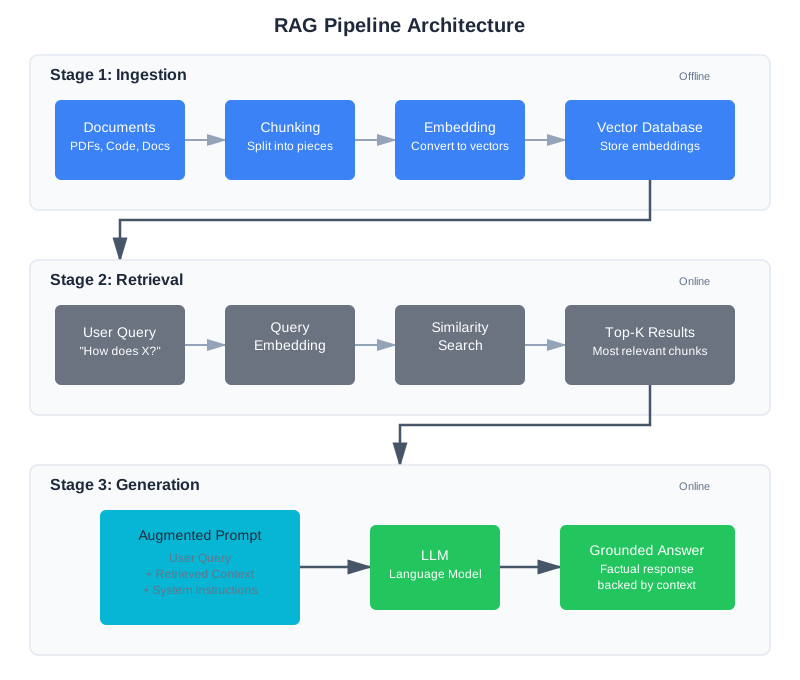
Stage 1: Ingestion
Before you can retrieve anything, you need to prepare your data.
Chunking: Your documents are too long to store as single units. You split them into chunks—pieces small enough to embed and retrieve meaningfully. This is the most consequential decision in RAG, and we’ll spend significant time on it below.
Embedding: Each chunk is converted into a vector—a list of numbers that captures its semantic meaning. Similar chunks have similar vectors.
Storage: Vectors go into a vector database optimized for similarity search. Metadata (source file, line numbers, section headers) goes alongside them. The metadata you store alongside vectors is critical for debugging and user experience. At minimum, store the source file path, the chunk’s location within that file (line numbers or section header), and the chunk type (function, class, documentation). In production, also store the embedding model version and indexing timestamp — you’ll need both when diagnosing stale index issues or planning re-indexing after model upgrades.
Stage 2: Retrieval
When a user asks a question:
Query embedding: The question is converted to a vector using the same embedding model used during ingestion.
Similarity search: The vector database finds chunks whose vectors are closest to the query vector.
Ranking: Results are sorted by similarity. The top-K most relevant chunks are returned.
Stage 3: Generation
The retrieved chunks are injected into the prompt:
System: You are a helpful coding assistant. Answer based only
on the retrieved context below. If the answer isn't in the
context, say so.

Context from codebase:
[Retrieved chunk 1]
[Retrieved chunk 2]
[Retrieved chunk 3]

User question: How does authentication work in this codebase?
The model generates an answer grounded in the retrieved context—not from its training data.
Where you place retrieved context matters. Research by Liu et al. (“Lost in the Middle,” TACL 2024, arXiv:2307.03172) found that language models exhibit a U-shaped performance pattern: they use information best when it appears at the beginning or end of the context, and performance degrades by over 30% when relevant information is buried in the middle. For RAG, this means you should place your most relevant retrieved chunks first, less relevant ones in the middle, and moderately relevant ones at the end—exploiting both primacy and recency effects.
Why RAG Beats the Alternatives
You have three options for getting custom knowledge into an LLM:
Fine-tuning: Retrain the model on your data. Expensive, slow, requires ML expertise, and the model still might not recall specific details reliably. Best for learning patterns and style, not for factual recall.
Long context: Dump everything into the context window. Works for small datasets, but costs scale linearly, quality degrades with length (context rot from Chapter 2), and you’re paying to process irrelevant content on every query.
RAG: Retrieve only what’s relevant. Cost-effective, dynamically updatable, and the model sees exactly what it needs. You can update your knowledge base without retraining, swap LLM providers without re-indexing, and debug retrieval independently of generation.
For most applications—including codebase search—RAG wins. As of early 2026, RAG powers an estimated 60% of production AI applications, from customer support chatbots to internal knowledge bases.
When NOT to Use RAG
Before investing in a RAG pipeline, consider whether you actually need one. RAG adds complexity, and sometimes simpler approaches work better.
Skip RAG if your context fits in the window. If your entire knowledge base is under 50,000 tokens, just put it all in the context. You’ll get better results (no retrieval errors) at comparable cost. This is common for small codebases, single-document analysis, and focused Q&A over limited content. The break-even point depends on query volume — if you’re making thousands of queries per day, RAG saves money even for small datasets. For occasional use, long context is simpler.
Skip RAG if you need learned patterns, not factual recall. If you want the model to adopt a writing style, follow specific formatting rules, or exhibit behavioral patterns, fine-tuning is more appropriate. RAG is for “what does this code do?” — fine-tuning is for “write code in our team’s style.”
Use RAG when knowledge changes frequently. If your documents, code, or data updates weekly or more often, RAG beats fine-tuning hands down. Re-indexing documents takes minutes; re-training a model takes hours or days.
Use RAG when you need source attribution. RAG naturally supports “here’s where this answer came from” because you have the source metadata. Fine-tuning and long-context approaches make attribution much harder.
The Compounding Error Problem
The most important thing to understand about RAG is that it’s not one system—it’s a pipeline of systems, and errors at each stage multiply.
Here’s the math. Suppose each of the four pipeline stages (chunking, embedding, retrieval, generation) operates at 95% accuracy—pretty good by any individual standard. The overall system reliability is 0.95 × 0.95 × 0.95 × 0.95 = 0.815. Nearly one in five queries will produce a bad result.
Now consider what happens when one stage drops to 90%: 0.90 × 0.95 × 0.95 × 0.95 = 0.77. More than one in five queries fail.
This is why naive RAG prototypes work well in demos but fail in production. With a handful of test queries, you don’t notice the 20% failure rate. With thousands of real users asking unexpected questions, it becomes the defining characteristic of your system. Production teams processing 5M+ documents report that the primary challenge isn’t any single stage—it’s controlling the cascade.
The engineering response: test each stage independently. Verify your chunks contain the right content. Verify retrieval returns expected results. Verify the model uses what you gave it. Chapter 3’s systematic debugging mindset applies directly—but now you’re debugging a data pipeline, not just a prompt.
Why RAG Systems Fail in Production
Industry data from 2024-2025 paints a sobering picture. An estimated 90% of agentic RAG projects fail to reach production. This isn’t because the technology doesn’t work—it’s because teams underestimate the engineering required at each stage.
The dominant failure categories, drawn from analysis of hundreds of production deployments:
Chunking quality (most common). As noted above, chunking quality constrains retrieval accuracy more than embedding model choice. Teams spend weeks tuning embedding models while ignoring the fact that their chunks split key information across boundaries.
Stale indexes. Your knowledge base changes, but your embeddings don’t. A function gets refactored, but the old version stays in the index. Users get outdated information and stop trusting the system.
Irrelevant distractors. Semantic similarity is imprecise. A query about “Python decorators” might retrieve a blog post about “Christmas decorations” because the embeddings are close enough. False positive retrieval is particularly insidious because the model generates a confident answer from wrong context.
Context overload. Retrieving too many chunks exceeds the model’s effective attention span. Even within the context window, the model starts ignoring information (context rot from Chapter 2). The fix is usually reducing top_k and adding reranking rather than expanding the window.
Missing feedback loops. Teams deploy RAG without logging, then can’t diagnose failures because they have no data on which queries fail and why.
The trust erosion problem compounds everything: production experience shows that users who decide a system can’t be trusted rarely check back to see if it improved. User trust, once lost, is nearly impossible to recover. This means you need to get retrieval quality right before you scale—not after.
Chunking: The Highest-Leverage Decision
Chunking determines what your retrieval system can find. Get it wrong, and no amount of fancy embedding models or reranking will save you.
Production data backs this up: analysis of production RAG failures found that roughly 80% trace back to chunking decisions, not to embedding quality or retrieval algorithms. Chunking quality constrains everything downstream.
The Chunking Trade-off
Small chunks are precise but lose context. Large chunks preserve context but dilute relevance.
Consider this function:
def calculate_discount(user, cart):
    """
    Calculate discount based on user tier and cart value.

    Discount tiers:
    - Bronze: 5% off orders over $100
    - Silver: 10% off orders over $50
    - Gold: 15% off all orders
    - Platinum: 20% off all orders + free shipping
    """
    if user.tier == "platinum":
        cart.shipping = 0
        return cart.total * 0.20
    elif user.tier == "gold":
        return cart.total * 0.15
    # ... more logic
If you chunk too small (sentence-level), someone searching “how do platinum users get discounts” might retrieve only “Platinum: 20% off all orders + free shipping” without the function that implements it.
If you chunk too large (file-level), someone searching the same thing retrieves the entire 500-line file, burying the relevant function in noise.
Chunking Strategies
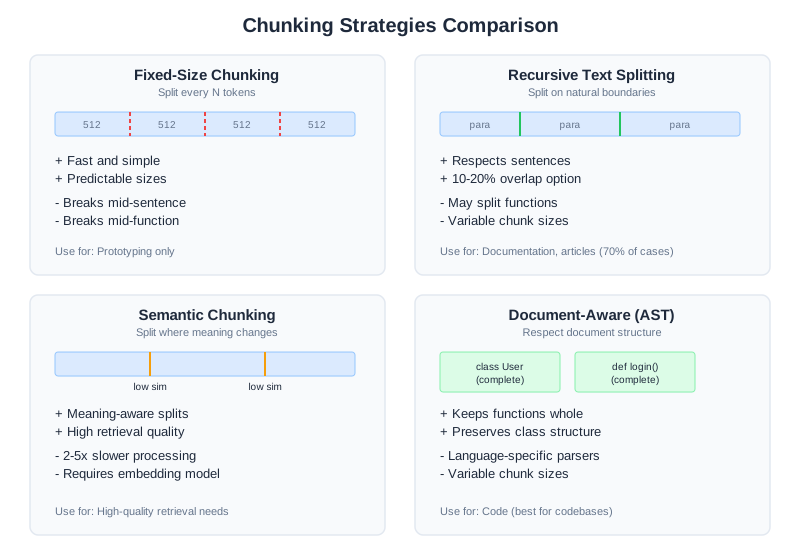
Greg Kamradt’s “Five Levels of Text Splitting” framework provides a useful progression from simple to sophisticated:
Level 1 — Fixed-size chunking: Split every N characters or tokens. Fast and simple, but breaks mid-sentence and mid-function. Only use for prototyping.
# Don't use this in production
chunks = [text[i:i+512] for i in range(0, len(text), 512)]
Level 2 — Recursive text splitting: Split on natural boundaries (paragraphs, then sentences, then words). The default in most frameworks. Good enough for many use cases.
from langchain.text_splitter import RecursiveCharacterTextSplitter

splitter = RecursiveCharacterTextSplitter(
    chunk_size=512,
    chunk_overlap=50,  # 10% overlap prevents boundary losses
    separators=["\n\n", "\n", " ", ""]
)
chunks = splitter.split_text(document)
Level 3 — Semantic chunking: Split where meaning changes. Embed each sentence, then create boundaries where consecutive sentences are dissimilar—typically using a threshold like the 95th percentile of cosine distances between adjacent sentences. Better quality when it works, but significantly slower (often 2-10x the processing cost).
Level 4 — Agentic chunking: Use an LLM to decide chunk boundaries based on content understanding. Highest quality, highest cost. Rarely worth it in practice.
Level 5 — Document-aware chunking: Respect document structure—keep functions whole, preserve markdown headers, don’t break code blocks. Best for structured content like code.
What the Research Actually Shows
Here’s a finding that surprises many practitioners: research on semantic chunking (arXiv:2410.13070, “Is Semantic Chunking Worth the Computational Cost?”) found that on natural (non-artificially constructed) datasets, fixed-size chunking with recursive splitting consistently performed comparably to semantic chunking. Semantic chunking achieved 91.9% recall versus recursive splitting’s 88-89.5%—a 2-3% improvement at substantially higher processing cost.
The lesson isn’t “don’t use semantic chunking.” It’s that the gap between a good recursive splitter and a semantic splitter is much smaller than the gap between bad chunking and good chunking. Start with recursive splitting at 256-512 tokens, measure your retrieval quality, and only invest in semantic chunking if you have evidence it helps your specific data.
Level 3: Semantic Chunking Implementation
Semantic chunking identifies natural topic boundaries by detecting where sentence meaning shifts. The approach uses embedding similarity: consecutive sentences that are very similar stay together; where similarity drops sharply, a chunk boundary occurs.
How Semantic Chunking Works
The algorithm is straightforward:
- Split text into sentences
- Embed each sentence using an embedding model
- Calculate cosine similarity between consecutive sentences
- Find a threshold (typically the 95th percentile of all similarity scores)
- Create chunk boundaries wherever similarity drops below the threshold
- Add context window: include neighboring sentences to avoid chunk truncation
Implementation
def semantic_chunk(text: str, embedding_model, threshold_percentile: float = 95,
                   context_window: int = 2) -> list:
    """Chunk text by detecting topic changes via embedding similarity.

    Args:
        text: The text to chunk
        embedding_model: SentenceTransformer model for embeddings
        threshold_percentile: Percentile of similarity scores to use as boundary threshold
        context_window: Include this many surrounding sentences for context

    Returns:
        List of chunks with metadata
    """
    from sentence_transformers import util
    import numpy as np

    # Step 1: Split into sentences
    sentences = text.split('. ')
    sentences = [s.strip() + '.' if not s.endswith('.') else s.strip()
                 for s in sentences if s.strip()]

    if len(sentences) < 3:
        # Too small to meaningfully chunk
        return [{"content": text, "sentences": len(sentences)}]

    # Step 2: Embed all sentences
    embeddings = embedding_model.encode(sentences, convert_to_tensor=True)

    # Step 3: Calculate similarities between consecutive sentences
    similarities = []
    for i in range(len(embeddings) - 1):
        similarity = util.pytorch_cos_sim(embeddings[i], embeddings[i + 1]).item()
        similarities.append(similarity)

    # Step 4: Find threshold
    threshold = np.percentile(similarities, threshold_percentile)

    # Step 5: Identify boundaries where similarity drops below threshold
    boundaries = [0]  # Always start a chunk at the beginning
    for i, similarity in enumerate(similarities):
        if similarity < threshold:
            boundaries.append(i + 1)  # Boundary after sentence i
    boundaries.append(len(sentences))  # Always end with the final sentence

    # Step 6: Create chunks with context window
    chunks = []
    for i in range(len(boundaries) - 1):
        start_idx = boundaries[i]
        end_idx = boundaries[i + 1]

        # Add context: include surrounding sentences for smoother transitions
        context_start = max(0, start_idx - context_window)
        context_end = min(len(sentences), end_idx + context_window)

        chunk_sentences = sentences[context_start:context_end]
        chunk_text = ' '.join(chunk_sentences)

        chunks.append({
            "content": chunk_text,
            "start_sentence": context_start,
            "end_sentence": context_end,
            "sentences": len(chunk_sentences),
            "has_context": context_start < start_idx or context_end > end_idx,
        })

    return chunks

# Example usage
from sentence_transformers import SentenceTransformer

model = SentenceTransformer('all-MiniLM-L6-v2')

text = """
Authentication is the process of verifying user identity.
The system uses JWT tokens for stateless authentication.
Tokens expire after one hour of inactivity.

Database design requires careful planning.
PostgreSQL provides strong consistency guarantees.
Replication ensures high availability.
"""

chunks = semantic_chunk(text, model, threshold_percentile=85)
print(f"Created {len(chunks)} semantic chunks")
for i, chunk in enumerate(chunks):
    print(f"Chunk {i}: {len(chunk['sentences'])} sentences")
    print(f"  {chunk['content'][:80]}...")
Tuning Semantic Chunking
The threshold percentile is your tuning knob:
- Lower percentile (50th): More aggressive splitting, smaller chunks, more boundaries detected
- 95th percentile: Fewer but larger chunks, only splits on major topic shifts
- 99th percentile: Very conservative, almost never splits
For code documentation, the 85th-90th percentile works well. For narrative text, try 90th-95th. Start at 90 and adjust based on your evaluation metrics.
Sliding Window Optimization
For very long documents, computing embeddings for every sentence is expensive. Use a sliding window:
def semantic_chunk_sliding_window(text: str, embedding_model,
                                  window_size: int = 50,
                                  threshold_percentile: float = 90) -> list:
    """Semantic chunking optimized for long documents using sliding window."""

    sentences = text.split('. ')
    sentences = [s.strip() + '.' if not s.endswith('.') else s.strip()
                 for s in sentences if s.strip()]

    chunks = []
    i = 0

    while i < len(sentences):
        # Process a window of sentences
        window_end = min(i + window_size, len(sentences))
        window = sentences[i:window_end]

        # Find boundaries within this window
        if len(window) > 1:
            embeddings = embedding_model.encode(window, convert_to_tensor=True)

            # Calculate similarities
            similarities = []
            for j in range(len(embeddings) - 1):
                from sentence_transformers import util
                sim = util.pytorch_cos_sim(embeddings[j], embeddings[j + 1]).item()
                similarities.append(sim)

            # Find strong boundary in window (biggest similarity drop)
            if similarities:
                import numpy as np
                threshold = np.percentile(similarities, threshold_percentile)
                boundary_indices = [j for j, sim in enumerate(similarities) if sim < threshold]

                if boundary_indices:
                    # Use first strong boundary in window
                    split_point = i + boundary_indices[0] + 1
                else:
                    # No strong boundary, use window end
                    split_point = window_end
            else:
                split_point = window_end
        else:
            split_point = window_end

        # Create chunk
        chunk_text = ' '.join(sentences[i:split_point])
        chunks.append({
            "content": chunk_text,
            "sentences": len(sentences[i:split_point])
        })

        i = split_point

    return chunks
Trade-offs of Semantic Chunking
Pros:
- Respects natural topic boundaries
- Fewer artificial breaks in the middle of explanations
- Good for long documents with multiple topics
Cons:
- 2-10x slower than recursive splitting (requires embedding computation)
- Embedding model quality affects results
- Threshold tuning required per domain
When to use: Use semantic chunking for long-form documentation (READMEs, tutorials), narrative text, or when your evaluation metrics show recursive splitting misses important boundaries. The 2-3% recall improvement might not be worth the latency cost for most real-time applications.
Level 4: Agentic Chunking Implementation
Agentic chunking uses an LLM to understand document structure and identify logical chunk boundaries. Rather than using embeddings or syntax rules, you ask the model “where should I split this document?”
How Agentic Chunking Works
The approach is straightforward but expensive:
- Divide the document into sections (roughly 1000-2000 tokens each)
- For each section, ask an LLM: “What are the logical document boundaries within this section?”
- The LLM identifies where topics naturally break
- Create chunks at those boundaries
Implementation
def agentic_chunk(text: str, llm_client, section_size: int = 1500,
                  overlap: int = 100) -> list:
    """Chunk text by asking an LLM to identify logical boundaries.

    Args:
        text: The text to chunk
        llm_client: LLM client (e.g., Anthropic client)
        section_size: Rough size of sections to analyze (tokens)
        overlap: Overlap between analyzed sections to catch boundaries

    Returns:
        List of chunks identified by the LLM
    """
    # Step 1: Split into analysis sections
    # (rough token estimate: ~4 chars per token)
    section_char_size = section_size * 4
    sections = []
    i = 0

    while i < len(text):
        section_start = i
        section_end = min(i + section_char_size, len(text))

        # Extend section to end at a sentence boundary
        if section_end < len(text):
            last_period = text.rfind('.', section_start, section_end)
            if last_period > section_start:
                section_end = last_period + 1

        section = text[section_start:section_end]
        sections.append(section)

        # Move forward, with overlap to catch boundaries
        i = section_end - (overlap * 4)

    # Step 2: Ask LLM to identify boundaries in each section
    all_boundaries = []

    for section_idx, section in enumerate(sections):
        prompt = _make_chunking_prompt(section, section_idx)

        response = llm_client.messages.create(
            model="claude-opus-4-6",
            max_tokens=500,
            messages=[{"role": "user", "content": prompt}]
        )

        # Parse boundaries from response
        boundaries = _parse_boundaries_from_response(response.content[0].text, section)
        all_boundaries.extend(boundaries)

    # Step 3: Deduplicate and sort boundaries
    unique_boundaries = sorted(set(all_boundaries))

    # Step 4: Create chunks at identified boundaries
    chunks = []
    chunk_start = 0

    for boundary in unique_boundaries:
        if boundary > chunk_start and boundary < len(text):
            chunk_text = text[chunk_start:boundary].strip()
            if len(chunk_text) > 100:  # Skip tiny chunks
                chunks.append({
                    "content": chunk_text,
                    "boundary_detected_by_llm": True
                })
            chunk_start = boundary

    # Final chunk
    if chunk_start < len(text):
        final_chunk = text[chunk_start:].strip()
        if len(final_chunk) > 100:
            chunks.append({
                "content": final_chunk,
                "boundary_detected_by_llm": True
            })

    return chunks


def _make_chunking_prompt(section: str, section_idx: int) -> str:
    """Create prompt asking LLM to identify chunk boundaries."""
    return f"""Analyze this document section and identify logical chunk boundaries.

Your task: Find places where one topic ends and another begins. These become chunk boundaries.

Return ONLY a JSON list of character positions where chunks should split. Example:
{{"boundaries": [245, 512, 890]}}

Each boundary position is where a new chunk should START (after the previous one ends).

Guidelines:
- Identify transitions between major topics
- Keep related content together (e.g., function + docstring, title + paragraph)
- Avoid splitting in the middle of explanations or code blocks
- Boundaries should fall at natural breaks (end of paragraphs, between sections)

Document section:
---
{section[:2000]}  # Show only first 2000 chars to stay within token limits
---

Return JSON with boundaries list only, no other text."""


def _parse_boundaries_from_response(response_text: str, section: str) -> list:
    """Extract boundary positions from LLM response."""
    import json
    import re

    # Extract JSON from response
    json_match = re.search(r'\\{.*?"boundaries".*?\\}', response_text, re.DOTALL)
    if not json_match:
        return []

    try:
        parsed = json.loads(json_match.group())
        boundaries = parsed.get("boundaries", [])
        return [int(b) for b in boundaries if isinstance(b, (int, float))]
    except (json.JSONDecodeError, ValueError, KeyError):
        return []
Agentic Chunking with Streaming for Large Documents
For very long documents, process sections in parallel:
def agentic_chunk_parallel(text: str, llm_client, num_workers: int = 3) -> list:
    """Agentic chunking with parallel processing for large documents."""
    import concurrent.futures

    # Split into analysis sections
    section_size = 2000 * 4  # chars
    sections = []
    i = 0

    while i < len(text):
        section_end = min(i + section_size, len(text))
        # Extend to sentence boundary
        if section_end < len(text):
            last_period = text.rfind('.', i, section_end)
            if last_period > i:
                section_end = last_period + 1

        sections.append(text[i:section_end])
        i = section_end

    # Process sections in parallel
    all_boundaries = []

    with concurrent.futures.ThreadPoolExecutor(max_workers=num_workers) as executor:
        futures = [
            executor.submit(_get_boundaries_for_section, llm_client, section, idx)
            for idx, section in enumerate(sections)
        ]

        for future in concurrent.futures.as_completed(futures):
            boundaries = future.result()
            all_boundaries.extend(boundaries)

    # Deduplicate and create chunks
    unique_boundaries = sorted(set(all_boundaries))
    chunks = []
    chunk_start = 0

    for boundary in unique_boundaries:
        if boundary > chunk_start:
            chunk_text = text[chunk_start:boundary].strip()
            if len(chunk_text) > 100:
                chunks.append({"content": chunk_text})
            chunk_start = boundary

    return chunks


def _get_boundaries_for_section(llm_client, section: str, idx: int) -> list:
    """Get boundaries for a single section."""
    prompt = _make_chunking_prompt(section, idx)
    response = llm_client.messages.create(
        model="claude-opus-4-6",
        max_tokens=500,
        messages=[{"role": "user", "content": prompt}]
    )
    return _parse_boundaries_from_response(response.content[0].text, section)
Trade-offs of Agentic Chunking
Pros:
- Best quality: understands actual document meaning and intent
- Works for any document type with context
- Can incorporate domain-specific chunking rules
Cons:
- Very expensive: 1-2 API calls per document section
- Slow: can take minutes for long documents
- Inconsistent: LLM responses can vary between runs
Cost analysis (as of early 2026):
- Semantic chunking: ~0.5-2 seconds per 10K tokens
- Agentic chunking: ~20-40 seconds per 10K tokens (API latency)
- Cost: $0.001-0.01 per document depending on size
When to use: Agentic chunking is worth the cost only for:
- High-value documents where retrieval quality is critical (critical system documentation, legal contracts, medical records)
- Documents that are chunked once and queried many times (the per-query cost is amortized)
- One-time batch processing where latency doesn’t matter
For real-time RAG systems or documents chunked once and queried infrequently, semantic or recursive chunking is better. The 5-10% quality improvement rarely justifies the latency and cost in production.
Chunking for Code
Code has structure that text chunkers destroy. A function split in half is useless. A class without its methods is confusing.
For codebases, chunk by semantic unit using AST (Abstract Syntax Tree) parsing:
def chunk_python_file(content: str, filename: str) -> list:
    """Chunk Python file by functions and classes."""
    import ast

    chunks = []
    tree = ast.parse(content)
    lines = content.split('\n')

    for node in ast.walk(tree):
        if isinstance(node, (ast.FunctionDef, ast.AsyncFunctionDef, ast.ClassDef)):
            # Extract the complete definition
            start_line = node.lineno - 1
            end_line = node.end_lineno
            chunk_content = '\n'.join(lines[start_line:end_line])

            # Add context: filename and type
            chunk = {
                "content": chunk_content,
                "metadata": {
                    "source": filename,
                    "type": type(node).__name__,
                    "name": node.name,
                    "start_line": node.lineno,
                    "end_line": node.end_lineno,
                }
            }
            chunks.append(chunk)

    return chunks
This preserves complete functions and classes. When someone asks about calculate_discount, they get the whole function—not a fragment.
The Chunking Decision Framework
| Content Type | Recommended Strategy | Chunk Size | Overlap |
|---|---|---|---|
| Code | AST-based (functions/classes) | Variable (whole units) | None needed |
| Documentation | Document-aware (headers) | 256-512 tokens | 10-20% |
| Chat logs | Message-based | Per message | Include parent |
| Long articles | Recursive or semantic | 512-1024 tokens | 10-20% |
| Q&A pairs | Keep pairs together | Per pair | None |
Testing Your Chunking
Before building the full pipeline, test chunking in isolation:
def test_chunking_quality(chunks: list, test_queries: list):
    """Verify chunks contain expected information."""

    for query, expected_content in test_queries:
        # Check if any chunk contains the expected answer
        found = False
        for chunk in chunks:
            if expected_content.lower() in chunk["content"].lower():
                found = True
                print(f"✓ Query '{query}' → Found in chunk from {chunk['metadata']['source']}")
                break

        if not found:
            print(f"✗ Query '{query}' → Expected content not in any chunk!")
            print(f"  Looking for: {expected_content[:100]}...")

# Test with known queries
test_queries = [
    ("platinum discount", "cart.total * 0.20"),
    ("free shipping", "cart.shipping = 0"),
]
test_chunking_quality(chunks, test_queries)
If expected content isn’t in any chunk, your chunking is wrong—and retrieval will fail regardless of everything else. This is why “don’t trust the pipeline” starts here.
Embeddings and Vector Search
Embeddings convert text to vectors. Similar text produces similar vectors. This enables semantic search—finding content by meaning, not just keywords.
Understanding Embeddings: The Intuition
Imagine giving every sentence a location on a map. Not a real geographic map—a meaning map with hundreds of dimensions. Sentences about Python error handling cluster near each other, while sentences about database design cluster somewhere else. When a user asks “how do I fix this TypeError?”, the embedding of that question lands near the cluster of sentences about Python errors, and the retrieval system finds the closest neighbors.
Here’s a more precise analogy. Picture two people standing in a field, each pointing at a star. If they both point at the same star, their arms are perfectly aligned—that’s a cosine similarity of 1. If they point at stars in completely opposite directions, that’s -1. Everything in between is a measure of how similar their directions are. Embeddings work the same way: each piece of text becomes a direction in high-dimensional space, and similar meanings point in similar directions.
You don’t need to understand the mathematics to use embeddings effectively. The key mental model is: similar meaning = similar direction = close neighbors on the map.
Here’s a concrete example to make this tangible. Real embeddings have hundreds of dimensions, but the principle works with just a few numbers:
from sentence_transformers import SentenceTransformer
from sklearn.metrics.pairwise import cosine_similarity

model = SentenceTransformer('all-MiniLM-L6-v2')

# Embed three code-related sentences
sentences = [
    "def authenticate_user(username, password):",
    "Verify user credentials and return a session token",
    "Calculate the total price including tax and shipping",
]

vectors = model.encode(sentences)

# Compare similarities
sim_auth_verify = cosine_similarity([vectors[0]], [vectors[1]])[0][0]
sim_auth_price = cosine_similarity([vectors[0]], [vectors[2]])[0][0]

print(f"'authenticate' vs 'verify credentials': {sim_auth_verify:.3f}")
# Output: 'authenticate' vs 'verify credentials': 0.612

print(f"'authenticate' vs 'calculate price':    {sim_auth_price:.3f}")
# Output: 'authenticate' vs 'calculate price':    0.128
The authentication function and the credential verification sentence have a high similarity (0.612) — they point in similar directions. The authentication function and the pricing function are nearly unrelated (0.128) — they point in very different directions. This is exactly the behavior that makes semantic search work: when someone asks “how do I verify a user?”, the retrieval system finds authentication-related chunks, not pricing logic.
The famous Word2Vec result illustrates this even more dramatically: king - man + woman ≈ queen. Embeddings capture relationships so precisely that you can do arithmetic on concepts. While you won’t do vector arithmetic in a RAG system, this property explains why semantic search works: meanings that are related in the real world are related in the vector space.
Choosing an Embedding Model
You need to make a practical choice, not an academic one.
For getting started: Use all-MiniLM-L6-v2 (free, fast, 384 dimensions) to learn and prototype. It runs locally with no API costs and produces good-enough quality for understanding how RAG works.
For production: The MTEB (Massive Text Embedding Benchmark) leaderboard tracks model performance across dozens of tasks. As of early 2026, the top performers include Google’s Gemini Embedding, Alibaba’s Qwen3-Embedding (open-source under Apache 2.0), and OpenAI’s text-embedding-3-large. The practical differences between top-tier models are small compared to the impact of chunking strategy.
Key factors:
- Dimensions: 384-768 is the sweet spot. Higher dimensions (1024+) offer marginal quality gains at significant speed and storage cost.
- Speed: Matters if you’re embedding at query time. Less critical for batch ingestion.
- Cost: Self-hosted models are free after setup. API models charge per token—typically $0.01-0.10 per million tokens (as of early 2026).
- Task fit: General-purpose models work surprisingly well for code. Code-specific models exist but rarely justify the added complexity.
from sentence_transformers import SentenceTransformer

# Good default: fast, free, 384 dimensions
model = SentenceTransformer('all-MiniLM-L6-v2')

# Embed a chunk
vector = model.encode("def calculate_discount(user, cart):")
# Returns: array of 384 floats
See Appendix A for a detailed comparison of embedding models and vector databases, including the current MTEB leaderboard, pricing data, and decision frameworks for choosing between them.
Vector Databases
Vectors need a home. Vector databases are optimized for similarity search—finding the nearest neighbors to a query vector efficiently, even when you have millions of vectors.
For learning and prototyping: Use Chroma. It’s free, runs locally, requires no infrastructure setup, and is perfect for understanding how RAG works. All the examples in this chapter use Chroma.
For production: Evaluate based on your scale requirements and deployment preferences. Pinecone offers a fully managed experience with low-latency queries. Qdrant (written in Rust) and Milvus provide high-performance open-source options. If you already run PostgreSQL, pgvector lets you add vector search without a new database.
See Appendix A for a detailed comparison including pricing, scale characteristics, and selection criteria.
import chromadb

# Create a local database
client = chromadb.Client()
collection = client.create_collection("codebase")

# Add chunks with embeddings
collection.add(
    documents=[chunk["content"] for chunk in chunks],
    metadatas=[chunk["metadata"] for chunk in chunks],
    ids=[f"chunk_{i}" for i in range(len(chunks))]
)

# Query
results = collection.query(
    query_texts=["how does authentication work"],
    n_results=5
)
The Embedding Gotcha
Use the same model for ingestion and query. If you embed documents with model A and queries with model B, similarity scores are meaningless. The vectors live in different spaces.
This sounds obvious but causes real bugs:
- You upgrade your embedding model and forget to re-index
- Your query service uses a different model version than your indexing pipeline
- A colleague experiments with a new model and commits the change
Always version your embedding model alongside your index. When you change models, you must re-embed everything.
A practical approach: store the embedding model name as metadata on the collection itself. When your application starts, check that the stored model name matches the model you’re about to use for queries. If they don’t match, refuse to serve results and trigger a re-indexing job. This defensive check prevents the subtle, hard-to-diagnose bugs that come from mismatched embedding spaces.
# Defensive check at startup
collection = client.get_collection("codebase")
stored_model = collection.metadata.get("embedding_model", "unknown")
current_model = "all-MiniLM-L6-v2"

if stored_model != current_model:
    raise RuntimeError(
        f"Index was built with '{stored_model}' but current model is "
        f"'{current_model}'. Re-index required before serving queries."
    )
This is the same principle behind database migration checks in traditional software — verify that your schema matches your code before accepting queries.
Hybrid Search: Dense + Sparse
Pure vector search has a weakness: it finds semantically similar content but can miss exact keyword matches.
Consider a query for “AuthenticationError”. Vector search might return chunks about login failures, access denied, and credential validation—semantically related, but none containing the actual AuthenticationError class definition.
Sparse search (keyword-based, like BM25) finds exact matches but misses semantic connections. It would find AuthenticationError but not “login failures” unless those exact words appear.
Hybrid search combines both. Run dense (vector) and sparse (keyword) searches in parallel, then merge results using Reciprocal Rank Fusion (RRF).
Reciprocal Rank Fusion: A Worked Example
RRF was introduced by Cormack, Clarke, and Büttcher at SIGIR 2009. The key insight: rather than trying to normalize incompatible scoring scales (vector distances vs BM25 scores), RRF converts everything to ranks and rewards consensus.
The formula is simple. For each document, sum its reciprocal rank across all search methods:
score(document) = Σ 1 / (k + rank_i)
Where k is a smoothing constant (default 60) and rank_i is the document’s position in search method i (1-indexed).
Let’s trace through a concrete example. Suppose a user searches for “AuthenticationError handling” and we run two retrievers:
BM25 (keyword) results:
auth_errors.py— contains “AuthenticationError” classmiddleware.py— contains “authentication” and “error” keywordslogin.py— contains “auth” keyword
Dense (vector) results:
error_handler.py— semantically about error handlingauth_errors.py— semantically about authentication errorssecurity.py— semantically about auth security
RRF fusion (k=60):
| Document | BM25 Rank | Dense Rank | RRF Score |
|---|---|---|---|
auth_errors.py | 1 | 2 | 1/61 + 1/62 = 0.03252 |
error_handler.py | — | 1 | 1/61 = 0.01639 |
middleware.py | 2 | — | 1/62 = 0.01613 |
security.py | — | 3 | 1/63 = 0.01587 |
login.py | 3 | — | 1/63 = 0.01587 |
Final ranking: auth_errors.py wins decisively—not because it was #1 in either search, but because it appeared in both. RRF rewards consensus between different retrieval methods. This is exactly the behavior you want: a document that’s relevant both semantically and by keyword match is more likely to be what the user needs.
def hybrid_search(query: str, collection, bm25_index, top_k: int = 10):
    """Combine vector and keyword search with Reciprocal Rank Fusion."""

    # Dense search (semantic)
    dense_results = collection.query(
        query_texts=[query],
        n_results=top_k * 2  # Retrieve more, then merge
    )

    # Sparse search (keyword)
    sparse_results = bm25_index.search(query, top_k=top_k * 2)

    # Merge with Reciprocal Rank Fusion (RRF)
    scores = {}
    k = 60  # RRF constant — see sidebar

    for rank, doc_id in enumerate(dense_results["ids"][0]):
        scores[doc_id] = scores.get(doc_id, 0) + 1 / (k + rank + 1)

    for rank, doc_id in enumerate(sparse_results):
        scores[doc_id] = scores.get(doc_id, 0) + 1 / (k + rank + 1)

    # Sort by combined score
    merged = sorted(scores.items(), key=lambda x: x[1], reverse=True)
    return [doc_id for doc_id, score in merged[:top_k]]
Impact: Benchmarks from Microsoft Azure AI Search show hybrid retrieval with RRF achieving NDCG scores of 0.85, compared to 0.72 for dense-only and 0.65 for sparse-only search. For codebases with lots of specific identifiers (class names, function names, error codes), the improvement can be even larger because keyword search catches exact matches that vector search misses.
The k parameter: The default of 60 works well across diverse scenarios. Lower values (20-40) let top-ranked results dominate, which helps when you trust one ranker more than the other. Higher values (80-100) reward consensus more heavily. In practice, tuning k rarely matters as much as improving chunking or adding reranking (Chapter 7).
Going further: This implementation covers the core pattern. Chapter 7 builds on hybrid retrieval with code-aware tokenization, BM25 tuning for technical domains, and weighted dense/sparse balancing for production systems.
Measuring RAG Quality
How do you know if your RAG system is actually working? You need metrics that measure each stage of the pipeline independently.
The RAGAS (Retrieval-Augmented Generation Assessment) framework defines four metrics that together cover the full pipeline:
Context Precision — Of the chunks you retrieved, how many were actually relevant? This is your retrieval signal-to-noise ratio. Low precision means you’re drowning the model in irrelevant context.
Context Recall — Of all the relevant chunks in your index, how many did you find? Low recall means you’re missing important information.
Faithfulness — Does the generated answer stick to the retrieved context? Measured as (claims supported by context) / (total claims in response). Low faithfulness means the model is hallucinating despite having the right context.
Answer Relevance — Does the answer actually address the user’s question? You can have perfect retrieval and faithful generation but still miss what the user was asking.
The first two metrics measure retrieval quality. The last two measure generation quality. When your RAG system produces bad answers, these metrics tell you where in the pipeline to look: if context recall is low, fix your retrieval; if faithfulness is low, fix your prompt engineering.
Building an Evaluation Dataset
You don’t need to implement RAGAS from scratch—the ragas Python library provides automated evaluation. But you do need to build an evaluation dataset: a set of questions with known answers and the source documents those answers come from.
Start with 20-30 hand-curated examples that cover your most important query types. For a codebase RAG system, this might look like:
eval_dataset = [
    {
        "question": "How does the rate limiter work?",
        "expected_answer": "The RateLimiter class uses a sliding window...",
        "expected_source": "rate_limiter.py",
        "expected_function": "RateLimiter.check_rate_limit",
        "query_type": "implementation_detail",
    },
    {
        "question": "What happens when authentication fails?",
        "expected_answer": "AuthenticationError is raised with...",
        "expected_source": "auth_service.py",
        "expected_function": "authenticate_user",
        "query_type": "error_handling",
    },
    {
        "question": "How are database connections managed?",
        "expected_answer": "Connection pooling via SQLAlchemy...",
        "expected_source": "database.py",
        "expected_function": "get_db_session",
        "query_type": "architecture",
    },
]
For each evaluation example, you can measure retrieval quality independently of generation quality:
def evaluate_retrieval(rag_system, eval_dataset):
    """Measure retrieval quality across evaluation dataset."""

    results = {"hits": 0, "misses": 0, "avg_rank": []}

    for example in eval_dataset:
        retrieved = rag_system.retrieve(example["question"], top_k=5)
        sources = [r["source"] for r in retrieved]
        names = [r["name"] for r in retrieved]

        # Did we retrieve the expected source?
        if example["expected_source"] in " ".join(sources):
            results["hits"] += 1
            # At what rank?
            for i, source in enumerate(sources):
                if example["expected_source"] in source:
                    results["avg_rank"].append(i + 1)
                    break
        else:
            results["misses"] += 1
            print(f"MISS: '{example['question']}' — expected {example['expected_source']}")
            print(f"  Got: {sources}")

    total = len(eval_dataset)
    hit_rate = results["hits"] / total
    avg_rank = sum(results["avg_rank"]) / len(results["avg_rank"]) if results["avg_rank"] else 0

    print(f"\nRetrieval Results:")
    print(f"  Hit rate: {hit_rate:.1%} ({results['hits']}/{total})")
    print(f"  Average rank of correct result: {avg_rank:.1f}")
    print(f"  Misses: {results['misses']}")

    return results
Targets to aim for: Hit rate above 80% means your retrieval is solid. Average rank below 2.0 means the right content is usually at the top. If you’re below these thresholds, focus on chunking and hybrid search before anything else.
The critical insight: measure retrieval separately from generation. A bad answer could mean bad retrieval (wrong chunks) or bad generation (right chunks, wrong interpretation). Without measuring both, you can’t tell which to fix. Chapter 12 covers evaluation methodology in depth, including how to build ground truth datasets and run automated evaluation pipelines.
CodebaseAI Evolution: Adding RAG
Previous versions of CodebaseAI required you to paste code manually. Now we build a proper codebase search system that retrieves relevant code automatically.
import chromadb
from sentence_transformers import SentenceTransformer
from pathlib import Path
import ast

class CodebaseRAG:
    """RAG-powered codebase search for CodebaseAI."""

    def __init__(self, codebase_path: str):
        self.codebase_path = Path(codebase_path)
        self.embedding_model = SentenceTransformer('all-MiniLM-L6-v2')
        self.client = chromadb.Client()
        self.collection = self.client.create_collection(
            name="codebase",
            metadata={"embedding_model": "all-MiniLM-L6-v2"}
        )
        self.indexed = False

    def index_codebase(self):
        """Index all Python files in the codebase."""
        chunks = []

        for py_file in self.codebase_path.rglob("*.py"):
            try:
                content = py_file.read_text()
                file_chunks = self._chunk_python_file(content, str(py_file))
                chunks.extend(file_chunks)
            except Exception as e:
                print(f"Warning: Could not process {py_file}: {e}")

        if not chunks:
            raise ValueError("No chunks created. Check your codebase path.")

        # Add to vector database
        self.collection.add(
            documents=[c["content"] for c in chunks],
            metadatas=[c["metadata"] for c in chunks],
            ids=[f"chunk_{i}" for i in range(len(chunks))]
        )

        self.indexed = True
        print(f"Indexed {len(chunks)} chunks from {self.codebase_path}")

        return {"chunks": len(chunks), "files": len(list(self.codebase_path.rglob("*.py")))}

    def _chunk_python_file(self, content: str, filename: str) -> list:
        """Extract functions and classes as chunks."""
        chunks = []

        try:
            tree = ast.parse(content)
            lines = content.split('\n')

            for node in ast.walk(tree):
                if isinstance(node, (ast.FunctionDef, ast.AsyncFunctionDef, ast.ClassDef)):
                    start = node.lineno - 1
                    end = node.end_lineno
                    chunk_content = '\n'.join(lines[start:end])

                    # Skip tiny chunks (one-liners without docstrings)
                    if len(chunk_content) < 50:
                        continue

                    chunks.append({
                        "content": chunk_content,
                        "metadata": {
                            "source": filename,
                            "type": type(node).__name__,
                            "name": node.name,
                            "lines": f"{node.lineno}-{node.end_lineno}",
                        }
                    })
        except SyntaxError:
            # Fall back to file-level chunk for non-parseable files
            chunks.append({
                "content": content[:2000],  # Truncate very long files
                "metadata": {
                    "source": filename,
                    "type": "file",
                    "name": filename,
                }
            })

        return chunks

    def retrieve(self, query: str, top_k: int = 5) -> list:
        """Retrieve relevant code chunks for a query."""
        if not self.indexed:
            raise RuntimeError("Codebase not indexed. Call index_codebase() first.")

        results = self.collection.query(
            query_texts=[query],
            n_results=top_k
        )

        # Format results with metadata
        retrieved = []
        for i, (doc, metadata) in enumerate(zip(
            results["documents"][0],
            results["metadatas"][0]
        )):
            retrieved.append({
                "content": doc,
                "source": metadata["source"],
                "type": metadata["type"],
                "name": metadata["name"],
                "rank": i + 1
            })

        return retrieved

    def format_context(self, retrieved: list) -> str:
        """Format retrieved chunks for LLM context.

        Places most relevant chunks first, following the
        'Lost in the Middle' research on position effects.
        """
        parts = ["=== Retrieved Code ===\n"]

        for chunk in retrieved:
            parts.append(f"--- {chunk['source']} ({chunk['type']}: {chunk['name']}) ---")
            parts.append(chunk["content"])
            parts.append("")

        return "\n".join(parts)


class RAGCodebaseAI:
    """CodebaseAI with RAG-powered retrieval."""

    VERSION = "0.5.0"
    PROMPT_VERSION = "v3.0.0"

    SYSTEM_PROMPT = """
[ROLE]
You are a senior software engineer helping developers understand and work with their codebase.
You have access to retrieved code snippets that are relevant to the user's question.

[CONTEXT]
- You can see code that was retrieved based on the user's query
- The retrieved code may not be complete—it's the most relevant snippets
- If the retrieved code doesn't answer the question, say so

[INSTRUCTIONS]
1. Read the retrieved code carefully before answering
2. Reference specific functions, classes, or lines when explaining
3. If the answer isn't in the retrieved code, say "Based on the retrieved code, I don't see..."
4. Suggest what other code might be relevant if the retrieval seems incomplete

[CONSTRAINTS]
- Only make claims you can support with the retrieved code
- Cite the source file when referencing specific code
- If uncertain, say so explicitly
"""

    def __init__(self, codebase_path: str, llm_client):
        self.rag = CodebaseRAG(codebase_path)
        self.llm = llm_client
        self.memory = TieredMemory()  # From Chapter 5

    def index(self):
        """Index the codebase. Call once before querying."""
        return self.rag.index_codebase()

    def ask(self, question: str) -> dict:
        """Ask a question about the codebase."""

        # Retrieve relevant code
        retrieved = self.rag.retrieve(question, top_k=5)
        context = self.rag.format_context(retrieved)

        # Add to conversation memory
        self.memory.add("user", question)

        # Build prompt
        conversation = self.memory.get_context()
        full_prompt = f"{conversation}\n\n{context}\n\nQuestion: {question}"

        # Generate response
        response = self.llm.messages.create(
            model="claude-sonnet-4-20250514",
            max_tokens=2000,
            system=self.SYSTEM_PROMPT,
            messages=[{"role": "user", "content": full_prompt}]
        )

        answer = response.content[0].text
        self.memory.add("assistant", answer)

        return {
            "answer": answer,
            "retrieved": retrieved,
            "retrieval_count": len(retrieved),
        }
What Changed
Before: You had to manually paste code into the conversation. The AI only knew what you explicitly showed it.
After: The system automatically retrieves relevant code based on your question. Ask “how does authentication work” and it finds the auth-related functions without you searching for them.
The RAG pipeline:
- On startup, index the codebase (extract functions/classes, embed, store)
- On each question, retrieve the top 5 most relevant chunks
- Inject retrieved code into the prompt, most relevant first
- Generate answer grounded in actual code
Limitations: This version uses pure vector search. Chapter 7 adds reranking for better result quality, and compression for handling larger codebases.
The Engineering Principle: Separation of Concerns
The RAG architecture embodies a fundamental software engineering principle: separation of concerns. Each stage has a single responsibility — chunking organizes data, embedding converts it, retrieval finds it, generation uses it. You can test, debug, and improve each stage independently.
This isn’t just architectural neatness. It’s what makes RAG systems debuggable. When the final answer is wrong, separation of concerns means you can trace the failure to a specific stage rather than staring at a monolithic black box. Compare this to an approach where you fine-tune a model to “just know” your codebase — when the answer is wrong, you have no idea why, and no clear path to fix it.
The pattern applies beyond AI: any complex system benefits from clear boundaries between components. In RAG, those boundaries are explicit data contracts: chunking produces chunks with metadata, embedding produces vectors, retrieval produces ranked results, generation produces answers. When you change one component (say, switching embedding models), you know exactly which downstream effects to test for. This is the same principle Chapter 3 introduced as “make failures legible” — applied to a data pipeline instead of a prompt.
Debugging: “My RAG Returns Irrelevant Results”
RAG debugging is pipeline debugging. When the final answer is wrong, the error could be in chunking, embedding, retrieval, or generation. You need to isolate which stage failed.
Step 1: Verify the Data Exists
First question: is the answer actually in your indexed data?
def verify_data_exists(collection, expected_content: str):
    """Check if expected content exists in the index."""

    # Get all documents (careful: expensive for large collections)
    all_docs = collection.get()

    for doc in all_docs["documents"]:
        if expected_content.lower() in doc.lower():
            print(f"✓ Found: {expected_content[:50]}...")
            return True

    print(f"✗ Not found: {expected_content[:50]}...")
    print("Check: Was this content chunked? Was the file indexed?")
    return False
If the content isn’t there, retrieval can’t find it. Check your chunking and indexing.
Step 2: Verify Retrieval
If the data exists, does retrieval find it?
def debug_retrieval(collection, query: str, expected_source: str):
    """Check if retrieval returns expected results."""

    results = collection.query(query_texts=[query], n_results=10)

    print(f"Query: {query}")
    print(f"Looking for content from: {expected_source}")
    print("\nTop 10 results:")

    found_expected = False
    for i, (doc, metadata) in enumerate(zip(
        results["documents"][0],
        results["metadatas"][0]
    )):
        source = metadata.get("source", "unknown")
        is_expected = expected_source in source
        marker = "→" if is_expected else " "

        print(f"{marker} {i+1}. {source}")
        print(f"     Preview: {doc[:100]}...")

        if is_expected:
            found_expected = True
            print(f"     ✓ Found expected content at rank {i+1}")

    if not found_expected:
        print(f"\n✗ Expected source '{expected_source}' not in top 10")
        print("Possible causes:")
        print("  - Query doesn't match content semantically")
        print("  - Embedding model mismatch")
        print("  - Better matches are drowning out the expected result")
Step 3: Check Semantic Similarity
Sometimes the query and content are too semantically distant for vector search to connect them.
def debug_similarity(model, query: str, expected_content: str):
    """Check semantic similarity between query and expected content."""
    from sklearn.metrics.pairwise import cosine_similarity

    query_vec = model.encode([query])
    content_vec = model.encode([expected_content])

    similarity = cosine_similarity(query_vec, content_vec)[0][0]

    print(f"Query: {query}")
    print(f"Content: {expected_content[:100]}...")
    print(f"Similarity: {similarity:.3f}")

    if similarity < 0.3:
        print("⚠ Very low similarity. Consider:")
        print("  - Query expansion (add synonyms)")
        print("  - Hybrid search (add keyword matching)")
        print("  - Better chunking (add context to chunks)")
    elif similarity < 0.5:
        print("⚠ Moderate similarity. May need reranking to surface.")
    else:
        print("✓ Good similarity. Should retrieve if in index.")
Step 4: Trace End-to-End
When you’ve isolated the problem, trace a single query through the full pipeline:
def trace_rag_query(rag_system, query: str):
    """Full trace of RAG pipeline."""

    print(f"=== RAG Trace: {query} ===\n")

    # 1. Retrieval
    print("1. RETRIEVAL")
    retrieved = rag_system.retrieve(query, top_k=5)
    for r in retrieved:
        print(f"   - {r['source']}: {r['name']}")

    # 2. Context formation
    print("\n2. CONTEXT")
    context = rag_system.format_context(retrieved)
    print(f"   Context length: {len(context)} chars")
    print(f"   Preview: {context[:200]}...")

    # 3. Generation
    print("\n3. GENERATION")
    result = rag_system.ask(query)
    print(f"   Answer preview: {result['answer'][:200]}...")

    # 4. Grounding check
    print("\n4. GROUNDING CHECK")
    # Does the answer reference the retrieved sources?
    for r in retrieved:
        if r['name'] in result['answer'] or r['source'] in result['answer']:
            print(f"   ✓ Answer references {r['name']}")
        else:
            print(f"   ? Answer doesn't mention {r['name']}")

    return result
Common Failure Patterns
Symptom: Retrieval returns unrelated content.
Likely cause: Chunking is wrong—relevant content was split or not indexed.
Fix: Verify chunking with test_chunking_quality(). Check that the content exists in any chunk.
Symptom: Correct content exists but isn’t retrieved. Likely cause: Semantic mismatch between query terms and content terms. Common with technical identifiers. Fix: Add hybrid search. The keyword component catches exact matches that vectors miss.
Symptom: Retrieval is good but answer is wrong. Likely cause: Too much retrieved context diluting the relevant part, or relevant context buried in the middle (the “Lost in the Middle” effect). Fix: Reduce top_k, add reranking (Chapter 7), or reorder chunks to place most relevant first.
Symptom: Answer ignores retrieved context entirely. Likely cause: System prompt doesn’t emphasize grounding, or context is too long relative to the question. Fix: Strengthen “use only retrieved context” instruction. Place it early in the system prompt where it gets more attention.
Symptom: System works on test queries but fails on real user queries. Likely cause: Real queries use different vocabulary than your test data. Users ask “why is login broken” not “how does the authentication service handle credential validation.” Fix: Build an evaluation set from real user queries, not synthetic ones. Consider query expansion or Anthropic’s contextual retrieval approach, which prepends explanatory context to chunks before embedding, reducing retrieval errors by 49%.
Worked Example: Diagnosing a Retrieval Failure
Let’s walk through a real debugging scenario to see the diagnostic process in action.
The problem: A developer using CodebaseAI asks “how does the rate limiter work?” The system retrieves chunks about HTTP request handling and middleware setup—tangentially related but not the rate limiter implementation. The generated answer describes generic rate limiting concepts instead of the actual code.
Step 1 — Does the data exist?
# Check if rate limiter code is in the index
verify_data_exists(collection, "rate_limit")
# ✓ Found: rate_limit...

verify_data_exists(collection, "class RateLimiter")
# ✗ Not found: class RateLimiter...
Interesting. The term “rate_limit” exists somewhere, but the RateLimiter class doesn’t. Let’s check why.
# What chunks contain rate_limit?
results = collection.get(where_document={"$contains": "rate_limit"})
for doc, meta in zip(results["documents"], results["metadatas"]):
    print(f"Source: {meta['source']}, Name: {meta['name']}")
    print(f"Preview: {doc[:150]}")
    print()
Output:
Source: middleware.py, Name: setup_middleware
Preview: def setup_middleware(app):
    """Configure application middleware."""
    app.add_middleware(CORSMiddleware, ...)
    app.add_middleware(rate_limit_middleware, ...)
Diagnosis: The setup_middleware function references rate limiting, but the actual RateLimiter class in rate_limiter.py wasn’t indexed. Checking further: the file rate_limiter.py is present in the codebase but had a syntax error (a dangling f-string from a recent commit), so the AST parser failed silently and the file-level fallback truncated the content.
Step 2 — Fix and verify.
# After fixing the syntax error and re-indexing:
verify_data_exists(collection, "class RateLimiter")
# ✓ Found: class RateLimiter...

debug_retrieval(collection, "how does the rate limiter work", "rate_limiter.py")
# → 1. rate_limiter.py (RateLimiter class)
#   ✓ Found expected content at rank 1
Step 3 — Verify generation uses the context.
result = trace_rag_query(rag, "how does the rate limiter work")
# 1. RETRIEVAL
#    - rate_limiter.py: RateLimiter
#    - rate_limiter.py: check_rate_limit
#    - middleware.py: setup_middleware
# 4. GROUNDING CHECK
#    ✓ Answer references RateLimiter
#    ✓ Answer references check_rate_limit
The root cause was in Stage 1 (ingestion), not Stage 2 (retrieval). A syntax error in the source file caused the AST parser to fail, which meant the key class never entered the index. Retrieval was working correctly—it was finding the best match for “rate limiter” among the indexed chunks, which happened to be a tangentially-related middleware function.
Lessons from this diagnosis:
- Always check Stage 1 first. If the data isn’t indexed, nothing else matters.
- Silent failures in chunking are common. The AST parser didn’t raise an error—it fell back to file-level chunking, which truncated the content.
- Re-indexing fixed the problem instantly once the root cause was identified.
- The four-step debugging process (exists → retrieves → matches → grounds) systematically narrowed from “it gives wrong answers” to “one file has a syntax error.”
The RAG Quality Feedback Loop
RAG systems improve through iteration. Build a feedback loop:
- Log everything: Query, retrieved chunks, generated answer, user feedback
- Sample and review: Regularly review a sample of queries with poor feedback
- Diagnose: Which stage failed? Chunking? Retrieval? Generation?
- Improve: Fix the specific stage that’s failing
- Measure: Track retrieval quality metrics (precision, recall, faithfulness) over time
def log_rag_interaction(query, retrieved, answer, user_feedback=None):
    """Log for debugging and improvement."""
    log_entry = {
        "timestamp": datetime.utcnow().isoformat(),
        "query": query,
        "retrieved_sources": [r["source"] for r in retrieved],
        "retrieved_names": [r["name"] for r in retrieved],
        "answer_preview": answer[:200],
        "user_feedback": user_feedback,  # thumbs up/down
        "retrieval_count": len(retrieved),
    }
    # Write to your logging system
    logger.info(json.dumps(log_entry))
When you see patterns in failures—certain query types always fail, certain files never get retrieved—you know where to focus improvement efforts. This is the same systematic debugging approach from Chapter 3 applied to a multi-stage pipeline.
Common patterns you’ll discover through logging:
Query vocabulary mismatch: Users ask “why is login broken” but your chunks contain “authentication failure handling.” Vector search bridges some of this gap, but not all. The fix is query expansion or better chunk metadata that includes alternative terms.
File coverage gaps: Certain files or directories never appear in retrieval results. Often caused by indexing errors (syntax errors preventing AST parsing, files excluded by path patterns) or by files whose content is too generic to match any specific query.
Retrieval rank degradation over time: Hit rates that were good at launch decline as the codebase changes but the index isn’t refreshed. Schedule periodic re-indexing — daily for active codebases, weekly for stable ones.
The trust erosion problem makes this urgent: production experience shows that users who decide a system can’t be trusted rarely check back to see if it improved. User trust, once lost, is nearly impossible to recover. Get retrieval quality right before you scale.
Context Engineering Beyond AI Apps
Your project structure is a retrieval system — whether you designed it that way or not.
When Cursor indexes your codebase, it’s building a RAG pipeline. Your files get chunked, embedded, and stored for retrieval. When you ask a question, the tool retrieves relevant code and injects it into the model’s context. The quality of that retrieval determines the quality of the response — exactly the dynamic this chapter describes.
This means the RAG principles you’ve learned apply directly to how you organize code for AI tools. Chunking strategy translates to file structure: smaller, focused files with clear purposes are easier for AI tools to retrieve accurately than large, multi-purpose files. A 2,000-line utils.py file is to AI-assisted development what a poorly chunked document is to RAG — the relevant function exists somewhere inside, but it’s buried in noise that dilutes retrieval quality. Semantic coherence in chunks translates to logical module boundaries in your codebase. Metadata that helps retrieval translates to clear file names, directory structures, and documentation.
The monorepo renaissance is partly driven by this insight. Industry analysis in 2025 found that monorepos provide unified context for AI workflows because having all related projects in the same place enables AI agents to perform cross-project changes as single operations with full testing and review. The alternative — code scattered across multiple repositories — creates the same problem as a poorly designed RAG system: the AI can’t find what it needs because the information lives outside its retrieval boundary.
SK Telecom’s production RAG deployment illustrates this at enterprise scale. Their system integrates knowledge from Confluence docs, customer service tickets, internal wikis, and technical manuals into a unified retrieval system. Rather than treating each knowledge source independently, they layer domain context — telecom terminology, common procedures, product knowledge — alongside retrieved documents, creating rich context packages for each query. The result: a 30% improvement in answer quality came from better context engineering, not from upgrading the underlying model. Their lightweight reranking layer improved retrieval relevance by 45% for roughly 10% additional compute cost — a pattern worth noting for any team evaluating RAG optimizations.
The dual-model routing pattern SKT uses is also instructive: simple questions route to a smaller, cheaper model, while complex reasoning queries route to a more capable model. The context engineering stays the same regardless of which model processes it. This separation of concerns — retrieval and context assembly on one side, generation on the other — is the same architectural principle you’d apply in software engineering: decouple components so you can upgrade each independently.
The same engineering approach applies at every scale: measure retrieval quality, iterate on structure, and verify that the AI is actually finding the right code for each query. Whether you’re building a RAG pipeline for your application or organizing files so that Cursor can help you effectively, the principles are identical.
What to Practice
Before moving to Chapter 7, try these exercises to solidify the RAG fundamentals:
Exercise 1: Index a small codebase. Take any Python project with 10+ files (your own, or clone a small open-source project). Write the ingestion pipeline: chunk by functions/classes using AST parsing, embed with all-MiniLM-L6-v2, and store in Chroma. Query it with natural language questions and observe what comes back. Pay attention to what’s missing from the results—it’ll tell you about your chunking quality.
Exercise 2: Compare chunking strategies. Take a single long file and chunk it three ways: fixed-size (512 characters), recursive text splitting (512 tokens with 50-token overlap), and AST-based. Run the same five queries against each approach and compare which returns the most useful results. This exercise usually convinces people that chunking matters more than they thought.
Exercise 3: Build a mini evaluation set. Write 10 question-answer pairs where you know which file contains the answer. Run evaluate_retrieval() from this chapter and measure your hit rate. If it’s below 80%, diagnose why using the four-step debugging process.
Exercise 4: Implement hybrid search. Add BM25 keyword search alongside vector search. Use the RRF implementation from this chapter to merge results. Test with queries that include specific identifiers (class names, error codes) and compare the results to vector-only search.
Summary
Key Takeaways
- RAG has three stages: ingestion (chunk → embed → store), retrieval (query → search → rank), and generation (context → LLM → answer). Debug each independently.
- Chunking is the highest-leverage decision. Roughly 80% of production RAG failures trace to chunking, not to models or algorithms.
- For code, chunk by semantic units (functions, classes) using AST parsing, not arbitrary size.
- Hybrid search (dense + sparse with RRF) outperforms pure vector search — benchmarks show NDCG of 0.85 vs 0.72 for dense-only.
- Place most relevant retrieved context first, not in the middle — the “Lost in the Middle” effect can degrade performance by over 30%.
- When retrieval fails, trace systematically: Does the data exist? Is it retrieved? Is it used? Is the answer grounded?
Concepts Introduced
- RAG architecture (ingest → embed → retrieve → generate)
- Chunking strategies (fixed, recursive, document-aware, semantic, agentic) and the five-level progression
- Embeddings as directions in meaning space
- Vector databases for similarity search
- Hybrid search with Reciprocal Rank Fusion (worked example)
- RAG evaluation metrics (context precision, context recall, faithfulness, answer relevance)
- The “Lost in the Middle” position effect
- The RAG debugging methodology
- The quality feedback loop and trust erosion
CodebaseAI Status
Added RAG-powered codebase search. The system now indexes Python files by extracting functions and classes via AST parsing, embeds them with sentence transformers, stores them in a vector database, and retrieves relevant code for each question. No more manual code pasting.
Engineering Habit
Don’t trust the pipeline—verify each stage independently.
Try it yourself: Complete, runnable versions of this chapter’s code examples are available in the companion repository.
In Chapter 7, we’ll improve retrieval quality with reranking and compression—turning good RAG into great RAG.