Chapter 7: Advanced Retrieval and Compression
Your RAG pipeline retrieves documents. Sometimes they’re the right documents. Sometimes they’re not. And you have no idea which is which until you see the final answer.
This is the state most teams live in after building basic RAG. Retrieval “works” in the sense that something comes back. But relevance is inconsistent. Some queries nail it—the retrieved chunks are exactly what’s needed. Other queries return plausible-looking but ultimately useless context. The model generates confident answers either way, leaving you to wonder whether you can trust any of it.
Consider a real scenario. Your team built a codebase Q&A tool using Chapter 6’s approach. It handles most questions well—“where is the database connection configured?” returns the right file, “what does the User model look like?” pulls up the class definition. But then someone asks “how does the payment retry logic interact with the notification system?” and the system returns three chunks about payment processing and two about email templates. All technically relevant. None actually showing how these systems connect. The answer sounds plausible but misses the critical detail: retries trigger notifications through an event bus, not direct calls. That integration logic lives in a file the retrieval never surfaced.
This is the gap between basic and advanced retrieval. Basic retrieval finds documents that match your query terms. Advanced retrieval finds documents that answer your question—even when the question requires understanding relationships, disambiguating terminology, or extracting specific details from long passages.
The techniques in this chapter—hybrid retrieval, reranking, query expansion, and context compression—can dramatically improve retrieval quality. But they can also make things worse if applied blindly. A reranker trained on general web data might actively hurt performance on your specialized codebase. Query expansion can introduce noise that drowns out the signal. Compression can strip away the very details your model needed.
The stakes are real. A study by Galileo AI found that retrieval quality is the single largest factor in RAG system accuracy—more impactful than prompt engineering, model selection, or generation parameters. Get retrieval right and the rest of the pipeline benefits. Get it wrong and no amount of prompt tuning can compensate.
This chapter teaches you to optimize retrieval systematically. The core practice: always measure. Intuition lies; data reveals. Every technique here should be evaluated against a baseline, with metrics that matter for your use case. The goal isn’t to apply every advanced technique—it’s to know which ones help and which ones don’t.
How to Read This Chapter
This chapter covers five advanced techniques. You don’t need all of them. Here’s how to navigate:
Core path (recommended for all readers): Start with The Optimization Mindset to establish baselines and measurement. Then read Hybrid Retrieval and Reranking—together, these are the highest-impact improvements for most RAG systems. The CodebaseAI evolution section shows both in action.
Going deeper: Query Expansion and Context Compression solve specific problems—read them when you hit those problems. GraphRAG is for relationship-heavy domains and can be skipped until you need it.
If you’re not sure where to start, jump to the decision flowchart below.
Which Technique Do You Need?
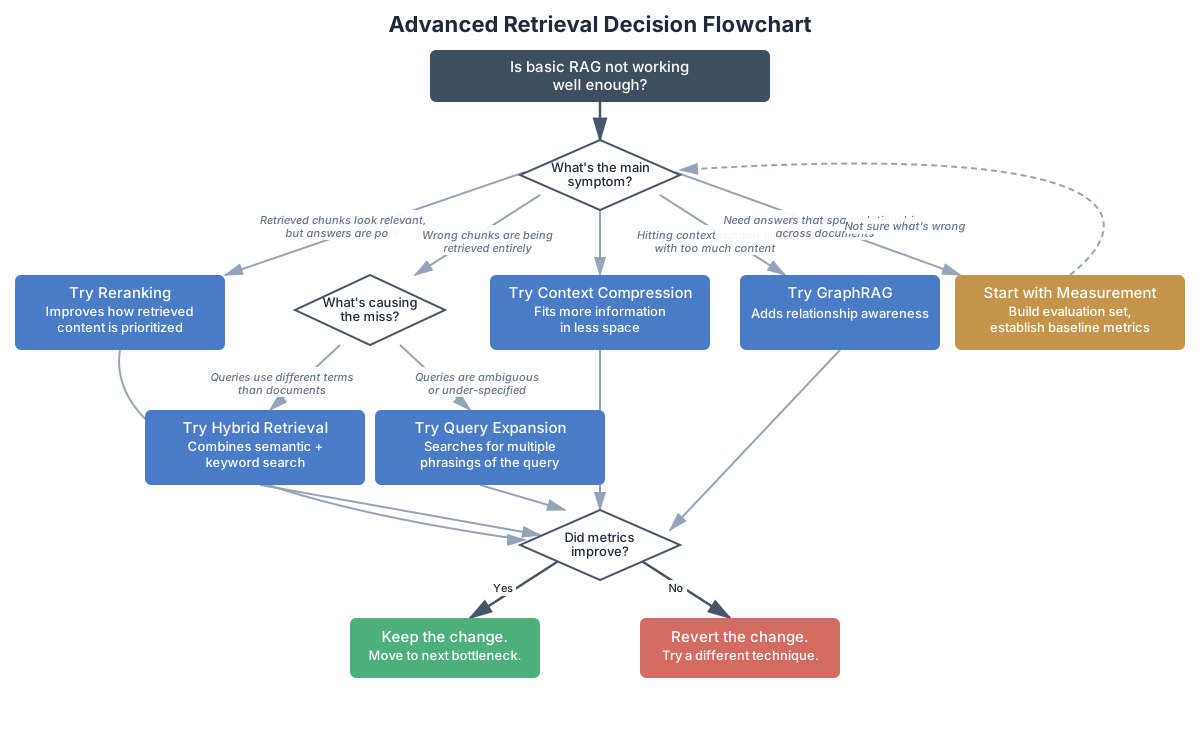
Is basic RAG not working well enough?
│
├─ Retrieved chunks look relevant, but answers are poor
│  → Try Reranking (improves how retrieved content is prioritized)
│
├─ Wrong chunks are being retrieved entirely
│  ├─ Queries use different terms than the documents
│  │  → Try Hybrid Retrieval (combines semantic + keyword search)
│  └─ Queries are ambiguous or under-specified
│     → Try Query Expansion (searches for multiple phrasings)
│
├─ Hitting context window limits with too much content
│  → Try Context Compression (fits more information in less space)
│
├─ Need answers that span relationships across documents
│  → Try GraphRAG (adds relationship awareness)
│
└─ Not sure what's wrong
   → Start with The Optimization Mindset (next section)
The Optimization Mindset
Before adding any complexity to your RAG pipeline, establish two things: a baseline and a way to measure improvement. This is the single most important section in this chapter—everything else builds on it.
The temptation is strong to skip straight to the techniques. You read that reranking improves precision by 15-25% and want to add it immediately. But that 15-25% number comes from specific benchmarks on specific datasets. Your system might see 30% improvement, or it might see 5% degradation. Without measurement, you’ll never know which.
Teams skip measurement for understandable reasons. Building an evaluation set takes time. Running evaluations takes time. And the techniques have such strong reputations—so many blog posts and papers recommending them—that it feels unnecessary to verify the obvious. But the “obvious” improvement that turns out to hurt your system is the most expensive kind of bug: it looks like progress while making things worse. The worked example later in this chapter shows exactly this pattern. Don’t skip measurement.
Building an Evaluation Dataset
Your evaluation dataset is a collection of queries paired with the chunks that should be retrieved to answer them correctly. Building a good one requires thought.
Start with real queries. If your system is already in use, pull questions from query logs. If it’s not yet deployed, sit down with potential users and ask them what they’d search for. Don’t make up queries in a vacuum—synthetic queries tend to match your chunking strategy perfectly, which is exactly the scenario you don’t need to test.
For each query, identify the expected sources—the chunks or documents that contain the answer. Be specific: not just “something from the auth module” but “auth/middleware.py, specifically the verify_token function.”
# Evaluation dataset: queries + expected chunks
evaluation_set = [
    {
        "query": "How does authentication work?",
        "expected_sources": ["auth/login.py", "auth/middleware.py"],
        "expected_content": ["verify_token", "session_create"],
        "difficulty": "easy"  # Single-topic, clear terminology
    },
    {
        "query": "What's the discount calculation logic?",
        "expected_sources": ["billing/discounts.py"],
        "expected_content": ["calculate_discount", "tier"],
        "difficulty": "easy"
    },
    {
        "query": "How do retries interact with notifications?",
        "expected_sources": ["payments/retry.py", "events/handlers.py"],
        "expected_content": ["retry_payment", "notify_on_event"],
        "difficulty": "hard"  # Multi-hop, cross-module
    },
    {
        "query": "auth stuff",
        "expected_sources": ["auth/login.py", "auth/middleware.py"],
        "expected_content": ["verify_token"],
        "difficulty": "hard"  # Vague query
    },
    # ... 20-50 more queries covering your use cases
]
Notice the difficulty labels. These help you diagnose problems. If your system handles “easy” queries well but fails on “hard” ones, you know where to focus. And those hard queries—vague phrasing, multi-hop reasoning, terminology mismatches—are exactly where advanced retrieval techniques shine.
How many queries do you need? For initial development, 20-50 queries covering your main use cases will reveal most problems. For production monitoring, aim for 50-100 with proportional coverage of easy, medium, and hard cases. The goal isn’t statistical significance—it’s catching systematic failures.
One trap to avoid: the golden test set problem. If you optimize your system against the same test set repeatedly, you risk overfitting to those specific queries. Keep a held-out set of 10-20 queries that you only run periodically as a sanity check. When your primary metrics look great but the held-out set shows degradation, you’ve overfit.
Maintaining Your Evaluation Set
An evaluation set isn’t a one-time creation—it’s a living document that evolves with your system and your users.
When users report bad results, add those queries to your evaluation set. These are exactly the failure cases you need to catch in the future. Over time, your evaluation set becomes a record of every retrieval failure you’ve encountered and fixed—a regression test suite for your RAG pipeline.
Periodically review whether the expected sources are still correct. Code gets refactored, documentation gets reorganized, and what was once in auth/middleware.py might now be in security/jwt_handler.py. Stale expected sources cause false negatives in your evaluation—the system finds the right answer in its new location, but your test set says it failed.
Also add new queries when your use cases change. If your team starts using the Q&A system for a new type of question—deployment configuration, performance debugging, architecture decisions—add representative queries for those use cases. An evaluation set that only covers your original use cases won’t catch regressions in new ones.
Measuring What Matters
RAG evaluation has standardized around a few key metrics. The RAGAS framework (Retrieval-Augmented Generation Assessment, Es et al., 2023) defines four that cover different aspects of system quality:
Context Precision: Of the chunks you retrieved, how many were actually relevant? If you retrieve 5 chunks and only 2 contain useful information, your precision is 0.4. Low precision means your model is wading through irrelevant context—which increases cost, adds latency, and can actually reduce answer quality by confusing the model with noise.
Context Recall: Of all the relevant chunks in your index, how many did you actually retrieve? If there are 4 relevant chunks and you only found 2, your recall is 0.5. Low recall means you’re missing important context, which leads to incomplete or incorrect answers.
Faithfulness: Is the generated answer grounded in the retrieved context? Does the model stick to what was retrieved, or does it fill gaps with hallucinated information? This metric matters most for applications where accuracy is critical—medical, legal, financial contexts where a confident-sounding wrong answer is dangerous.
Answer Relevancy: Does the generated answer actually address the question asked? A system might retrieve perfect context and generate a faithful response that still doesn’t answer what was asked, especially with vague or multi-part queries.
For retrieval optimization, precision and recall are your primary levers. A simple evaluation function:
def evaluate_retrieval(rag_system, evaluation_set: list) -> dict:
    """Measure retrieval quality against known-good queries."""

    precision_scores = []
    recall_scores = []

    for test_case in evaluation_set:
        query = test_case["query"]
        expected_sources = set(test_case["expected_sources"])

        # Get what the system actually retrieves
        retrieved = rag_system.retrieve(query, top_k=5)
        retrieved_sources = set(r["source"] for r in retrieved)

        # Calculate precision: relevant / retrieved
        relevant_retrieved = retrieved_sources & expected_sources
        precision = len(relevant_retrieved) / len(retrieved_sources) if retrieved_sources else 0
        precision_scores.append(precision)

        # Calculate recall: relevant_retrieved / total_relevant
        recall = len(relevant_retrieved) / len(expected_sources) if expected_sources else 0
        recall_scores.append(recall)

    avg_p = sum(precision_scores) / len(precision_scores)
    avg_r = sum(recall_scores) / len(recall_scores)

    return {
        "precision": avg_p,
        "recall": avg_r,
        "f1": 2 * (avg_p * avg_r) / (avg_p + avg_r) if (avg_p + avg_r) > 0 else 0,
        "num_queries": len(evaluation_set)
    }

# Run before any changes
baseline = evaluate_retrieval(rag_system, evaluation_set)
print(f"Baseline - Precision: {baseline['precision']:.2f}, Recall: {baseline['recall']:.2f}")
# Typical output: Baseline - Precision: 0.62, Recall: 0.58
Now you have a number. Every change you make should improve that number—or you shouldn’t make it.
Beyond Precision and Recall
These basic metrics tell you about retrieval, but they don’t tell you about the full pipeline. A system might have perfect retrieval but generate terrible answers because the chunks are too long, poorly formatted, or contradictory.
For end-to-end evaluation, consider adding answer quality checks:
def evaluate_end_to_end(rag_system, evaluation_set: list, llm_client) -> dict:
    """Evaluate both retrieval and generation quality."""

    retrieval_metrics = evaluate_retrieval(rag_system, evaluation_set)

    faithfulness_scores = []
    for test_case in evaluation_set:
        # Get the full pipeline response
        answer = rag_system.query(test_case["query"])
        retrieved = rag_system.last_retrieved_chunks  # Assumes your system exposes this

        # Use an LLM to check faithfulness
        check_prompt = f"""Given these source documents and this answer, is the answer
fully supported by the sources? Rate from 0.0 (not supported) to 1.0 (fully supported).

Sources:
{chr(10).join([c['content'][:200] for c in retrieved])}

Answer: {answer}

Score (0.0-1.0):"""

        response = llm_client.messages.create(
            model="claude-sonnet-4-20250514",
            max_tokens=10,
            messages=[{"role": "user", "content": check_prompt}]
        )

        try:
            score = float(response.content[0].text.strip())
            faithfulness_scores.append(score)
        except ValueError:
            pass  # Skip unparseable responses

    retrieval_metrics["faithfulness"] = (
        sum(faithfulness_scores) / len(faithfulness_scores) if faithfulness_scores else 0
    )
    return retrieval_metrics
This isn’t perfect—LLM-as-judge has its own biases—but it catches the cases where good retrieval leads to bad answers, which pure retrieval metrics miss.
Integrating Evaluation into Your Workflow
Measurement is only useful if it happens consistently. The most effective teams make evaluation automatic—part of the development workflow rather than a manual step that gets skipped under deadline pressure.
At minimum, run your evaluation set before deploying any retrieval change. This is the “unit test” for RAG: a fast check that catches regressions before users see them. The evaluation set from earlier in this section can run in seconds—it’s just a loop over queries with precision and recall calculations.
For production systems, consider continuous monitoring. Log retrieval metrics for a sample of production queries and alert when metrics drift:
class RetrievalMonitor:
    """Monitor retrieval quality in production."""

    def __init__(self, alert_threshold: float = 0.1):
        self.baseline_precision = None
        self.recent_scores = []
        self.alert_threshold = alert_threshold

    def set_baseline(self, precision: float):
        """Set baseline from evaluation results."""
        self.baseline_precision = precision

    def log_query(self, query: str, retrieved: list, user_clicked: str = None):
        """Log a production query for monitoring."""
        # If we have click data, use it as a relevance signal
        if user_clicked and retrieved:
            # Did the user click one of the top results?
            top_sources = [r["source"] for r in retrieved[:3]]
            precision_proxy = 1.0 if user_clicked in top_sources else 0.0
            self.recent_scores.append(precision_proxy)

        # Check for drift
        if len(self.recent_scores) >= 100:
            recent_precision = sum(self.recent_scores[-100:]) / 100
            if self.baseline_precision and (
                self.baseline_precision - recent_precision > self.alert_threshold
            ):
                self.alert(
                    f"Retrieval quality dropped: "
                    f"baseline={self.baseline_precision:.2f}, "
                    f"recent={recent_precision:.2f}"
                )
            self.recent_scores = self.recent_scores[-100:]

    def alert(self, message: str):
        """Send alert about quality degradation."""
        print(f"ALERT: {message}")  # Replace with your alerting system
This is particularly important after deployment changes that seem unrelated to retrieval—a new embedding model version, a reindexing operation, or even changes to your document corpus. Any of these can silently degrade retrieval quality without touching the retrieval code itself.
Consider what “unrelated” changes can affect retrieval quality:
- Corpus changes: Someone adds or removes documents. Your evaluation set’s expected sources might no longer exist, or new, better sources might not be reflected in expectations.
- Embedding model updates: A new version of your embedding model is released. The embeddings change subtly, and documents that used to be nearest neighbors might not be anymore.
- Reindexing: You rebuild the index from scratch, perhaps with slightly different chunking parameters. The chunk boundaries shift, and a function that was previously in one chunk is now split across two.
- Infrastructure changes: A database migration, a caching layer update, or even a library version bump can change retrieval behavior in subtle ways.
Without monitoring, these changes create slow degradation that no one notices until the system is significantly worse than it used to be. Users adapt—they learn to rephrase queries or skip the search entirely—and the team assumes the system is fine because no one is complaining loudly.
The investment in evaluation infrastructure pays for itself the first time it catches a regression. Without it, you discover problems through user complaints—by which point you’ve already lost trust.
Hybrid Retrieval: Combining Dense and Sparse Search
Chapter 6 introduced vector search: embed your query, find the nearest document embeddings, return the closest matches. This works well when queries and documents use similar language. But it falls apart in predictable ways.
Consider these failures:
Exact match blindness. A user searches for “ERR_CONNECTION_REFUSED” and vector search returns chunks about network errors, connection timeouts, and socket handling. All semantically similar—the embedding model correctly identifies that these are all related to connection problems. But none contain the actual error code the user is searching for. A keyword search would have found the exact match immediately.
Acronym confusion. “What does the JWT middleware do?” returns chunks about authentication in general. The embedding model captures the semantic meaning of “authentication,” but the specific acronym “JWT” gets diluted in the vector representation. Meanwhile, a document titled “JWT Token Verification Middleware” sits in the index, unretrieved.
Code-specific terminology. Searching for “the calculate_total function” returns chunks about calculation logic, pricing, and totals. The specific function name—an exact string—is better served by keyword matching.
These aren’t edge cases. In code-heavy domains, exact and partial string matching matters as much as semantic similarity. Every codebase has function names, error codes, configuration keys, and variable names that are meaningful strings, not natural language. Embedding models were trained primarily on natural language—they capture meaning well but treat specific identifiers as noise.
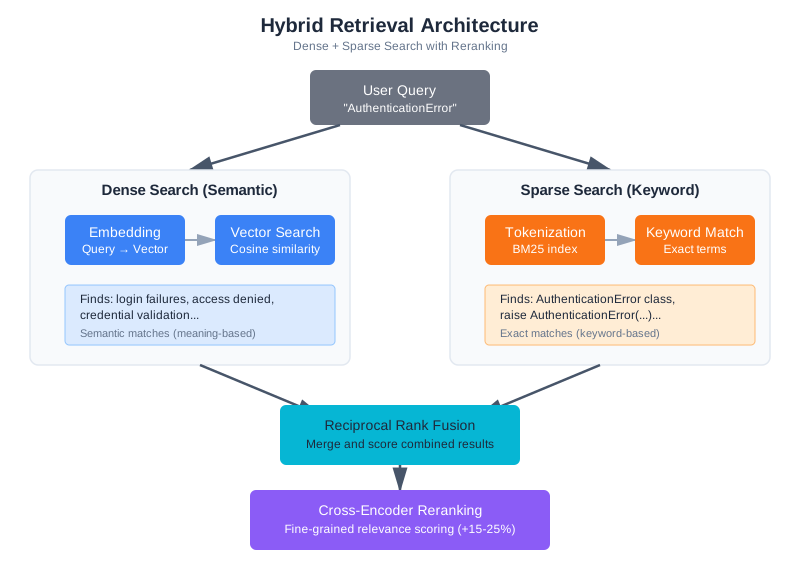
The solution is hybrid retrieval: combine vector (dense) search with keyword (sparse) search.
BM25: The Keyword Baseline
BM25 (Best Matching 25) is the standard keyword search algorithm. It ranks documents by term frequency—how often the search terms appear in each document—adjusted for document length and term rarity. It’s been the backbone of information retrieval since the early 1990s, and it remains surprisingly effective even in the era of neural embeddings. In fact, many production search systems—including Elasticsearch and OpenSearch—still use BM25 as their primary ranking algorithm. Its longevity isn’t nostalgia; it’s because BM25 does something that embedding models struggle with: exact term matching with predictable, debuggable behavior.
from rank_bm25 import BM25Okapi
import re

class BM25Search:
    """Keyword-based search using BM25."""

    def __init__(self):
        self.documents = []
        self.bm25 = None

    def index(self, chunks: list):
        """Index chunks for keyword search."""
        self.documents = chunks
        # Tokenize: split on whitespace and punctuation, lowercase
        tokenized = [self._tokenize(c["content"]) for c in chunks]
        self.bm25 = BM25Okapi(tokenized)

    def search(self, query: str, top_k: int = 10) -> list:
        """Search by keyword relevance."""
        tokenized_query = self._tokenize(query)
        scores = self.bm25.get_scores(tokenized_query)

        # Pair scores with documents, sort by score
        scored = list(zip(self.documents, scores))
        scored.sort(key=lambda x: x[1], reverse=True)

        return [{"chunk": doc, "score": score} for doc, score in scored[:top_k]]

    def _tokenize(self, text: str) -> list:
        """Simple tokenization for code-aware search."""
        # Split on whitespace, underscores, and camelCase boundaries
        tokens = re.findall(r'[a-zA-Z]+|[0-9]+', text.lower())
        return tokens
BM25 excels at exact term matching but misses semantic similarity. “Authentication” and “login” are unrelated terms to BM25. Vector search captures the relationship but misses exact matches. Together, they cover each other’s blind spots.
One important detail: tokenization matters more than you’d think, especially for code. The simple tokenizer above splits on non-alphanumeric characters and lowercases everything. This works for prose but has blind spots for code. Consider these improvements for code-heavy corpora:
def _tokenize_code_aware(self, text: str) -> list:
    """Tokenization that understands code conventions."""
    # Split camelCase: processPayment → [process, payment]
    text = re.sub(r'([a-z])([A-Z])', r'\1 \2', text)
    # Split snake_case: process_payment → [process, payment]
    text = text.replace('_', ' ')
    # Split on dots: os.path.join → [os, path, join]
    text = text.replace('.', ' ')
    # Extract alphanumeric tokens
    tokens = re.findall(r'[a-zA-Z]+|[0-9]+', text.lower())
    # Remove very short tokens (less meaningful)
    return [t for t in tokens if len(t) > 1]
Better tokenization means better keyword matching, which means better hybrid retrieval results. If your users search for “calculateTotal” and the function is defined as calculate_total, the code-aware tokenizer finds the match where the simple one misses it.
Reciprocal Rank Fusion (Production Version)
Chapter 6 introduced Reciprocal Rank Fusion (RRF) as the merging strategy for hybrid search—ignoring raw scores and working purely with rankings. Here we generalize that implementation for production use, handling multiple result lists and document deduplication:
def reciprocal_rank_fusion(
    result_lists: list[list],
    k: int = 60
) -> list:
    """
    Merge multiple ranked result lists using RRF.

    Generalized from Chapter 6's implementation:
    - Handles arbitrary numbers of result lists (not just two)
    - Deduplicates by source + name composite key
    - Returns full chunk objects for downstream processing

    Args:
        result_lists: List of ranked result lists, each containing
                      dicts with at least a "source" key for deduplication
        k: RRF constant (default 60, higher = less emphasis on top ranks)

    Returns:
        Merged and re-ranked results
    """
    fused_scores = {}

    for result_list in result_lists:
        for rank, result in enumerate(result_list):
            doc_id = result["source"] + ":" + result.get("name", "")
            if doc_id not in fused_scores:
                fused_scores[doc_id] = {"chunk": result, "score": 0}
            fused_scores[doc_id]["score"] += 1 / (k + rank + 1)

    sorted_results = sorted(
        fused_scores.values(),
        key=lambda x: x["score"],
        reverse=True
    )

    return [r["chunk"] for r in sorted_results]
Putting It Together
A hybrid retrieval system runs both searches in parallel, then fuses the results:
class HybridRetriever:
    """Combines dense (vector) and sparse (BM25) retrieval with RRF."""

    def __init__(self, vector_store, bm25_index):
        self.vector_store = vector_store
        self.bm25_index = bm25_index

    def retrieve(self, query: str, top_k: int = 10, candidates: int = 30) -> list:
        """
        Hybrid retrieval with Reciprocal Rank Fusion.

        Runs vector and keyword search in parallel, then fuses results.
        """
        # Dense retrieval (semantic similarity)
        dense_results = self.vector_store.search(query, top_k=candidates)

        # Sparse retrieval (keyword matching)
        sparse_results = self.bm25_index.search(query, top_k=candidates)
        sparse_chunks = [r["chunk"] for r in sparse_results]

        # Fuse with RRF
        fused = reciprocal_rank_fusion(
            [dense_results, sparse_chunks],
            k=60
        )

        return fused[:top_k]
When Hybrid Beats Pure Vector
Hybrid retrieval consistently outperforms pure vector search in domains with technical terminology, code, and structured data. The improvement is most pronounced for:
- Exact match queries: Error codes, function names, configuration keys
- Short queries: Single-word or two-word searches where semantic embedding lacks context
- Mixed queries: “How does the
process_paymentfunction handle retries?” combines semantic intent with a specific identifier
In benchmarks on code search, hybrid retrieval typically improves recall by 10-20% over pure vector search without sacrificing precision, because the keyword path catches documents that vector search misses while RRF prevents keyword noise from dominating.
For general-purpose text search (documentation, articles, knowledge bases), the improvement is smaller—typically 5-10%—because vector search already handles natural language well. If your content is primarily prose, you may not need hybrid retrieval. Measure and decide.
Tuning the Hybrid Balance
RRF with default parameters (k=60) gives equal weight to both retrieval methods. But you might want to adjust the balance based on your domain.
For code-heavy corpora, sparse search deserves more weight—exact function names and error codes matter more than semantic similarity. You can achieve this by including more candidates from sparse search in the fusion:
def weighted_hybrid_retrieve(
    vector_store, bm25_index, query: str,
    top_k: int = 10,
    dense_candidates: int = 20,
    sparse_candidates: int = 40  # More sparse candidates = more keyword weight
) -> list:
    """Hybrid retrieval with adjustable dense/sparse balance."""

    dense_results = vector_store.search(query, top_k=dense_candidates)
    sparse_results = bm25_index.search(query, top_k=sparse_candidates)
    sparse_chunks = [r["chunk"] for r in sparse_results]

    return reciprocal_rank_fusion([dense_results, sparse_chunks], k=60)[:top_k]
For prose-heavy corpora, the opposite applies—dense search is usually better, and sparse search primarily serves as a safety net for proper nouns and specific terms.
How do you know which balance is right? Use your evaluation set. Run compare_configurations with different candidate ratios and measure which gives the best precision and recall for your actual queries. There’s no universal answer—the right balance depends on your data and your users.
Reranking: The Quality Multiplier
Vector search is fast but approximate. It finds chunks whose embeddings are close to the query embedding—but embedding similarity doesn’t always match true relevance. A chunk about “authentication flow” might embed similarly to “authorization flow,” even though they’re different concepts for your use case.
Reranking adds a second pass. After retrieving candidates with vector search (or hybrid search), a reranker scores each candidate against the query more carefully, then reorders them by relevance. Think of it as a two-stage process: cast a wide net, then sort the catch.
How Rerankers Work
The most accurate rerankers are cross-encoders. To understand why, you need to understand the difference between how embeddings and cross-encoders process queries and documents.
Embedding models (bi-encoders) process the query and document independently. Each gets converted to a vector, and relevance is measured by vector similarity. This is fast—you can pre-compute document embeddings and store them, then just compute the query embedding at search time. But because the query and document never “see” each other during encoding, the model can’t capture fine-grained interactions between specific query terms and document content.
Cross-encoders process the query and document together as a single input. The model sees both simultaneously and can learn interactions like “this document mentions verify_token, which directly relates to the query about authentication.” This attention across query and document produces more accurate relevance scores—but it’s expensive, because you can’t pre-compute anything.
| Aspect | Bi-Encoder (Embeddings) | Cross-Encoder (Reranker) |
|---|---|---|
| How it works | Encodes query and document separately | Processes query and document together |
| Speed | Fast (pre-computed embeddings) | Slow (10-100x slower) |
| Accuracy | Good | Better (captures fine-grained interactions) |
| Use case | Initial retrieval (millions of docs) | Reranking (dozens of candidates) |
| Example models | sentence-transformers, text-embedding-3 | cross-encoder/ms-marco-*, bge-reranker |
Embedding Model (bi-encoder):
  Query → [Vector A]
  Document → [Vector B]
  Score = cosine_similarity(A, B)

Cross-Encoder (reranker):
  [Query + Document together] → Relevance Score
This architectural difference explains why cross-encoders produce better relevance scores. They can attend to specific interactions between query terms and document content—recognizing that “JWT verification” in the document answers “how does authentication work” in the query, or that “rate_limit_config” in the document matches “rate limit settings” in the query. Bi-encoders compress all of this nuance into a single vector, which inevitably loses some of the fine-grained signal.
This is why reranking is always a second stage. You can’t run cross-encoders over millions of documents—the latency would be seconds or minutes, since each query-document pair requires a full forward pass through the model with no pre-computation possible. But running them over 20-50 candidates from the first stage adds only 100-250ms. That’s a worthwhile trade for significantly better ranking.
Implementing Reranking
from sentence_transformers import CrossEncoder

class RerankedRAG:
    """RAG with cross-encoder reranking."""

    def __init__(self, base_retriever):
        self.base_retriever = base_retriever
        # Cross-encoder trained for relevance ranking
        self.reranker = CrossEncoder('cross-encoder/ms-marco-MiniLM-L-6-v2')

    def retrieve(self, query: str, top_k: int = 5, candidates: int = 20) -> list:
        """Retrieve with reranking."""

        # Step 1: Get more candidates than we need
        candidates_list = self.base_retriever.retrieve(query, top_k=candidates)

        if not candidates_list:
            return []

        # Step 2: Score each candidate with cross-encoder
        pairs = [(query, c["content"]) for c in candidates_list]
        scores = self.reranker.predict(pairs)

        # Step 3: Sort by reranker score
        scored = list(zip(candidates_list, scores))
        scored.sort(key=lambda x: x[1], reverse=True)

        # Step 4: Return top_k after reranking
        return [item[0] for item in scored[:top_k]]
The key insight is in the candidates parameter. You retrieve more documents than you need (20 when you want 5), then let the reranker select the best subset. This gives the reranker a pool to work with—if the best document was ranked 15th by vector search, the reranker can promote it to position 1.
Choosing a Reranker Model
Not all rerankers are created equal, and the right choice depends on your domain:
General-purpose rerankers like ms-marco-MiniLM are trained on web search data. They work well for general text but can struggle with domain-specific content. They’re fast and a good starting point.
Larger cross-encoders like ms-marco-electra-base offer better accuracy at the cost of speed. Consider these when reranking latency isn’t critical—batch processing, offline evaluation, or applications where users expect longer wait times.
Domain-specific models trained or fine-tuned on your domain’s data offer the best accuracy for specialized applications. If you have labeled relevance data (query-document-relevance triples), fine-tuning a cross-encoder on your data is often the highest-impact improvement you can make.
API-based rerankers from Cohere, Jina, and Voyage AI offer hosted reranking without managing models locally. These can be good starting points but add network latency and external dependencies.
Start with ms-marco-MiniLM for experimentation—it’s fast enough for interactive use and good enough to validate whether reranking helps at all. If it helps, then explore larger or domain-specific models.
The Reranking Trade-off
More candidates means better recall but slower reranking:
| Candidates Retrieved | Rerank Time | Quality Improvement | When to Use |
|---|---|---|---|
| 10 | ~50ms | Minimal | Latency-critical applications |
| 20 | ~100ms | Good | Typical starting point |
| 50 | ~250ms | Excellent | Quality-critical applications |
| 100 | ~500ms | Diminishing returns | When recall is your bottleneck |
For most applications, retrieve 20-50 candidates and rerank to top 5. This adds 100-250ms latency but typically improves precision by 15-25%. If your initial retrieval already has high recall (the right documents are in the candidate set), reranking has the most room to help by promoting them to the top positions.
There’s an important interaction between the candidate count and your initial retrieval quality. If vector search has poor recall—the right document isn’t even in the top 50—reranking can’t help because it can only reorder what’s already been retrieved. If you’re seeing poor reranking results, check whether increasing the candidate count to 50 or 100 brings the relevant documents into the pool. If they’re still not there, the problem is upstream in your embedding quality or chunking strategy, not in the reranking.
When Reranking Hurts
Reranking isn’t always better. It can hurt in three predictable ways:
Domain mismatch. Most rerankers are trained on web search data—news articles, Wikipedia pages, forum posts. If your domain is highly specialized (medical imaging reports, legal contracts, API documentation), the reranker might not understand what “relevant” means in your context.
# Test for domain mismatch
def test_reranker_domain_fit(reranker, domain_pairs: list) -> dict:
    """Check if reranker scores align with domain relevance."""

    correct = 0
    total = 0

    for query, relevant_doc, irrelevant_doc in domain_pairs:
        relevant_score = reranker.predict([(query, relevant_doc)])[0]
        irrelevant_score = reranker.predict([(query, irrelevant_doc)])[0]

        total += 1
        if relevant_score > irrelevant_score:
            correct += 1
        else:
            print(f"Mismatch on: '{query[:50]}...'")
            print(f"  Relevant scored: {relevant_score:.3f}")
            print(f"  Irrelevant scored: {irrelevant_score:.3f}")

    accuracy = correct / total if total > 0 else 0
    print(f"\nDomain fit: {accuracy:.1%} ({correct}/{total} correct rankings)")
    return {"accuracy": accuracy, "correct": correct, "total": total}

# Test with your actual data
domain_pairs = [
    (
        "implement authentication",
        "def verify_jwt_token(token): ...",
        "def verify_email_format(email): ..."
    ),
    (
        "rate limit configuration",
        "RATE_LIMIT_MAX_REQUESTS = 100\nRATE_LIMIT_WINDOW_SECONDS = 60",
        "Configuring your development environment requires several steps..."
    ),
    # More domain-specific examples
]
test_reranker_domain_fit(reranker, domain_pairs)
# Good domain fit: > 90% accuracy
# Poor domain fit: < 80% accuracy — consider alternatives
Good initial retrieval. If your vector search already achieves 90%+ precision, reranking has little room to improve and adds latency for no benefit. This is especially common with small, well-curated document collections. Measure first.
Short documents. Cross-encoders work best when they have substantial text to analyze. If your chunks are very short (a few sentences), the reranker doesn’t have enough signal to improve on embedding similarity. Chunk size matters for reranking effectiveness.
Practical Deployment Patterns
A few patterns that make reranking work better in production:
Batch scoring. If you’re processing multiple queries (batch document analysis, automated testing), batch your reranking calls. Cross-encoders are much more efficient when scoring multiple pairs at once rather than one at a time, because they can use GPU parallelism.
def batch_rerank(reranker, queries_and_candidates: list) -> list:
    """Rerank multiple queries in a single batch for efficiency."""

    all_pairs = []
    query_boundaries = []  # Track which pairs belong to which query

    for query, candidates in queries_and_candidates:
        start = len(all_pairs)
        pairs = [(query, c["content"]) for c in candidates]
        all_pairs.extend(pairs)
        query_boundaries.append((start, len(all_pairs), candidates))

    # Score all pairs in one call
    all_scores = reranker.predict(all_pairs)

    # Split scores back by query
    results = []
    for start, end, candidates in query_boundaries:
        scores = all_scores[start:end]
        scored = sorted(zip(candidates, scores), key=lambda x: x[1], reverse=True)
        results.append([item[0] for item in scored])

    return results
Caching. If the same queries appear frequently (common in documentation search), cache reranking results. The cross-encoder scores for a given query-document pair don’t change unless the document changes. A simple LRU cache keyed on (query_hash, document_hash) can eliminate redundant computation.
Graceful degradation. If the reranker service is slow or unavailable, fall back to the unranked results rather than failing the entire query. Users prefer slightly worse results now over no results while waiting for a timeout.
Query Expansion: Catching What You Missed
Sometimes the problem isn’t ranking—it’s that the relevant chunks never made it into the candidate set. The user asks “auth stuff” and the relevant document is titled “JWT Token Verification Middleware.” Vector search finds a fuzzy semantic match, but the terminology gap is too wide for the embedding model to bridge confidently.
Query expansion addresses this by generating multiple variants of the query and searching for each, then combining results. It’s particularly effective when your users and your documents use different vocabulary.
Multi-Query Expansion
The simplest form of query expansion: use an LLM to generate alternative phrasings of the user’s question.
def expand_query(llm_client, original_query: str, num_variants: int = 3) -> list:
    """Generate query variants for broader retrieval coverage."""

    prompt = f"""Generate {num_variants} alternative ways to ask this question.
Each variant should:
- Preserve the core intent
- Use different terminology
- Focus on different aspects that might be relevant

Original question: {original_query}

Return only the alternative questions, one per line."""

    response = llm_client.messages.create(
        model="claude-sonnet-4-20250514",
        max_tokens=200,
        messages=[{"role": "user", "content": prompt}]
    )

    variants = response.content[0].text.strip().split('\n')
    return [original_query] + [v.strip() for v in variants if v.strip()]

# Example
# Input: "How does authentication work?"
# Output: [
#   "How does authentication work?",
#   "What is the login and session management flow?",
#   "How are user credentials verified and tokens issued?",
#   "Where is the auth middleware implemented?"
# ]
Then retrieve for each variant and merge results, using hit count as a relevance signal:
def retrieve_with_expansion(rag_system, llm_client, query: str, top_k: int = 5) -> list:
    """Retrieve using query expansion with multi-query fusion."""

    # Generate variants
    variants = expand_query(llm_client, query, num_variants=3)

    # Retrieve for each variant
    all_results = {}
    for variant in variants:
        results = rag_system.retrieve(variant, top_k=top_k)
        for r in results:
            doc_id = r["source"] + ":" + r.get("name", "")
            if doc_id not in all_results:
                all_results[doc_id] = {"chunk": r, "hits": 0}
            all_results[doc_id]["hits"] += 1

    # Rank by number of query variants that retrieved this chunk
    sorted_results = sorted(
        all_results.values(),
        key=lambda x: x["hits"],
        reverse=True
    )

    return [r["chunk"] for r in sorted_results[:top_k]]
Documents that appear in results for multiple variants are likely relevant—they match the query intent from multiple angles. A document about JWT authentication that appears for “How does authentication work?”, “What is the login flow?”, and “How are credentials verified?” is almost certainly relevant to the user’s question. Documents that appear for only one variant might be noise introduced by that particular phrasing—for instance, a document about “session management” might only match the “login flow” variant, and its relevance to the original question is uncertain.
Hypothetical Document Embeddings (HyDE)
A more sophisticated approach: instead of generating alternative queries, generate a hypothetical answer and search for documents similar to that answer.
The insight is that the hypothetical answer will be in the same “language” as the documents in your index. If a user asks “how does auth work?” the hypothetical answer might mention “JWT tokens,” “middleware,” and “session management”—all terms that would appear in the actual documentation.
def hyde_retrieve(llm_client, rag_system, query: str, top_k: int = 5) -> list:
    """
    Hypothetical Document Embeddings (HyDE).

    Generate a hypothetical answer, then search for documents
    similar to that answer rather than similar to the query.
    """

    # Step 1: Generate a hypothetical answer
    response = llm_client.messages.create(
        model="claude-sonnet-4-20250514",
        max_tokens=300,
        messages=[{"role": "user", "content": f"""Write a short, technical answer
to this question as if you were documenting a codebase.
Include specific function names, file paths, and implementation details
that would appear in actual documentation.

Question: {query}

Answer:"""}]
    )

    hypothetical_doc = response.content[0].text

    # Step 2: Search using the hypothetical document as the query
    # The embedding of the hypothetical answer will be closer to
    # the embeddings of real documents than the original query
    results = rag_system.retrieve(hypothetical_doc, top_k=top_k)

    return results
HyDE works particularly well when user queries are short or conversational while the target documents are technical and detailed. The hypothetical answer bridges the vocabulary gap between how users ask questions and how information is documented.
But HyDE has costs beyond latency. The extra LLM call adds 500ms-2s before retrieval even starts. More importantly, if the LLM’s hypothetical answer is wrong—mentioning function names that don’t exist, describing an architecture that doesn’t match your system—it can lead retrieval astray. The system ends up searching for documents similar to a hallucinated answer rather than documents relevant to the actual question.
This makes HyDE sensitive to the LLM’s knowledge of your domain. For well-known frameworks and common patterns, the LLM generates reasonable hypothetical answers. For proprietary codebases and custom systems, the hypothetical answer may be entirely wrong. Test HyDE on your specific domain before relying on it.
Sub-Question Decomposition
For complex queries that require information from multiple sources, decompose the query into sub-questions:
def decompose_and_retrieve(
    llm_client, rag_system, query: str, top_k: int = 5
) -> list:
    """Break complex queries into sub-questions, retrieve for each."""

    # Step 1: Decompose
    response = llm_client.messages.create(
        model="claude-sonnet-4-20250514",
        max_tokens=200,
        messages=[{"role": "user", "content": f"""Break this question into 2-3
simpler sub-questions that could each be answered independently.

Question: {query}

Sub-questions (one per line):"""}]
    )

    sub_questions = [
        q.strip().lstrip('0123456789.-) ')
        for q in response.content[0].text.strip().split('\n')
        if q.strip()
    ]

    # Step 2: Retrieve for each sub-question
    all_chunks = []
    for sub_q in sub_questions:
        results = rag_system.retrieve(sub_q, top_k=3)
        all_chunks.extend(results)

    # Step 3: Deduplicate
    seen = set()
    unique = []
    for chunk in all_chunks:
        chunk_id = chunk["source"] + ":" + chunk.get("name", "")
        if chunk_id not in seen:
            seen.add(chunk_id)
            unique.append(chunk)

    return unique[:top_k]

# Example:
# Input: "How does the payment retry logic interact with notifications?"
# Sub-questions:
#   1. "How does the payment retry logic work?"
#   2. "How does the notification system work?"
#   3. "How do payments and notifications communicate?"
This is especially useful for multi-hop questions that basic retrieval consistently fails on. But it multiplies your retrieval calls—three sub-questions means three searches—so use it selectively for queries that need it.
When Query Expansion Helps
Query expansion is most valuable when:
- User queries are short or ambiguous (“auth stuff”, “deployment”) where a single embedding can’t capture the full intent
- Terminology mismatches between users and documents (“login” vs. “authentication” vs. “sign-in” vs. “SSO”)
- Multi-hop questions requiring information from different parts of your corpus
- Vocabulary-rich domains where the same concept has many names (common in medical, legal, and technical domains)
Query expansion is least helpful when queries are already precise and technical (“the verify_jwt_token function in auth/middleware.py”), or when your embedding model already handles synonym matching well.
The Expansion Trade-off
More variants means broader coverage but also more noise and latency:
| Strategy | LLM Calls | Retrieval Calls | Latency Added | Best For |
|---|---|---|---|---|
| Multi-query (2-3 variants) | 1 | 2-3 | 500ms-1s | Terminology mismatches |
| HyDE | 1 | 1 | 500ms-2s | Short/vague queries |
| Sub-question decomposition | 1 | 2-3 | 1-2s | Multi-hop questions |
| Combined (multi-query + HyDE) | 2 | 4-6 | 1.5-3s | Difficult queries only |
Always measure recall improvement against precision loss. If adding variants improves recall by 20% but drops precision by 25%, you’ve made things worse overall. The compound cost of multiple LLM calls plus multiple retrieval calls adds up—use expansion selectively, not as a default for every query.
A practical pattern: route queries through expansion only when initial retrieval confidence is low. If vector search returns results with high similarity scores, the query is probably specific enough. If scores are low or clustered, expansion is more likely to help.
Query Routing: Choosing the Right Strategy
Rather than applying the same expansion strategy to every query, classify queries and route them to the appropriate technique:
def classify_and_expand(
    llm_client, rag_system, query: str, top_k: int = 5
) -> list:
    """Route queries to the appropriate expansion strategy."""

    # Step 1: Classify the query
    response = llm_client.messages.create(
        model="claude-haiku-3-5-20241022",  # Fast model for classification
        max_tokens=20,
        messages=[{"role": "user", "content": f"""Classify this search query
into one category. Reply with only the category name.

Categories:
- SPECIFIC: References exact names, codes, or identifiers
- VAGUE: Short or ambiguous, needs clarification
- MULTI_HOP: Requires connecting information from multiple sources
- NORMAL: Standard question with clear intent

Query: {query}

Category:"""}]
    )

    category = response.content[0].text.strip().upper()

    # Step 2: Route to appropriate strategy
    if category == "SPECIFIC":
        # Exact queries work best with hybrid retrieval, no expansion needed
        return rag_system.retrieve(query, top_k=top_k)

    elif category == "VAGUE":
        # Vague queries benefit from HyDE or multi-query expansion
        return hyde_retrieve(llm_client, rag_system, query, top_k=top_k)

    elif category == "MULTI_HOP":
        # Multi-hop queries need decomposition
        return decompose_and_retrieve(llm_client, rag_system, query, top_k=top_k)

    else:
        # Normal queries: standard retrieval, maybe with multi-query
        return retrieve_with_expansion(rag_system, llm_client, query, top_k=top_k)
This adds one fast LLM call (using a small model for classification) but avoids the cost of expansion for queries that don’t need it. Specific queries like “the verify_token function” go straight to retrieval. Vague queries like “auth stuff” get expanded. Multi-hop queries like “how does payment interact with notifications” get decomposed.
The classification isn’t always perfect, but it doesn’t need to be. Even a rough routing reduces unnecessary LLM calls and prevents expansion-related noise for queries that are already well-formed.
Context Compression: Doing More with Less
You’ve retrieved relevant chunks. Now you face another problem: the chunks are too long for effective generation. A 50-line function contains the 3-line answer buried in setup code, imports, and error handling. The model has to find the needle in the haystack—and sometimes it misses.
Context compression extracts the relevant parts from retrieved chunks before passing them to the generator. It reduces token usage, lowers cost, and—perhaps counterintuitively—can actually improve answer quality by removing distractions. Research has consistently shown that models perform better with focused, relevant context than with large amounts of context that includes irrelevant information. The “lost in the middle” phenomenon—where models struggle to use information buried in the middle of a long context—means that more context isn’t always better context.
When Compression Matters
Compression becomes important when:
- Your chunks are large (500+ tokens each) and contain significant irrelevant content
- You’re retrieving many chunks (10+) and hitting context window limits
- Cost is a concern—fewer input tokens means lower API bills
- Response quality degrades as context length increases
Compression is unnecessary when your chunks are already focused (small, well-scoped chunks from Chapter 6’s strategies), when you’re retrieving only a few chunks, or when your model handles long contexts well.
Extractive Compression
The simplest approach: use an LLM to extract only the relevant sentences:
def compress_context(
    llm_client, query: str, chunks: list, target_tokens: int = 1000
) -> str:
    """Compress retrieved chunks to most relevant content."""

    combined = "\n\n---\n\n".join([c["content"] for c in chunks])

    prompt = f"""Extract the most relevant information for answering this question.
Keep only sentences and code that directly help answer the question.
Remove boilerplate, imports, and unrelated logic.
Preserve exact variable names, function signatures, and code structure.
Target length: approximately {target_tokens} tokens.

Question: {query}

Content to compress:
{combined}

Extracted relevant content:"""

    response = llm_client.messages.create(
        model="claude-sonnet-4-20250514",
        max_tokens=target_tokens + 200,
        messages=[{"role": "user", "content": prompt}]
    )

    return response.content[0].text
This adds one LLM call but can dramatically reduce the tokens in the final generation call. For code-heavy contexts, the key is preserving structural elements—function signatures, return types, key variable names—while stripping setup code, imports, and boilerplate.
Contextual Chunking: Compression at Index Time
Rather than compressing at query time, you can add contextual information to chunks during indexing. Each chunk gets a short preamble explaining where it fits in the larger document:
def add_chunk_context(llm_client, chunk: dict, full_document: str) -> dict:
    """Add contextual summary to a chunk during indexing."""

    prompt = f"""Here is a chunk from a larger document. Write a 1-2 sentence
summary that explains what this chunk contains and where it fits
in the broader document. This summary will be prepended to the chunk
to help search understand its context.

Full document title: {chunk.get('source', 'unknown')}

Chunk content:
{chunk['content'][:500]}

Contextual summary:"""

    response = llm_client.messages.create(
        model="claude-haiku-3-5-20241022",  # Fast model for bulk processing
        max_tokens=100,
        messages=[{"role": "user", "content": prompt}]
    )

    context_summary = response.content[0].text.strip()

    # Prepend context to chunk for embedding and retrieval
    enriched_content = f"{context_summary}\n\n{chunk['content']}"

    return {
        **chunk,
        "content": enriched_content,
        "context_summary": context_summary,
        "original_content": chunk["content"]
    }
This approach—which Anthropic has described as “contextual retrieval”—improves retrieval quality because the contextual summary helps the embedding model understand what the chunk is about. A chunk containing if user.tier == 'gold': discount = 0.15 gets a preamble like “This section of billing/discounts.py handles discount calculation for premium tier users,” which gives the embedding model much more to work with.
The trade-off: indexing is more expensive (one LLM call per chunk) and your index grows larger. But retrieval quality improves because each chunk carries its own context, reducing the need for query-time compression.
The Compression Trade-off
Compression reduces tokens but risks losing information:
| Compression Approach | Token Reduction | Added Latency | Risk |
|---|---|---|---|
| Extractive (LLM) | 40-70% | 1-2s per query | May miss relevant details |
| Contextual chunking | Index grows 20-30% | None at query time | Expensive to index |
| Token-level (LLMLingua) | 30-60% | 100-500ms | Can damage code syntax |
Token-level compression tools like LLMLingua remove individual tokens that contribute little to meaning. They can achieve significant compression ratios—removing 50% of tokens while preserving most of the semantic content. These work better for natural language text than for code, where removing a single token can change the meaning entirely. If you’re working primarily with code, prefer extractive compression that understands syntax.
Always evaluate compressed vs. uncompressed on your test set. Sometimes the full context, despite being longer, produces better answers because the model has more information to work with. Compression is a tool to reach for when context length is your bottleneck, not a default optimization.
Choosing Your Compression Strategy
The three approaches serve different needs. Here’s how to decide:
Use extractive compression when you’re retrieving many chunks (10+) and need to distill them into a focused context. This works well when chunks are large and heterogeneous—some are highly relevant, others are marginally useful. The LLM can intelligently select the most important parts. The downside is the extra LLM call, which adds 1-2 seconds of latency.
Use contextual chunking when you want to improve retrieval quality across the board without adding query-time latency. The investment is at index time—one LLM call per chunk during indexing—but the payoff is better embeddings and more informative chunks at query time. This is particularly valuable when your chunks are extracted from larger documents and lose context in isolation—a function body without knowing which module it belongs to, a paragraph without knowing the document’s topic. In benchmarks, Anthropic reported that contextual retrieval combined with hybrid search and reranking reduced retrieval failure rates by 67% compared to standard approaches.
Use token-level compression (LLMLingua or similar) when you need to compress natural language text and can tolerate some quality degradation. These tools are fast (100-500ms) and don’t require an LLM call, but they work by removing tokens that contribute little to meaning—which can be problematic for code, where every token carries structural significance. A missing bracket, removed keyword, or deleted variable name can change meaning entirely.
For most applications, the recommendation is: start with contextual chunking during indexing to improve baseline retrieval quality, and add extractive compression at query time only if you’re still hitting context window limits after other optimizations.
GraphRAG: When Relationships Matter
Standard RAG retrieves chunks independently. Each query returns a set of documents ranked by relevance to that query. But some questions require understanding relationships between entities across multiple documents.
“What team is responsible for authentication?” requires connecting:
- Authentication code (mentions team comments or ownership files)
- Team documentation (lists members and responsibilities)
- Organizational structure (defines team hierarchies)
No single chunk contains the answer. You need to traverse relationships.
When to Consider GraphRAG
GraphRAG is appropriate when:
- Questions frequently require multi-hop reasoning (“Which team owns the service that handles payment retries?”)
- Your corpus has explicit entity relationships—code ownership files, document cross-references, organizational structures
- Simple RAG consistently fails on relationship queries despite good single-hop performance
- You have the engineering budget for added complexity
GraphRAG is overkill when:
- Most questions can be answered from a single chunk
- Your corpus is small enough for long-context approaches (under 100K tokens total)
- You’re still optimizing basic retrieval—get the fundamentals right first
GraphRAG Architecture
The core idea: extract entities and relationships into a knowledge graph, then traverse the graph during retrieval.
Standard RAG:
  Query → Vector Search → Chunks → LLM → Answer

GraphRAG:
  Query → Entity Extraction → Graph Traversal → Related Chunks → LLM → Answer
Microsoft’s GraphRAG implementation follows a four-stage indexing process:
- Entity extraction: An LLM reads each document and identifies entities (people, systems, files, concepts) and relationships between them
- Community detection: Graph algorithms group related entities into communities—clusters of tightly connected nodes
- Community summarization: An LLM generates summaries for each community, capturing the key themes and relationships
- Query: At search time, the system searches community summaries, then retrieves the underlying documents for relevant communities
This architecture excels at “global” questions—queries that require synthesizing information across many documents rather than finding specific details. “What are the main architectural patterns in this codebase?” benefits from community summaries that capture cross-cutting themes.
For a codebase Q&A system, entity extraction would identify entities like functions, classes, modules, and services, then extract relationships like “calls,” “imports,” “extends,” and “depends-on.” Community detection would group related components together—perhaps finding that the authentication module, session management, and JWT library form a tightly-connected community, while the payment processing, billing, and invoice generation form another.
A query like “who is responsible for payment processing?” could then traverse the graph from the payment processing community to ownership files and team documentation, connecting information across multiple documents that standard RAG would retrieve independently.
Building a Knowledge Graph: Implementation Walkthrough
Let’s walk through building a basic knowledge graph from documents. The process has three stages: entity extraction, relationship mapping, and graph construction.
Stage 1: Entity Extraction from Documents
Entity extraction identifies what entities exist in your corpus. For a technical codebase, entities might include functions, classes, files, modules, and services. An LLM is particularly good at this—it understands context and can distinguish between a function name that’s an entity and a function name mentioned in a comment that’s not.
def extract_entities(document: str, llm_client) -> dict:
    """Extract entities from a document using an LLM."""

    extraction_prompt = f"""Extract all entities from this code/documentation.
Identify these types of entities:
- Files (specific file paths)
- Functions/Methods (exact function names)
- Classes/Types (exact class/type names)
- Modules/Services (logical groupings)
- External Libraries (imported packages)

Return JSON with format:
{{
  "files": ["path/to/file.py", ...],
  "functions": ["function_name", ...],
  "classes": ["ClassName", ...],
  "modules": ["module_name", ...],
  "libraries": ["library_name", ...]
}}

Document:
{document[:3000]}  # Limit size to avoid huge prompts
"""

    response = llm_client.messages.create(
        model="claude-sonnet-4-20250514",
        max_tokens=1000,
        messages=[{"role": "user", "content": extraction_prompt}]
    )

    try:
        # Parse JSON from response
        import json
        text = response.content[0].text
        start = text.find('{')
        end = text.rfind('}') + 1
        return json.loads(text[start:end])
    except (json.JSONDecodeError, ValueError):
        return {"files": [], "functions": [], "classes": [], "modules": [], "libraries": []}
Stage 2: Relationship Extraction and Mapping
Once you’ve identified entities, extract relationships between them. In code, typical relationships include:
- “calls” (function A calls function B)
- “imports” (file A imports module B)
- “extends” (class A extends class B)
- “depends-on” (module A depends on module B)
- “written-in” (function is written in language X)
def extract_relationships(document: str, entities: dict, llm_client) -> list:
    """Extract relationships between entities."""

    relationship_prompt = f"""Given these entities found in the code:
Files: {', '.join(entities.get('files', [])[:5])}
Functions: {', '.join(entities.get('functions', [])[:5])}
Classes: {', '.join(entities.get('classes', [])[:5])}
Modules: {', '.join(entities.get('modules', [])[:5])}

Find relationships between them in this document. Return JSON list:
[
  {{"source": "entity_name", "relationship": "calls", "target": "entity_name"}},
  {{"source": "entity_name", "relationship": "imports", "target": "entity_name"}}
]

Document excerpt:
{document[:2000]}
"""

    response = llm_client.messages.create(
        model="claude-sonnet-4-20250514",
        max_tokens=1500,
        messages=[{"role": "user", "content": relationship_prompt}]
    )

    try:
        import json
        text = response.content[0].text
        start = text.find('[')
        end = text.rfind(']') + 1
        return json.loads(text[start:end])
    except (json.JSONDecodeError, ValueError, IndexError):
        return []
Stage 3: Graph Construction and Storage
Build a graph data structure from extracted entities and relationships. For production systems, store this in a graph database like Neo4j. For experimentation, an in-memory representation works:
class KnowledgeGraph:
    """In-memory knowledge graph for retrieval."""

    def __init__(self):
        self.nodes = {}  # node_id -> {name, type, document_source}
        self.edges = []  # [(source_id, target_id, relationship_type)]

    def add_entity(self, name: str, entity_type: str, source_doc: str):
        """Add an entity node."""
        node_id = f"{entity_type}:{name}"
        if node_id not in self.nodes:
            self.nodes[node_id] = {
                "name": name,
                "type": entity_type,
                "sources": [source_doc]
            }
        else:
            if source_doc not in self.nodes[node_id]["sources"]:
                self.nodes[node_id]["sources"].append(source_doc)

    def add_relationship(self, source: str, source_type: str,
                         target: str, target_type: str,
                         relationship: str):
        """Add a relationship edge."""
        source_id = f"{source_type}:{source}"
        target_id = f"{target_type}:{target}"

        # Only add if both endpoints exist
        if source_id in self.nodes and target_id in self.nodes:
            edge = (source_id, target_id, relationship)
            if edge not in self.edges:
                self.edges.append(edge)

    def traverse(self, start_node_id: str, max_depth: int = 3) -> set:
        """Traverse from a node, returning all reachable nodes."""
        visited = set()
        to_visit = [(start_node_id, 0)]

        while to_visit:
            node_id, depth = to_visit.pop(0)
            if node_id in visited or depth > max_depth:
                continue

            visited.add(node_id)

            # Find connected nodes
            for source, target, rel_type in self.edges:
                if source == node_id:
                    if target not in visited:
                        to_visit.append((target, depth + 1))
                elif target == node_id:
                    if source not in visited:
                        to_visit.append((source, depth + 1))

        return visited

    def index_all_documents(self, documents: list, llm_client):
        """Extract and index all documents."""
        for doc in documents:
            # Extract entities
            entities = extract_entities(doc["content"], llm_client)
            doc_source = doc.get("source", "unknown")

            # Add to graph
            for entity_type in ["files", "functions", "classes", "modules"]:
                for entity_name in entities.get(entity_type, []):
                    self.add_entity(entity_name, entity_type, doc_source)

            # Extract and add relationships
            relationships = extract_relationships(doc["content"], entities, llm_client)
            for rel in relationships:
                # Infer types from context (in production, extract these too)
                source_type = self._infer_type(rel["source"], entities)
                target_type = self._infer_type(rel["target"], entities)
                if source_type and target_type:
                    self.add_relationship(
                        rel["source"], source_type,
                        rel["target"], target_type,
                        rel["relationship"]
                    )

    def _infer_type(self, entity_name: str, entities: dict) -> str:
        """Simple type inference."""
        for entity_type in ["files", "functions", "classes", "modules"]:
            if entity_name in entities.get(entity_type, []):
                return entity_type
        return None
Concrete Relationship Extraction Example
Let’s see this in action with a real code snippet. Suppose we have this Python document:
# config.py
from flask import Flask
from database import get_connection

app = Flask(__name__)

def load_config():
    """Load configuration from database."""
    conn = get_connection()
    return conn.query("SELECT * FROM config")

def setup_app():
    """Initialize Flask application."""
    config = load_config()
    app.config.from_dict(config)
    return app
Entity extraction would identify:
- Files:
config.py - Functions:
load_config,setup_app,get_connection - Classes:
Flask - Modules:
flask,database - External Libraries:
flask
Relationship extraction would find:
config.py→imports→flask(file imports module)config.py→imports→database(file imports module)load_config()→calls→get_connection()(function calls function)setup_app()→calls→load_config()(function calls function)Flask→is_from→flask(class from module)
These relationships form a graph where you can traverse from a query like “show me everything related to configuration” and discover all connected components: the config functions, the database module they depend on, and the Flask setup they feed into.
GraphRAG Query Traversal Example
Now imagine a query: “How does the payment system handle retries?”
Standard RAG would search for keywords like “payment” and “retries” and return documents mentioning both. If the retry logic lives in one file and the payment API integration in another, with retry invocation happening through an event bus in a third file, you’d likely get:
- The payment processing file (relevant)
- The retry logic file (relevant but not why you want it)
- Maybe miss the event bus file that connects them
With GraphRAG, the system would:
- Extract the query entities:
payment,retries(or specific functions likeprocess_payment,retry_payment) - Find matching nodes in the graph (maybe
process_paymentfunction,paymentmodule) - Traverse relationships: from
process_payment, follow “calls” edges → find it callsemit_event→ follow that edge → find the event system → follow “subscribes-to” edges → find the retry handler - Collect all source documents for traversed nodes
- Return this complete chain to the LLM
The LLM now has context showing not just the individual files but their connections, making the answer precise: “Retries are invoked through the event system when payment processing completes.”
Deciding When GraphRAG Is Worth the Cost
GraphRAG’s indexing cost is significant—roughly proportional to the number of documents times the number of LLM calls per document (entity extraction, relationship extraction, community detection). For a 1000-document corpus, expect 3000+ LLM calls during indexing.
When is this cost justified? Consider these criteria:
Document Interconnectedness Score: How much does understanding relationships matter? For a codebase where modules frequently depend on each other and questions often require understanding these dependencies, the score is high. For a collection of independent documentation pages, it’s low. If more than 30% of your evaluation queries require multi-hop reasoning (traversing 2+ relationships), GraphRAG is likely worth it.
Entity-Relationship Density: How many entities and relationships per document? Code-heavy content has high density—lots of function calls, imports, class hierarchies. Prose-heavy content has lower density. Higher density means more value from the graph. If your average document has fewer than 5 extractable entities, the graph will be sparse and provide less benefit.
Multi-Hop Query Frequency: What percentage of queries span multiple documents? If 80% of questions are answerable from a single document (even a long one), basic RAG with good chunking is sufficient. If 30%+ of questions require connecting information across documents, GraphRAG shines.
Update Frequency: How often does your corpus change? GraphRAG is indexing-heavy but query-light. If your documents are stable, the upfront cost is amortized over many queries. If you’re constantly adding documents and rebuilding the graph weekly, the cost is harder to justify.
Budget: Full GraphRAG costs roughly $50-200 per 1000 documents in LLM API costs, plus infrastructure for maintaining the graph. If this exceeds your retrieval budget, consider alternatives like LazyGraphRAG.
A practical decision tree:
- Is multi-hop reasoning required for >30% of queries? → Yes: Consider GraphRAG
- Is your corpus stable (monthly or less frequent updates)? → Yes: GraphRAG cost is amortized
- Is document interconnectedness high (entities mentioned across files)? → Yes: GraphRAG provides value
- Do you have budget for indexing costs? → Yes: Implement GraphRAG
- If any is “No” → Try LazyGraphRAG first, upgrade only if it underperforms
The Cost Question
Full GraphRAG is expensive. Entity extraction requires an LLM call for every document during indexing—for a 10,000-document corpus, that’s 10,000+ LLM calls before your system handles its first query. Index updates require re-extracting entities and re-running community detection.
For many teams, a lighter-weight approach provides 80% of the benefit at 20% of the cost. The decision comes down to your specific data and use cases, which we’ll explore in the “Choosing Your Retrieval Stack” section at the end of this chapter.
Lightweight Alternative: LazyGraphRAG
LazyGraphRAG defers entity extraction to query time:
def lazy_graph_retrieve(llm_client, rag_system, query: str) -> list:
    """Graph-style retrieval without pre-built graph."""

    # Step 1: Initial retrieval
    initial_chunks = rag_system.retrieve(query, top_k=5)

    # Step 2: Extract entities from retrieved chunks
    entities_prompt = f"""List the key entities (people, systems, components,
files, functions) mentioned in this content.
Return as a comma-separated list.

{chr(10).join([c['content'][:500] for c in initial_chunks])}"""

    entities_response = llm_client.messages.create(
        model="claude-sonnet-4-20250514",
        max_tokens=200,
        messages=[{"role": "user", "content": entities_prompt}]
    )

    entities = [e.strip() for e in entities_response.content[0].text.split(',')]

    # Step 3: Retrieve chunks related to extracted entities
    related_chunks = []
    for entity in entities[:3]:  # Limit to avoid explosion
        entity_results = rag_system.retrieve(entity, top_k=3)
        related_chunks.extend(entity_results)

    # Step 4: Deduplicate and return
    seen = set()
    unique_chunks = []
    for chunk in initial_chunks + related_chunks:
        chunk_id = chunk["source"] + ":" + chunk.get("name", "")
        if chunk_id not in seen:
            seen.add(chunk_id)
            unique_chunks.append(chunk)

    return unique_chunks[:10]
This gives graph-like traversal without the indexing overhead—useful for experimentation before committing to full GraphRAG. The trade-off is latency at query time: you’re running an LLM call plus additional retrievals for every query. For applications where multi-hop questions are rare, this on-demand approach makes more sense than maintaining a full knowledge graph.
There’s an important quality consideration with LazyGraphRAG: the entity extraction step is only as good as the initial retrieval. If the first retrieval misses a key entity—because the initial chunks don’t mention it—the graph traversal won’t find it either. Full GraphRAG avoids this by pre-extracting all entities from all documents. LazyGraphRAG trades comprehensiveness for simplicity.
In practice, LazyGraphRAG handles about 70-80% of multi-hop queries well—the cases where at least one initial chunk mentions the entities you need to traverse. The remaining 20-30% are the cases where full GraphRAG’s comprehensive entity extraction would have helped. Whether that gap justifies the investment in full GraphRAG depends entirely on how often your users ask multi-hop questions and how critical those answers are.
Choosing Your Approach
| Approach | Index Cost | Query Latency | Multi-hop Quality | Best For |
|---|---|---|---|---|
| Standard RAG | Low | Low | Poor | Single-topic questions |
| Sub-question decomposition | Low | Medium | Good | Occasional multi-hop |
| LazyGraphRAG | Low | High | Good | Experimentation |
| Full GraphRAG | Very High | Low | Excellent | Frequent multi-hop, stable corpus |
Start with sub-question decomposition (from the Query Expansion section). If that’s insufficient, try LazyGraphRAG. Only invest in full GraphRAG when multi-hop questions are a primary use case and you have the infrastructure to maintain the graph.
Choosing Your Retrieval Stack: Cost vs. Quality Trade-offs
Throughout this chapter, we’ve explored techniques that improve retrieval quality. But each technique comes with costs: computation time, API expenses, and implementation complexity. The art is choosing the right combination for your specific use case.
The retrieval techniques exist on a spectrum from simple-and-fast to complex-and-accurate. Your job is finding the sweet spot—where quality meets your requirements without excessive cost.
The Technique Spectrum
Let’s map each approach to its cost, latency, and quality characteristics:
| Technique | API Cost | Latency | Quality | Best For | Worst Case |
|---|---|---|---|---|---|
| Basic vector search | Low | Low (20-50ms) | Good for simple queries | MVP, proof of concept, simple datasets | Fails on acronyms, exact matches, multi-hop reasoning |
| Hybrid (vector + BM25) | Low | Low (30-80ms) | Better recall | Technical content, code search, acronyms | Still can’t handle multi-hop or very vague queries |
| + Reranking | Low-Moderate | Moderate (100-300ms) | 15-25% precision boost | When hybrid precision is decent but needs refinement | Domain mismatch (trained on web data), adds latency |
| + Query expansion | Moderate | Moderate-High (500-2000ms) | Handles vague queries | Vague or under-specified queries, terminology mismatch | Query expansion noise, wasted API calls on clear queries |
| + GraphRAG | High | High (500-3000ms) | Excellent for relational | Relationship-heavy corpus, multi-hop reasoning required | Massive indexing cost, slow inference, requires stable corpus |
| Full pipeline | Very High | High (2000-5000ms) | Production-grade | Critical systems where quality is paramount | Highest cost and latency, overkill for many use cases |
Cost Multipliers
To make this concrete, here’s how costs stack up. Assume base vector search costs $0.01 per query (embedding + search):
- Basic vector search: 1x cost baseline
- + BM25 hybrid: 1.2x (minimal additional cost, mostly server-side)
- + Reranking: 1.5-2.5x (cross-encoder model inference is expensive, typically $0.01-0.02 per candidate ranked)
- + Query expansion: 2-4x (LLM call for each query expansion, $0.01+ per call)
- + GraphRAG: 50-100x initially (indexing), then 1.5-3x per query (graph traversal + retrieval)
- Full pipeline: 10-50x per query (everything happening)
These are rough estimates—actual costs depend on your embedding model, LLM provider, query volume, and corpus size. But the relative relationships hold: reranking doubles the per-query cost, expansion triples it, and GraphRAG is expensive both to build and to run.
Latency Budgets and User Experience
Latency matters as much as cost. Each stage adds delay, and user perception becomes noticeably worse around 500ms total latency.
| Latency | Perceived By Users | Typical Threshold |
|---|---|---|
| <100ms | Instant, responsive | Interactive search |
| 100-300ms | Fast, acceptable | Typical search applications |
| 300-500ms | Noticeable but tolerable | Acceptable for most uses |
| 500-1000ms | Slow, slightly frustrating | Complex queries with expansion |
| 1000-2000ms | Annoying, visible wait | Batch processing, offline work |
| >2000ms | Very slow, feels broken | Only acceptable for “hard” queries |
Practical latency budgets by application:
- Interactive chatbot: 200ms total (vector + fusion + optional reranking). No expansion unless scores are very low.
- Search interface: 300-500ms. Can include expansion for vague queries, with visual feedback (“searching…”).
- Batch analysis: No latency constraint. Run the full pipeline.
- Real-time Q&A: 150ms hard limit. Use only vector + hybrid, skip reranking unless top-3 candidates are very close.
When to Use Each Technique
Start here: Basic vector search
You need evidence that something is wrong before adding complexity. Build your evaluation set, measure baseline precision and recall, and establish what “good” looks like for your domain.
Cost: Low. Latency: 30-50ms. Quality: Often sufficient.
When to stop here: If your baseline precision and recall both exceed 0.7 on your evaluation set, you’re done. The 80/20 rule applies—basic retrieval solves 80% of problems with 20% of the complexity.
Add hybrid retrieval when:
You’re seeing poor recall on exact match queries (error codes, function names, acronyms). Vector search is missing documents that keyword search would find. BM25 is cheap to add and almost always helps for technical content.
Expected improvement: +10-20% recall, +5-10% precision. Added latency: ~30ms.
Add reranking when:
Your hybrid retrieval has good recall but mediocre precision. You’re retrieving the right documents but they’re not ranked correctly. Your evaluation set shows this pattern: many of the right documents in the top 20, but not in the top 5.
Expected improvement: +15-25% precision. Added latency: +100-200ms.
Before reranking, validate domain fit. The reranker must understand what “relevant” means in your domain. If it’s trained on web search data and you’re searching medical literature, it might hurt. Test on 10-20 queries before committing.
Add query expansion when:
You’re seeing specific failure patterns:
- Queries with terminology mismatches (“authentication” vs. “login”)
- Vague or under-specified queries (“how do we handle errors?”)
- Multi-part questions that need decomposition
These failures should be visible in your evaluation set—queries where hybrid + reranking still underperform. Don’t add expansion as a general solution; add it as a targeted fix for identified problems.
Expected improvement: +5-15% recall on affected queries, but can hurt precision on clear queries if not tuned.
Add GraphRAG when:
Multi-hop reasoning is a primary use case (>30% of queries). Your evaluation set includes questions like:
- “What team owns the service that handles payment processing?”
- “How does the retry system integrate with notifications?”
- “Which functions form the authentication chain?”
These questions require connecting information across multiple documents in a specific order—exactly what GraphRAG is designed for.
Expected improvement: Excellent (80%+) recall on multi-hop questions. Latency: High (1-3 seconds).
The cost is also high—$50-200 to index a 1000-document corpus. Only justify this if multi-hop questions are common and worth the investment.
Decision Framework: Build vs. Buy vs. Simple
For each application, ask these questions in order:
-
Does basic retrieval work? If precision + recall > 0.7, stop here. You’ve solved the problem at minimal cost.
-
Is the problem low recall or low precision?
- Low recall (missing relevant documents) → Try hybrid retrieval
- Low precision (too much noise) → Try reranking
- Both problems → Try hybrid + reranking
-
What’s your latency budget?
- <150ms → Hybrid only, no reranking
- <300ms → Hybrid + reranking
- <500ms → Can add limited query expansion
- No constraint → Full pipeline
-
What’s your cost budget?
- Minimal → Vector + hybrid (1.2x cost)
- Moderate → Add reranking (2-3x cost)
- High → Can explore expansion and GraphRAG
-
Do you have multi-hop reasoning needs?
- Yes, frequent → Investigate GraphRAG
- Yes, occasional → Try LazyGraphRAG first
- No → Stick with standard techniques
Real-World Examples
Example 1: Internal codebase Q&A
Baseline (vector only): Precision 0.62, Recall 0.58. Works for simple queries, struggles with exact matches and error codes.
Problem: Developers searching for specific error messages or function names get wrong results because embeddings treat these as noise.
Solution: Add hybrid retrieval. Latency increases from 30ms to 70ms. Precision jumps to 0.68, Recall to 0.71. Cost multiplier: 1.2x.
Reranking test: Domain fit is good (code is highly structured). Adding reranker improves precision to 0.79. Cost multiplier: 1.5x, latency adds 100ms.
Final decision: Keep hybrid + reranking. Developers tolerate 170ms latency for better results. Total cost: 1.5x baseline.
Example 2: Customer support documentation
Baseline: Precision 0.65, Recall 0.62. Documentation is well-written and self-contained; most questions are answerable from a single document.
Problem: Some vague queries like “how do I track orders?” return documentation about the tracking feature, but users need the entire process from order placement through delivery.
Analysis: This isn’t a multi-hop problem—it’s a chunking problem. The entire process is in one document. Solution: improve chunking in Chapter 6, not retrieval complexity.
Result: No advanced retrieval needed. Keep basic vector search.
Example 3: Enterprise knowledge graph with multi-hop questions
Baseline: Precision 0.55, Recall 0.48. Company has 10,000 documents across multiple systems. Questions frequently require connecting information.
Evaluation set shows: 40% of questions are multi-hop (“What’s the deployment process for services owned by the platform team?”).
Analysis: This is a GraphRAG case. LazyGraphRAG would help but indexing cost ($200-500) and query latency (1-2s) are acceptable given the use case.
Decision: Invest in full GraphRAG. Cost amortized over 1000+ queries per month justifies the investment.
Putting It All Together: The Retrieval Pipeline
Each technique in this chapter addresses a different failure mode. The art is combining them into a pipeline that handles diverse queries without excessive complexity or latency.
Here’s a practical architecture that layers the techniques from this chapter:
Query arrives
    │
    ├─ Stage 1: Hybrid Retrieval (always on)
    │   Run dense + sparse search in parallel
    │   Fuse with RRF
    │   → 20-30 candidates, ~50ms
    │
    ├─ Stage 2: Reranking (conditional)
    │   If top scores are clustered → rerank
    │   If clear winner → skip
    │   → 5-10 results, +0-150ms
    │
    ├─ Stage 3: Expansion (on-demand)
    │   If initial results are poor (low scores) → expand query
    │   Route to appropriate strategy (multi-query, HyDE, decomposition)
    │   → Merged results, +0-2s
    │
    └─ Stage 4: Compression (if needed)
        If total context > threshold → compress
        If context fits comfortably → skip
        → Final context for generation
The key principle is progressive enhancement: start with the fast, always-on techniques (hybrid retrieval) and only invoke the slower, more expensive techniques (expansion, compression) when the fast ones aren’t sufficient. This keeps latency low for the common case—most queries are answered well by hybrid retrieval plus conditional reranking—while still handling difficult queries effectively.
Latency Budgets
Every technique adds latency. In production, you need a latency budget—a maximum total time you’re willing to spend on retrieval before the user starts to feel it.
| Component | Typical Latency | Runs When |
|---|---|---|
| Vector search | 20-50ms | Always |
| BM25 search | 10-30ms | Always (parallel with vector) |
| RRF fusion | <5ms | Always |
| Cross-encoder reranking | 50-250ms | When scores are clustered |
| Query classification | 200-500ms | When initial results are poor |
| Query expansion (LLM) | 500-2000ms | When classified as vague/multi-hop |
| Additional retrieval calls | 30-100ms each | After expansion |
| Context compression | 500-2000ms | When context exceeds threshold |
For interactive applications (chatbots, search), aim for under 500ms total for 80% of queries. The remaining 20%—the difficult queries that need expansion or compression—can take 2-3 seconds. Users tolerate longer waits when the answer is better.
For batch applications (document processing, automated analysis), latency matters less. Run the full pipeline for every query and optimize for quality.
One architectural decision that simplifies latency management: make the expensive stages asynchronous and optional. If vector search returns a high-confidence result, return it immediately. If confidence is low, show a preliminary result and upgrade it in the background as expansion and reranking complete. This “progressive loading” pattern gives users a fast initial answer while transparently improving it.
When to Add Complexity
Start simple and add techniques only when measurement shows they help. A reasonable progression:
Phase 1: Baseline. Vector search only. Build your evaluation set. Measure precision and recall. This is your starting point—don’t skip it.
Phase 2: Hybrid. Add BM25 and RRF. This is almost always worth doing—the implementation is straightforward, latency impact is minimal, and it consistently improves recall for technical content. Measure the improvement.
Phase 3: Reranking. Add a cross-encoder. Test it against your evaluation set before deployment. If it helps, keep it. If it hurts (domain mismatch), try conditional reranking. If that still hurts, remove it.
Phase 4: Expansion. Add query expansion for queries where the first three phases underperform. Use query routing to avoid expanding queries that are already specific enough. Measure the improvement against the cost.
Phase 5: Compression and GraphRAG. Only add these when you’ve identified specific problems they solve—context that’s too long for your model, or multi-hop questions that basic retrieval can’t handle.
Each phase should be validated with your evaluation set. Some systems peak at Phase 2. Others need all five phases. Your data tells you where to stop.
Here’s what this progression looks like in practice for a codebase Q&A system:
- Phase 1 (vector only): Precision 0.62, Recall 0.58. Works for most simple queries. Struggles with exact function names and error codes.
- Phase 2 (add hybrid): Precision 0.68, Recall 0.71. Big recall jump from keyword matching. Error code queries now work. Added 7ms latency.
- Phase 3 (add reranking): Precision 0.79, Recall 0.71. Reranking correctly promotes the most relevant results. Added 100ms latency. Domain fit test passes at 92%.
- Phase 4 (add expansion for vague queries): Precision 0.79, Recall 0.76 on full test set. Recall improves specifically for vague queries (“auth stuff”). Added 0-1.5s for vague queries only.
- Phase 5 decision: Context compression not needed—chunks are already well-scoped from Chapter 6’s AST-aware chunking. GraphRAG not needed—multi-hop questions are rare in this codebase. Stop here.
The team that builds this system resists the temptation to add phases 4 and 5 “just in case.” They measure at each phase, and the data shows that the cost of additional complexity outweighs the benefit. A simpler system is easier to maintain, debug, and reason about.
CodebaseAI Evolution: Adding the Quality Layer
Chapter 6’s CodebaseAI retrieved code with basic vector search. It could find relevant files and functions, but it had no way to know whether its retrieval was good. Now we add three capabilities: hybrid retrieval, reranking, and evaluation infrastructure.
from sentence_transformers import CrossEncoder
from rank_bm25 import BM25Okapi
from dataclasses import dataclass, field
from typing import Optional
import time
import re
import json
from datetime import datetime

@dataclass
class RetrievalMetrics:
    """Metrics for a single retrieval operation."""
    query: str
    candidates_retrieved: int
    reranked: bool
    hybrid: bool
    latency_ms: float
    top_scores: list = field(default_factory=list)
    retrieval_method: str = "vector"

class CodebaseRAGv2:
    """
    CodebaseAI RAG with hybrid retrieval, reranking, and evaluation.

    Evolution from Chapter 6:
    - Added BM25 keyword search alongside vector search
    - Added Reciprocal Rank Fusion for combining results
    - Added cross-encoder reranking
    - Added retrieval metrics logging
    - Added evaluation framework for measuring quality

    Version history:
    - v0.1-0.4: Basic RAG pipeline (Chapter 6)
    - v0.5.0: Chunking and retrieval (Chapter 6)
    - v0.6.0: Hybrid retrieval + reranking + evaluation (this chapter)
    """

    VERSION = "0.6.0"

    def __init__(
        self,
        codebase_path: str,
        enable_reranking: bool = True,
        enable_hybrid: bool = True
    ):
        # Base RAG from Chapter 6
        self.base_rag = CodebaseRAG(codebase_path)

        # BM25 index for keyword search
        self.enable_hybrid = enable_hybrid
        self.bm25_index = None

        # Reranking
        self.enable_reranking = enable_reranking
        self.reranker = None
        if enable_reranking:
            self.reranker = CrossEncoder('cross-encoder/ms-marco-MiniLM-L-6-v2')

        # Metrics collection
        self.metrics_log: list[RetrievalMetrics] = []

    def index(self):
        """Index the codebase for both vector and keyword search."""
        chunks = self.base_rag.index_codebase()

        # Build BM25 index alongside vector index
        if self.enable_hybrid:
            tokenized = [
                re.findall(r'[a-zA-Z]+|[0-9]+', c["content"].lower())
                for c in chunks
            ]
            self.bm25_index = BM25Okapi(tokenized)
            self._bm25_chunks = chunks

        return chunks

    def retrieve(
        self,
        query: str,
        top_k: int = 5,
        candidates: int = 20,
        log_metrics: bool = True
    ) -> tuple[list, Optional[RetrievalMetrics]]:
        """
        Retrieve with optional hybrid search and reranking.

        Pipeline: Hybrid Retrieval → RRF Fusion → Reranking → Top-K

        Returns:
            Tuple of (retrieved_chunks, metrics)
        """
        start = time.time()

        # Step 1: Get candidates
        if self.enable_hybrid and self.bm25_index is not None:
            # Dense retrieval
            dense_results = self.base_rag.retrieve(query, top_k=candidates)

            # Sparse retrieval
            tokenized_query = re.findall(r'[a-zA-Z]+|[0-9]+', query.lower())
            bm25_scores = self.bm25_index.get_scores(tokenized_query)
            scored_sparse = sorted(
                zip(self._bm25_chunks, bm25_scores),
                key=lambda x: x[1], reverse=True
            )
            sparse_results = [doc for doc, _ in scored_sparse[:candidates]]

            # Fuse with RRF
            candidate_chunks = reciprocal_rank_fusion(
                [dense_results, sparse_results], k=60
            )[:candidates]
            method = "hybrid"
        else:
            candidate_chunks = self.base_rag.retrieve(query, top_k=candidates)
            method = "vector"

        # Step 2: Rerank if enabled
        top_scores = []
        if self.enable_reranking and self.reranker and len(candidate_chunks) > 0:
            pairs = [(query, c["content"]) for c in candidate_chunks]
            scores = self.reranker.predict(pairs)

            scored = list(zip(candidate_chunks, scores))
            scored.sort(key=lambda x: x[1], reverse=True)

            results = [item[0] for item in scored[:top_k]]
            top_scores = [float(item[1]) for item in scored[:top_k]]
            method += "+reranked"
        else:
            results = candidate_chunks[:top_k]

        latency = (time.time() - start) * 1000

        # Log metrics
        metrics = RetrievalMetrics(
            query=query,
            candidates_retrieved=len(candidate_chunks),
            reranked=self.enable_reranking,
            hybrid=self.enable_hybrid,
            latency_ms=latency,
            top_scores=top_scores,
            retrieval_method=method
        )

        if log_metrics:
            self.metrics_log.append(metrics)

        return results, metrics

    def evaluate(self, test_set: list) -> dict:
        """
        Evaluate retrieval quality against a test set.

        Args:
            test_set: List of {"query": str, "expected_sources": list}

        Returns:
            Dict with precision, recall, f1, and latency stats
        """
        precision_scores = []
        recall_scores = []
        latencies = []

        for test_case in test_set:
            query = test_case["query"]
            expected = set(test_case["expected_sources"])

            results, metrics = self.retrieve(query, top_k=5, log_metrics=False)
            retrieved = set(r["source"] for r in results)

            relevant = retrieved & expected
            precision = len(relevant) / len(retrieved) if retrieved else 0
            recall = len(relevant) / len(expected) if expected else 0

            precision_scores.append(precision)
            recall_scores.append(recall)
            latencies.append(metrics.latency_ms)

        avg_precision = sum(precision_scores) / len(precision_scores)
        avg_recall = sum(recall_scores) / len(recall_scores)

        return {
            "precision": avg_precision,
            "recall": avg_recall,
            "f1": (
                2 * avg_precision * avg_recall / (avg_precision + avg_recall)
                if (avg_precision + avg_recall) > 0 else 0
            ),
            "avg_latency_ms": sum(latencies) / len(latencies),
            "p95_latency_ms": sorted(latencies)[int(len(latencies) * 0.95)] if latencies else 0,
            "num_queries": len(test_set)
        }

    def compare_configurations(self, test_set: list) -> dict:
        """Compare different retrieval configurations."""

        configs = {}

        # Config 1: Vector only
        self.enable_hybrid = False
        self.enable_reranking = False
        configs["vector_only"] = self.evaluate(test_set)

        # Config 2: Hybrid only
        self.enable_hybrid = True
        self.enable_reranking = False
        configs["hybrid_only"] = self.evaluate(test_set)

        # Config 3: Vector + reranking
        self.enable_hybrid = False
        self.enable_reranking = True
        configs["vector_reranked"] = self.evaluate(test_set)

        # Config 4: Hybrid + reranking (full pipeline)
        self.enable_hybrid = True
        self.enable_reranking = True
        configs["hybrid_reranked"] = self.evaluate(test_set)

        # Restore defaults
        self.enable_hybrid = True
        self.enable_reranking = True

        return configs
What Changed
Before (v0.5.0): Basic vector search with no quality measurement. Retrieved whatever was closest in embedding space. No way to know if results were good.
After (v0.6.0):
- Hybrid retrieval: BM25 keyword search runs alongside vector search, catching exact matches that embeddings miss
- RRF fusion: Reciprocal Rank Fusion merges dense and sparse results into a single ranked list
- Cross-encoder reranking: A second-pass model reorders results by relevance
- Metrics logging: Every retrieval is tracked with latency, scores, and method used
- Evaluation framework: The
compare_configurationsmethod tests four different retrieval setups against your test set, telling you exactly which components help
The key addition isn’t any single technique—it’s the ability to measure. The compare_configurations method runs your test set against four retrieval configurations and gives you concrete numbers:
# Compare all configurations
results = rag_v2.compare_configurations(evaluation_set)

# Example output:
# vector_only:      precision=0.62, recall=0.58, latency=45ms
# hybrid_only:      precision=0.68, recall=0.71, latency=52ms
# vector_reranked:  precision=0.74, recall=0.58, latency=148ms
# hybrid_reranked:  precision=0.79, recall=0.71, latency=155ms
Now you can make informed decisions. Hybrid retrieval improved recall by 13 points. Reranking improved precision by 11 points. Together, they’re worth the extra 110ms. Or maybe, for your codebase, the numbers tell a different story. That’s the point—you have the data to decide.
Using It in Practice
Here’s how you’d use CodebaseRAGv2 in a typical workflow:
# Initialize and index
rag = CodebaseRAGv2("./my-project", enable_hybrid=True, enable_reranking=True)
rag.index()

# Build evaluation set from real queries
eval_set = [
    {"query": "authentication middleware", "expected_sources": ["auth/middleware.py"]},
    {"query": "database connection pool", "expected_sources": ["db/pool.py"]},
    {"query": "how do payments connect to notifications",
     "expected_sources": ["payments/events.py", "notifications/handlers.py"]},
    # ... more queries
]

# Compare all configurations to find the best one
configs = rag.compare_configurations(eval_set)
for name, metrics in configs.items():
    print(f"{name:20s}: P={metrics['precision']:.2f} R={metrics['recall']:.2f} "
          f"F1={metrics['f1']:.2f} Latency={metrics['avg_latency_ms']:.0f}ms")

# Output:
# vector_only         : P=0.62 R=0.58 F1=0.60 Latency=45ms
# hybrid_only         : P=0.68 R=0.71 F1=0.69 Latency=52ms
# vector_reranked     : P=0.74 R=0.58 F1=0.65 Latency=148ms
# hybrid_reranked     : P=0.79 R=0.71 F1=0.75 Latency=155ms
The metrics tell a clear story. Hybrid retrieval is the biggest single improvement—it jumps F1 from 0.60 to 0.69 with only 7ms extra latency. Adding reranking on top pushes F1 to 0.75, which is worth the 100ms latency cost for this use case.
Without this comparison, you’d have to guess. With it, the decision is obvious.
Worked Example: The Optimization That Backfired
This is the story of a team that added reranking and made their RAG system worse. It illustrates why every technique in this chapter comes with the same caveat: measure first.
The Setup
A developer documentation team had built a RAG system for answering questions about their API. Basic vector search worked reasonably well—about 65% of queries returned useful results, and their users generally found what they needed. But “reasonably well” wasn’t good enough for an API documentation tool. When developers can’t find the right endpoint or configuration, they file support tickets. Those tickets were costing the team real time and money.
They’d read that reranking could improve precision by 15-25%—that number appeared in multiple benchmarks and blog posts. A cross-encoder reranker seemed like an obvious win: straightforward to implement, well-documented libraries available, and widely recommended by the RAG community.
The “Improvement”
They integrated the ms-marco-MiniLM reranker, one of the most popular cross-encoders available. The implementation was textbook—retrieve 20 candidates with vector search, rerank with the cross-encoder, return the top 5. They tested it manually on a few queries they knew well.
“How do I authenticate?” returned the authentication guide at the top. “Getting started” returned the quickstart tutorial. Spot checks looked promising.
They deployed to production without building an evaluation set.
The Problem
Within a week, support tickets spiked. Users complained that the documentation search was returning irrelevant results for technical queries. Not all queries—the general ones still worked fine. But the specific, technical queries that power users relied on were noticeably worse.
Searches for “rate limit configuration” returned the general rate limits overview instead of the configuration reference page. Searches for “WebSocket connection lifecycle” returned HTTP connection documentation. Searches for “ERR_QUOTA_EXCEEDED error code” returned a general error handling guide instead of the specific error reference.
Users didn’t report “the results are wrong”—they reported “I can’t find what I’m looking for anymore.” The degradation was subtle enough that each individual case looked like it might be the user’s fault. But the pattern was clear.
The Investigation
The team’s first instinct was to check if something broke during deployment. It hadn’t. Logs showed the reranker was processing every query and returning scores. The infrastructure was working exactly as designed.
Their second instinct was right: build an evaluation set from production query logs.
# Built from the last month of query logs + support tickets
eval_set = [
    {"query": "rate limit configuration", "expected_sources": ["api-reference/rate-limits.md"]},
    {"query": "WebSocket lifecycle", "expected_sources": ["api-reference/websockets.md"]},
    {"query": "authentication token format", "expected_sources": ["auth/tokens.md"]},
    {"query": "ERR_QUOTA_EXCEEDED", "expected_sources": ["errors/quota.md"]},
    {"query": "batch API endpoint", "expected_sources": ["api-reference/batch.md"]},
    # ... 45 more queries from production logs and support tickets
]
Then they measured, comparing the system with and without the reranker:
# Without reranking (their original system)
rag.enable_reranking = False
baseline = rag.evaluate(eval_set)
# precision: 0.64, recall: 0.61

# With reranking (the "improvement")
rag.enable_reranking = True
with_reranker = rag.evaluate(eval_set)
# precision: 0.52, recall: 0.58
Reranking had reduced precision by 12 percentage points. The system was actively making results worse.
The Diagnosis
They dug into specific failures to understand why. For the query “WebSocket connection lifecycle,” the base vector search correctly retrieved the WebSocket documentation—it was the most semantically similar document. The reranker then rescored all 20 candidates and ranked the HTTP connection documentation higher.
Why? The ms-marco-MiniLM reranker was trained on the MS MARCO dataset—web search queries paired with web documents. It had learned that “connection” + “lifecycle” often relates to HTTP concepts, because that’s what appeared most frequently in its training data. It had never seen WebSocket-specific API documentation. In its learned model of relevance, HTTP was simply a better match.
The same pattern appeared across technical queries. The reranker consistently preferred generic, web-like content over domain-specific technical content, because that’s what its training data looked like.
To confirm this hypothesis, they ran the domain fit test from the Reranking section:
# Testing the reranker's domain understanding
domain_pairs = [
    (
        "WebSocket connection lifecycle",
        "## WebSocket Lifecycle\n\nConnections follow: CONNECTING → OPEN → CLOSING → CLOSED...",
        "## HTTP Connection Handling\n\nHTTP connections use a request-response cycle..."
    ),
    (
        "ERR_QUOTA_EXCEEDED error code",
        "### ERR_QUOTA_EXCEEDED (429)\n\nRaised when the API rate limit is exceeded...",
        "## Error Handling Overview\n\nOur API uses standard HTTP error codes..."
    ),
    (
        "rate limit configuration",
        "rate_limit:\n  max_requests: 100\n  window_seconds: 60\n  burst_limit: 20",
        "Rate limiting protects our API from abuse. Learn about best practices..."
    ),
]

results = test_reranker_domain_fit(reranker, domain_pairs)
# Domain fit: 40.0% (2/5 correct rankings)
# The reranker was WRONG more often than right on domain-specific queries
The 40% accuracy confirmed the diagnosis. The reranker was essentially random—worse than random, actually, because it systematically preferred the wrong type of content. General queries like “how do I authenticate” worked fine because they matched the reranker’s training distribution. Specific queries like “ERR_QUOTA_EXCEEDED” failed because exact error codes aren’t the kind of relevance signal the reranker learned to recognize.
The Fix
They considered three options:
- Remove the reranker entirely—return to baseline performance
- Fine-tune the reranker on their API documentation domain—expensive and requires labeled training data they didn’t have
- Conditional reranking—only rerank when the base retrieval is uncertain
They chose option 3, reasoning that the reranker helped for ambiguous queries but hurt for specific ones:
def retrieve_with_conditional_reranking(self, query: str, top_k: int = 5) -> list:
    """Only rerank when base retrieval is uncertain."""

    # Get candidates with similarity scores
    candidates = self.base_rag.retrieve_with_scores(query, top_k=20)

    if len(candidates) >= 2:
        # Check if top results are clearly differentiated
        score_gap = candidates[0]["score"] - candidates[1]["score"]

        if score_gap > 0.15:  # Clear winner — trust vector search
            return [c for c in candidates[:top_k]]

    # Close scores — reranking might help disambiguate
    return self.rerank(query, candidates)[:top_k]
The logic: when vector search has high confidence (a clear gap between the top result and the rest), trust it. When results are tightly clustered (the system isn’t sure which is best), let the reranker try to differentiate. The 0.15 threshold was found by analyzing the score distributions on their evaluation set—the gap between the top two results was consistently above 0.15 for queries where vector search got the right answer and consistently below 0.15 for ambiguous cases. This threshold will be different for your system; tune it using your own evaluation data.
The Result
After deploying conditional reranking:
# Conditional reranking
rag.enable_conditional_reranking = True
conditional = rag.evaluate(eval_set)
# precision: 0.71, recall: 0.65
Precision improved over both the baseline (0.64) and the naive reranking (0.52). The reranker was genuinely helping on ambiguous queries—it just needed to stay out of the way when vector search already had a clear answer.
The Lesson
The team’s mistake wasn’t adding reranking—it was adding reranking without measuring. If they’d built an evaluation set and tested before deployment, they would have caught the 12-point precision drop in minutes instead of discovering it through a week of user complaints.
They now follow a rule: every retrieval change gets evaluated against the test set before deployment. The evaluation takes less than a minute to run. The cost of not running it was a week of degraded user experience and dozens of unnecessary support tickets.
This pattern—where an optimization that’s widely recommended turns out to hurt a specific system—is not unusual. It’s the norm. Benchmarks measure average improvement across diverse datasets. Your system isn’t average. It has specific data, specific users, and specific failure modes. Only measurement on your data reveals whether a technique helps or hurts.
There’s a deeper lesson here about engineering judgment. The team didn’t fail because they chose the wrong reranker or configured it badly. They failed because they treated an optimization as a known-good change that didn’t need validation. In software engineering, we wouldn’t deploy a code change without running tests. In retrieval engineering, the evaluation set is the test suite. Every change—no matter how “obviously” beneficial—gets tested before deployment.
Debugging Focus: “I Added Complexity but Results Got Worse”
You added reranking, query expansion, or compression. Your metrics dropped. Here’s how to diagnose what went wrong.
Step 1: Isolate the Change
Test each component independently. Don’t try to debug the full pipeline—figure out which specific addition caused the regression.
def isolate_regression(rag_system, test_set: list, components: list) -> dict:
    """Test each component's impact independently."""

    results = {}

    # Baseline: all enhancements off
    rag_system.disable_all_enhancements()
    results["baseline"] = rag_system.evaluate(test_set)

    # Test each component alone
    for component in components:
        rag_system.disable_all_enhancements()
        rag_system.enable(component)
        results[component] = rag_system.evaluate(test_set)

    # Find the culprit
    baseline_precision = results["baseline"]["precision"]
    for component, metrics in results.items():
        if component == "baseline":
            continue
        delta = metrics["precision"] - baseline_precision
        status = "improved" if delta > 0 else "REGRESSED"
        print(f"{component}: precision {delta:+.2f} ({status})")

    return results
Step 2: Examine Specific Failures
Once you know which component caused the regression, find the specific queries that got worse:
def find_regressions(rag_system, test_set: list) -> list:
    """Find specific queries that got worse with enhancements."""

    regressions = []

    for test_case in test_set:
        query = test_case["query"]
        expected = set(test_case["expected_sources"])

        # Without enhancement
        rag_system.disable_all_enhancements()
        baseline_results = rag_system.retrieve(query, top_k=5)[0]
        baseline_found = len(set(r["source"] for r in baseline_results) & expected)

        # With enhancement
        rag_system.enable_all_enhancements()
        enhanced_results = rag_system.retrieve(query, top_k=5)[0]
        enhanced_found = len(set(r["source"] for r in enhanced_results) & expected)

        if enhanced_found < baseline_found:
            regressions.append({
                "query": query,
                "baseline_found": baseline_found,
                "enhanced_found": enhanced_found,
                "expected": expected,
                "baseline_sources": [r["source"] for r in baseline_results],
                "enhanced_sources": [r["source"] for r in enhanced_results]
            })

    return regressions
Step 3: Look for Patterns
Common regression patterns and their fixes:
Domain mismatch (reranking): The reranker scores don’t correlate with domain relevance. Specific, technical queries regress while general queries improve. Fix: conditional reranking, domain-specific model, or fine-tuning.
Noise introduction (query expansion): Expanded queries retrieve irrelevant chunks that dilute good results. The system finds more documents but the wrong documents. Fix: fewer variants, stricter variant generation prompts, or higher fusion thresholds.
Information loss (compression): Compressed context removes the details the model needed to answer correctly. Answers become more generic or miss specific details. Fix: lower compression ratio, preserve key terms, or use contextual chunking instead.
Latency impact: Added latency causes timeouts in production or degrades user experience. Users abandon searches before results arrive. Fix: async processing, caching frequent queries, or removing the slowest component.
Step 4: Decide Whether to Keep the Change
Not every enhancement is worth keeping. Use concrete metrics to decide:
| Improvement | Latency Cost | Complexity Added | Verdict |
|---|---|---|---|
| +15% precision | +100ms | Moderate | Keep — clear win |
| +5% precision | +500ms | High | Remove — cost too high |
| +20% recall, -10% precision | +200ms | Moderate | Depends on use case |
| No measurable improvement | Any cost | Any | Remove immediately |
The goal is overall system improvement, not using every available technique. A simpler system that performs well is better than a complex system that performs identically.
Quick Diagnostic: A Debugging Checklist
When your metrics drop after adding a retrieval enhancement, work through this checklist in order:
1. Confirm the regression is real. Run your evaluation set three times. Small fluctuations can come from non-deterministic components (LLM-based query expansion, for example). If the drop is consistent across runs, it’s real.
2. Check the before and after on easy queries. If easy queries also regressed, the problem is likely fundamental—wrong model loaded, configuration error, broken integration. If only hard queries regressed, the problem is more nuanced (domain mismatch, noise introduction).
3. Look at what replaced the correct results. When the system stops returning the right document, what does it return instead? If the replacement is semantically similar but wrong (HTTP docs instead of WebSocket docs), you have a domain mismatch. If the replacement is random-looking, you have a scoring or fusion bug.
4. Compare scores, not just results. Log the scores from each pipeline stage. If vector search scores the right document highly but the reranker demotes it, the reranker is the problem. If vector search already scored it low, the problem is upstream.
5. Test with a single query you understand deeply. Pick one query where you know exactly which document should be returned and why. Walk through every stage of the pipeline manually. This is tedious but often reveals the issue faster than aggregate metrics.
Most retrieval regressions come from one of three causes: a component that doesn’t fit your domain, a component that adds noise for simple queries, or an interaction between components that individually work fine. The diagnostic checklist narrows down which cause applies.
Common Antipatterns
As you optimize, watch for these mistakes that teams commonly make:
Optimizing without a baseline. The most common antipattern. A team adds reranking and reports “it feels better.” Without numbers, “feels better” might mean the team tested their three favorite queries and those happened to improve—while fifty other queries regressed. Always establish a baseline before making changes.
Chasing benchmarks instead of your data. A paper reports that technique X improves recall by 30% on the BEIR benchmark. So the team implements X and is disappointed when their recall barely moves. Benchmarks use specific datasets that may not represent your data, your queries, or your domain. The only benchmark that matters is your evaluation set.
Adding all techniques at once. A team reads this chapter and adds hybrid retrieval, reranking, query expansion, and compression in a single sprint. Results improve, but they don’t know which technique is responsible. When something breaks later, they can’t isolate the cause. Add one technique at a time, measure its individual impact, then decide whether to keep it before adding the next.
Over-engineering for rare cases. A team notices that multi-hop questions fail, so they implement full GraphRAG. It turns out multi-hop questions are 3% of their query volume. They’ve added significant infrastructure complexity to handle a rare case. A simpler approach—sub-question decomposition routed only to queries that need it—would have achieved similar results with a fraction of the complexity.
Ignoring latency. A team achieves excellent precision and recall by running every query through expansion, reranking, and compression. The total latency is 5 seconds. Users start abandoning searches. Metrics look great on paper but the system is unusable. Always measure latency alongside quality metrics.
The Engineering Habit
Always measure. Intuition lies; data reveals.
This habit separates optimization from cargo-culting. Everyone knows reranking “improves” RAG. Everyone knows compression “helps” with long contexts. But do they help your system, with your data, for your queries?
The engineering habit has three parts:
Establish baselines before changing anything. You can’t measure improvement without knowing where you started. Before adding any optimization, capture current performance on a representative test set. Write down the numbers. This takes 30 minutes and saves days of debugging.
Measure after every change. Small changes compound in unexpected ways. A reranker that helps alone might hurt when combined with query expansion—the reranker could promote the noise introduced by expansion. Test each change individually, then test combinations. The compare_configurations method in CodebaseAI v0.6.0 automates this.
Let data override intuition. When your metrics say the “improvement” made things worse, believe the metrics. Your intuition was trained on other people’s blog posts about other people’s systems. Your data represents your actual system. The worked example in this chapter isn’t an unusual situation—it’s the common case. Most teams that add retrieval optimizations without measuring discover that at least one “improvement” actually hurt.
Build evaluation into your development workflow. Run your test set before every deployment. Make “did this actually help?” the first question you ask about any change, not an afterthought.
This habit extends beyond the techniques in this chapter. When you’re choosing embedding models, measure. When you’re adjusting chunk sizes, measure. When you’re tuning prompt templates for generation, measure. The teams that build the best RAG systems aren’t the ones that use the most advanced techniques—they’re the ones that measure everything and keep only what works.
A useful mental model: treat every retrieval change as a hypothesis. “Adding reranking will improve precision” is a hypothesis. “Query expansion will improve recall for vague queries” is a hypothesis. Hypotheses are tested with experiments, and experiments need metrics. The evaluation set is your experiment. The metrics are your evidence. And like any good scientist, you go where the evidence leads—even when it contradicts your expectations.
Choosing Your Technique: A Cost-Benefit Decision Matrix
This chapter presents many techniques—reranking, query expansion, GraphRAG, context compression. But which do you actually need? More isn’t better; each technique adds cost, latency, and complexity.
The Incremental Value Test
Before adding any technique, ask: what’s the current failure mode, and will this technique fix it?
| If your problem is… | The technique to try | Expected improvement | Added cost |
|---|---|---|---|
| Wrong documents retrieved | Hybrid search (dense + sparse) | 15-25% recall improvement | +50ms latency |
| Right documents, wrong ranking | Cross-encoder reranking | 15-25% precision improvement | +100-250ms latency |
| Vocabulary mismatch | Query expansion | 10-20% recall improvement | +1 LLM call (~$0.001-0.02) |
| Multi-document reasoning needed | GraphRAG | Enables new capabilities | +significant setup cost |
| Context too verbose | Extractive compression | 30-50% token reduction | +1 LLM call |
| All of the above | Stop. Pick one. Measure. Then decide on the next. | — | — |
The Stacking Rule
Techniques compound in cost but not always in quality. Each technique you add:
- Adds latency: reranking (100-250ms) + query expansion (200-500ms) + compression (200-500ms) = 500-1,250ms before the model even sees the query
- Adds cost: Each LLM call in the pipeline has a per-query cost
- Adds failure modes: More components means more things that can break
Start with the technique that addresses your biggest failure mode. Measure the improvement. Only add the next technique if the first one wasn’t sufficient.
A Practical Decision Path
For most RAG systems, this sequence works well:
- Baseline: Basic vector search with good chunking (Chapter 6). Measure quality.
- If keyword queries fail: Add hybrid search. Measure again.
- If precision is low: Add reranking. Measure again.
- If recall is low: Add query expansion. Measure again.
- If you need cross-document reasoning: Consider GraphRAG. But first check if better chunking or metadata filtering solves the problem more cheaply.
Most production systems stop at step 2 or 3. Only add complexity when you’ve measured that simpler approaches fall short.
Context Engineering Beyond AI Apps
The advanced retrieval techniques from this chapter have parallels in emerging AI-driven development practices.
Spec-driven development is query expansion applied to code generation. When you write a clear specification before asking an AI tool to implement a feature, you’re providing multiple angles on what you need—requirements, constraints, examples, edge cases. This is the same principle behind multi-query expansion: more perspectives on the same intent produce better results. Specifications should provide clarity (unambiguous requirements), completeness (all edge cases explicit), context (domain and architecture background), concreteness (specific examples), and testability (clear validation criteria). These map directly to the query expansion principles from this chapter.
Test-driven development serves as few-shot retrieval. When you provide existing test files as examples before asking an AI tool to generate new tests, you’re showing the model the pattern you want it to follow. The tests aren’t just validation—they’re context that guides generation, the same way retrieved chunks guide RAG answers.
The compression principles matter for code clarity. AI development tools that index large codebases need to extract the essential information from each file. Clear, well-documented code compresses better—the signal-to-noise ratio is higher when your code is readable and your documentation is precise. The same code that helps human readers helps AI tools.
And measurement applies everywhere. Whether you’re optimizing a RAG pipeline or evaluating an AI coding assistant, the principle is identical: establish a baseline, make a change, measure the impact, decide whether to keep it. Intuition about what “should” help is a hypothesis. Data is evidence.
These parallels aren’t coincidental. Context engineering is about providing the right information in the right form at the right time—whether the consumer is an AI model in a RAG pipeline or an AI coding assistant generating your next function. The techniques differ, but the principles carry across domains: measure what matters, remove what doesn’t help, and always let data guide your decisions.
Summary
Key Takeaways
- Hybrid retrieval combines dense (vector) and sparse (keyword) search to cover each other’s blind spots. Reciprocal Rank Fusion merges results without needing comparable scores. Most effective for code and technical content.
- Reranking adds a second pass that reorders retrieval results by relevance—typically improving precision by 15-25%, but only when the reranker fits your domain. Cross-encoders are more accurate than bi-encoders because they process query and document together.
- Query expansion generates variant queries to improve recall. Multi-query expansion, HyDE, and sub-question decomposition each solve different problems—terminology mismatches, vague queries, and multi-hop questions respectively.
- Context compression reduces token count but risks losing critical information. Contextual chunking at index time is often more effective than compression at query time.
- GraphRAG enables relationship-based retrieval for multi-hop questions but adds significant complexity. Start with sub-question decomposition before investing in a full knowledge graph.
- Every optimization must be measured against a baseline. The worked example showed how a widely-recommended technique reduced precision by 12 points on a real system. Intuition about what “should” help is frequently wrong.
Concepts Introduced
- BM25 keyword search and hybrid dense/sparse retrieval
- Reciprocal Rank Fusion (RRF) for merging ranked results
- Cross-encoder reranking and the bi-encoder vs. cross-encoder distinction
- RAGAS evaluation metrics (precision, recall, faithfulness, relevancy)
- Multi-query expansion, HyDE, and sub-question decomposition
- Extractive compression and contextual chunking
- GraphRAG and LazyGraphRAG patterns
- Conditional enhancement (applying techniques only when they help)
CodebaseAI Status
Upgraded to v0.6.0 with hybrid retrieval, cross-encoder reranking, and evaluation infrastructure. The system can now measure retrieval quality, compare four different configurations (vector, hybrid, reranked, hybrid+reranked), and log performance metrics over time. The compare_configurations method provides concrete data for every optimization decision.
Engineering Habit
Always measure. Intuition lies; data reveals.
Try it yourself: Complete, runnable versions of this chapter’s code examples are available in the companion repository.
In Chapter 8, we’ll give CodebaseAI the ability to act—reading files, running tests, and executing code through tool use and function calling. Optimized retrieval ensures CodebaseAI finds the right context; tools will let it do something with that context.