Chapter 8: Tool Use and Function Calling
Your AI can explain how to read a file. It can describe the steps to run tests. It can outline a plan for searching your codebase. But it can’t actually do any of these things—unless you give it tools.
This is the gap between AI as advisor and AI as actor. An advisor tells you what to do. An actor does it. The previous chapters built an AI that retrieves relevant code and generates helpful answers. But every action still requires you to copy commands, run them yourself, and paste results back. The AI is smart but helpless.
Tools change this. A tool is a function the model can call—read a file, search code, execute a test, make an API request. Instead of describing what to do, the model does it. Instead of suggesting you check a file, it reads the file and tells you what’s in it.
But tools introduce new failure modes. The model might call the wrong tool. It might pass invalid parameters. The tool might timeout, crash, or return unexpected data. And unlike a wrong answer—which you can simply ignore—a wrong action can have real consequences. A model that deletes the wrong file has done something you can’t undo.
This chapter teaches you to build tools that are useful and safe. The core practice: design for failure. Every external call can fail. Tools extend your AI’s capabilities, but every extension is a potential failure point. The systems that work are the ones that expect failure and handle it gracefully.
Tool use is also where context engineering becomes most concrete. In previous chapters, context was information—system prompts, conversation history, retrieved documents. With tools, context becomes action. The tool definitions you provide shape what actions the model considers. The tool results you return shape what the model knows. The error messages you craft shape how the model recovers. Every aspect of tool integration is a context engineering decision, and the quality of those decisions directly determines whether your system is useful or frustrating.
How to Read This Chapter
Core path (recommended for all readers): What Tools Are, Designing Tool Schemas, Handling Tool Errors, and the CodebaseAI Evolution section. This gives you everything you need to add tools to your own systems.
Going deeper: The Model Context Protocol (MCP) covers the industry standard for tool integration—important if you’re building interoperable tools or working with MCP-enabled development tools like Claude Code, Cursor, or VS Code. The Agentic Loop shows how tools enable autonomous AI behavior—read this when you’re ready to build agents that plan and act independently. Tools in Production covers the patterns that keep tool-using systems reliable at scale.
What Tools Are
A tool is a function the model can invoke. When you define tools, you’re telling the model: “Here are actions you can take. Here’s how to take them.”
The Tool Call Flow
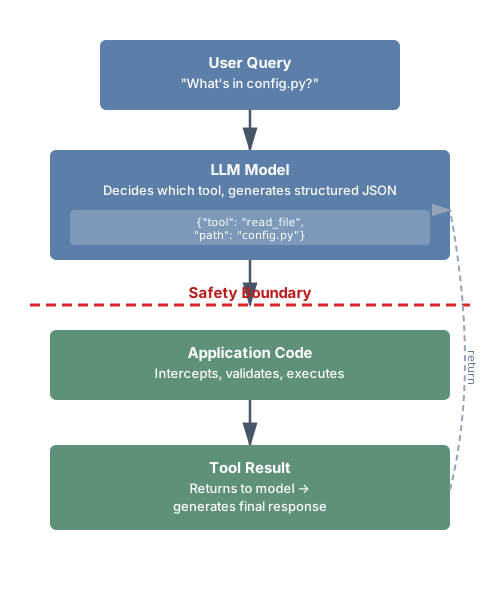
The model doesn’t execute tools directly—it requests tool calls. Your code intercepts those requests, executes the actual operations, and returns results. This separation is critical for safety: you control what actually happens.
Why Tools Matter
Without tools, your AI is limited to information in its training data, context you explicitly provide, and generating text without taking actions. With tools, your AI can access current information by reading files and querying APIs, take actions like creating files and running commands, interact with external systems like databases and services, and verify its own assumptions by checking whether a file exists before suggesting edits.
The difference is profound. A coding assistant without tools can only comment on code you show it. A coding assistant with tools can explore your codebase, run your tests, and verify its suggestions work.
How Function Calling Works Under the Hood
When you register tools with an LLM provider, you’re extending the model’s vocabulary of actions. The model doesn’t “call” anything—it generates structured output in a specific format that your code interprets as a tool call request. This is the same next-token prediction the model always does, but trained to output structured JSON when a tool would be helpful.
Here’s the concrete flow for the Anthropic API:
import anthropic

client = anthropic.Anthropic()

# Define tools
tools = [
    {
        "name": "read_file",
        "description": "Read a file's contents",
        "input_schema": {
            "type": "object",
            "properties": {
                "path": {"type": "string", "description": "File path"}
            },
            "required": ["path"]
        }
    }
]

# Send message with tools
response = client.messages.create(
    model="claude-sonnet-4-20250514",
    max_tokens=1024,
    tools=tools,
    messages=[{"role": "user", "content": "What's in config.py?"}]
)

# Check if model wants to use a tool
if response.stop_reason == "tool_use":
    tool_block = next(b for b in response.content if b.type == "tool_use")
    print(f"Tool: {tool_block.name}")      # "read_file"
    print(f"Input: {tool_block.input}")     # {"path": "config.py"}
    print(f"ID: {tool_block.id}")           # "toolu_abc123"

    # Your code executes the actual operation
    file_content = Path(tool_block.input["path"]).read_text()

    # Send result back
    followup = client.messages.create(
        model="claude-sonnet-4-20250514",
        max_tokens=1024,
        tools=tools,
        messages=[
            {"role": "user", "content": "What's in config.py?"},
            {"role": "assistant", "content": response.content},
            {"role": "user", "content": [
                {
                    "type": "tool_result",
                    "tool_use_id": tool_block.id,
                    "content": file_content
                }
            ]}
        ]
    )
    # Now the model has the file contents and can answer
Three things to notice. First, the model’s tool call is a request—your code decides whether and how to fulfill it. You can validate inputs, check permissions, or refuse the call entirely. Second, tool results go back as a user message. From the model’s perspective, it asked a question and received an answer. Third, the tool_use_id links each result to its corresponding request. This matters when the model makes multiple tool calls in a single response—parallel tool use, which most providers now support.
Types of Tools
Not all tools are created equal. Understanding the spectrum helps you make better design decisions:
Read-only tools retrieve information without changing anything: reading files, searching code, querying databases, fetching API data. These are the safest tools—they can’t cause harm beyond consuming context tokens and compute. Start here when adding tools to your system.
Write tools modify state: creating files, updating databases, sending messages, modifying configurations. These require more careful design because mistakes can have lasting consequences. Always consider: what happens if this tool is called with wrong parameters? Can the action be undone?
Execution tools run arbitrary operations: executing code, running shell commands, deploying applications. These are the most powerful and most dangerous. They should always be sandboxed, time-limited, and require explicit confirmation for destructive operations.
Observation tools provide metadata about the environment rather than direct data: listing available files, checking system status, reporting resource usage. These help the model plan before acting—understanding what’s available before deciding what to do.
A well-designed tool system typically includes tools from multiple categories. CodebaseAI uses read-only tools (read_file, search_codebase) for information gathering and an execution tool (run_tests) for verification—but notably doesn’t include write tools yet. That’s intentional: we add capability incrementally, proving each layer works before adding the next.
Provider Differences in Tool Calling
While the concepts are universal, implementation details vary between LLM providers. Understanding these differences matters if you’re building systems that work across multiple providers or considering switching.
Anthropic (Claude) uses tool_use blocks in the response content with an input_schema field in tool definitions. The model signals tool use via stop_reason: "tool_use". Tool results go back as tool_result content blocks in the user message. Claude supports parallel tool calls—requesting multiple tools in a single response.
OpenAI (GPT-4) uses tool_calls in the response with a parameters field in definitions. The model uses finish_reason: "tool_calls". Results go back as messages with role: "tool". OpenAI also supports parallel tool calls and additionally offers “function calling” as a simpler variant.
Google (Gemini) uses a similar pattern with function_call parts in responses and function_response parts for results.
The schemas are similar enough that abstracting across providers is practical—many teams build a thin adapter layer:
class ToolAdapter:
    """Normalize tool definitions across providers."""

    @staticmethod
    def to_anthropic(tools: list[dict]) -> list[dict]:
        return [{"name": t["name"], "description": t["description"],
                 "input_schema": t["parameters"]} for t in tools]

    @staticmethod
    def to_openai(tools: list[dict]) -> list[dict]:
        return [{"type": "function", "function": {
            "name": t["name"], "description": t["description"],
            "parameters": t["parameters"]}} for t in tools]
This abstraction lets you switch providers without rewriting your tool implementations—only the tool definition format and response parsing change. The tool execution logic stays the same, because the actual operations (reading files, running tests) don’t depend on which model requested them.
For this book, we use Anthropic’s API format in code examples. The concepts transfer directly to any provider. If you’re working with a different provider, the mental model is the same: define what the tool does, describe when to use it, specify its parameters, and handle the results when they come back. Only the JSON structure changes.
Tool Anatomy
Every tool has three components:
Name: What the model calls to invoke it. Clear, unambiguous, action-oriented.
Description: What the tool does and when to use it. This is prompt engineering—the model uses this text to decide whether to call the tool.
Parameters: What inputs the tool accepts. Types, constraints, required vs. optional.
# Tool definition structure
tool_definition = {
    "name": "read_file",
    "description": "Read the contents of a file. Use this when you need to see what's in a specific file.",
    "parameters": {
        "type": "object",
        "properties": {
            "path": {
                "type": "string",
                "description": "Path to the file, relative to project root"
            }
        },
        "required": ["path"]
    }
}
Note: Different providers use slightly different JSON schema formats for tool definitions. Anthropic uses input_schema, OpenAI uses parameters. The concepts are identical—check your provider’s documentation for exact field names.
Designing Tool Schemas
Tool design is interface design. A poorly designed tool is like a poorly designed API—it invites misuse, causes errors, and frustrates everyone involved. But tool design has a dimension that API design doesn’t: every tool definition consumes tokens from your context budget, and the model reads your descriptions to decide what to call. This means tool design is simultaneously API design and prompt engineering.
Naming: Clarity Over Cleverness
Tool names should be action-oriented (read_file, not file or file_contents), unambiguous (search_code, not search—search what?), and familiar, matching patterns the model has seen in training.
Anthropic’s research found that tools with names matching common patterns (like Unix commands) are used 40% more reliably than tools with custom names. The model has seen millions of examples of cat, grep, and ls—it knows how they work.
# Good: Matches familiar patterns
"read_file"      # Like cat
"search_code"    # Like grep
"list_files"     # Like ls
"run_command"    # Like exec

# Bad: Ambiguous or unfamiliar
"file"           # Read? Write? Delete?
"query"          # Query what?
"do_thing"       # What thing?
"codebase_text_search_v2"  # Overly specific, version in name
Descriptions: Prompt Engineering for Tools
The description tells the model when and how to use the tool. This is prompt engineering—treat it with the same care as your system prompt.
Include what the tool does (one sentence), when to use it (conditions), what it returns (output format), and limitations (what it can’t do).
# Weak description
"description": "Reads a file"

# Strong description
"description": """Read the contents of a file from the codebase.

Use this when you need to:
- See the implementation of a specific function or class
- Check configuration files
- Verify file contents before suggesting changes

Returns the file contents as a string. Returns an error if the file doesn't exist or is binary.

Limitations:
- Cannot read files outside the project directory
- Binary files (images, compiled code) will return an error
- Files larger than 100KB are truncated"""
Parameters: Be Explicit About Types and Constraints
Vague parameters lead to malformed calls. The model generates parameter values based on the schema you provide—if the schema is ambiguous, the generated values will be too.
Specify types precisely. A parameter described as “the number of results” could be interpreted as a string (“5”) or an integer (5). Use JSON Schema types explicitly:
"parameters": {
    "type": "object",
    "properties": {
        "query": {
            "type": "string",
            "description": "Search term (e.g., 'def authenticate', 'class User')"
        },
        "max_results": {
            "type": "integer",
            "description": "Maximum results to return",
            "minimum": 1,
            "maximum": 50,
            "default": 10
        },
        "file_type": {
            "type": "string",
            "description": "Filter by file type",
            "enum": ["python", "javascript", "typescript", "any"],
            "default": "any"
        },
        "include_tests": {
            "type": "boolean",
            "description": "Whether to include test files in results",
            "default": False
        }
    },
    "required": ["query"]
}
Notice the enum for file_type—this prevents the model from inventing values like “py” or “.python” that your code doesn’t expect. The min/max on max_results prevents the model from requesting 10,000 results. And the defaults mean the model can call the tool with just the required parameter for the common case.
A common anti-pattern: parameters that accept free-form strings when structured values would be safer. If a parameter should be a file path, say so. If it should be one of three options, use an enum. The more constrained your parameters, the fewer error states you need to handle.
Examples in Descriptions
Models learn from examples. Including usage examples significantly improves correct usage:
"description": """Search for code matching a pattern.

Examples:
- search_code(query="def authenticate") - Find auth functions
- search_code(query="TODO", file_pattern="*.py") - Find TODOs in Python

Returns matches with file path, line number, and context."""
Tool Granularity: Finding the Right Size
One of the most common design mistakes is getting tool granularity wrong. Tools that are too coarse combine multiple responsibilities, making it hard for the model to use them precisely. Tools that are too fine require many sequential calls for simple operations, burning through context budget and increasing latency.
Too coarse: A manage_files tool that reads, writes, deletes, and lists files based on an action parameter. The model has to reason about which action to specify, the description is complex, and errors are harder to handle because they could come from any operation.
Too fine: Separate tools for open_file, read_line, close_file. A simple “read this file” operation now requires three tool calls, each consuming context.
Right-sized: read_file, write_file, list_files, delete_file. Each tool does one thing. The model can combine them for complex operations, but each individual call is clear.
The principle: each tool should map to one action the model might want to take. If you find yourself adding an action or mode parameter, you probably need separate tools. If you find the model making five sequential calls for one conceptual operation, you probably need a higher-level tool.
A useful heuristic from production deployments: if a tool’s description exceeds 200 words, it’s trying to do too much. Split it.
Token-Aware Tool Design
Every tool definition you register consumes tokens from your context window—before any conversation happens. A simple tool definition with name, description, and a few parameters costs 50-100 tokens. An enterprise-grade tool with comprehensive schemas, extensive descriptions, and many parameters can cost 500-1,000 tokens.
This matters. In a production deployment analyzed by researchers in late 2025, seven MCP servers registered their full tool sets and consumed 67,300 tokens—33.7% of a 200K token context window—before a single user message was processed. With smaller context windows, the problem is worse: 50 tools can easily consume 20,000-25,000 tokens, which is most of a 32K window.
The implication for design: don’t register every tool you have. Register the tools relevant to the current task. If your system has 50 possible tools but a typical task only needs 5-8, implement dynamic tool selection—register a base set and add specialized tools based on the user’s first message or the task category.
class DynamicToolRegistry:
    """Register tools based on task context, not all at once."""

    def __init__(self):
        self.all_tools = {}
        self.base_tools = ["read_file", "search_code", "list_files"]

    def get_tools_for_task(self, task_description: str) -> list[dict]:
        """Select relevant tools based on the task."""
        tools = [self.all_tools[name] for name in self.base_tools]

        # Add specialized tools based on task signals
        if any(word in task_description.lower() for word in ["test", "pytest", "spec"]):
            tools.append(self.all_tools["run_tests"])
        if any(word in task_description.lower() for word in ["deploy", "build", "ci"]):
            tools.append(self.all_tools["run_command"])
        if any(word in task_description.lower() for word in ["write", "create", "modify"]):
            tools.append(self.all_tools["write_file"])

        return [t.definition for t in tools]
Keep descriptions concise. Front-load the most important information—the model weighs earlier tokens more heavily. And measure: track which tools are actually called and remove the ones that never get used.
Tool Composition Patterns
Individual tools are building blocks. The real power comes from how tools compose—the model chains multiple tools together to accomplish complex tasks. Understanding composition patterns helps you design tools that work well together.
The Gather-Then-Act Pattern: The model first uses read-only tools to understand the situation, then uses write or execution tools to take action. For CodebaseAI: search for relevant files → read the specific files → run tests to verify understanding. This pattern is natural and safe—the model builds context before committing to action.
The Verify-After-Write Pattern: After making a change, the model uses observation tools to confirm the change worked. Write a file → read the file back → run tests. This catches errors that the write tool itself might not report—like a file that was written successfully but contains a syntax error.
The Fallback Pattern: When one tool fails, the model tries an alternative. File not found with read_file? Try search_code to find the right path. Search returns no results? Try a broader query or different terms. Good error messages enable this pattern by suggesting alternatives.
The Progressive Disclosure Pattern: Start with summary tools, drill down with detail tools. List files in a directory → search for a pattern → read the matching file → read a specific function. Each step narrows the focus, avoiding the context explosion of reading everything at once.
These patterns emerge naturally when tools are well-designed—clear names, focused responsibilities, and error messages that point to alternatives. They break down when tools overlap in functionality (the model can’t decide which to use), when error messages are vague (the model can’t figure out what to try next), or when tools return too much data (the context fills before the model can act).
The Model Context Protocol (MCP)
As tool ecosystems grow, standardization becomes essential. The Model Context Protocol (MCP) is the open standard for tool integration—a common interface that lets tools work across different AI systems. If context engineering is about getting the right information to the model, MCP is the infrastructure that makes that possible at scale.
From Custom to Standard
Before MCP, every AI application implemented its own tool integration. Your Claude tools had different schemas than your OpenAI tools. Your Cursor extensions couldn’t be reused in VS Code. Each integration was custom-built, tested once, and maintained separately. This is the same problem the web faced before HTTP standardized communication between browsers and servers.
Introduced by Anthropic in November 2024, MCP was donated to the Linux Foundation’s Agentic AI Foundation in December 2025—a directed fund co-founded with contributions from Block (the Goose agent framework) and OpenAI (the AGENTS.md standard). The foundation’s platinum members include AWS, Anthropic, Block, Bloomberg, Cloudflare, Google, Microsoft, and OpenAI. This cross-vendor governance is significant: it means MCP isn’t controlled by any single company, and competing providers have committed to supporting it.
By late 2025, MCP had reached 97 million monthly SDK downloads across Python and TypeScript, with over 10,000 active servers and first-class client support in Claude, ChatGPT, Cursor, Gemini, Microsoft Copilot, and VS Code (as of early 2026; these numbers are growing rapidly). OpenAI announced MCP support in March 2025 across the Agents SDK, Responses API, and ChatGPT desktop—a decisive signal that the industry was converging on a single standard rather than fragmenting.
What MCP Standardizes
MCP standardizes three things that matter for context engineering:
Tool discovery: AI systems can discover what tools are available without hardcoding them. Servers advertise capabilities through .well-known URLs, and the MCP Registry (launched in preview September 2025, with 407% growth in entries as of early 2026) provides a global directory where companies publish their MCP servers. This means your context architecture can be dynamic—tools appear and disappear based on what’s needed.
Tool invocation: A common protocol for calling tools and receiving results, regardless of what the tool does or where it runs. The same interface works for reading a file, querying a database, or calling an external API.
Context sharing: Tools can provide context to the model—not just results, but metadata about what’s available, what’s changed, and what the model should know. MCP servers can expose “resources”—structured data like file contents, database schemas, or API documentation—that clients can pull into the model’s context window on demand. They can also expose “prompts”—reusable prompt templates with parameters—that standardize how specific tasks are framed. This is where MCP connects directly to context engineering: it’s a standardized way to assemble context from external sources.
The combination of tools, resources, and prompts makes MCP more than a function-calling protocol. It’s a context assembly protocol—a way for external systems to contribute exactly the right information to the model’s context window, in the right format, at the right time.
MCP Architecture
MCP uses a client-server architecture. Your AI application is the client. External capabilities are provided by servers. Communication happens over a transport layer.
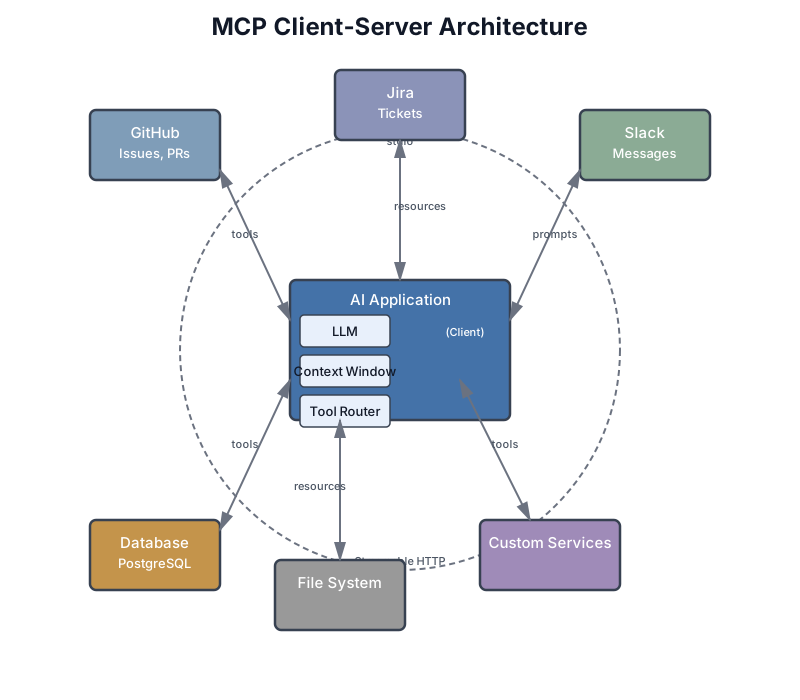
Transport options evolved significantly in the protocol’s first year. The original stdio transport works for local development—your MCP server runs as a subprocess, communicating through standard input/output. For production, the November 2025 specification introduced Streamable HTTP transport, replacing the earlier server-sent events (SSE) approach that couldn’t handle thousands of concurrent connections. Streamable HTTP supports stateless deployments, chunked transfer encoding for large payloads, and cloud-native scaling patterns.
Authorization also matured. The November 2025 spec made PKCE (Proof Key for Code Exchange) mandatory for OAuth2 flows and introduced Client ID Metadata Documents (CIMD) as the default registration mechanism—enabling authorization servers to properly manage and audit client access without requiring pre-registration.
The MCP Ecosystem in Practice
Understanding the ecosystem helps you decide what to build versus what to reuse. As of late 2025, the MCP ecosystem includes several categories of servers:
Developer tool integrations are the largest category. Servers for GitHub (issues, PRs, repositories), Jira (tickets, sprints), Slack (channels, messages), and dozens of other services let AI coding tools interact with your development workflow without custom integrations. When Claude Code can pull your Sentry errors, read your Notion documentation, and check your CI/CD pipeline—that’s MCP servers at work.
Database access servers provide structured access to PostgreSQL, SQLite, MongoDB, and other data stores. These are particularly useful because they can enforce access controls, limit query scope, and format results for model consumption—rather than giving the model raw SQL access.
File and content servers expose local and cloud filesystems, including specialized servers for PDF processing, image analysis, and document parsing. These turn unstructured content into structured context the model can reason about.
Infrastructure and deployment servers bridge AI tools with cloud platforms, container orchestration, and monitoring systems. These enable the “AI-assisted DevOps” pattern, where the model can check deployment status, read logs, and even trigger deployments (with appropriate confirmation gates).
The MCP Registry (modelcontextprotocol.io) serves as the discovery layer—a global directory where you can find servers by capability, read usage documentation, and evaluate trust. Think of it as npm or PyPI for AI tool integrations. For enterprises, the registry supports subregistries—curated, filtered views that enforce organizational policies about which servers are approved for use.
A practical approach: before building a custom tool, check the registry. The ecosystem is growing fast and someone may have already built what you need. If they have, evaluate it like any dependency—check the source, review the security posture, and test it in a sandbox before deploying to production. If they haven’t, consider whether your custom tool should be an MCP server that others can use too.
Building an MCP Server: A Worked Example
Let’s build an MCP server that exposes your codebase to any MCP-compatible AI tool—Claude Code, Cursor, VS Code, or your own application. This server provides three capabilities: reading files, searching code, and listing project structure.
"""
CodebaseAI MCP Server

A Model Context Protocol server that provides codebase access
to any MCP-compatible client (Claude Code, Cursor, VS Code, etc.)

Run locally:  python codebase_mcp_server.py
Configure in: claude_desktop_config.json or .cursor/mcp.json
"""

from pathlib import Path
from mcp.server import Server
from mcp.types import Tool, TextContent
import asyncio
import fnmatch
import re

# Initialize the MCP server with a descriptive name
server = Server("codebase-context")

# Configuration
PROJECT_ROOT = Path(".").resolve()
ALLOWED_EXTENSIONS = {".py", ".js", ".ts", ".md", ".json", ".yaml", ".yml", ".toml"}
MAX_FILE_SIZE = 50_000  # characters


@server.tool()
async def read_file(path: str) -> list[TextContent]:
    """
    Read a source file from the project.

    Use when you need to see the implementation of a specific function,
    check configuration, or verify file contents before suggesting changes.

    Returns file contents as text. Errors if file doesn't exist,
    is outside the project, or is a binary file.

    Args:
        path: File path relative to project root (e.g., "src/auth.py")
    """
    target = (PROJECT_ROOT / path).resolve()

    # Security: must be within project
    try:
        target.relative_to(PROJECT_ROOT)
    except ValueError:
        return [TextContent(type="text", text=f"Error: Path '{path}' is outside the project directory.")]

    if target.suffix not in ALLOWED_EXTENSIONS:
        return [TextContent(type="text", text=f"Error: File type '{target.suffix}' not allowed. Allowed: {', '.join(sorted(ALLOWED_EXTENSIONS))}")]

    if not target.is_file():
        return [TextContent(type="text", text=f"Error: File not found: {path}. Use list_files to see available files.")]

    try:
        content = target.read_text()
        if len(content) > MAX_FILE_SIZE:
            content = content[:MAX_FILE_SIZE] + f"\n\n[Truncated at {MAX_FILE_SIZE} chars — {len(content)} total]"
        return [TextContent(type="text", text=f"=== {path} ===\n{content}\n=== End {path} ===")]
    except UnicodeDecodeError:
        return [TextContent(type="text", text=f"Error: '{path}' appears to be a binary file.")]


@server.tool()
async def search_code(
    query: str,
    file_pattern: str = "*",
    max_results: int = 10
) -> list[TextContent]:
    """
    Search for code matching a text pattern across the project.

    Use to find where something is implemented, locate specific
    functions or classes, or discover how features work.

    Do NOT use for reading specific files (use read_file instead).

    Args:
        query: Text pattern to search for (supports regex)
        file_pattern: Glob pattern to filter files (e.g., "*.py", "tests/*.py")
        max_results: Maximum results to return (1-50, default 10)
    """
    max_results = max(1, min(50, max_results))
    results = []

    try:
        pattern = re.compile(query, re.IGNORECASE)
    except re.error:
        # Fall back to literal search if regex is invalid
        pattern = re.compile(re.escape(query), re.IGNORECASE)

    for file_path in PROJECT_ROOT.rglob("*"):
        if not file_path.is_file():
            continue
        if file_path.suffix not in ALLOWED_EXTENSIONS:
            continue
        if not fnmatch.fnmatch(file_path.name, file_pattern):
            continue
        # Skip hidden directories and common noise
        if any(part.startswith('.') for part in file_path.relative_to(PROJECT_ROOT).parts):
            continue
        if any(part in ('node_modules', '__pycache__', '.git', 'venv') for part in file_path.parts):
            continue

        try:
            content = file_path.read_text()
            for i, line in enumerate(content.splitlines(), 1):
                if pattern.search(line):
                    rel_path = file_path.relative_to(PROJECT_ROOT)
                    results.append(f"{rel_path}:{i}: {line.strip()}")
                    if len(results) >= max_results:
                        break
        except (UnicodeDecodeError, PermissionError):
            continue

        if len(results) >= max_results:
            break

    if not results:
        return [TextContent(type="text", text=f"No matches found for '{query}' in {file_pattern} files.")]

    header = f"=== Search: '{query}' ({len(results)} results) ===\n"
    body = "\n".join(results)
    return [TextContent(type="text", text=header + body)]


@server.tool()
async def list_files(
    directory: str = ".",
    pattern: str = "*",
    max_depth: int = 3
) -> list[TextContent]:
    """
    List files in the project directory tree.

    Use to understand project structure, find files before reading them,
    or discover what's available in a directory.

    Args:
        directory: Directory relative to project root (default: root)
        pattern: Glob pattern to filter files (e.g., "*.py")
        max_depth: Maximum directory depth to traverse (1-5, default 3)
    """
    target = (PROJECT_ROOT / directory).resolve()

    try:
        target.relative_to(PROJECT_ROOT)
    except ValueError:
        return [TextContent(type="text", text=f"Error: Directory '{directory}' is outside the project.")]

    if not target.is_dir():
        return [TextContent(type="text", text=f"Error: '{directory}' is not a directory.")]

    max_depth = max(1, min(5, max_depth))
    files = []

    for path in sorted(target.rglob(pattern)):
        if not path.is_file():
            continue
        rel = path.relative_to(PROJECT_ROOT)
        if len(rel.parts) > max_depth + 1:
            continue
        if any(part.startswith('.') or part in ('node_modules', '__pycache__', 'venv') for part in rel.parts):
            continue
        files.append(str(rel))

    if not files:
        return [TextContent(type="text", text=f"No files matching '{pattern}' in '{directory}'.")]

    return [TextContent(type="text", text=f"=== Files ({len(files)}) ===\n" + "\n".join(files))]


if __name__ == "__main__":
    asyncio.run(server.run_stdio())
To use this server with Claude Code, add it to your configuration:
{
    "mcpServers": {
        "codebase": {
            "command": "python",
            "args": ["path/to/codebase_mcp_server.py"],
            "env": {"PROJECT_ROOT": "/your/project"}
        }
    }
}
For Cursor, the configuration goes in .cursor/mcp.json with the same structure. For VS Code, use the MCP extension settings. The server code is identical in every case—that’s the point of standardization.
Notice how the MCP server mirrors the same design principles we established for direct tool implementations: clear descriptions with “use when” and “do NOT use” guidance, security validation on every input, helpful error messages with recovery suggestions, and output formatting with clear delimiters. The protocol changes; the engineering doesn’t.
A few implementation notes worth highlighting. The @server.tool() decorator handles the JSON Schema generation from your function signature and docstring—you don’t need to manually write tool definitions. The async functions are required by MCP’s async architecture, even if your underlying operations are synchronous. And the run_stdio() transport is the simplest option for local development; for production deployment, you’d switch to Streamable HTTP with proper authentication.
Testing your MCP server is straightforward. The MCP Inspector tool (available via npx @modelcontextprotocol/inspector) lets you send test requests and see responses without connecting to an LLM. Start there before configuring your AI tool to use it—debugging protocol issues is easier with a dedicated tool than through the AI’s behavior.
When to Use MCP
Use MCP when you’re building tools for multiple AI systems, sharing tools across teams, integrating with the broader MCP ecosystem (10,000+ existing servers), or building systems that need to compose tools dynamically. If your codebase context server needs to work with both Claude Code and Cursor, MCP means writing it once.
Skip MCP when building a single application with dedicated tools, doing early prototyping where speed matters more than interoperability, or when latency overhead of the protocol layer matters. For CodebaseAI, we implement tools directly to keep the focus on fundamentals—the concepts transfer directly when you’re ready for MCP.
For production deployments, use Streamable HTTP transport (not stdio, which is designed for local development). The November 2025 specification also introduced Tasks for long-running operations—if your tool needs to index a large codebase or run an extended test suite, Tasks let the client poll for status rather than holding a connection open.
For detailed protocol specifications, SDK references, and the full framework comparison between MCP and alternatives like LangChain and LlamaIndex, see Appendix A.
MCP vs. Direct Function Calling
Understanding when to use MCP versus direct function calling is a practical design decision you’ll face. They’re not competing approaches—they solve different problems.
Direct function calling is what we’ve built throughout this chapter: you define tool schemas, pass them to the LLM API, and handle tool calls in your application code. The tools are part of your application. This is simpler, faster (no protocol overhead), and gives you complete control. The downside is portability—your tools work with your application and nothing else.
MCP separates tools from applications. A tool defined as an MCP server works with any MCP client—Claude Code, Cursor, VS Code, ChatGPT, or your custom application. The cost is protocol overhead and additional complexity. The benefit is an ecosystem: instead of building every tool yourself, you can use thousands of existing MCP servers, and tools you build can be shared across your entire toolchain.
The practical decision matrix: if you’re building a product with dedicated tools that won’t be reused elsewhere, use direct function calling. If you’re building developer tools, internal infrastructure, or anything that should compose with other AI systems, use MCP. Many production systems use both—direct function calling for core application logic, MCP for extensible integrations.
One common evolution path: start with direct function calling to get your system working, then extract reusable tools into MCP servers as your needs grow. The tool implementation stays largely the same—you’re just changing how it’s exposed.
Managing Tool Outputs in Context
Tool results become part of the context, consuming token budget. A file read returning 5,000 tokens leaves less room for conversation history, system prompts, and the model’s response. This isn’t a minor concern—in tool-heavy workflows, tool outputs often dominate the context window.
The Context Budget Problem
Consider a typical agentic workflow: the model reads three files (3,000 tokens each), searches the codebase (500 tokens of results), and runs tests (2,000 tokens of output). That’s 11,500 tokens of tool output alone—before counting the system prompt, conversation history, tool definitions, and the model’s own responses. In a 32K context window, you’ve consumed over a third of your budget on a single cycle of tool use.
The problem compounds in agentic loops. Each iteration adds more tool results to the conversation history. After five iterations, tool outputs can easily exceed 50,000 tokens. Without management, the system hits context limits and either fails or starts losing important earlier context.
Strategies for Tool Output Management
Truncation: Limit output size and indicate when truncated. This is the simplest strategy and should be your default.
def read_file_with_limit(path: str, max_chars: int = 10000) -> str:
    content = Path(path).read_text()
    if len(content) > max_chars:
        return content[:max_chars] + f"\n\n[Truncated - {len(content)} chars total]"
    return content
Summarization: For large outputs, summarize before returning. Use a fast, cheap model to compress verbose tool output into the essential information.
async def summarize_test_output(raw_output: str, max_tokens: int = 500) -> str:
    """Compress verbose test output to key findings."""
    if len(raw_output) < max_tokens * 4:  # Rough char-to-token ratio
        return raw_output

    summary = await fast_model.complete(
        f"Summarize these test results. Include: pass/fail counts, "
        f"failed test names, and error messages.\n\n{raw_output[:8000]}"
    )
    return f"[Summarized from {len(raw_output)} chars]\n{summary}"
Pagination: For search results, return pages rather than everything. Let the model request more if needed.
Formatting: Use clear delimiters so the model knows where output begins and ends:
def format_file_result(path: str, content: str) -> str:
    return f"=== File: {path} ===\n{content}\n=== End of {path} ==="
Progressive detail: Return a summary first, with the option to drill down. A search tool might return file names and line numbers initially, letting the model call read_file only on the files that look relevant.
Structured vs. unstructured output: When possible, return structured data rather than raw text. A test runner that returns {"passed": 45, "failed": 2, "failures": [{"test": "test_auth", "error": "AssertionError"}]} gives the model more to work with than a wall of pytest output. The model can quickly determine the important information (2 failures, what failed) without parsing verbose text. For cases where raw output is needed—like file contents or detailed logs—wrap it in clear delimiters so the model knows where useful content begins and ends.
Selective inclusion: Not every piece of information a tool produces needs to go into the context. A database query tool might return column metadata, query execution time, and results. The model probably only needs the results. Strip the metadata unless the model specifically asks for it. This is the tool equivalent of the context engineering principle from earlier chapters: relevance over completeness.
The Tool Output Explosion
A production anti-pattern worth highlighting: tools that return everything they can instead of everything the model needs. A database query tool that returns all columns when the model only asked about user names. A log search that returns full stack traces when the model only needs error messages. A file listing that includes every file in a 10,000-file project.
The fix is the same principle from Chapter 4’s system prompt design: give the model what it needs, not everything you have. Design tool outputs like you design context—relevance over completeness.
Measuring Context Consumption
In practice, you need to track how much context your tools consume. Build this into your tool executor:
def estimate_tokens(text: str) -> int:
    """Rough token estimate: ~4 chars per token for English text, ~3 for code."""
    return len(text) // 3  # Conservative estimate for mixed content

class ContextAwareToolExecutor:
    """Track and limit tool output token consumption."""

    def __init__(self, tools, max_tool_tokens: int = 40000):
        self.tools = tools
        self.max_tool_tokens = max_tool_tokens
        self.tokens_used = 0

    def execute(self, tool_name: str, params: dict) -> ToolResult:
        result = self.tools.execute(tool_name, params)

        if result.success:
            tokens = estimate_tokens(str(result.data))
            self.tokens_used += tokens

            if self.tokens_used > self.max_tool_tokens:
                # Summarize rather than returning full output
                result.data = self._compress_output(result.data)

        return result

    def budget_remaining(self) -> int:
        return max(0, self.max_tool_tokens - self.tokens_used)
This connects directly to the context window management from Chapter 2. Your total context budget is fixed. Tool definitions, conversation history, system prompt, and tool results all compete for the same space. Managing tool output size isn’t optimization—it’s basic resource management.
Error Handling: Design for Failure
Every tool call can fail. Files don’t exist. Services timeout. Permissions are denied. Invalid inputs are passed. The question isn’t whether failures will happen—it’s how you handle them.
The Error Handling Hierarchy
Level 1: Validation — Catch problems before execution
def read_file(path: str) -> str:
    # Validate input
    if not path:
        return {"error": "Path is required", "error_type": "validation"}

    if ".." in path:
        return {"error": "Path traversal not allowed", "error_type": "security"}

    # Check file exists before reading
    full_path = PROJECT_ROOT / path
    if not full_path.exists():
        return {"error": f"File not found: {path}", "error_type": "not_found"}

    # Proceed with operation...
Level 2: Execution — Handle failures during operation
def run_tests(test_path: str, timeout: int = 60) -> dict:
    try:
        result = subprocess.run(
            ["pytest", test_path, "-v"],
            capture_output=True,
            text=True,
            timeout=timeout,
            cwd=PROJECT_ROOT
        )
        return {
            "success": result.returncode == 0,
            "output": result.stdout,
            "errors": result.stderr
        }
    except subprocess.TimeoutExpired:
        return {"error": f"Tests timed out after {timeout}s", "error_type": "timeout"}
    except FileNotFoundError:
        return {"error": "pytest not found - is it installed?", "error_type": "dependency"}
    except Exception as e:
        return {"error": str(e), "error_type": "unknown"}
Level 3: Recovery — Help the model recover from errors
def handle_tool_error(error_result: dict, tool_name: str) -> str:
    """Format error for model with recovery suggestions."""

    error_type = error_result.get("error_type", "unknown")
    error_msg = error_result.get("error", "Unknown error")

    suggestions = {
        "not_found": "Try listing files first to verify the path exists.",
        "validation": "Check the parameter format and try again.",
        "timeout": "The operation took too long. Try a smaller scope.",
        "security": "This operation is not allowed for security reasons.",
        "dependency": "A required dependency is missing.",
    }

    recovery = suggestions.get(error_type, "Check the error message and try a different approach.")

    return f"""Tool '{tool_name}' failed:
Error: {error_msg}
Suggestion: {recovery}"""
Error Response Format
Consistent error formats help the model understand and recover:
# Successful result
{
    "success": True,
    "data": "file contents here..."
}

# Error result
{
    "success": False,
    "error": "File not found: auth.py",
    "error_type": "not_found",
    "suggestion": "Use list_files to see available files"
}
Graceful Degradation
When tools fail, provide context for the model to continue—explain what went wrong and suggest alternatives. The model should be able to recover without repeatedly calling the same failing tool. A common failure pattern: the model calls a tool, gets an error, and retries the exact same call. Your error messages should redirect: “File not found: auth.py. Did you mean src/auth.py? Use search_code(query='auth') to find authentication-related files.”
Common Error Handling Mistakes
Swallowing errors silently. A tool that returns an empty string on failure gives the model nothing to work with. It may assume the file is empty, the search found nothing, or the tests passed—when in reality, something went wrong. Always return explicit error information.
Exposing raw stack traces. The model doesn’t need to see a Python traceback. It needs to know what went wrong, why, and what to do next. Transform exceptions into structured error objects before returning them.
Missing timeout handling. Every external operation needs a timeout. A tool that hangs indefinitely blocks the entire agentic loop. The model can’t recover from something that never returns. Set conservative timeouts and return clear error messages when they trigger: “Database query timed out after 30s. The query may be too broad—try adding filters.”
Inconsistent error formats. If read_file returns {"error": "not found"} and search_code returns "ERROR: no results", the model has to learn two different error formats. Standardize. Use the same error structure across all tools so the model can handle errors consistently.
Tool Versioning and Breaking Changes
Your tools are contracts. The model learns these contracts from your tool definitions—what parameters they accept, what they return, what they do. When you change a tool’s schema, you’re breaking that contract. The model has no way to know the change happened; it only sees the new definition in the next message. Breaking changes in tools are subtle but devastating: the model will confidently call a tool with old parameters against a new schema, causing silent failures or confusing errors.
What Counts as a Breaking Change
Not all modifications to tools are breaking:
Non-breaking changes (safe to make without versioning):
- Adding a new optional parameter with a default value
- Returning additional fields in the response that the model didn’t previously see
- Making a required parameter optional
- Accepting a wider range of input values
Breaking changes (require versioning or migration):
- Renaming a parameter (the model will still use the old name)
- Changing a parameter type (from string to integer, or vice versa)
- Adding a new required parameter (existing calls won’t provide it)
- Removing a parameter (existing calls might still use it)
- Changing the response format (fields removed, reordered, or renamed)
- Changing parameter constraints (making a parameter more restrictive)
# Breaking: renamed parameter
# Before:
{"name": "search_code", "parameters": {
    "properties": {"query": {"type": "string"}, "limit": {"type": "integer"}}
}}

# After:
{"name": "search_code", "parameters": {
    "properties": {"query_string": {"type": "string"}, "max_results": {"type": "integer"}}
}}
# The model will still use "query" and "limit", causing failures

# Non-breaking: adding optional parameter
# Before:
{"name": "read_file", "parameters": {
    "properties": {"path": {"type": "string"}},
    "required": ["path"]
}}

# After:
{"name": "read_file", "parameters": {
    "properties": {
        "path": {"type": "string"},
        "max_lines": {"type": "integer", "default": 1000}
    },
    "required": ["path"]
}}
# Existing calls still work; new calls can use max_lines
Strategy 1: Versioned Tool Names
The simplest and most reliable approach: use versioned tool names. Instead of renaming search_code, create search_code_v2.
tools = [
    {
        "name": "search_code",  # v1, original version
        "description": "Search for code matching a pattern. (Deprecated: use search_code_v2)",
        "input_schema": {...}
    },
    {
        "name": "search_code_v2",  # v2, with improved parameters
        "description": "Search code with better filtering. Supports file type, line number ranges, and semantic search.",
        "input_schema": {
            "type": "object",
            "properties": {
                "query": {"type": "string"},
                "file_pattern": {"type": "string", "default": "*"},
                "search_mode": {
                    "type": "string",
                    "enum": ["regex", "literal", "semantic"],
                    "default": "literal"
                }
            },
            "required": ["query"]
        }
    }
]
When deploying v2, include both versions. The model can call either. Implement v1 as a wrapper around v2 for backward compatibility:
def execute_tool(tool_name: str, params: dict) -> dict:
    if tool_name == "search_code":
        # v1: translate to v2 call
        return execute_search_code_v2(
            query=params["query"],
            file_pattern=params.get("file_pattern", "*"),
            search_mode="literal"  # v1 always uses literal search
        )
    elif tool_name == "search_code_v2":
        return execute_search_code_v2(**params)
Advantages: The model can use either version. Existing conversations keep working. No confusion about which version is current.
Disadvantages: You maintain two versions. Eventually, you need a deprecation period before removing v1.
Strategy 2: Schema Migration with Deprecation Period
For long-lived systems, versioning can become messy. An alternative is a careful migration strategy:
- Announce deprecation (2 weeks before change): Update the tool description to indicate the parameter change is coming and what will change.
{
    "name": "read_file",
    "description": """Read a file's contents.

DEPRECATION WARNING: The 'limit' parameter will be renamed to 'max_lines' on 2026-03-01.
New tool signature: read_file(path, max_lines=1000, return_metadata=false)

To prepare, update calls to use max_lines instead of limit."""
}
- Accept both names (2-week window): During the deprecation period, accept both the old and new parameter names. The model might still use the old name, but the tool works either way.
def read_file_impl(path: str, max_lines: int = 1000, limit: int = None, **kwargs) -> dict:
    """Accept both 'max_lines' (new) and 'limit' (old) for compatibility."""
    # Prefer the new parameter name
    lines_to_read = max_lines if limit is None else limit
    return {...}
- Remove old parameter (after deprecation period): The model may still try the old name, but since the tool has shifted all context to the new name, the schema change is minimal.
Advantages: Smooth transition. Existing systems keep working during the window. Users have time to adapt.
Disadvantages: Requires discipline. Easy to forget the deprecation period and cause breakage. Intermediate state has both parameters.
How the Model Handles Schema Changes
Understanding this is critical. The model has no memory of old schemas. It learns what’s possible from the tool definition provided in each message. If you send a message with new tool definitions, the model will use those definitions starting immediately in that response.
# Message 1: Old schema
tools = [
    {"name": "search_code", "parameters": {"properties": {"query": ..., "limit": ...}}}
]
response = client.messages.create(messages=[...], tools=tools)
# Model calls: search_code(query="auth", limit=10)

# Message 2: New schema (renamed parameters)
tools = [
    {"name": "search_code", "parameters": {"properties": {"query": ..., "max_results": ...}}}
]
response = client.messages.create(messages=[...], tools=tools)
# Model calls: search_code(query="auth", max_results=10)
# This works because the model used the new schema it was given

# Problem: within the same message, the tool definition is consistent
# But across messages (different API calls), changes propagate immediately
This is why versioned names are safer than schema migration. With versioned names, both versions exist simultaneously, and the model gradually shifts to the new one as conversations progress. With schema migration, you have a hard cutover point, and any model using the old schema in its cached context will suddenly fail.
Best Practice: Treat Tool Definitions Like API Contracts
Think of your tool definitions as published API contracts. In software engineering, we don’t casually rename API parameters—we deprecate the old version, release a new version, and give users time to migrate. Apply the same rigor to tools.
For stable tools:
- Use semantic versioning: v1, v2, v3 as major versions
- Maintain backward compatibility within major versions
- Give at least 2 weeks notice before removing old versions
- Document migration paths clearly
# Well-versioned tools
tools = [
    {"name": "read_file_v1", "description": "Deprecated. Use read_file_v2."},
    {"name": "read_file_v2", "description": "Read file, supports line ranges"},
    {"name": "read_file_v3", "description": "Read file, supports encoding and metadata"},
]

# Implementation intelligently routes based on version
def read_file_router(tool_name: str, params: dict) -> dict:
    if tool_name == "read_file_v1":
        return read_file_v1_impl(params)
    elif tool_name == "read_file_v2":
        return read_file_v2_impl(params)
    elif tool_name == "read_file_v3":
        return read_file_v3_impl(params)
This approach scales. Users of the system see three options and can choose which to use. New conversations will naturally gravitate to v3. Old conversations can keep using v1 indefinitely without breaking.
Security Boundaries
Tools let your AI take actions. That’s powerful—and dangerous. A model with unrestricted file access can read sensitive data. A model with command execution can delete files, install malware, or exfiltrate data. Security isn’t paranoia; it’s engineering.
Three Core Principles
Least privilege. Give tools only the permissions they need. A file reader should be restricted to specific directories and file types. A command runner should have an allowlist of permitted commands. Path validation, extension checking, and root directory constraints are your first line of defense.
Confirmation for destructive actions. Any tool that modifies state—writing files, running commands, changing configuration—should require explicit user confirmation before executing. The confirmation should describe what will happen in plain language, not just pass the action through silently.
Sandboxing. Commands should run in isolated environments with restricted PATH, temporary directories, and timeouts. Never give an AI unrestricted shell access, regardless of how well-intentioned the use case.
Real-World Security Failures
These principles aren’t theoretical. The MCP ecosystem’s rapid growth in 2025 produced real security incidents that illustrate what goes wrong:
The supply chain attack (2025): A single npm package vulnerability (CVE-2025-6514) in a popular MCP server component affected over 437,000 downloads through a command injection flaw. The vulnerability allowed arbitrary command execution on any machine running the affected server. The lesson: MCP servers are code running on your machine with your permissions. Vet them like any dependency.
The confused deputy: During an enterprise MCP integration launch, a caching bug caused one customer’s data to become visible to another customer’s AI agent. The tool itself worked correctly—the context isolation between tenants was the failure. When tools access shared resources, user-level isolation isn’t optional; it’s the first thing to build.
The inspector backdoor: Anthropic’s own MCP Inspector developer tool contained a vulnerability that allowed unauthenticated remote code execution via its proxy architecture. Even debugging tools need security boundaries. If it runs on your machine and accepts input, it’s an attack surface.
These incidents share a pattern: the tool worked as designed, but the security boundary around it was insufficient. Correct tool behavior isn’t enough—you need correct boundaries. The security mindset for tool-using AI systems is: assume the model will eventually attempt every action your tools make possible. If a tool can read files outside the project directory, the model will eventually try. If a tool can execute arbitrary commands, the model will eventually run something dangerous. Security boundaries aren’t protecting against malice—they’re protecting against the inevitability of a model making a judgment call that humans wouldn’t make.
Defense in Depth
Don’t rely on a single security layer. Stack defenses:
class SecureToolExecutor:
    """Multiple security layers for tool execution."""

    def execute(self, tool_name: str, params: dict, user_context: dict) -> dict:
        # Layer 1: Input validation
        if not self._validate_inputs(tool_name, params):
            return {"error": "Invalid input", "error_type": "validation"}

        # Layer 2: Permission check
        if not self._user_has_permission(user_context, tool_name):
            return {"error": "Permission denied", "error_type": "authorization"}

        # Layer 3: Rate limiting
        if not self._within_rate_limit(user_context["user_id"], tool_name):
            return {"error": "Rate limit exceeded", "error_type": "rate_limit"}

        # Layer 4: Confirmation for destructive actions
        if tool_name in self.DESTRUCTIVE_TOOLS:
            if not self._get_confirmation(tool_name, params):
                return {"error": "Cancelled by user", "error_type": "cancelled"}

        # Layer 5: Sandboxed execution
        return self._execute_sandboxed(tool_name, params)

        # Layer 6: Output validation (post-execution)
        # Check that the output doesn't contain sensitive data
Permission Models
Different tools need different levels of trust. A practical approach is to categorize tools into tiers:
Tier 1 — Unrestricted: Read-only tools that can’t cause harm. File reads, code searches, status checks. These run without confirmation.
Tier 2 — Logged: Tools that access sensitive data but don’t modify it. Database queries, API reads, log access. These run without confirmation but generate audit logs.
Tier 3 — Confirmed: Tools that modify state reversibly. Writing files (with backups), updating configuration, creating resources. These require user confirmation before execution.
Tier 4 — Restricted: Tools that make irreversible changes. Deleting files, sending emails, deploying code, running arbitrary commands. These require explicit confirmation per invocation and should be logged with full context.
class TieredToolExecutor:
    """Execute tools based on permission tiers."""

    TOOL_TIERS = {
        "read_file": 1, "search_code": 1, "list_files": 1,
        "query_database": 2, "read_logs": 2,
        "write_file": 3, "update_config": 3,
        "delete_file": 4, "send_email": 4, "run_command": 4,
    }

    def execute(self, tool_name: str, params: dict) -> ToolResult:
        tier = self.TOOL_TIERS.get(tool_name, 4)  # Default to most restricted

        if tier >= 2:
            self.audit_log(tool_name, params)

        if tier >= 3:
            description = self.describe_action(tool_name, params)
            if not self.get_user_confirmation(description):
                return ToolResult(success=False, error="Cancelled", error_type="cancelled")

        return self._execute(tool_name, params)
This tiered approach lets you add capability incrementally. Start with Tier 1 tools only. Once you’re confident in the model’s judgment, add Tier 2. Add higher tiers as your confidence—and your security infrastructure—grows.
The CodebaseAI implementation demonstrates these principles in practice—the CodebaseTools class validates paths against allowed roots, checks file extensions, uses timeouts for subprocess execution, and formats errors with recovery suggestions. Note that this section covers tool-level security—designing individual tools to be safe. Chapter 14 addresses system-level security: prompt injection defenses, context isolation, output filtering for sensitive data, and adversarial testing. Together, these two layers form the defense-in-depth approach that production systems require.
CodebaseAI Evolution: Adding Tools
Chapter 7’s CodebaseAI retrieved relevant code and generated answers. Now we make it capable of action—reading files on demand, searching the codebase, and running tests.
from pathlib import Path
from dataclasses import dataclass
from typing import Callable
import subprocess
import json

@dataclass
class ToolResult:
    """Standardized tool result."""
    success: bool
    data: str | dict | None = None
    error: str | None = None
    error_type: str | None = None

class CodebaseTools:
    """
    Tools for CodebaseAI v0.7.0.

    Provides three capabilities:
    - read_file: Read source files with security boundaries
    - search_codebase: Search indexed code using RAG
    - run_tests: Execute tests with sandboxing
    """

    VERSION = "0.7.0"

    def __init__(
        self,
        project_root: str,
        rag_system,  # CodebaseRAGv2 from Chapter 7
        allowed_extensions: list[str] = None,
        confirm_destructive: Callable[[str], bool] = None
    ):
        self.project_root = Path(project_root).resolve()
        self.rag = rag_system
        self.allowed_extensions = allowed_extensions or [".py", ".js", ".ts", ".md", ".txt", ".json", ".yaml", ".yml"]
        self.confirm = confirm_destructive or (lambda x: True)

        # Tool definitions for the model
        self.tool_definitions = [
            self._read_file_definition(),
            self._search_codebase_definition(),
            self._run_tests_definition(),
        ]

    def _read_file_definition(self) -> dict:
        return {
            "name": "read_file",
            "description": """Read file contents. Use when you need to see implementation details or verify file contents. Only reads files within project; large files truncated.
Examples: read_file(path="src/auth.py"), read_file(path="config/settings.json")""",
            "parameters": {
                "type": "object",
                "properties": {
                    "path": {"type": "string", "description": "Path relative to project root"}
                },
                "required": ["path"]
            }
        }

    def _search_codebase_definition(self) -> dict:
        return {
            "name": "search_codebase",
            "description": """Search for code using semantic search. Use to find implementations, locate usages, or discover related code.
Examples: search_codebase(query="authentication"), search_codebase(query="class User", max_results=5)""",
            "parameters": {
                "type": "object",
                "properties": {
                    "query": {"type": "string", "description": "Function name, class name, or concept"},
                    "max_results": {"type": "integer", "description": "Max results (1-20)", "default": 5}
                },
                "required": ["query"]
            }
        }

    def _run_tests_definition(self) -> dict:
        return {
            "name": "run_tests",
            "description": """Run pytest tests. Use to verify code changes or check test status. Times out after 60s.
Examples: run_tests(), run_tests(test_path="tests/test_auth.py")""",
            "parameters": {
                "type": "object",
                "properties": {
                    "test_path": {"type": "string", "description": "Test file or directory", "default": "tests/"},
                    "verbose": {"type": "boolean", "description": "Verbose output", "default": False}
                },
                "required": []
            }
        }

    def execute(self, tool_name: str, parameters: dict) -> ToolResult:
        """Execute a tool by name with given parameters."""

        tools = {
            "read_file": self._read_file,
            "search_codebase": self._search_codebase,
            "run_tests": self._run_tests,
        }

        if tool_name not in tools:
            return ToolResult(
                success=False,
                error=f"Unknown tool: {tool_name}",
                error_type="unknown_tool"
            )

        try:
            return tools[tool_name](**parameters)
        except TypeError as e:
            return ToolResult(
                success=False,
                error=f"Invalid parameters: {e}",
                error_type="validation"
            )
        except Exception as e:
            return ToolResult(
                success=False,
                error=f"Tool execution failed: {e}",
                error_type="execution"
            )

    def _read_file(self, path: str) -> ToolResult:
        """Read a file with security checks."""
        if not path:
            return ToolResult(success=False, error="Path is required", error_type="validation")

        try:
            target = (self.project_root / path).resolve()
            target.relative_to(self.project_root)  # Security: must be within project
        except (Exception, ValueError):
            return ToolResult(success=False, error="Invalid or disallowed path", error_type="security")

        if target.suffix not in self.allowed_extensions:
            return ToolResult(success=False, error=f"File type {target.suffix} not allowed", error_type="security")

        if not target.exists() or not target.is_file():
            return ToolResult(success=False, error=f"File not found: {path}", error_type="not_found")

        try:
            content = target.read_text()
            if len(content) > 50000:
                content = content[:50000] + f"\n\n[Truncated - {len(content)} chars total]"
            return ToolResult(success=True, data=f"=== {path} ===\n{content}\n=== End of {path} ===")
        except UnicodeDecodeError:
            return ToolResult(success=False, error="Cannot read binary file", error_type="validation")

    def _search_codebase(self, query: str, max_results: int = 5) -> ToolResult:
        """Search codebase using RAG system."""
        if not query:
            return ToolResult(success=False, error="Query is required", error_type="validation")

        try:
            results, _ = self.rag.retrieve(query, top_k=min(20, max(1, max_results)))
            if not results:
                return ToolResult(success=True, data="No results found.")

            formatted = [f"=== Search Results for '{query}' ===\n"]
            for i, r in enumerate(results, 1):
                formatted.append(f"[{i}] {r['source']} ({r['type']}: {r['name']})")
                formatted.append(f"    Preview: {r['content'][:150]}...\n")
            formatted.append("=== End Results ===")
            return ToolResult(success=True, data='\n'.join(formatted))
        except Exception as e:
            return ToolResult(success=False, error=f"Search failed: {e}", error_type="execution")

    def _run_tests(self, test_path: str = "tests/", verbose: bool = False) -> ToolResult:
        """Run tests with sandboxing."""
        full_path = self.project_root / test_path
        try:
            full_path.relative_to(self.project_root)
        except ValueError:
            return ToolResult(success=False, error="Test path must be within project", error_type="security")

        if not full_path.exists():
            return ToolResult(success=False, error=f"Test path not found: {test_path}", error_type="not_found")

        cmd = ["pytest", str(full_path)] + (["-v"] if verbose else [])
        try:
            result = subprocess.run(cmd, capture_output=True, text=True, timeout=60, cwd=self.project_root)
            output = f"=== Test Results ===\nExit Code: {result.returncode}\n"
            output += result.stdout[-5000:] if result.stdout else ""
            output += f"\n{result.stderr[-1000:]}" if result.stderr else ""
            output += "\n=== End Results ==="
            return ToolResult(success=result.returncode == 0, data=output)
        except subprocess.TimeoutExpired:
            return ToolResult(success=False, error="Tests timed out after 60s", error_type="timeout")
        except FileNotFoundError:
            return ToolResult(success=False, error="pytest not found", error_type="dependency")

    def format_result(self, result: ToolResult) -> str:
        """Format tool result for inclusion in context."""

        if result.success:
            return str(result.data)
        else:
            return f"""Tool Error:
{result.error}
Error Type: {result.error_type}

Suggestion: {self._get_recovery_suggestion(result.error_type)}"""

    def _get_recovery_suggestion(self, error_type: str) -> str:
        suggestions = {
            "not_found": "Verify the path exists. Use search_codebase to find the right file.",
            "validation": "Check the parameter format and try again.",
            "security": "This operation is not allowed. Try a different approach.",
            "timeout": "The operation took too long. Try a smaller scope.",
            "execution": "An unexpected error occurred. Try a different approach.",
            "unknown_tool": "Use one of the available tools: read_file, search_codebase, run_tests",
        }
        return suggestions.get(error_type, "Check the error message and try again.")
Integrating Tools with the Chat Loop
class AgenticCodebaseAI:
    """CodebaseAI v0.7.0 with tool use capabilities."""

    VERSION = "0.7.0"

    SYSTEM_PROMPT = """You are CodebaseAI, an assistant that helps developers understand and work with their codebase.

You have access to these tools:
- read_file: Read the contents of a file
- search_codebase: Search for code using semantic search
- run_tests: Run pytest tests

When answering questions:
1. Use tools to gather information before responding
2. Cite specific files and line numbers when referencing code
3. If a tool fails, explain the error and try an alternative approach
4. Don't make assumptions—verify with tools when possible

If you encounter repeated tool failures, explain what you tried and ask for clarification."""

    def __init__(self, project_root: str, llm_client):
        self.rag = CodebaseRAGv2(project_root)
        self.tools = CodebaseTools(project_root, self.rag)
        self.llm = llm_client
        self.conversation = []

    def index(self):
        """Index the codebase for search."""
        return self.rag.index()

    def chat(self, user_message: str) -> str:
        """Process a message, potentially using tools."""

        self.conversation.append({"role": "user", "content": user_message})

        # Initial LLM call with tools
        response = self.llm.messages.create(
            model="claude-sonnet-4-20250514",
            max_tokens=4000,
            system=self.SYSTEM_PROMPT,
            tools=self.tools.tool_definitions,
            messages=self.conversation
        )

        # Handle tool use loop
        while response.stop_reason == "tool_use":
            # Extract tool calls
            tool_calls = [block for block in response.content if block.type == "tool_use"]

            # Execute each tool
            tool_results = []
            for tool_call in tool_calls:
                result = self.tools.execute(tool_call.name, tool_call.input)
                tool_results.append({
                    "type": "tool_result",
                    "tool_use_id": tool_call.id,
                    "content": self.tools.format_result(result)
                })

            # Add assistant response and tool results to conversation
            self.conversation.append({"role": "assistant", "content": response.content})
            self.conversation.append({"role": "user", "content": tool_results})

            # Continue conversation
            response = self.llm.messages.create(
                model="claude-sonnet-4-20250514",
                max_tokens=4000,
                system=self.SYSTEM_PROMPT,
                tools=self.tools.tool_definitions,
                messages=self.conversation
            )

        # Extract final text response
        final_text = next(
            (block.text for block in response.content if hasattr(block, "text")),
            "I wasn't able to generate a response."
        )

        self.conversation.append({"role": "assistant", "content": final_text})
        return final_text
What Changed
Before (v0.6.0): CodebaseAI could retrieve relevant code and generate answers, but every action beyond retrieval required user intervention. “Read auth.py” meant the model describing what auth.py might contain.
After (v0.7.0): CodebaseAI can read files, search code, and run tests autonomously. “Read auth.py” means actually reading auth.py and showing the contents. “Run the tests” means running pytest and reporting results.
The key additions: tool definitions that tell the model what capabilities exist, secure tool implementations with path validation and sandboxing, error handling with recovery suggestions, and a chat loop that handles tool calls automatically.
Parallel Tool Calls
Modern LLM APIs support parallel tool use—the model can request multiple tool calls in a single response. Instead of reading one file at a time, the model might request three file reads simultaneously. Your tool execution loop should handle this:
# The model's response may contain multiple tool_use blocks
tool_calls = [block for block in response.content if block.type == "tool_use"]

# Execute all tool calls (potentially in parallel)
tool_results = []
for tool_call in tool_calls:
    result = self.tools.execute(tool_call.name, tool_call.input)
    tool_results.append({
        "type": "tool_result",
        "tool_use_id": tool_call.id,
        "content": self.tools.format_result(result)
    })
Parallel tool calls significantly reduce latency for information-gathering tasks. Instead of five sequential LLM round-trips to read five files, the model requests all five reads in one round-trip. You can optionally execute them concurrently in your code using asyncio or threading.
But parallel tool calls also multiply context consumption. Five file reads returning 3,000 tokens each add 15,000 tokens in a single iteration. Your context budget management needs to account for this—a single “read these files” request can consume a large fraction of your available tokens.
Conversation Management with Tools
As tool-using conversations grow, context management becomes critical. Each tool call adds an assistant message (with the tool request) and a user message (with the tool result) to the conversation history. After several iterations, the conversation can contain thousands of tokens of tool calls and results that are no longer relevant.
Strategies for managing tool-heavy conversation histories include summarizing completed tool interactions (replacing the full tool call and result with a brief note like “Read auth.py: 245 lines, defines User class with authenticate method”), dropping old tool results while keeping the model’s conclusions from them, and maintaining a sliding window that preserves the most recent N interactions in full detail while summarizing older ones.
This connects directly to Chapter 5’s conversation history management—the same principles apply, but tools add volume faster than normal conversation. A system that handles 20 turns of normal conversation gracefully might overflow after 5 turns of tool-heavy interaction.
One approach that works well in practice: after each agentic loop completes (the model has gathered information and generated a response), compress the tool interaction history into a summary before the next user message. Keep the user’s question and the model’s final answer in full, but replace the intermediate tool calls with a brief note: “Used search_codebase and read_file to examine src/auth.py and src/middleware.py.” This preserves the essential context while dramatically reducing token consumption for subsequent interactions.
The Agentic Loop
What we’ve built has a name in the broader industry: the agentic loop. The model receives a task, decides which tools to use, executes them, evaluates the results, and continues until the task is complete—all without step-by-step human direction.
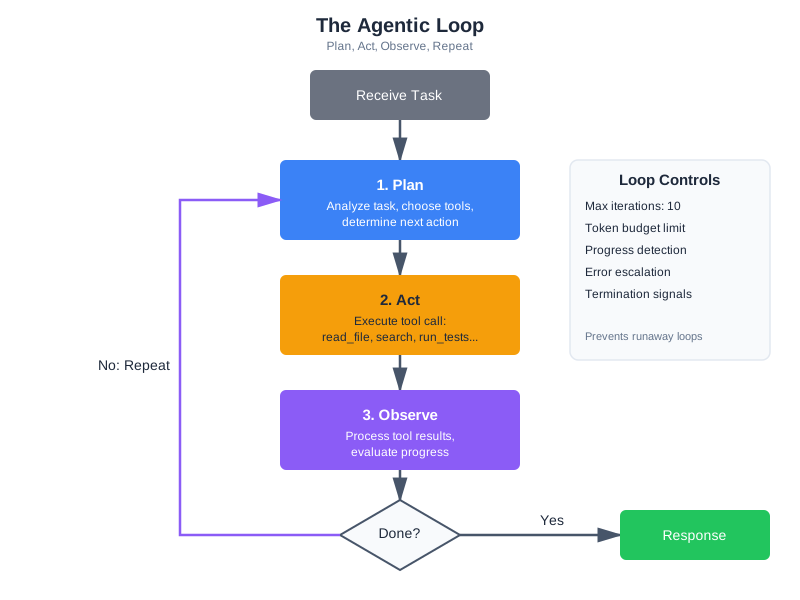
This is the foundation of agentic coding—the pattern where AI agents autonomously plan, execute, and iterate on development tasks. When Karpathy described the shift from vibe coding to agentic engineering in early 2026, this is the machinery he was pointing to. Vibe coding is conversational: you describe what you want and iterate on the output. Agentic coding is autonomous: the model plans a multi-step approach and executes it, using tools to interact with the real world.
The pattern is already widespread. Claude Code uses an agentic loop to read your codebase, write code, run tests, and iterate until the task is complete—reportedly generating 90% of its own code through this loop. Cursor’s Composer mode plans multi-file edits and applies them. GitHub Copilot Workspace breaks down issues into implementation plans and executes them. These tools differ in their interfaces, but under the hood, they all implement variations of the same pattern: an LLM with tools in a loop, with context engineering determining the quality of the output.
Loop Control: When to Continue, When to Stop
An agentic loop without termination conditions is dangerous. The model might call tools indefinitely—burning tokens, consuming API quota, and making changes that compound errors. You need explicit controls:
Maximum iterations. Set a hard limit on tool call rounds. Ten iterations is reasonable for most coding tasks; complex operations might need twenty. After the limit, force the model to respond with what it has.
Progress detection. Track whether the model is making progress or spinning. If the last three tool calls were identical (same tool, same parameters), the model is stuck. Break the loop and ask for human guidance.
Budget limits. Track token consumption across the loop. If tool results have consumed 80% of your context budget, stop gathering and start answering.
Termination signals. The model should know it can stop. Include in your system prompt: “When you have enough information to answer, respond directly instead of calling more tools.” Without this guidance, some models will continue gathering information indefinitely, treating each new piece of data as a reason to gather more.
Error escalation. After two consecutive failures of the same tool, the model should either try a different approach or ask the user for help. Continuing to retry a broken tool wastes iterations and context budget.
class ControlledAgenticLoop:
    """Agentic loop with safety controls."""

    MAX_ITERATIONS = 10
    MAX_TOOL_TOKENS = 50000

    def run(self, task: str) -> str:
        tool_tokens_used = 0
        recent_calls = []

        for iteration in range(self.MAX_ITERATIONS):
            response = self._call_llm(task)

            if response.stop_reason != "tool_use":
                return self._extract_text(response)  # Model chose to respond

            # Execute tools
            for tool_call in self._extract_tool_calls(response):
                # Check for loops
                call_sig = (tool_call.name, str(tool_call.input))
                if recent_calls.count(call_sig) >= 2:
                    return self._force_response("Detected repeated tool calls. Responding with available information.")

                recent_calls.append(call_sig)

                result = self.tools.execute(tool_call.name, tool_call.input)
                tool_tokens_used += self._estimate_tokens(result)

                # Check budget
                if tool_tokens_used > self.MAX_TOOL_TOKENS:
                    return self._force_response("Context budget limit reached. Responding with gathered information.")

        return self._force_response(f"Reached {self.MAX_ITERATIONS} iterations. Responding with available information.")
Planning vs. Reactive Tool Use
There are two modes of tool use in agentic systems. Reactive tool use: the model encounters a question, decides it needs a tool, calls it, and continues. This is what our basic agentic loop does. Planning tool use: the model first creates a plan (“I’ll need to: 1. Read the config file, 2. Search for all usages of the config, 3. Run the tests”), then executes the plan step by step.
Planning is more reliable for complex tasks. It reduces wasted tool calls because the model thinks before acting. It also makes the system’s behavior more interpretable—you can see the plan and understand what the model intends to do.
The difference matters in practice. A reactive agent asked to “refactor the authentication module” might: read a file, notice an import, read that file, notice another dependency, follow that chain, and eventually lose track of the original goal. After eight tool calls, it has consumed most of its context budget reading tangentially related files and has forgotten the original refactoring task.
A planning agent handles the same request differently. It would outline the scope (“I need to: 1. Identify all auth-related files, 2. Understand the current structure, 3. Plan the refactoring, 4. Implement changes, 5. Verify with tests”), then execute systematically. It reads only the files relevant to each step, skips the tangential dependencies, and stays focused on the goal.
The cost difference is measurable. In production systems, planning-mode agents typically use 40-60% fewer tool calls than reactive agents for complex tasks, while achieving better outcomes. The upfront investment in planning is recovered many times over by avoiding wasted tool calls.
You can encourage planning through your system prompt:
When given a complex task:
1. First, outline your approach (which tools you'll use and why)
2. Execute your plan step by step
3. After each step, evaluate whether the result changes your plan
4. When you have enough information, synthesize and respond
Context engineering is what makes agentic systems reliable. The agent’s tool definitions, its system prompt, the results flowing back from tool calls—these are all context. A poorly designed context produces an agent that calls the wrong tools, misinterprets results, and spirals. A well-designed context produces an agent that systematically works through problems and knows when to stop.
Tool Use Traces: Observability for Agentic Systems
When an agentic loop doesn’t produce the right result, you need to understand why. A tool use trace records every step: what tool was called, what parameters were passed, what the tool returned, how long it took, and what the model decided to do next.
@dataclass
class ToolTrace:
    """Record of a single tool invocation."""
    iteration: int
    tool_name: str
    parameters: dict
    result: ToolResult
    duration_ms: float
    tokens_consumed: int
    model_reasoning: str  # The text the model generated before the tool call

class TracedAgenticLoop:
    """Agentic loop that records traces for debugging."""

    def __init__(self, tools, llm):
        self.tools = tools
        self.llm = llm
        self.traces: list[ToolTrace] = []

    def execute_with_trace(self, tool_call, iteration: int) -> ToolResult:
        start = time.time()
        result = self.tools.execute(tool_call.name, tool_call.input)
        duration = (time.time() - start) * 1000

        self.traces.append(ToolTrace(
            iteration=iteration,
            tool_name=tool_call.name,
            parameters=tool_call.input,
            result=result,
            duration_ms=duration,
            tokens_consumed=estimate_tokens(str(result.data)),
            model_reasoning=""  # Extracted from model's text blocks
        ))
        return result

    def get_summary(self) -> str:
        """Summarize the trace for debugging."""
        lines = [f"Agentic loop: {len(self.traces)} tool calls"]
        for t in self.traces:
            status = "OK" if t.result.success else f"FAIL ({t.result.error_type})"
            lines.append(f"  [{t.iteration}] {t.tool_name}({t.parameters}) → {status} ({t.duration_ms:.0f}ms)")
        total_tokens = sum(t.tokens_consumed for t in self.traces)
        lines.append(f"Total tool tokens: {total_tokens}")
        return "\n".join(lines)
Traces answer questions that logs alone can’t: “Why did the model read the same file three times?” (Because the context window was reset between iterations and it forgot.) “Why did it call search_code instead of read_file?” (Because the error message from read_file didn’t suggest trying a different path.) “Why did it stop after two iterations when it needed five?” (Because the token budget was consumed by a large file read.)
Tracing is especially valuable during development. When you’re tuning tool descriptions, adjusting error messages, or modifying your system prompt, traces show you exactly what changed in the model’s behavior. Chapter 13 covers observability in depth—but tool traces are the specific observability tool you need for agentic systems.
In Chapter 10, we’ll extend this pattern to multiple agents coordinating together. For now, understand that the tool use loop you’ve built is the atomic unit of agentic systems. Everything larger composes from this.
End-to-End Agentic Loop Trace: A Complete Example
To solidify your understanding, let’s trace through a complete agentic loop step by step. The query is practical: “What’s the weather in Tokyo and should I bring an umbrella?”
The system has two tools available:
get_weather(city: string)→ returns temperature, conditions, precipitation_chanceget_packing_recommendation(weather_data: dict)→ returns recommendations based on conditions
Step 1: User query arrives
user_message = "What's the weather in Tokyo and should I bring an umbrella?"

# The messages array at this point contains just the user query
messages = [
    {"role": "user", "content": "What's the weather in Tokyo and should I bring an umbrella?"}
]
Step 2: First LLM call - Model examines available tools and decides what to call
response = client.messages.create(
    model="claude-sonnet-4-20250514",
    max_tokens=1024,
    system="You are a helpful assistant. Answer questions about weather.",
    tools=[
        {
            "name": "get_weather",
            "description": "Get current weather conditions for a city",
            "input_schema": {
                "type": "object",
                "properties": {
                    "city": {"type": "string", "description": "City name"}
                },
                "required": ["city"]
            }
        },
        {
            "name": "get_packing_recommendation",
            "description": "Get packing recommendations based on weather",
            "input_schema": {
                "type": "object",
                "properties": {
                    "temperature": {"type": "integer", "description": "Current temperature in Celsius"},
                    "conditions": {"type": "string", "description": "Weather conditions (sunny, rainy, etc)"},
                    "precipitation_chance": {"type": "integer", "description": "Chance of rain 0-100"}
                },
                "required": ["temperature", "conditions", "precipitation_chance"]
            }
        }
    ],
    messages=messages
)

# Model's response:
# {
#   "stop_reason": "tool_use",
#   "content": [
#     {"type": "text", "text": "I'll help you check the weather in Tokyo."},
#     {"type": "tool_use", "id": "tool_call_1", "name": "get_weather", "input": {"city": "Tokyo"}}
#   ]
# }
Step 3: Tool call is executed, result returned
# Application code intercepts the tool call
tool_call = response.content[1]  # The tool_use block
tool_name = tool_call.name  # "get_weather"
tool_input = tool_call.input  # {"city": "Tokyo"}
tool_id = tool_call.id  # "tool_call_1"

# Execute the actual tool
weather_result = {
    "city": "Tokyo",
    "temperature": 18,
    "conditions": "Cloudy",
    "precipitation_chance": 65
}

# Add to messages array: the assistant's response with tool call
messages.append({
    "role": "assistant",
    "content": response.content  # Includes both text and tool_use blocks
})

# Add to messages array: the tool result
messages.append({
    "role": "user",
    "content": [
        {
            "type": "tool_result",
            "tool_use_id": "tool_call_1",
            "content": json.dumps(weather_result)
        }
    ]
})

# Messages now look like:
# [
#   {"role": "user", "content": "What's the weather in Tokyo...?"},
#   {"role": "assistant", "content": [text block, tool_use block]},
#   {"role": "user", "content": [tool_result block]}
# ]
Step 4: Model processes result, decides if more tool calls are needed
# Second LLM call with updated messages
response = client.messages.create(
    model="claude-sonnet-4-20250514",
    max_tokens=1024,
    system="You are a helpful assistant. Answer questions about weather.",
    tools=[...],  # Same tools as before
    messages=messages  # Now includes the tool result
)

# Model's response:
# {
#   "stop_reason": "tool_use",
#   "content": [
#     {"type": "text", "text": "Now I'll get packing recommendations based on this weather."},
#     {
#       "type": "tool_use",
#       "id": "tool_call_2",
#       "name": "get_packing_recommendation",
#       "input": {
#         "temperature": 18,
#         "conditions": "Cloudy",
#         "precipitation_chance": 65
#       }
#     }
#   ]
# }
Step 5: Second tool call is executed
# Execute the second tool
recommendation_result = {
    "items": ["light jacket", "umbrella", "comfortable shoes"],
    "rationale": "65% chance of rain, so bring umbrella. Temperature 18°C suggests light jacket."
}

# Update messages
messages.append(response.content)  # Assistant's second response

messages.append({
    "role": "user",
    "content": [
        {
            "type": "tool_result",
            "tool_use_id": "tool_call_2",
            "content": json.dumps(recommendation_result)
        }
    ]
})

# Messages array now has 5 elements:
# [user query, assistant response 1 (with tool_call_1), tool_result_1,
#  assistant response 2 (with tool_call_2), tool_result_2]
Step 6: Model generates final response
# Third LLM call - now with all information
response = client.messages.create(
    model="claude-sonnet-4-20250514",
    max_tokens=1024,
    system="You are a helpful assistant. Answer questions about weather.",
    tools=[...],
    messages=messages
)

# Model's response:
# {
#   "stop_reason": "end_turn",  # No more tool calls needed
#   "content": [
#     {
#       "type": "text",
#       "text": "The weather in Tokyo is cloudy and cool at 18°C. There's a 65% chance of rain, so yes, you should definitely bring an umbrella. I'd also recommend a light jacket and comfortable shoes."
#     }
#   ]
# }

# The loop ends because stop_reason is "end_turn", not "tool_use"
final_answer = response.content[0].text
Complete Message History
Here’s what the full conversation context looked like as the loop progressed:
# Iteration 1:
messages = [
    {"role": "user", "content": "What's the weather in Tokyo and should I bring an umbrella?"},
    {"role": "assistant", "content": [
        {"type": "text", "text": "I'll help you check the weather in Tokyo."},
        {"type": "tool_use", "id": "tool_call_1", "name": "get_weather", "input": {"city": "Tokyo"}}
    ]},
    {"role": "user", "content": [
        {"type": "tool_result", "tool_use_id": "tool_call_1",
         "content": '{"city": "Tokyo", "temperature": 18, "conditions": "Cloudy", "precipitation_chance": 65}'}
    ]}
]

# Iteration 2:
messages = [
    {"role": "user", "content": "What's the weather in Tokyo and should I bring an umbrella?"},
    {"role": "assistant", "content": [
        {"type": "text", "text": "I'll help you check the weather in Tokyo."},
        {"type": "tool_use", "id": "tool_call_1", "name": "get_weather", "input": {"city": "Tokyo"}}
    ]},
    {"role": "user", "content": [
        {"type": "tool_result", "tool_use_id": "tool_call_1",
         "content": '{"city": "Tokyo", "temperature": 18, "conditions": "Cloudy", "precipitation_chance": 65}'}
    ]},
    {"role": "assistant", "content": [
        {"type": "text", "text": "Now I'll get packing recommendations based on this weather."},
        {"type": "tool_use", "id": "tool_call_2", "name": "get_packing_recommendation",
         "input": {"temperature": 18, "conditions": "Cloudy", "precipitation_chance": 65}}
    ]},
    {"role": "user", "content": [
        {"type": "tool_result", "tool_use_id": "tool_call_2",
         "content": '{"items": ["light jacket", "umbrella", "comfortable shoes"], "rationale": "65% chance of rain..."}'}
    ]}
]

# Iteration 3:
# Model responds with final answer, stop_reason = "end_turn"
# Loop terminates, final_answer is returned to user
Key Observations from This Trace
-
Context accumulation: The messages array grows with each iteration. By the end, it contains the original query, tool calls, results, and intermediate model reasoning. This context is passed to every subsequent LLM call—it’s why context management matters.
-
Tool results as messages: Tool results go back into the messages array as user-role messages. From the model’s perspective, it asked a question (“Call get_weather”) and received an answer (the weather data).
-
No special handling needed: The model doesn’t need to be told “here’s a tool result.” It sees the
tool_resultcontent block in the messages and understands what happened. This is pure context. -
Stopping conditions: The model stops when
stop_reasonis"end_turn"instead of"tool_use". It decided it had enough information to answer. No external logic forced this—it came from the model’s understanding that the task was complete. -
Sequential tool use: Each tool call happened one at a time (sequential). Modern APIs support parallel tool use—the model could have requested both tool calls in the same response. The pattern is identical; just handle multiple
tool_useblocks in the same response content. -
Token consumption: This entire exchange (query, two tool calls with results, and final answer) consumed roughly:
- Query: 15 tokens
- Tool calls + results: ~300 tokens
- Final response: ~80 tokens
- Total: ~395 tokens across 3 LLM calls
For more complex tasks, this can easily grow to thousands of tokens, which is why context management and tool result compression matter.
Tools in Production
Building tools that work in development is one challenge. Building tools that work reliably at scale—thousands of users, millions of tool calls, real money on the line—is a different challenge entirely.
The API-Wrapper Anti-Pattern
A study of 1,899 production MCP servers in late 2025 found a stark divide. Servers designed as generic API wrappers—thin layers over existing REST endpoints—averaged 5.3 times more tool invocations than domain-optimized implementations for equivalent tasks. A generic “call any GitHub API” tool required the model to make multiple calls to discover endpoints, authenticate, paginate results, and handle errors. A domain-optimized “get pull request with reviews and CI status” tool returned everything needed in a single call.
The lesson: don’t just wrap your APIs. Design tools around the tasks your model actually performs. If the model always reads a file and then searches for related files, consider a tool that does both. If the model always queries a database and then formats the results, build that into the tool. This is the same context engineering principle applied to tool design: assemble the right context in the right format.
The difference between a generic API wrapper and a domain-optimized tool is the difference between giving someone a dictionary and giving them an answer. A generic github_api(method="GET", endpoint="/repos/owner/repo/pulls/123") tool requires the model to know GitHub’s API structure, handle pagination, and compose multiple calls. A domain-optimized get_pull_request(repo="owner/repo", number=123, include=["reviews", "checks", "comments"]) tool returns everything the model needs in one call, formatted for easy consumption. The second approach uses one tool call instead of five, consumes less context, and produces fewer errors.
When you’re building your first tools, start with domain-optimized designs. You can always add lower-level tools later if you need them. The reverse path—starting generic and trying to optimize later—usually means rewriting your tools entirely once you understand the actual usage patterns.
Caching Tool Results
Many tool calls produce identical results within a session. Reading the same file twice, searching for the same query, listing the same directory. Without caching, each call goes to the underlying system, adding latency and cost.
class CachingToolExecutor:
    """Cache tool results within a session."""

    def __init__(self, tools: CodebaseTools, cache_ttl: int = 300):
        self.tools = tools
        self.cache = {}
        self.cache_ttl = cache_ttl
        self.stats = {"hits": 0, "misses": 0}

    def execute(self, tool_name: str, params: dict) -> ToolResult:
        cache_key = f"{tool_name}:{json.dumps(params, sort_keys=True)}"

        if cache_key in self.cache:
            result, timestamp = self.cache[cache_key]
            if time.time() - timestamp < self.cache_ttl:
                self.stats["hits"] += 1
                return result

        self.stats["misses"] += 1
        result = self.tools.execute(tool_name, params)

        if result.success:  # Only cache successful results
            self.cache[cache_key] = (result, time.time())

        return result
Cache invalidation matters. If the model writes a file and then reads it, the cached read result is stale. Invalidate cache entries when related write operations occur. A simple approach: invalidate all cache entries for a given path when a write operation touches that path. A more sophisticated approach: maintain a dependency graph of tool results and invalidate transitively.
In practice, session-level caching alone can reduce tool calls by 30-40% in typical coding workflows, where the model frequently re-reads the same files or re-searches the same queries during a single conversation.
Rate Limiting and Cost Control
In production, every tool call has a cost—API quotas, compute time, or monetary cost for external services. Rate limiting prevents runaway costs and protects upstream services.
Track tool calls per user, per session, and per time window. Set limits that reflect your cost model: if each LLM call costs $0.01 and you allow 50 tool iterations, that’s $0.50 per user request in LLM costs alone—plus whatever the tools themselves cost.
A practical rate limiting approach:
class ToolRateLimiter:
    """Rate limit tool calls per user and globally."""

    def __init__(self, per_user_per_minute: int = 60, per_session_total: int = 200):
        self.per_user_per_minute = per_user_per_minute
        self.per_session_total = per_session_total
        self.user_calls = defaultdict(list)  # user_id -> [timestamps]
        self.session_counts = defaultdict(int)  # session_id -> count

    def check(self, user_id: str, session_id: str) -> bool:
        """Returns True if call is allowed."""
        now = time.time()

        # Clean old entries
        self.user_calls[user_id] = [
            t for t in self.user_calls[user_id] if now - t < 60
        ]

        # Check per-minute limit
        if len(self.user_calls[user_id]) >= self.per_user_per_minute:
            return False

        # Check session total
        if self.session_counts[session_id] >= self.per_session_total:
            return False

        self.user_calls[user_id].append(now)
        self.session_counts[session_id] += 1
        return True

    def remaining(self, user_id: str, session_id: str) -> dict:
        """Return remaining quota—useful for warning users before they hit limits."""
        now = time.time()
        recent = [t for t in self.user_calls.get(user_id, []) if now - t < 60]
        return {
            "per_minute_remaining": self.per_user_per_minute - len(recent),
            "session_remaining": self.per_session_total - self.session_counts.get(session_id, 0),
        }

    def end_session(self, session_id: str) -> None:
        """Clean up when a session ends to prevent memory leaks."""
        self.session_counts.pop(session_id, None)
Integrate the rate limiter into your tool execution loop so it fires before every tool call:
rate_limiter = ToolRateLimiter(per_user_per_minute=60, per_session_total=200)

async def execute_tool_with_limits(tool_name: str, args: dict, user_id: str, session_id: str):
    if not rate_limiter.check(user_id, session_id):
        remaining = rate_limiter.remaining(user_id, session_id)
        if remaining["session_remaining"] <= 0:
            return {"error": "Session tool limit reached. Please start a new session."}
        return {"error": "Too many tool calls. Please wait a moment."}

    return await execute_tool(tool_name, args)
Rate limits protect you from two scenarios: a single user monopolizing resources, and an agentic loop going rogue—calling tools hundreds of times without converging on an answer. The session limit is particularly important; it’s the backstop when loop detection and iteration limits both fail.
Monitoring Tool Usage
You can’t improve what you don’t measure. Track these metrics for every tool:
Call frequency: Which tools get called most? Tools that are never called should be removed (they waste context tokens). Tools called excessively might indicate the model is struggling with a task.
Success rate: What percentage of calls succeed? A tool with a 30% success rate has a description problem, a parameter problem, or a reliability problem. Investigate.
Latency distribution: How long do tool calls take? P50 might be 100ms, but if P99 is 30 seconds, your users are occasionally waiting a long time. Set timeouts accordingly.
Token consumption: How many tokens do tool results consume on average? This directly impacts your context budget. If one tool consistently returns 5,000 tokens, that’s a significant portion of your budget per call.
Error patterns: What types of errors occur most? “File not found” errors suggest the model is guessing paths instead of searching first. “Timeout” errors suggest your timeout is too aggressive or the operation is too expensive.
These metrics feed back into tool design. If the search_code tool has a 90% success rate but run_tests only has 60%, investigate what’s different. Maybe the test runner needs clearer error messages, or maybe the model doesn’t understand when to use it.
Reliability Patterns
Production tool systems need the same reliability patterns as any distributed system, plus patterns specific to AI tool use.
Retries with backoff: External services fail transiently. A database query that times out once may succeed on retry. Implement exponential backoff with jitter—but limit retries to prevent the agentic loop from wasting iterations on a fundamentally broken tool.
async def execute_with_retry(
    tool_func, params: dict, max_retries: int = 2, base_delay: float = 1.0
) -> ToolResult:
    """Retry transient failures with exponential backoff."""
    for attempt in range(max_retries + 1):
        result = tool_func(**params)
        if result.success or result.error_type in ("validation", "security", "not_found"):
            return result  # Don't retry non-transient errors
        if attempt < max_retries:
            delay = base_delay * (2 ** attempt) + random.uniform(0, 0.5)
            await asyncio.sleep(delay)
    return result  # Return last failure after all retries
Circuit breakers: If a tool fails repeatedly (say, 5 failures in 60 seconds), stop calling it entirely for a cooldown period rather than continuing to fail and waste context. This prevents a broken external service from degrading your entire system.
Graceful degradation: When a tool is unavailable, the system should still function—just with reduced capability. If run_tests is down, the model can still read files and search code. Communicate this to the model: “Note: test execution is currently unavailable. You can still read and search code.”
Idempotency: When possible, design tools so that calling them twice with the same parameters produces the same result without side effects. This makes retries safe and simplifies error recovery. Read operations are naturally idempotent. Write operations need care—writing a file twice should produce the same file, not append duplicate content. For tools that interact with external services, idempotency keys (unique identifiers for each operation) prevent duplicate actions when retries occur.
Cost Estimation for Tool-Heavy Systems
Before launching a tool-using system, estimate your costs. Here’s a framework:
For a system with N users making M requests per day, where each request averages T tool iterations with average LLM call cost of C:
LLM cost per request: T × C (e.g., 5 iterations × $0.01 = $0.05/request) Daily LLM cost: N × M × T × C (e.g., 1,000 users × 10 requests × 5 iterations × $0.01 = $500/day)
Add the cost of the tools themselves—external API calls, compute for code execution, database queries. For CodebaseAI, the tool costs are minimal (file reads and subprocess calls), but for systems calling external paid APIs, tool costs can dominate.
The 5.3x efficiency difference between generic and domain-optimized tools translates directly to cost. A generic tool that needs 15 iterations costs 3× more than a domain-optimized tool that needs 5 iterations for the same result. Investing in tool design pays for itself quickly at scale.
Worked Example: The Tool That Worked Too Well
Here’s a story about why security boundaries matter.
The Setup
A team building an internal coding assistant wanted to let their AI modify files directly. They implemented a write_file tool:
# Their initial implementation
def write_file(path: str, content: str) -> str:
    Path(path).write_text(content)
    return f"Successfully wrote to {path}"
Simple. Clean. No error handling, no validation. What could go wrong?
The Incident
A developer asked the assistant: “Clean up the temp files in my project.”
The model, trying to be helpful, decided to remove files it identified as temporary. But its definition of “temporary” was broader than expected. It found a file called _backup.py (the underscore prefix looked temporary) and decided to “clean it up” by overwriting it with an empty string.
That file? A critical backup of the authentication module, kept as reference during a refactor.
The Investigation
The team traced what happened:
- User asked to “clean up temp files”
- Model searched for files matching temp patterns
- Model identified
_backup.pyas temporary (underscore prefix) - Model called
write_file("_backup.py", "")to “clean” it - File was overwritten with empty content
- No confirmation was requested
- No backup was made
- The deletion was immediate and irreversible
The Diagnosis
Three security failures combined: no path validation (the tool accepted any path, including critical files), no operation type restrictions (“write” was used for destructive deletion), and no confirmation (destructive operations happened silently).
The Fix
They rebuilt the file tools with security layers:
class SecureFileTools:
    # Files that should never be modified
    PROTECTED_PATTERNS = ["**/backup*", "**/.git/**", "**/node_modules/**"]

    # Operations that require confirmation
    DESTRUCTIVE_OPS = {"delete", "overwrite", "truncate"}

    def write_file(self, path: str, content: str, operation: str = "write") -> dict:
        # Check protected patterns
        for pattern in self.PROTECTED_PATTERNS:
            if Path(path).match(pattern):
                return {"error": f"Cannot modify protected file: {path}"}

        # Check if file exists (overwrite vs create)
        exists = Path(path).exists()
        if exists and operation != "overwrite":
            return {"error": f"File exists. Use operation='overwrite' to replace."}

        # Require confirmation for destructive operations
        if exists and operation in self.DESTRUCTIVE_OPS:
            if not self.confirm(f"Overwrite existing file {path}?"):
                return {"error": "Operation cancelled by user"}

        # Create backup before modifying
        if exists:
            backup_path = f"{path}.bak.{int(time.time())}"
            shutil.copy(path, backup_path)

        # Finally, write the file
        Path(path).write_text(content)
        return {"success": True, "backup": backup_path if exists else None}
The Lessons
Assume the model will misuse tools—not maliciously, but its judgment about what’s “temporary” or “safe to modify” isn’t perfect. Protect what matters most: some files should never be touched by automated tools. Require confirmation for irreversible actions. Create backups automatically. And design for the worst case, not the best case. The question isn’t “will this tool work correctly?”—it’s “what happens when it doesn’t?”
Debugging Focus: Tool Call Failures
When tools don’t work as expected, diagnose systematically.
Symptom: Model Calls Wrong Tool
Diagnosis: Tool descriptions are ambiguous. If search_code and read_file both mention “finding code,” the model may confuse them.
Fix: Add explicit “when to use” and “when NOT to use” guidance in descriptions. Make the distinction clear: “Use search_code to find relevant files. Use read_file to see a specific file’s contents.”
Symptom: Model Passes Invalid Parameters
Diagnosis: Parameter types aren’t clearly specified, or the model lacks examples.
Fix: Add examples in parameter descriptions: "Path to file (e.g., 'src/auth.py')". Include enum values explicitly rather than relying on the model to infer valid options.
Symptom: Tool Returns Error, Model Keeps Retrying
Diagnosis: Error messages don’t guide recovery. The model sees “Error” and retries, hoping for a different result.
Fix: Include recovery suggestions: "File not found. Use search_codebase to find the correct path." Redirect the model to a different approach rather than repeating the same one.
Symptom: Tool Succeeds but Model Ignores Result
Diagnosis: Tool output format is unclear. The model can’t parse the result or doesn’t recognize it as relevant.
Fix: Use clear delimiters: === File: path === ... === End ===. Structure results so the model can easily extract the information it needs.
Symptom: Model Uses Tools When It Shouldn’t
Diagnosis: The model is calling tools for questions it could answer from context or training data. Fix: Add guidance in your system prompt: “Only use tools when you need information not already in the conversation.” This reduces unnecessary tool calls and speeds up responses.
Symptom: Agentic Loop Runs Out of Iterations
Diagnosis: The model is taking too many steps to accomplish a simple task, or it’s gathering more information than it needs. Fix: Check your system prompt. Add explicit guidance: “Gather the minimum information needed, then respond.” Consider whether your tools are too granular—if the model needs five tool calls for one logical operation, a higher-level tool would help.
A Debugging Walkthrough
Here’s how these symptoms look in practice. You deploy CodebaseAI and a user reports: “When I ask about the auth module, it reads every file in the project instead of just the relevant ones.”
You pull the tool trace and see:
[1] search_codebase(query="auth module") → OK (5 results)
[2] read_file(path="src/auth.py") → OK
[3] read_file(path="src/middleware.py") → OK
[4] read_file(path="src/routes.py") → OK
[5] read_file(path="src/models.py") → OK
[6] read_file(path="src/utils.py") → OK
[7] read_file(path="src/config.py") → OK
[8] read_file(path="tests/test_auth.py") → OK
Total tool tokens: 42,000
The model searched, found 5 results, then read every file it found plus several others. Why? Looking at the search results, they included files with broad relevance—utils.py matched because it has a utility function used by auth. The model, unsure which files mattered, read them all.
The fixes: improve the search tool to return relevance scores so the model can prioritize, adjust the system prompt to say “Read only the most relevant 2-3 files from search results,” and add a progressive disclosure pattern—search returns summaries, the model reads full files only for the most relevant matches.
This is the debugging loop: observe the behavior (trace), identify the root cause (tool design or prompt issue), fix it, and verify the fix resolves the problem. Most tool use problems have straightforward causes once you can see what’s actually happening in the tool trace. The hard part isn’t fixing the issue—it’s getting visibility into the issue in the first place, which is why tracing and structured logging are so important.
Quick Checklist
When debugging tool issues, check: description clarity (does each tool explain when to use it and when not to?), parameter types (are constraints explicit?), error messages (do they suggest alternatives?), result format (can the model parse it?), your tool call handling loop (does it handle all stop reasons?), and whether security boundaries are blocking legitimate operations.
The Engineering Habit
Design for failure. Every external call can fail.
This habit applies beyond AI tools—it’s fundamental to building reliable systems. Networks drop. Services timeout. Disks fill up. Users provide unexpected input. The question isn’t whether things will fail, but whether your system handles failure gracefully.
For tool design specifically: validate before executing (a validation error is better than a partial execution failure), timeout everything (any external operation needs a timeout—infinite hangs are worse than failures), limit output sizes (a tool that returns 10MB will blow your context budget), provide recovery paths (an error message with a suggestion is more useful than an error message alone), and log everything (when something goes wrong in production, logs are how you understand what happened).
The systems that survive production are the ones designed to fail safely—not the ones designed never to fail.
In tool design, this habit manifests in a specific way: before implementing a tool, ask “what are the three most likely ways this tool will be misused?” Then design for those cases. A file read tool will be called with non-existent paths—return a helpful error with suggestions. A search tool will receive vague queries—return the best results you have with a note about specificity. A command execution tool will receive dangerous commands—validate against an allowlist before executing. Anticipating misuse isn’t pessimism; it’s good engineering.
Context Engineering Beyond AI Apps
The tool use principles from this chapter extend directly to how AI development tools connect to your project’s ecosystem through the Model Context Protocol. MCP servers give Cursor, Claude Code, and VS Code access to project-specific knowledge—your databases, APIs, internal documentation, CI/CD pipelines. When you configure an MCP server to expose your project’s database schema to an AI coding tool, you’re doing the same thing as defining a tool for an AI product: specifying what the model can access, what parameters it needs, and how to handle errors.
The same design principles apply. Tool descriptions need to be clear—an MCP server that vaguely exposes “project data” will be used less effectively than one that provides specific, well-named capabilities like “query the user table” or “check the CI build status.” Error handling matters just as much—an MCP server that fails silently leaves the AI tool working with incomplete information. Security boundaries are critical—your MCP server shouldn’t expose production credentials or allow destructive operations without safeguards.
Here’s a concrete example. Say your team uses a custom deployment pipeline. You could build an MCP server that exposes three tools: get_deploy_status (what’s currently deployed to each environment), get_deploy_history (recent deployments with timestamps and authors), and trigger_deploy (deploy a specific version to staging—with Tier 4 confirmation, never directly to production). Now every AI coding tool your team uses—Claude Code, Cursor, VS Code—can check deployment status and history as part of its context. A developer asking “what version is in staging?” gets an answer from real infrastructure, not hallucinated recollection.
The investment in learning tool design pays compound returns. Every tool you build well makes your AI systems more capable—whether those systems are products you ship to customers, internal tools your team uses, or the AI-powered development environment where you write your code. The engineering is the same: expose what’s necessary, describe clearly, handle failures gracefully, and respect security boundaries.
Summary
Key Takeaways
- Tools transform AI from advisor to actor—enabling real actions, not just suggestions.
- Tool design is interface design and prompt engineering simultaneously: clear names, precise parameters, explicit constraints, and token-aware definitions.
- Every tool call can fail. Design for validation errors, execution failures, timeouts, and security violations.
- Security boundaries are essential: validate paths, allowlist operations, require confirmation for destructive actions. Real incidents (CVE-2025-6514, confused deputy attacks) demonstrate what goes wrong without them.
- Token-aware design matters: tool definitions consume 50-1,000 tokens each. Register relevant tools dynamically rather than all tools at once.
- Error messages should include recovery suggestions, not just descriptions of what went wrong.
- MCP is the industry standard for tool integration—donated to the Linux Foundation in December 2025, supported by all major AI providers, with 97M+ monthly SDK downloads (as of late 2025).
- The agentic loop (tool use in a cycle) is the foundation of agentic coding. Control it with iteration limits, progress detection, and budget constraints.
- In production, domain-optimized tools outperform generic API wrappers by 5.3x in invocation efficiency. Cache results, monitor metrics, and measure what matters.
Concepts Introduced
- Tool anatomy: name, description, parameters
- Tool call flow: request → execution → result → response
- Tool granularity: finding the right size for each tool
- Token-aware tool design and dynamic tool registration
- The Model Context Protocol (MCP): architecture, ecosystem, and building servers
- The agentic loop: the pattern behind agentic coding, with loop controls
- Security boundaries, defense in depth, and real-world failure patterns
- Production patterns: caching, rate limiting, monitoring, the API-wrapper anti-pattern
- Graceful degradation and error recovery
CodebaseAI Status
Upgraded to v0.7.0 with tool use capabilities. The system can now read files with path validation and size limits, search the codebase using the RAG system from previous chapters, run tests with timeout and output capture, and handle tool errors gracefully with recovery suggestions. An equivalent MCP server implementation demonstrates how these same capabilities can be exposed to any MCP-compatible client.
Engineering Habit
Design for failure. Every external call can fail.
Try it yourself: Complete, runnable versions of this chapter’s code examples are available in the companion repository.
What’s Next
Chapter 8 gave your AI the ability to act—but those actions are ephemeral. When the conversation ends, everything the model learned through tool use is lost. The next chapter solves this: memory and persistence. CodebaseAI will remember what it learned about your codebase across sessions, accumulate understanding over time, and build context that grows more valuable with every interaction.
In Chapter 9, we’ll give CodebaseAI memory that persists across sessions—remembering past interactions, learning user preferences, and building long-term context.
With that, we move from Part II’s core techniques into Part III: building real systems. The remaining chapters tackle persistence, scale, and production concerns—the challenges that separate prototypes from products.