Chapter 10: Multi-Agent Systems
CodebaseAI has come a long way. Version 0.8.0 has memory, tools, RAG—the works. It remembers user preferences across sessions, searches codebases intelligently, and even runs tests. But watch what happens when a user asks something complex: “Find the authentication code, run its tests, and explain what’s failing.”
The single system prompt tries to juggle three distinct skills. Search instructions compete with testing instructions compete with explanation guidelines. The model picks the wrong tool first, runs tests on the wrong files, then produces a confused explanation that references code it never actually found. The context is bloated with instructions for everything, and the model attends to the wrong parts.
You wouldn’t ask one person to simultaneously be the researcher, the tester, and the technical writer. Different skills require different focus. But that’s exactly what we’re asking our AI to do when we stuff every capability into one prompt.
Before we dive into solutions, let’s be honest about the trade-offs. A systematic study of seven popular multi-agent frameworks found failure rates between 41% and 86.7%, across 1,600+ annotated execution traces (Cemri, Pan, Yang et al., “Why Do Multi-Agent LLM Systems Fail?”, arXiv:2503.13657, 2025—presented as a NeurIPS 2025 Spotlight). The failures cluster into three categories: system design issues (agents interpreting specifications differently), inter-agent misalignment (agents working on outdated state or contradicting each other), and task verification problems (systems stopping before work is complete, or never stopping at all). Multi-agent architectures are powerful, but they’re not free. If you can solve your problem with a single well-designed prompt, do that. This chapter teaches multi-agent patterns so you know when they’re worth the complexity—and how to avoid the common failure modes when they are.
There’s a reason this chapter matters beyond CodebaseAI. The industry is converging on what Karpathy and others call agentic engineering—building systems where AI agents autonomously plan, execute, and iterate on complex tasks. In Chapter 8, you built the agentic loop: a single agent using tools in a cycle. This chapter extends that pattern to multiple agents coordinating together. This is where agentic coding becomes agentic engineering—the orchestration of autonomous systems toward a shared goal. And the discipline that holds it all together is context engineering: each agent’s context must be carefully designed so it has exactly what it needs, and nothing that confuses it.
When Multiple Agents Make Sense
The first question isn’t “how do I build a multi-agent system?” It’s “do I actually need one?” Here’s a decision framework.
Signs you might need multiple agents:
Conflicting context requirements. One task needs detailed code context, another needs high-level architecture summaries. Both can’t fit in the same context window, or including both confuses the model about what level of detail to operate at.
Distinct failure modes. Different parts of your pipeline fail differently. Search failures need retry with different queries. Test failures need debugging context. Explanation failures need clarification from the user. Handling all these in one agent makes error recovery logic unwieldy.
Parallelizable subtasks. You have independent work that could run simultaneously. Searching three different parts of a codebase, or running multiple analysis strategies in parallel.
Specialized tools. Different tasks need different tool sets. When all tools are available to one agent, the model sometimes picks the wrong one. A search agent that can only search won’t accidentally try to run tests.
Signs you should stay single-agent:
Tasks complete successfully. They might be slow, but they work. Don’t add complexity to solve a problem you don’t have.
Errors are content problems. The model gives wrong answers, but it’s using the right approach. Better prompts or better retrieval will help more than splitting into agents.
You want it to “feel more organized.” Architectural elegance isn’t a good reason. Multi-agent systems are harder to debug, more expensive to run, and more likely to fail in subtle ways.
You haven’t tried improving the single agent. Before splitting, try: better tool descriptions, clearer output schemas, more focused system prompts, improved retrieval. Often these solve the problem without the coordination overhead.
The Single-Agent Ceiling
Let’s see exactly where CodebaseAI v0.8.0 struggles. Here’s the system prompt that’s grown organically over chapters:
SYSTEM_PROMPT = """You are CodebaseAI, an expert assistant for understanding codebases.

## Memory Context
{memory_context}

## Available Tools
- search_code(pattern): Search for code matching pattern
- read_file(path): Read file contents
- list_files(dir): List directory contents
- run_tests(path): Run tests for specified path
- get_coverage(path): Get test coverage report
- explain_code(code): Generate explanation of code

## Instructions
When searching: Start broad, narrow based on results. Check multiple directories.
When reading: Summarize key functions. Note dependencies.
When testing: Run related tests. Report failures clearly.
When explaining: Match user's expertise level. Use examples.

## Error Handling
If search returns nothing: Try alternative patterns.
If tests fail: Include failure message and relevant code.
If file not found: Suggest similar paths.

## Output Format
Always structure responses with clear sections.
Include code snippets when relevant.
End with suggested next steps.

## Current Codebase
{codebase_path}
"""
This prompt is already over 400 tokens before we add memory context, RAG results, or conversation history. And it’s asking the model to keep six different operational modes in mind simultaneously. When a user asks a complex question, the model has to:
- Decide which tools to use (often picks wrong order)
- Remember the instructions for each tool (lost in the middle problem)
- Handle errors appropriately for each tool type (instructions compete)
- Format output correctly (varies by task type)
The result: inconsistent behavior on complex queries. Sometimes it works beautifully. Sometimes it searches for tests instead of running them. Sometimes it explains code it never found.
Multi-Agent Patterns
When single-agent fails, you have several architectural patterns to choose from. Each solves different problems.
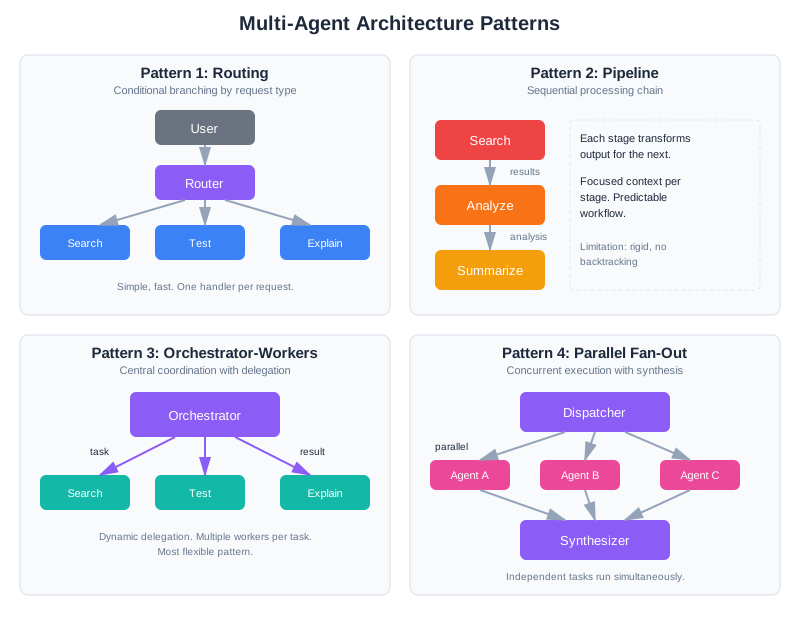
Pattern 1: Routing
The simplest multi-agent pattern. A lightweight classifier routes requests to specialized handlers.
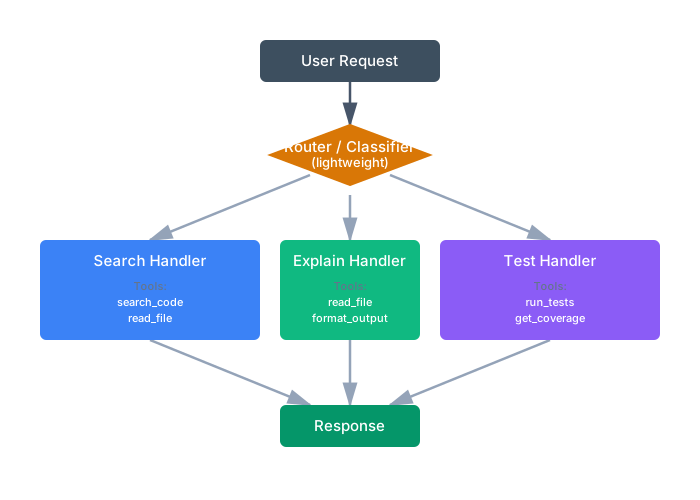
Each handler has focused context—only the tools and instructions it needs. The router is cheap (small prompt, fast response), and handlers are reliable (clear, single purpose).
When to use: Different request types need fundamentally different context. A search question needs search tools and search strategies. An explanation question needs the code plus explanation guidelines. Mixing them causes confusion.
Limitation: Only works for requests that fit cleanly into one category. “Find the auth code and explain it” needs both search and explain.
Pattern 2: Pipeline
Each agent transforms output for the next, like an assembly line.
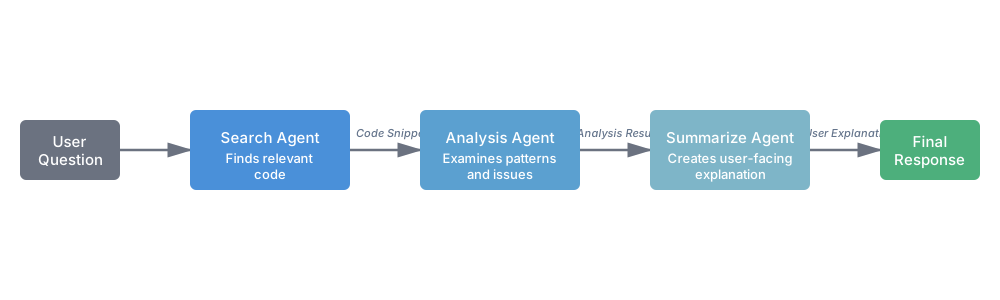
Search agent finds relevant code. Analysis agent examines it for patterns or issues. Summary agent produces user-facing explanation. Each agent has exactly the context it needs: the search agent doesn’t need to know how to summarize, and the summary agent doesn’t need search tools.
When to use: Tasks have clear sequential dependencies. Each stage’s output naturally becomes the next stage’s input.
Limitation: Rigid structure. If the analysis agent needs to search for more code, it can’t—it’s not in the pipeline. Works best for predictable workflows.
Pattern 3: Orchestrator-Workers
Note: This pattern goes by many names: orchestrator-workers, supervisor-agents, manager-subordinates, or coordinator-specialists. The core concept—a central agent that delegates to focused specialists—remains the same.
A central orchestrator dynamically delegates to specialized workers.
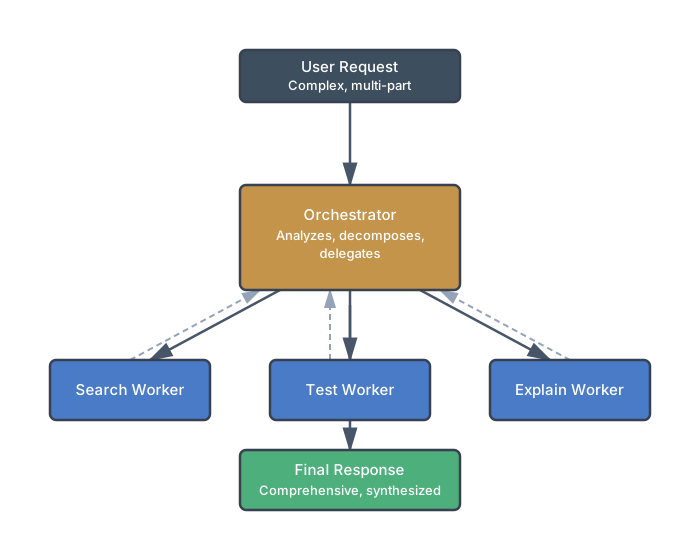
The orchestrator receives the full request, breaks it into subtasks, delegates to appropriate workers, and synthesizes their results. Unlike routing, it can call multiple workers for one request. Unlike pipelines, it decides the execution order dynamically.
When to use: Complex tasks that need dynamic decomposition. The orchestrator figures out what workers to call based on the specific request, not a fixed pattern.
Trade-off: The orchestrator itself needs context about all workers’ capabilities. It’s another LLM call. But workers stay focused and reliable.
Pattern 4: Parallel with Aggregation
Multiple agents work simultaneously on independent subtasks.
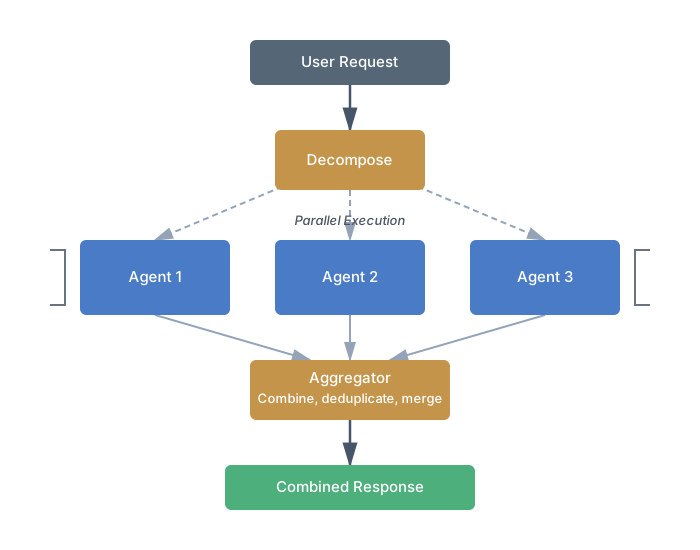
Search different parts of the codebase simultaneously. Run multiple analysis strategies in parallel. Then combine results.
When to use: Independent subtasks that don’t need each other’s output. Latency-sensitive applications where parallel execution matters.
Limitation: Only works when subtasks are truly independent. If Agent B needs Agent A’s output, you’re back to a pipeline.
Pattern 5: Validator
A dedicated agent checks another agent’s work.
┌──────────┐     ┌───────────┐
│ Producer │ ──► │ Validator │ ──► Output (if valid)
└──────────┘     └─────┬─────┘
                       │
                       ▼ (if invalid)
                 Retry with feedback
Research shows cross-validation between agents can significantly improve accuracy on tasks where correctness can be verified. The validator has different context than the producer—it sees the output plus validation criteria, not the production instructions.
When to use: High-stakes outputs where errors are costly. Code generation, factual claims, anything where “close enough” isn’t good enough.
Context Engineering for Multi-Agent
The core challenge in multi-agent systems isn’t coordination logic—it’s deciding what context each agent sees. Give agents too much context, and you’re back to the single-agent confusion problem. Give them too little, and they make decisions without crucial information.
Global vs. Agent-Specific Context
Global context is shared across all agents:
- Original user request (everyone needs to know the goal)
- Key constraints (deadlines, format requirements, user expertise level)
- Decisions already made (prevents contradictions)
- Current state (what’s been completed, what’s blocked)
Agent-specific context varies by role:
- Task assignment (what this agent should do)
- Relevant prior results (not everything, just what this agent needs)
- Available tools (only the tools this agent uses)
- Output schema (what format to produce)
Here’s the difference in practice:
# Orchestrator context: broad view
orchestrator_context = {
    "user_request": "Find auth code, run tests, explain failures",
    "user_expertise": "intermediate",
    "constraints": {"max_response_length": 500},
    "available_workers": ["search", "test", "explain"],
}

# Search worker context: focused
search_context = {
    "task": "Find authentication-related code and test files",
    "codebase_path": "/app",
    "tools": ["search_code", "read_file", "list_files"],
    "output_schema": {"files": ["list of paths"], "snippets": {"path": "code"}},
}

# Explain worker context: receives prior work
explain_context = {
    "task": "Explain why these tests are failing",
    "code_to_explain": search_results["snippets"],  # From search worker
    "test_failures": test_results["failures"],       # From test worker
    "user_expertise": "intermediate",
    "tools": [],  # Explainer doesn't need tools
}
The search worker doesn’t know about test failures—it doesn’t need to. The explainer doesn’t have search tools—it can’t get distracted searching when it should be explaining.
Anthropic’s engineering team learned this the hard way when building their own multi-agent research system: without detailed task descriptions specifying exactly what each agent should do and produce, agents consistently duplicated each other’s work, left gaps in coverage, or failed to find information that was available. The fix was exactly what we’re describing—explicit, focused context for each agent with clear output expectations. Generic instructions like “research this topic” led to poor coordination; specific instructions like “find the three most-cited papers on X and extract their methodology sections” produced reliable results.
The Handoff Problem
When Agent A’s output becomes Agent B’s input, you face a choice: pass everything or pass a summary. Both have failure modes.
Passing everything causes context bloat:
# Agent A produces detailed search results with reasoning
agent_a_output = {
    "reasoning": "I searched for 'auth' and found 47 matches...",  # 2000 tokens
    "all_matches": [...],  # Another 3000 tokens
    "selected_files": ["auth.py", "test_auth.py"],
    "why_selected": "These contain the core auth logic..."  # 500 tokens
}

# Agent B receives 5500+ tokens of context it may not need
Passing too little loses crucial information:
# Overly compressed handoff
agent_b_input = {"files": ["auth.py", "test_auth.py"]}

# Agent B doesn't know WHY these files were selected
# Can't make good decisions about how to process them
The sweet spot is structured handoffs with schemas:
@dataclass
class SearchResult:
    """Schema for search worker output."""
    selected_files: list[str]
    code_snippets: dict[str, str]  # path -> relevant snippet
    selection_rationale: str       # Brief explanation (1-2 sentences)

# Orchestrator validates output before passing
search_output = SearchResult(**search_worker.execute(context))

# Next agent gets structured, appropriately-sized context
test_context = {
    "files_to_test": search_output.selected_files,
    "context": search_output.selection_rationale,
}
Schemas force agents to produce structured output. Validation catches malformed results before they cascade. The next agent gets what it needs, nothing more.
When Multi-Agent Systems Break
Multi-agent systems fail in ways single agents don’t. A single agent makes a mistake and stops. In a multi-agent system, one agent’s mistake cascades to another, which compounds it, creating chains of failure that are confusing to debug. This section covers the pathologies unique to distributed AI systems.
Cascading Errors
Agent A searches for authentication code and returns nothing (search failed, network timeout, whatever). Agent A faithfully reports the empty result. Agent B receives no code to test and tries to work around it: maybe it synthesizes test code based on patterns, maybe it returns “no tests to run,” but now Agent B is working with garbage that Agent A produced.
Agent C receives Agent B’s garbage and tries to explain it. Agent C produces a plausible-sounding explanation of non-existent failures. The user reads a confident explanation of code that doesn’t exist. The error has been laundered through multiple agents until it’s unrecognizable.
Validation between agents catches errors before propagation:
@dataclass
class SearchResult:
    """Output schema from search agent with validation."""
    files_found: list[str]
    snippets: dict[str, str]
    search_notes: str

    def __post_init__(self):
        """Validate immediately after construction."""
        if not self.files_found:
            raise ValueError("Search agent returned empty results")
        if len(self.snippets) != len(self.files_found):
            raise ValueError(
                f"Snippet count {len(self.snippets)} != "
                f"file count {len(self.files_found)}"
            )

@dataclass
class TestResult:
    """Output schema from test agent with validation."""
    files_tested: list[str]
    tests_run: int
    passed: int
    failed: int
    failures: Optional[dict]

    def __post_init__(self):
        """Validate assertions about test results."""
        if self.tests_run != (self.passed + self.failed):
            raise ValueError(
                f"Test count {self.tests_run} != "
                f"passed {self.passed} + failed {self.failed}"
            )
        if self.failed > 0 and not self.failures:
            raise ValueError(
                f"Agent reports {self.failed} failures but provided no details"
            )
When Agent A produces invalid output, the orchestrator catches it immediately:
def execute_agent_with_validation(agent, context) -> Any:
    """Execute agent and validate output against schema."""
    try:
        result = agent.execute(context)

        # Validate: attempt to construct the schema
        validated = agent.output_schema(**result)
        return validated

    except ValueError as e:
        # Agent produced invalid output
        return {
            "error": "validation_failed",
            "agent": agent.name,
            "reason": str(e),
            "raw_output": result  # For debugging
        }
Circuit breakers stop propagation when repeated failures occur:
class CircuitBreaker:
    """
    Fail-fast mechanism: if an agent fails repeatedly,
    don't try it again immediately.
    """

    def __init__(self, failure_threshold: int = 3, timeout_seconds: int = 60):
        self.failure_threshold = failure_threshold
        self.timeout_seconds = timeout_seconds
        self.failures = 0
        self.last_failure_time = None
        self.state = "closed"  # closed, open, half-open

    def call(self, agent_fn, *args, **kwargs):
        """
        Execute agent function with circuit breaker protection.
        """
        if self.state == "open":
            # Circuit is open: check if timeout has passed
            if (datetime.now() - self.last_failure_time).seconds < self.timeout_seconds:
                return {"error": "circuit_open", "agent_unavailable": True}
            else:
                # Timeout passed, try again
                self.state = "half-open"
                self.failures = 0

        try:
            result = agent_fn(*args, **kwargs)

            # Success: close the circuit if it was half-open
            if self.state == "half-open":
                self.state = "closed"
                self.failures = 0

            return result

        except Exception as e:
            self.failures += 1
            self.last_failure_time = datetime.now()

            if self.failures >= self.failure_threshold:
                self.state = "open"
                return {"error": "circuit_open", "reason": str(e)}

            return {"error": "agent_failed", "reason": str(e)}
When the search agent fails repeatedly (network down, service unavailable), the circuit breaker prevents wasting time on retries. The orchestrator can decide: escalate to a human, fall back to a cache, or fail gracefully.
Context Starvation
The orchestrator asks the search agent: “Find authentication code and test files.” The search agent returns:
{
  "files_found": ["src/auth.py", "tests/test_auth.py"],
  "search_notes": "Core auth in auth.py, JWT middleware in src/middleware/jwt.py"
}
The test agent receives this summary and tries to run tests. But the summary omitted critical detail: the JWT middleware is in a separate file. The test agent runs tests on the core auth file, but those tests depend on the JWT module. Tests fail with import errors. The test agent reports “tests failed” without understanding why.
The explain agent receives “tests failed on auth.py” and produces an explanation of authentication logic that’s wrong because it’s missing the middleware context.
Original context alongside summaries prevents starvation:
@dataclass
class SearchResult:
    selected_files: list[str]
    code_snippets: dict[str, str]
    search_rationale: str
    # NEW: include original search results, not just summary
    full_search_results: dict  # Raw search output
    original_query: str

# Test agent receives summary AND full results
test_context = {
    "task": "Run tests for authentication",
    "files_to_test": search_result.selected_files,
    "rationale": search_result.search_rationale,
    "full_search_context": search_result.full_search_results,  # Everything!
    "original_query": search_result.original_query
}
Request-for-detail mechanism lets agents ask for more:
@dataclass
class AgentRequest:
    """Agent can request additional context."""
    requested_from: str  # Which agent to ask
    context_needed: str  # Description of what's needed
    reason: str  # Why it's needed

class Orchestrator:
    def execute_agent_with_feedback(self, agent, context):
        """
        Execute agent, but allow it to request more context
        if it detects gaps.
        """
        result = agent.execute(context)

        # Check if agent returned a request for more info
        if result.get("needs_more_context"):
            request = result.get("context_request")

            # Fulfill the request from the appropriate source
            additional_context = self._fulfill_context_request(request)

            # Re-execute with augmented context
            context["additional_context"] = additional_context
            return agent.execute(context)

        return result
Example: test agent detects missing import:
class TestAgent:
    def execute(self, context):
        # Try to run tests
        output = self._run_tests(context["files_to_test"])

        # If import error, ask for more context
        if "ImportError" in output or "ModuleNotFoundError" in output:
            return {
                "needs_more_context": True,
                "context_request": AgentRequest(
                    requested_from="search",
                    context_needed="All files imported by test files",
                    reason="Tests have import errors"
                ),
                "partial_output": output
            }

        return {"passed": ..., "failed": ...}
Infinite Loops
Agent A asks Agent B: “Can you help clarify the test failures?” Agent B asks Agent A: “What code generated these tests?” Agent A asks Agent B again. Neither can make progress without the other. The system hangs, endlessly passing messages.
In single-agent systems, loops like this don’t happen—the agent would hit a token limit and stop. In multi-agent systems, agents can loop forever because each one is cheap and fast.
Max iteration limits with escalation:
class Orchestrator:
    MAX_ITERATIONS = 10

    def execute(self, query, memory, specialists):
        """Execute complex query with loop detection."""

        iteration = 0
        current_state = {"query": query, "results": {}}

        while iteration < self.MAX_ITERATIONS:
            iteration += 1

            # Create execution plan
            plan = self._create_plan(current_state, memory)

            # Check for loops: is plan identical to previous plan?
            if plan == current_state.get("last_plan"):
                # Same plan twice means we're looping
                return self._escalate_to_human(current_state)

            # Execute plan
            results = self._execute_plan(plan, specialists)

            # Check if we're making progress
            if self._progress_stalled(current_state, results):
                return self._escalate_to_human(current_state)

            current_state = {
                "query": query,
                "results": results,
                "last_plan": plan
            }

        # Max iterations exceeded
        return {
            "error": "max_iterations_exceeded",
            "partial_results": current_state["results"],
            "status": "escalated_to_human"
        }

    def _progress_stalled(self, old_state, new_results) -> bool:
        """Check if we're making forward progress."""
        old_keys = set(old_state.get("results", {}).keys())
        new_keys = set(new_results.keys())
        return old_keys == new_keys  # No new results generated
Escalation mechanism routes stuck queries to a human:
def _escalate_to_human(self, orchestrator_state: dict) -> dict:
    """
    When automation breaks down, escalate gracefully.
    """
    ticket = {
        "type": "escalation",
        "reason": "multi_agent_loop_detected",
        "user_query": orchestrator_state["query"],
        "last_state": orchestrator_state["results"],
        "timestamp": datetime.now().isoformat()
    }

    # Create support ticket
    ticket_id = support_system.create_ticket(ticket)

    return {
        "error": "loop_detected",
        "status": "escalated_to_support",
        "ticket_id": ticket_id,
        "message": f"This query needs human review. Support ticket: {ticket_id}"
    }
Coordination Deadlocks
Two agents need access to the same resource. Agent A needs a database lock to update configuration. Agent B needs that same lock to read the current configuration. Agent A waits for the lock, gets it, but then waits for Agent B to do something. Agent B waits for the lock that Agent A holds. Neither proceeds. The system deadlocks.
Deadlocks are rare in cloud systems but not impossible, especially when agents are making external requests.
Resource ordering prevents circular wait:
class ResourceManager:
    """
    Centralized resource management with a defined lock order.
    """

    # Define a global ordering of resources
    RESOURCE_ORDER = [
        "database_connection",
        "file_lock",
        "cache_lock"
    ]

    def acquire_resources(self, resource_names: list[str], timeout: int = 30) -> dict:
        """
        Acquire multiple resources in a defined order.
        Always lock in the same sequence: prevents circular waits.
        """

        # Sort resource names according to RESOURCE_ORDER
        sorted_names = sorted(
            resource_names,
            key=lambda r: self.RESOURCE_ORDER.index(r)
        )

        acquired = {}
        try:
            for resource_name in sorted_names:
                # Acquire with timeout
                resource = self._acquire_single(resource_name, timeout)
                acquired[resource_name] = resource

            return acquired

        except TimeoutError:
            # Release all acquired resources on failure
            for resource in acquired.values():
                resource.release()
            raise
Timeouts with fallback behavior prevent waiting indefinitely:
class Orchestrator:
    def execute_agent_with_timeout(
        self,
        agent,
        context,
        timeout: int = 30
    ) -> dict:
        """Execute agent with timeout and fallback."""

        try:
            # Attempt execution with timeout
            result = self._with_timeout(
                lambda: agent.execute(context),
                timeout_seconds=timeout
            )
            return result

        except TimeoutError:
            # Timeout: fall back to cached result or partial answer
            cached = self._get_cached_result(agent.name, context)
            if cached:
                return {
                    "cached": True,
                    "result": cached,
                    "warning": f"Agent timeout after {timeout}s, using cached result"
                }

            # No cache: return partial result
            return {
                "error": "timeout",
                "agent": agent.name,
                "fallback": "skipping_this_agent"
            }
The habit: In distributed systems, assume deadlocks are possible. Prevent them through ordering, timeouts, and fallback behavior. Never wait indefinitely. Always have an escape hatch.
Hallucination Propagation
This is the most insidious multi-agent failure because it’s invisible. Agent A hallucinates—it confidently asserts something that isn’t true. In a single-agent system, the user might catch the hallucination. In a multi-agent system, Agent B receives Agent A’s hallucination as input and treats it as ground truth. Agent B builds on the hallucination, adding its own reasoning. By the time the result reaches the user, the original hallucination has been laundered through multiple agents and looks even more convincing.
Example: the search agent reports finding a function validate_session() in auth.py. This function doesn’t exist—the agent hallucinated it. The test agent, receiving this as authoritative, tries to write tests for validate_session(). The tests fail, but the test agent attributes the failure to a bug in validate_session(), not to its nonexistence. The explain agent then produces a detailed analysis of the “bug” in a function that was never real.
Cross-validation catches hallucinations before they propagate:
class Orchestrator:
    def _validate_search_results(self, search_output, codebase_path):
        """
        Ground-truth check: verify that files reported by
        the search agent actually exist.
        """
        verified_files = []
        for filepath in search_output.get("files_found", []):
            full_path = os.path.join(codebase_path, filepath)
            if os.path.exists(full_path):
                verified_files.append(filepath)
            else:
                logging.warning(
                    f"Search agent reported {filepath} but file does not exist. "
                    "Possible hallucination."
                )

        if not verified_files:
            raise ValueError(
                "Search agent found no verifiable files. "
                f"Reported: {search_output.get('files_found')}"
            )

        search_output["files_found"] = verified_files
        return search_output
The principle: never trust an agent’s output as ground truth. Validate against reality wherever possible—file existence, test execution, API responses. The MAST taxonomy (the research dataset behind the Cemri et al. study) identifies this as one of the most common failure patterns in production multi-agent systems.
CodebaseAI v0.9.0: The Multi-Agent Evolution
Let’s evolve CodebaseAI from a struggling single agent to a hybrid architecture that uses multi-agent only when needed.
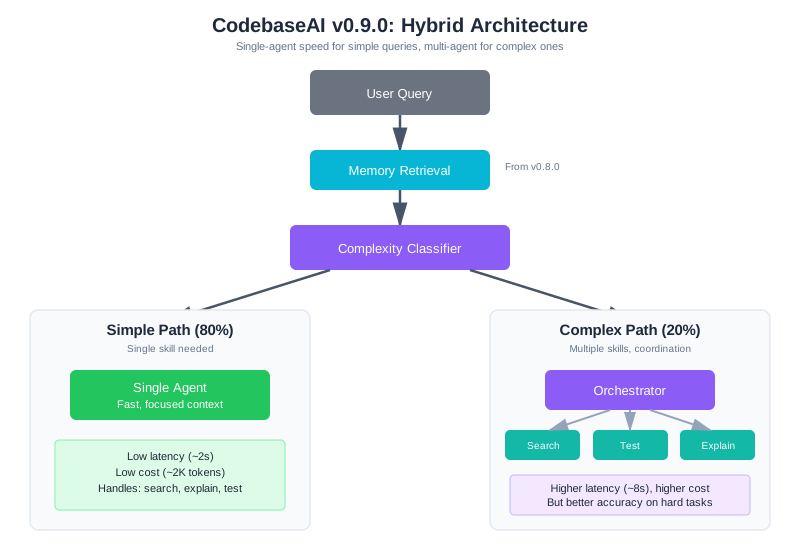
The Hybrid Approach
Rather than going full multi-agent, we’ll route based on query complexity:
"""
CodebaseAI v0.9.0 - Hybrid Single/Multi-Agent Architecture

Changelog from v0.8.0:
- Added complexity classifier for request routing
- Added orchestrator for multi-step task coordination
- Added specialist agents: search, test, explain
- Simple requests still use single-agent path (80% of traffic)
- Complex requests use orchestrator + specialists (20% of traffic)
"""

from dataclasses import dataclass
from enum import Enum


class QueryComplexity(Enum):
    SIMPLE = "simple"    # Single skill needed
    COMPLEX = "complex"  # Multiple skills, coordination required


class CodebaseAI:
    """
    CodebaseAI v0.9.0: Hybrid architecture.

    Routes simple queries to fast single-agent path.
    Routes complex queries to orchestrator + specialists.
    """

    def __init__(self, codebase_path: str, user_id: str, llm_client):
        self.codebase_path = codebase_path
        self.llm = llm_client

        # From v0.8.0: memory system still in use
        self.memory_store = MemoryStore(
            db_path=f"codebase_ai_memory_{user_id}.db",
            user_id=user_id
        )

        # New in v0.9.0: routing and specialists
        self.classifier = ComplexityClassifier(llm_client)
        self.orchestrator = Orchestrator(llm_client)
        self.specialists = {
            "search": SearchAgent(llm_client, codebase_path),
            "test": TestAgent(llm_client, codebase_path),
            "explain": ExplainAgent(llm_client),
        }

        # Single-agent fallback (for simple queries)
        self.single_agent = SingleAgent(llm_client, codebase_path)

    def query(self, question: str) -> str:
        """Answer a question, routing based on complexity."""

        # Retrieve relevant memories (from v0.8.0)
        memory_context = self.memory_store.get_context_injection(
            query=question, max_tokens=400
        )

        # Classify complexity
        complexity = self.classifier.classify(question)

        if complexity == QueryComplexity.SIMPLE:
            # Fast path: single agent handles it
            return self.single_agent.execute(question, memory_context)
        else:
            # Complex path: orchestrator coordinates specialists
            return self.orchestrator.execute(
                question, memory_context, self.specialists
            )
Most queries (around 80% in typical usage) are simple: “What does this function do?” or “Where is authentication handled?” These go straight to a single agent with focused context. Only genuinely complex queries—“Find the auth code, run its tests, explain what’s failing”—invoke the multi-agent machinery.
The Complexity Classifier
A lightweight classifier decides the routing:
class ComplexityClassifier:
    """
    Classify query complexity to route appropriately.

    Simple: Single skill, direct answer possible
    Complex: Multiple skills, coordination needed
    """

    PROMPT = """Classify this query as SIMPLE or COMPLEX.

Query: {query}

SIMPLE means:
- Single, direct question
- Needs only ONE skill (search OR test OR explain, not multiple)
- Can be answered in one step

COMPLEX means:
- Requires multiple steps (search THEN test, find THEN explain)
- Needs cross-referencing (find code AND verify behavior)
- Has conditional logic (if X then do Y)

Output only the word SIMPLE or COMPLEX."""

    def __init__(self, llm_client):
        self.llm = llm_client

    def classify(self, query: str) -> QueryComplexity:
        """Classify query complexity."""
        response = self.llm.complete(
            self.PROMPT.format(query=query),
            temperature=0,
            max_tokens=10
        )

        if "COMPLEX" in response.upper():
            return QueryComplexity.COMPLEX
        return QueryComplexity.SIMPLE
The classifier uses a small, cheap prompt. It doesn’t need the full context—just the query. Fast classification keeps simple queries on the fast path.
The Orchestrator
For complex queries, the orchestrator plans and coordinates:
class Orchestrator:
    """
    Coordinate specialist agents for complex queries.

    Plans subtasks, delegates to specialists, synthesizes results.
    """

    PLANNING_PROMPT = """Break this query into subtasks for specialist agents.

Query: {query}
User context: {memory}

Available specialists:
- search: Find code, files, patterns in the codebase
- test: Run tests, check results, report failures
- explain: Explain code, concepts, or results to the user

Create a plan. Each subtask should:
- Use exactly one specialist
- Have a clear, specific instruction
- List dependencies (which prior subtasks must complete first)

Output JSON:
{{
  "subtasks": [
    {{"id": "t1", "agent": "search", "task": "specific instruction", "depends_on": []}},
    {{"id": "t2", "agent": "test", "task": "specific instruction", "depends_on": ["t1"]}}
  ],
  "synthesis_instruction": "how to combine results for the user"
}}"""

    def __init__(self, llm_client):
        self.llm = llm_client

    def execute(self, query: str, memory: str, specialists: dict) -> str:
        """Execute a complex query through coordinated specialists."""

        # Step 1: Create execution plan
        plan = self._create_plan(query, memory)

        # Step 2: Execute subtasks in dependency order
        results = {}
        for subtask in self._topological_sort(plan["subtasks"]):
            agent = specialists[subtask["agent"]]

            # Build focused context for this agent
            agent_context = {
                "task": subtask["task"],
                "prior_results": {
                    dep: results[dep] for dep in subtask["depends_on"]
                },
                "memory": memory,
            }

            # Execute with timeout protection
            results[subtask["id"]] = self._execute_with_timeout(
                agent, agent_context
            )

        # Step 3: Synthesize results
        return self._synthesize(plan["synthesis_instruction"], results)

    def _create_plan(self, query: str, memory: str) -> dict:
        """Generate execution plan from query."""
        response = self.llm.complete(
            self.PLANNING_PROMPT.format(query=query, memory=memory),
            temperature=0
        )
        return json.loads(response)

    def _execute_with_timeout(self, agent, context, timeout=30):
        """Execute agent with timeout protection."""
        try:
            return agent.execute(context)
        except TimeoutError:
            return {"error": "timeout", "partial": None}
        except Exception as e:
            return {"error": str(e), "partial": None}
The orchestrator’s job is planning and coordination, not doing the actual work. It figures out which specialists to call in what order, passes appropriate context to each, and combines results.
Specialist Agents
Each specialist has a narrow focus and only its required tools:
class SearchAgent:
    """Specialist: find code in the codebase."""

    SYSTEM_PROMPT = """You are a code search specialist.

Your ONLY job: find relevant code in the codebase.
Do NOT explain the code—just find it.
Do NOT run tests—just search.

Tools available:
- search_code(pattern): Find code matching pattern
- read_file(path): Read file contents
- list_files(directory): List directory contents

Output JSON:
{{
  "files_found": ["list of relevant file paths"],
  "snippets": {{"path": "relevant code snippet"}},
  "search_notes": "brief note on what you found"
}}"""

    def __init__(self, llm_client, codebase_path):
        self.llm = llm_client
        self.codebase_path = codebase_path
        self.tools = [search_code, read_file, list_files]

    def execute(self, context: dict) -> dict:
        """Find relevant code for the given task."""
        response = self.llm.complete(
            system=self.SYSTEM_PROMPT,
            user=f"Task: {context['task']}\nCodebase: {self.codebase_path}",
            tools=self.tools
        )
        return json.loads(response)


class ExplainAgent:
    """Specialist: explain code to users."""

    SYSTEM_PROMPT = """You are a code explanation specialist.

Your ONLY job: explain code clearly to the user.
You receive code from other agents—do NOT search for code.
Do NOT run tests—just explain.

Adapt your explanation to the user's level.
Use analogies and concrete examples.
Be concise but complete."""

    def __init__(self, llm_client):
        self.llm = llm_client
        # No tools—explainer just explains

    def execute(self, context: dict) -> dict:
        """Explain code or results."""
        prior = context.get("prior_results", {})

        # Build explanation context from prior agent results
        code_context = ""
        for task_id, result in prior.items():
            if "snippets" in result:
                code_context += f"\n\nCode from {task_id}:\n"
                for path, snippet in result["snippets"].items():
                    code_context += f"\n{path}:\n{snippet}\n"
            if "failures" in result:
                code_context += f"\n\nTest failures:\n{result['failures']}"

        response = self.llm.complete(
            system=self.SYSTEM_PROMPT,
            user=f"Task: {context['task']}\n\nContext:{code_context}"
        )
        return {"explanation": response}
Notice what each agent doesn’t have. The search agent can’t run tests—it can only search. The explain agent has no tools at all—it can only work with what it receives. This constraint prevents the confusion that plagued the single-agent approach.
When Agents Fail
Multi-agent systems fail in predictable ways. Knowing the patterns helps you debug faster.
Debugging Case Study: Tracing a Multi-Agent Failure
Before we cover individual failure modes, let’s walk through a complete debugging scenario that shows how failures propagate and how to isolate them.
The Problem: A user reports that CodebaseAI’s 3-agent pipeline (researcher → analyzer → writer) produced an incorrect summary. The summary claims certain security vulnerabilities don’t exist when they actually do.
Step 1: Capture the Full Trace
First, enable detailed logging of what each agent receives and produces:
class DebugOrchestratorWrapper:
    """Wraps orchestrator to capture full execution trace."""

    def __init__(self, orchestrator):
        self.orchestrator = orchestrator
        self.execution_trace = []

    def execute(self, query: str, memory: str, specialists: dict) -> tuple[str, list]:
        """Execute and capture trace."""
        trace = {
            "query": query,
            "timestamp": datetime.now().isoformat(),
            "steps": []
        }

        # Patch specialist.execute to log inputs/outputs
        for name, agent in specialists.items():
            original_execute = agent.execute

            def logged_execute(context, agent_name=name, original_fn=original_execute):
                step_trace = {
                    "agent": agent_name,
                    "input_task": context.get("task"),
                    "input_prior_results": {k: v for k, v in context.get("prior_results", {}).items()},
                    "output": None,
                    "error": None
                }

                try:
                    result = original_fn(context)
                    step_trace["output"] = result
                    trace["steps"].append(step_trace)
                    return result
                except Exception as e:
                    step_trace["error"] = str(e)
                    trace["steps"].append(step_trace)
                    raise

            agent.execute = logged_execute

        # Run orchestrator
        result = self.orchestrator.execute(query, memory, specialists)
        self.execution_trace.append(trace)
        return result, trace
For the user’s query “Summarize security vulnerabilities in the authentication system,” the trace shows:
Step 1: Researcher Agent
  Task: "Find security-related code and vulnerability mentions"
  Output: {
    "files_found": ["src/auth.py", "src/middleware/jwt.py", "tests/security_tests.py"],
    "vulnerabilities_mentioned": ["missing rate limiting", "jwt not validating expiry"],
    "relevant_code": {...}
  }

Step 2: Analyzer Agent
  Task: "Analyze found vulnerabilities and assess severity"
  Input prior_results: {researcher: <output above>}
  Output: {
    "analyzed_vulnerabilities": [
      {"name": "missing rate limiting", "severity": "medium"},
      {"name": "jwt expiry validation", "severity": "high"}
    ],
    "missing_from_code": []
  }

Step 3: Writer Agent
  Task: "Summarize analysis for user"
  Input prior_results: {analyzer: <output above>}
  Output: {
    "summary": "The authentication system has two known vulnerabilities...",
    "note": "Note: system appears secure in the analyzed files"
  }
Step 2: Isolate Where the Chain Broke
The user says vulnerabilities don’t exist, but Step 2 (Analyzer) correctly identified them. Step 3 (Writer) added an erroneous “appears secure” note. The problem is either:
- Writer misinterpreted Analyzer’s output, or
- Writer received incomplete input
Test each agent independently with the same inputs:
# Re-run Step 2's input through Analyzer
analyzer_rerun = analyzer_agent.execute({
    "task": "Analyze found vulnerabilities and assess severity",
    "prior_results": {
        "researcher": {
            "files_found": ["src/auth.py", "src/middleware/jwt.py", "tests/security_tests.py"],
            "vulnerabilities_mentioned": ["missing rate limiting", "jwt not validating expiry"],
        }
    }
})
# Output matches original: correctly identified vulnerabilities

# Re-run Step 3's input through Writer
writer_rerun = writer_agent.execute({
    "task": "Summarize analysis for user",
    "prior_results": {
        "analyzer": {
            "analyzed_vulnerabilities": [
                {"name": "missing rate limiting", "severity": "medium"},
                {"name": "jwt expiry validation", "severity": "high"}
            ],
            "missing_from_code": []
        }
    }
})
# Output DIFFERS: "Note: system appears secure"
# BUT we gave it the correct vulnerabilities. Why the contradiction?
Step 3: Root Cause Analysis
The Writer agent is receiving the correct data but producing contradictory output. Looking at the Writer’s system prompt:
WRITER_PROMPT = """You are a security summary specialist.
...
Your task: Synthesize the analysis into a clear summary for the user.
...
Always include a note about whether the system appears secure overall."""
The prompt says “whether the system appears secure overall,” but the Analyzer found vulnerabilities. The Writer is balancing two conflicting instructions:
- Summarize the vulnerabilities (correct)
- Assess if “the system appears secure” (contradictory given the vulnerabilities)
The Writer, seeing high-severity issues, should conclude “system is NOT secure,” but the prompt’s phrasing (“appears secure overall”) made it waver.
Step 4: Apply the Fix
Three fixes for future instances:
# Fix 1: Clarify the Writer prompt
WRITER_PROMPT = """You are a security summary specialist.

Your ONLY job: present the vulnerabilities found by the analyzer to the user.
Do NOT add independent security assessment.
Do NOT conclude "secure" or "insecure" - let the vulnerabilities speak.

Synthesize the vulnerabilities into a clear summary."""

# Fix 2: Add schema validation
@dataclass
class WriterOutput:
    summary: str
    vulnerabilities_found: int

    def __post_init__(self):
        # Validate: if vulnerabilities > 0, summary must mention them
        if self.vulnerabilities_found > 0 and "secure" in self.summary.lower():
            if "insecure" not in self.summary.lower() and "vulnerable" not in self.summary.lower():
                raise ValueError(
                    "Summary mentions security but doesn't acknowledge vulnerabilities"
                )

# Fix 3: Add intermediate step validation
def execute_with_contradiction_check(writer_agent, prior_results):
    vuln_count = len(prior_results["analyzer"]["analyzed_vulnerabilities"])
    output = writer_agent.execute({"prior_results": prior_results})

    # Before returning, validate the output
    if vuln_count > 0 and "appears secure" in output["summary"]:
        # Contradiction detected - ask writer to revise
        output = writer_agent.execute({
            "prior_results": prior_results,
            "correction": f"The analysis found {vuln_count} vulnerabilities. Your summary should reflect that."
        })

    return output
Lesson: Multi-agent failures often come from agents receiving correct data but misinterpreting it due to conflicting instructions or prompt ambiguity. When you find this pattern, the fix is almost always to clarify the agent’s scope and prompt, not to change the data flow.
Failure 1: Agents Contradict Each Other
Symptom: Search agent finds auth.py. Explain agent talks about authentication.py. Results don’t match.
Diagnosis: Add handoff logging:
def debug_orchestration(execution_log):
    """Print what each agent received and produced."""
    for step in execution_log:
        print(f"\n=== {step['agent']} ===")
        print(f"Input task: {step['input']['task']}")
        print(f"Prior results received: {list(step['input']['prior_results'].keys())}")
        print(f"Output: {json.dumps(step['output'], indent=2)[:500]}")
Common causes:
- Context not passed: Agent B didn’t receive Agent A’s output. Check the dependency graph.
- Ambiguous task: “Explain the code” without specifying which code. Make tasks explicit.
- Output truncated: Agent A’s output was too long and got cut in the handoff. Add size limits.
Fix: Explicit schemas with validation:
@dataclass
class SearchOutput:
    files_found: list[str]
    snippets: dict[str, str]
    notes: str

# Validate before handoff
output = SearchOutput(**search_agent.execute(context))
# Now we know the structure is correct
Failure 2: System Hangs or Loops
Symptom: Query never completes. Orchestrator seems stuck.
Common causes:
- Circular dependencies: Task A depends on B, B depends on A. The topological sort fails or loops.
- No timeout: An agent call hangs forever waiting for an unresponsive service.
- Retry storm: Error triggers retry, retry triggers same error.
Fix: Timeouts and circuit breakers:
class Orchestrator:
    MAX_RETRIES = 2
    TIMEOUT_SECONDS = 30

    def _execute_with_safeguards(self, agent, context):
        """Execute with timeout and retry limits."""
        for attempt in range(self.MAX_RETRIES):
            try:
                # Timeout protection
                result = self._with_timeout(
                    lambda: agent.execute(context),
                    self.TIMEOUT_SECONDS
                )
                return result
            except TimeoutError:
                if attempt == self.MAX_RETRIES - 1:
                    return {"error": "timeout", "agent": agent.name}
            except Exception as e:
                if attempt == self.MAX_RETRIES - 1:
                    return {"error": str(e), "agent": agent.name}

        return {"error": "max_retries_exceeded"}
Failure 3: Wrong Tool Selection
Symptom: Search agent tries to run tests. Test agent tries to search.
Root cause: Agents have access to tools they shouldn’t, and instructions get lost in context.
Fix: Tool isolation. Each agent sees only its tools:
# Search agent: only search tools
search_agent.tools = [search_code, read_file, list_files]

# Test agent: only test tools
test_agent.tools = [run_tests, get_coverage]

# Explain agent: no tools at all
explain_agent.tools = []
When the explain agent can’t search, it can’t get confused and try to search.
The Coordination Tax
Let’s be honest about what multi-agent costs. Anthropic’s own engineering team found that their multi-agent research system uses 15x more tokens than single-agent chat interactions—a number that surprised even them. Here’s the breakdown for a typical CodebaseAI query:
| Metric | Single Agent | Multi-Agent (3 specialists) |
|---|---|---|
| LLM calls per query | 1 | 4+ (classifier + orchestrator + agents) |
| Latency | ~2 seconds | ~6-10 seconds |
| Tokens per query | ~4,000 | ~12,000+ (context duplication) |
| Cost multiplier | 1x | 3-15x (depends on coordination depth) |
| Failure points | 1 | 4+ (each component can fail) |
| Debugging complexity | Low | High (distributed tracing needed) |
The 15x figure from Anthropic is worth sitting with. Even their well-engineered orchestrator-worker system—Claude Opus 4 as lead agent coordinating Claude Sonnet 4 subagents—paid this token overhead. The multi-agent system produced 90%+ better results on complex research tasks, so the tradeoff was justified. But that’s a specific class of task (multi-source research) where single-agent approaches genuinely fail. For most queries, the coordination tax isn’t worth it.
Multi-agent is worth the tax when:
- Single-agent reliability is unacceptably low for complex queries
- Tasks are genuinely parallelizable (latency improvement)
- Different components need different models (cost optimization: cheap model for search, expensive for explanation)
- Failure handling needs to differ by component
And critically, it’s NOT worth the tax when:
- A better single-agent prompt would solve the problem
- Tasks require strict sequential reasoning (multi-agent adds 39-70% performance degradation on sequential reasoning benchmarks)
- Consistency matters more than capability (multiple agents introduce variance)
- You need predictable costs (multi-agent token usage is highly variable)
The hybrid approach in CodebaseAI v0.9.0 minimizes the tax: simple queries (80%) stay fast and cheap on the single-agent path. Only complex queries (20%) pay the coordination cost—and for those, the improved reliability is worth it.
Cost Justification Framework: When Is 15x Worth It?
The 15x token multiplier from Anthropic’s system is sobering. When is it actually justified?
Not worth it when:
Task complexity is low. “Explain this function” or “Find the main entry point” work fine with a focused single-agent prompt. If you can write a clear, specific instruction that a good LLM can follow, multi-agent adds pure overhead. A single agent with clear focus beats multiple agents with coordination overhead.
Quality baseline is already good. If your single-agent success rate is >90% and users are happy, adding multi-agent for the remaining 10% doesn’t justify the 15x cost. You’re spending $15 to fix a $1 problem.
Consistency matters more than capability. Single-agent systems are consistent—the same input produces the same output structure every time. Multi-agent systems are more variable (different agents may format output differently, different coordination paths produce subtly different results). If you need deterministic behavior (compliance reporting, financial calculations), single-agent wins.
You haven’t optimized single-agent yet. Before going multi-agent, spend time on prompt engineering, tool optimization, and retrieval quality. A well-engineered single agent often beats a poorly-engineered multi-agent system. The comparative failure rates tell the story: systems that went multi-agent without first maximizing single-agent performance saw failure rates above 80%. Systems that spent time optimizing single-agent first had failure rates below 40%.
Worth it when:
Task genuinely requires multiple specialized skills. “Find the vulnerability, write an exploit, document the attack scenario” requires different expertise for each step. A security researcher might find the vulnerability, but explaining the attack clearly requires a technical writer’s voice. Splitting these into agents where each can specialize improves quality in ways a single agent can’t.
Quality improvement is transformative, not incremental. Anthropic’s research system achieved 90%+ better results on multi-source research with multi-agent. That’s a massive improvement. CodebaseAI’s tests showed ~35-40% improvement on complex queries when using orchestrator-workers vs. single-agent. That’s worth a 15x cost multiplier because the alternative—wrong answers—is worse.
Parallelization improves latency in meaningful ways. If you have three independent search tasks, parallel agents reduce latency from 6 seconds (sequential) to 2 seconds (parallel). For user-facing systems where latency matters (search, recommendations), this can be worth the token cost.
Costs are amortized across many queries. The 15x multiplier applies to the complex queries (20% of traffic). The remaining 80% run cheap on single-agent path. Your actual multiplier is closer to 1.0 × 0.8 + 15 × 0.2 = 3.8x on average. If your query cost was $0.01, it becomes $0.038. Tolerable if quality matters.
Decision Matrix: Single-Agent vs. Multi-Agent
| Factor | Single-Agent Better | Multi-Agent Better |
|---|---|---|
| Task complexity | Simple, single-step | Complex, multi-step with dependencies |
| Success rate needed | >90% good enough | >95% required; single-agent fails 10%+ |
| Quality threshold | “Good enough” | High stakes (medical, financial, legal) |
| Failure mode tolerance | Can retry on failure | Failures are expensive/irreversible |
| Latency sensitivity | <2 sec acceptable | <1 sec required |
| Cost sensitivity | Budget-constrained | Quality/reliability driven |
| Task parallelizability | Sequential | Independent subtasks |
| Output consistency | Must be deterministic | Variance acceptable |
| Developer time | Limited | Engineering resources available |
Decision rule: Multi-agent wins when you’re solving for quality/reliability at the cost of latency and tokens. Single-agent wins when you’re solving for cost and consistency. Choose based on what’s actually constrained in your system.
Practical Implementation: From Single to Multi
If you decide multi-agent is worth it, here’s a pragmatic path:
-
Start with single-agent. Measure baseline quality, latency, and cost.
-
Identify failure patterns. What types of queries fail? What causes the failures? Log 100 failures and categorize them.
-
Try single-agent improvements first. Better prompt. Better tools. Better retrieval. These are often cheaper than multi-agent.
-
Add multi-agent for specific failure classes. Don’t go all-in on multi-agent. Route only the queries that fail with single-agent to the multi-agent pipeline. Hybrid approach (like CodebaseAI v0.9.0) gets you 80-90% of the multi-agent benefit at 30-40% of the cost.
-
Measure the tradeoff. Did you improve quality by X%? Did costs increase by 3-4x on average? Is X% quality improvement worth Y% cost increase? Answer this empirically, not philosophically.
The teams that regret going multi-agent are those that did it prematurely—before single-agent was mature, without measuring whether it actually solved real problems. The teams that succeeded carefully measured the gap between single and multi-agent performance, then added multi-agent only where the gap was large enough to justify the cost.
Worked Example: The Complex Query
Let’s trace through a complex query end-to-end.
User query: “Find the authentication code, run its tests, and explain what’s failing.”
Step 1: Classification
Query: "Find the authentication code, run its tests, and explain what's failing"
→ Requires search THEN test THEN explain
→ Classification: COMPLEX
Step 2: Orchestrator Plans
{
  "subtasks": [
    {"id": "t1", "agent": "search", "task": "Find authentication-related code and test files", "depends_on": []},
    {"id": "t2", "agent": "test", "task": "Run tests for the authentication code found", "depends_on": ["t1"]},
    {"id": "t3", "agent": "explain", "task": "Explain what tests are failing and why", "depends_on": ["t2"]}
  ],
  "synthesis_instruction": "Combine: what code was found, what tests failed, explanation of failures"
}
Step 3: Search Agent Executes
Input: {"task": "Find authentication-related code and test files"}
Tools used: search_code("auth"), list_files("tests/")
Output: {
  "files_found": ["src/auth.py", "src/middleware/jwt.py", "tests/test_auth.py"],
  "snippets": {"src/auth.py": "def verify_token(token):..."},
  "notes": "Core auth in auth.py, JWT handling in middleware"
}
Step 4: Test Agent Executes
Input: {
  "task": "Run tests for the authentication code found",
  "prior_results": {"t1": <search output>}
}
Tools used: run_tests("tests/test_auth.py")
Output: {
  "tests_run": 5,
  "passed": 3,
  "failed": 2,
  "failures": "test_token_expiry: AssertionError - token accepted after expiry\ntest_refresh: TimeoutError"
}
Step 5: Explain Agent Executes
Input: {
  "task": "Explain what tests are failing and why",
  "prior_results": {"t1": <search output>, "t2": <test output>}
}
Output: {
  "explanation": "Two authentication tests are failing:

1. **Token expiry test**: The verify_token() function in auth.py isn't checking
   token expiration correctly. Looking at the code, it compares timestamps but
   doesn't account for timezone differences...

2. **Refresh test**: The token refresh is timing out, likely because..."
}
Step 6: Synthesis The orchestrator combines results into a coherent response that answers all parts of the user’s question.
Without multi-agent, the single agent would have attempted all three tasks in one context, often running tests on the wrong files or explaining code it never found. With multi-agent, each specialist focuses on its job with appropriate context.
The Engineering Habit
Simplicity wins. Only add complexity when simple fails.
Multi-agent systems are powerful. They can solve problems that single agents can’t. But every agent you add is another component that can fail, another set of instructions to maintain, another handoff that can lose context, another LLM call that costs time and money.
Start with single-agent. Push it until it genuinely breaks—not until it’s slightly annoying, but until it fails in ways that matter. When it breaks, understand why it breaks. Only then consider multi-agent, and add the minimum complexity needed to solve the specific problem.
The best multi-agent systems are often hybrids: single-agent for the 80% of requests that are simple, multi-agent only for the 20% that genuinely need coordination. For everything else, keep it simple.
Context Engineering Beyond AI Apps
Multi-agent development workflows are already here, even if most teams don’t think of them that way. A developer might use Claude Code for architectural planning, Cursor for implementation, GitHub Copilot for inline completion, and a separate AI tool for code review. Each tool has different strengths, different context windows, different capabilities—and they don’t automatically share state. The code Claude Code planned might not match what Cursor implements if the context isn’t carefully managed between them.
The orchestration challenges from this chapter apply directly: shared state (how do you ensure all tools see the same project context?), coordination (how do you prevent tools from contradicting each other?), and failure modes (what happens when one tool generates code that breaks assumptions another tool relies on?). The same principle holds: simplicity wins. Using one well-configured tool is often better than poorly coordinating three.
As agentic development workflows mature—with tools like Claude Code handling entire implementation cycles autonomously—the multi-agent patterns from this chapter become practical requirements for every development team. Understanding when to split work across agents, how to maintain context isolation, and how to handle coordination failures will matter as much in your development workflow as in your AI products. The patterns, the pitfalls, and the recovery strategies are identical.
Summary
Multi-agent systems solve coordination problems that single agents can’t handle—but they come with a coordination tax that must be justified.
When to consider multi-agent:
- Conflicting context requirements across tasks
- Parallelizable subtasks
- Different failure modes needing different handling
- Specialized tools causing confusion when combined
Key patterns:
- Routing: Classify and dispatch to specialists
- Pipeline: Sequential transformation, each stage focused
- Orchestrator-Workers: Dynamic task decomposition and delegation
- Parallel + Aggregate: Independent subtasks running simultaneously
- Validator: Dedicated quality checking improves accuracy ~40%
Context engineering principles:
- Each agent gets focused context, not everything
- Explicit handoffs with validated schemas
- Global state for coordination, agent-specific context for execution
- Tool isolation prevents confused tool selection
Common failure modes:
- Cascading errors (one agent’s failure poisons downstream agents)
- Context starvation (agents missing critical information from prior steps)
- Infinite loops (agents cycling without progress)
- Hallucination propagation (one agent’s hallucination laundered into “fact”)
- Agents contradict (context not passed correctly)
- System hangs (missing timeouts and circuit breakers)
- Wrong tool selection (tools not properly isolated)
New Concepts Introduced
- Multi-agent coordination patterns
- Complexity-based routing
- Context distribution vs. isolation
- Agent handoff protocols with schemas
- Coordination tax and hybrid architectures
- Circuit breakers and timeout protection
CodebaseAI Evolution
Version 0.9.0 capabilities:
- Hybrid single/multi-agent architecture
- Complexity classifier for request routing
- Orchestrator for dynamic task decomposition
- Specialist agents: search, test, explain
- Schema-validated agent-to-agent handoffs
- Timeout and retry protection
The Engineering Habit
Simplicity wins. Only add complexity when simple fails.
Try it yourself: Complete, runnable versions of this chapter’s code examples are available in the companion repository.
Chapter 9 gave CodebaseAI memory across sessions. This chapter split it into specialized agents for complex tasks. But we’ve been building in development—what happens when real users with real problems start using it? Chapter 11 tackles production deployment: rate limits, cost management, graceful degradation, and the context engineering challenges that only emerge under load.