Chapter 11: Designing for Production
CodebaseAI v0.9.0 works beautifully on your machine. The multi-agent system handles complex queries gracefully. Memory persists across sessions. RAG retrieves relevant code snippets. You’ve tested it with your own codebase, run it through dozens of scenarios, and everything works. Time to deploy.
Then real users arrive. The first user pastes a 200,000-line codebase and asks “explain the architecture.” Your context window overflows. The second user fires off 50 questions in ten minutes; your API rate limit triggers and your monthly budget evaporates in an afternoon. The third user submits a query in a language your system prompt didn’t anticipate, and the orchestrator returns gibberish. The fourth user’s query takes 45 seconds to complete—they’ve already closed the tab.
Everything that worked in development fails at scale. Production isn’t just “development plus deployment.” It’s a fundamentally different environment with different constraints: unpredictable inputs, concurrent users, real costs, latency requirements, and no opportunity to say “let me fix that and restart.” The context engineering techniques from previous chapters—RAG, memory, multi-agent orchestration—all behave differently under production pressure. This chapter teaches you to design systems that survive contact with real users.
The challenges are unique to context engineering. Traditional web applications have predictable costs per request—a database query costs roughly the same whether the user asks “what’s my balance” or “show my transaction history.” LLM applications don’t work that way. A simple question might use 500 tokens; a complex one might use 50,000. A user who submits a small codebase costs $0.01 per query; a user who submits a monorepo costs $0.50. The variance in resource consumption per request is orders of magnitude larger than traditional software, and that variance directly translates to cost, latency, and capacity challenges.
This chapter covers the production infrastructure specific to context engineering: how to budget and cache context, limit token consumption, degrade gracefully under pressure, monitor context quality, version your prompts, and test your context strategies. We’ll skip generic deployment topics (containers, CI/CD, environment management)—plenty of excellent resources cover those—and focus entirely on what makes deploying AI systems different.
The Production Context Budget
In development, you optimize for quality. In production, you optimize for quality within constraints. The most important constraint is cost.
Context Costs Money
Every token you send to an LLM costs real money. Here’s what that looks like with current pricing:
| Model | Input (per 1M tokens) | Output (per 1M tokens) | 10K context query |
|---|---|---|---|
| Claude 3.5 Sonnet | $3.00 | $15.00 | ~$0.03 input |
| GPT-4o | $2.50 | $10.00 | ~$0.025 input |
| GPT-4o-mini | $0.15 | $0.60 | ~$0.0015 input |
| Claude 3 Haiku | $0.25 | $1.25 | ~$0.0025 input |
Note: Prices as of early 2026. Check current rates before planning.
These numbers look small until you multiply them. At 1,000 queries per day with an average 10K token context:
- Premium model (Sonnet/GPT-4o): ~$30/day input + output ≈ $900-1,500/month
- Budget model (mini/Haiku): ~$2/day input + output ≈ $60-100/month
The context engineering techniques from previous chapters multiply these costs. Every RAG chunk you retrieve adds tokens. Every memory you inject adds tokens. Multi-agent orchestration means multiple LLM calls per user query. A single complex query through the orchestrator might cost $0.15-0.30 with a premium model.
The Multi-User Math
Development: one user, controlled queries, predictable load. Production: N users, diverse queries, bursty traffic.
class ContextBudgetCalculator:
    """Calculate context costs for production planning."""

    def __init__(self, input_price_per_million: float, output_price_per_million: float):
        self.input_price = input_price_per_million
        self.output_price = output_price_per_million

    def estimate_query_cost(
        self,
        system_prompt_tokens: int,
        memory_tokens: int,
        rag_tokens: int,
        conversation_tokens: int,
        query_tokens: int,
        expected_output_tokens: int
    ) -> dict:
        """Estimate cost for a single query."""
        total_input = (system_prompt_tokens + memory_tokens +
                      rag_tokens + conversation_tokens + query_tokens)

        input_cost = (total_input / 1_000_000) * self.input_price
        output_cost = (expected_output_tokens / 1_000_000) * self.output_price

        return {
            "total_input_tokens": total_input,
            "output_tokens": expected_output_tokens,
            "input_cost": round(input_cost, 4),
            "output_cost": round(output_cost, 4),
            "total_cost": round(input_cost + output_cost, 4),
        }

    def project_monthly(self, queries_per_day: int, avg_cost: float) -> float:
        """Project monthly costs from daily usage."""
        return queries_per_day * 30 * avg_cost


# Example: CodebaseAI query cost estimation
calculator = ContextBudgetCalculator(
    input_price_per_million=3.00,   # Claude 3.5 Sonnet
    output_price_per_million=15.00
)

typical_query = calculator.estimate_query_cost(
    system_prompt_tokens=500,
    memory_tokens=400,
    rag_tokens=2000,
    conversation_tokens=1000,
    query_tokens=100,
    expected_output_tokens=500
)
# Result: ~$0.012 per query
# At 1000 queries/day: ~$360/month
Context Allocation Strategy
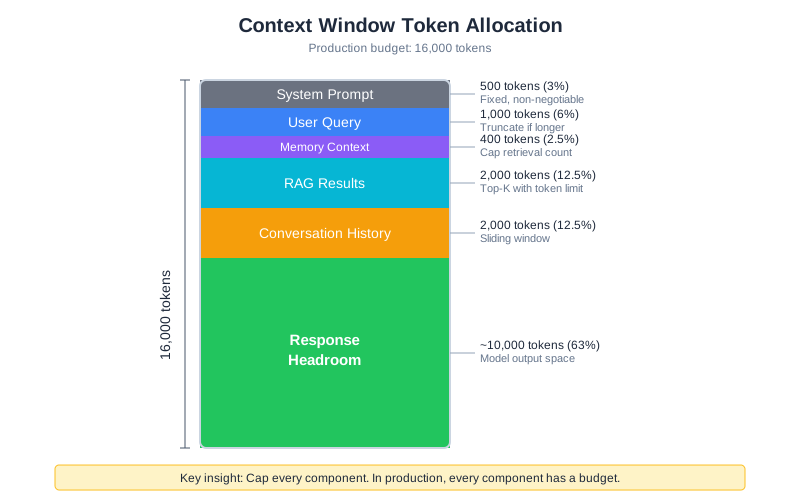
When context costs money, you need explicit allocation:
Total Context Budget: 16,000 tokens
├── System Prompt: 500 tokens (fixed, non-negotiable)
├── User Query: up to 1,000 tokens (truncate if longer)
├── Memory Context: up to 400 tokens (cap retrieval)
├── RAG Results: up to 2,000 tokens (top-k with limit)
├── Conversation History: up to 2,000 tokens (sliding window)
└── Response Headroom: ~10,000 tokens (for model output)
The key insight: cap every component. In development, you might let memory grow unbounded or retrieve unlimited RAG chunks. In production, every component has a budget. When a component exceeds its budget, truncate or summarize—don’t let it crowd out other components.
@dataclass
class ContextBudget:
    """Define token budgets for each context component."""
    system_prompt: int = 500
    user_query: int = 1000
    memory: int = 400
    rag: int = 2000
    conversation: int = 2000
    total_limit: int = 16000

    def allocate(self, components: dict) -> dict:
        """Allocate tokens to components within budget."""
        allocated = {}

        for name, content in components.items():
            limit = getattr(self, name, 1000)
            tokens = estimate_tokens(content)

            if tokens <= limit:
                allocated[name] = content
            else:
                allocated[name] = truncate_to_tokens(content, limit)

        return allocated
Context Caching: Reuse Before You Recompute
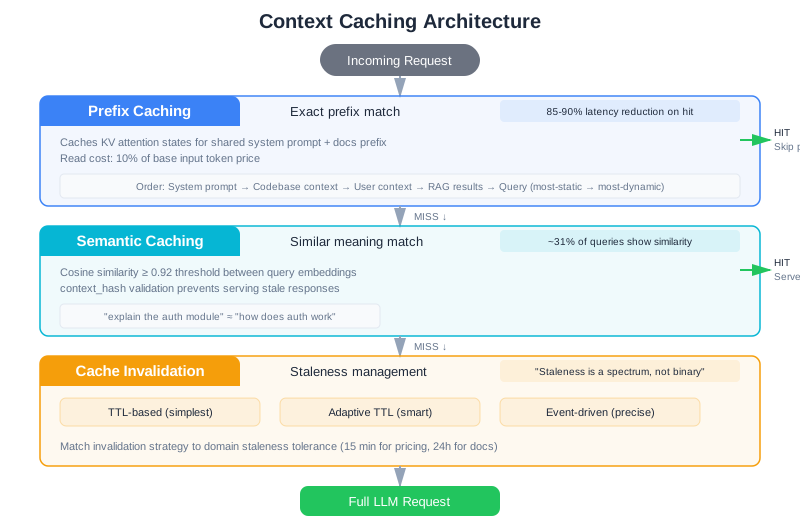
The single largest production optimization for context engineering isn’t a better model or a smarter retrieval algorithm—it’s caching. Research shows that roughly 31% of LLM queries in production systems exhibit semantic similarity to previous requests. Without caching, you’re paying full price to recompute context that’s already been assembled.
Prefix Caching
Most LLM requests share a significant prefix: the system prompt, few-shot examples, and often the same reference documents. Prefix caching stores the precomputed key-value attention states for these shared prefixes, so subsequent requests skip the expensive computation.
Consider CodebaseAI’s query pattern. Every request includes the same 500-token system prompt and the same set of codebase-level documentation. For a team of 20 developers making 50 queries each per day, that’s 1,000 requests recomputing the same prefix. With prefix caching, only the first request pays full cost. Anthropic reports 85-90% latency reduction on cache hits, with read tokens costing just 10% of base input token price (as of early 2026).
The mechanics are straightforward. Structure your context so shared content appears first:
class PrefixOptimizedContext:
    """Structure context to maximize prefix cache hits."""

    def build(self, query: str, user_context: dict) -> list:
        """Build context with cacheable prefix first."""
        return [
            # Layer 1: Static prefix (cached across ALL requests)
            {"role": "system", "content": self.system_prompt},

            # Layer 2: Codebase-level context (cached per codebase)
            {"role": "user", "content": self._codebase_summary()},

            # Layer 3: User-specific context (changes per user)
            {"role": "user", "content": self._user_memory(user_context)},

            # Layer 4: Query-specific context (changes per request)
            {"role": "user", "content": self._rag_results(query)},

            # Layer 5: The actual query (always unique)
            {"role": "user", "content": query},
        ]
The ordering matters. Everything before the first variable element gets cached. If you put the user’s query before the system prompt, nothing gets cached. Structure your context from most-static to most-dynamic.
Semantic Caching
Prefix caching handles identical prefixes. Semantic caching goes further: it recognizes that “explain the authentication module” and “how does the auth system work” are asking essentially the same question, and serves a cached response.
class SemanticCache:
    """Cache responses for semantically similar queries."""

    def __init__(self, similarity_threshold: float = 0.92, ttl_seconds: int = 3600):
        self.entries: list = []
        self.threshold = similarity_threshold
        self.ttl = ttl_seconds

    def get(self, query: str, context_hash: str) -> Optional[str]:
        """Find cached response for similar query with same context."""
        query_embedding = self._embed(query)
        now = time.time()

        for entry in self.entries:
            # Must match context (same codebase state)
            if entry["context_hash"] != context_hash:
                continue

            # Must not be expired
            if now - entry["timestamp"] > self.ttl:
                continue

            # Must be semantically similar
            similarity = self._cosine_similarity(query_embedding, entry["embedding"])
            if similarity >= self.threshold:
                return entry["response"]

        return None

    def put(self, query: str, context_hash: str, response: str):
        """Store response for future similar queries."""
        self.entries.append({
            "embedding": self._embed(query),
            "context_hash": context_hash,
            "response": response,
            "timestamp": time.time(),
        })
The context_hash parameter is critical. A cached response is only valid if the underlying context hasn’t changed. If someone commits new code to the repository, the hash changes and the cache invalidates. Without this check, you serve stale answers confidently—one of the subtlest production bugs.
Cache Invalidation: The Hard Problem
“There are only two hard things in Computer Science: cache invalidation and naming things.” In context engineering, cache invalidation is especially tricky because context staleness isn’t binary—it’s a spectrum.
A Case Study: The Pricing Catastrophe
Here’s what goes wrong with inadequate cache invalidation. A customer support bot for an e-commerce platform caches product pricing information with a 4-hour TTL. At 10:00 AM, prices are accurate and cached. At 11:30 AM, the pricing service pushes a new price list that reflects a 30% seasonal discount—but the cache doesn’t invalidate immediately. The cached prices remain stale for 2.5 more hours (until 2:00 PM). During that window, the support bot confidently quotes old prices to 847 customers, resulting in $12,000 in disputed charges when customers place orders at the quoted price and receive invoices at the new (lower) price. Two hours of debugging, one evening war room, and a week of customer support chaos—all because cache invalidation strategy didn’t match the business requirement of “pricing accuracy within 15 minutes of change.”
The lesson: invalidation strategy must match the staleness tolerance of your domain. For support contexts, 15-minute tolerance might be required. For documentation contexts, 24 hours is fine. Know your requirement first, design your invalidation strategy second.
Invalidation Strategies
Three strategies, from simplest to most robust:
TTL-based (simplest): Context expires after a fixed time. Set TTL based on how fast your underlying data changes. For a codebase that’s updated daily, a 1-hour TTL is reasonable. For a knowledge base updated weekly, 24 hours works. Easy to implement, but inevitably serves stale data between changes and expiration.
Adaptive TTL: Vary TTL based on content stability. Frequently-changing content gets short TTL (15 minutes). Stable content gets long TTL (24 hours). Requires analyzing change frequency, but avoids both aggressive cache misses and stale data. For CodebaseAI, frequently-modified files get 30-minute TTL; architectural documentation gets 8-hour TTL.
Event-driven invalidation: Invalidate when the source changes. When a git push updates the repository, invalidate all cached context for that codebase. When a configuration file changes, invalidate related caches. This is more precise but requires event infrastructure—webhooks from source control, message queues, or change data capture streams.
Event-driven patterns in production:
- Webhook-triggered: Source system (git, S3, database) calls a webhook on change. Handler purges affected cache keys. Simple but requires source system support and reliable delivery.
- Change Data Capture (CDC): Monitor source system logs (git commit logs, database transaction logs). When changes are detected, invalidate caches. More decoupled than webhooks.
- Publish-Subscribe: Source publishes change events. Cache service subscribes and invalidates. Scales well and provides flexibility for multiple subscribers.
Hybrid: TTL as a safety net, events for immediate invalidation. Events catch most changes within seconds; TTL catches the rare events the event system misses. This is what production systems use. CodebaseAI uses this approach: webhook-triggered invalidation on git push (immediate), plus 4-hour TTL fallback.
Cache Warming: Preparing for Invalidation
Invalidating a cache creates a “cold cache” problem: the first request after invalidation pays full cost to rebuild context. With semantic caching serving 30% of queries for free, a cache miss is expensive. Mitigate with cache warming—pre-populating caches after invalidation.
When a git repository updates, don’t just invalidate its cache. Proactively rebuild context for the most common queries on that repository:
class CacheWarmer:
    """Pre-populate caches for predictable queries after invalidation."""

    def __init__(self, context_builder, cache, analytics):
        self.context_builder = context_builder
        self.cache = cache
        self.analytics = analytics  # Track most common queries per repo

    def warm_after_invalidation(self, repo_id: str):
        """Rebuild cache for top queries after repo changes."""
        # Find top 10 queries for this repo from past week
        top_queries = self.analytics.get_top_queries(repo_id, limit=10)

        for query in top_queries:
            try:
                # Rebuild context eagerly
                context = self.context_builder.build(
                    query=query,
                    repo_id=repo_id
                )
                # Cache it
                cache_key = f"{repo_id}:{query}"
                self.cache.put(cache_key, context, ttl=3600)
            except Exception as e:
                # Don't fail warming on individual queries
                logger.warning(f"Failed to warm cache for {repo_id}: {query}")
                continue

    def warm_proactively(self, repo_id: str, predicted_queries: list):
        """Warm cache before expected spike (e.g., before team morning)."""
        for query in predicted_queries:
            try:
                context = self.context_builder.build(
                    query=query,
                    repo_id=repo_id
                )
                cache_key = f"{repo_id}:{query}"
                self.cache.put(cache_key, context, ttl=3600)
            except Exception:
                continue
Cache warming trades off a small amount of upfront work (rebuilding 10 queries) for a big reduction in latency variance. The cost: 50 seconds to warm 10 queries. The benefit: eliminating the 50-second latency spike on the next request for a popular query. Users experience consistent latency instead of random spiking.
The Specific Challenges of Caching LLM Responses
Caching LLM responses is harder than caching deterministic computations because of three fundamental challenges:
Variable inputs, similar meaning: “Explain the authentication module” and “How does auth work?” are the same question, but they’re different strings. Simple string-based caching misses the similarity. Semantic caching (which the code implements via embedding similarity) solves this, but requires embedding computation and similarity thresholds. The tradeoff: embedding similarity isn’t perfect. At 0.92 similarity, you might occasionally get the wrong answer for a semantically-similar-but-not-identical question. At 0.98, you cache almost nothing.
Non-deterministic outputs: The same input can produce different outputs. With temperature > 0, asking Claude “what are three ways to refactor this?” multiple times gives different answers each time—all correct, all different. Caching the first response means subsequent identical queries get the same answer, even though the user might prefer diversity. Some systems disable caching for non-deterministic queries (temperature > 0). Others treat it as a feature: “consistent answers for the same question.” Know your domain.
Semantic equivalence is hard to detect: “Show me the error handling in UserService.java” and “Where does UserService catch exceptions?” are asking about related but different things. Embedding similarity might score them as equivalent. If you return a cached answer about error handling when they asked about exception catching, the response might be correct but not quite what they wanted. This is the insidious failure mode of semantic caching: you serve an answer that looks relevant but doesn’t match the intent.
class ContextCache:
    """Production cache with TTL and event-based invalidation."""

    def __init__(self, default_ttl: int = 3600):
        self.cache: dict = {}
        self.default_ttl = default_ttl

    def get(self, key: str) -> Optional[str]:
        """Get cached context if fresh."""
        if key not in self.cache:
            return None
        value, expiry = self.cache[key]
        if time.time() > expiry:
            del self.cache[key]
            return None
        return value

    def put(self, key: str, value: str, ttl: int = None):
        """Store context with expiration."""
        ttl = ttl or self.default_ttl
        self.cache[key] = (value, time.time() + ttl)

    def invalidate(self, pattern: str):
        """Invalidate all keys matching pattern (event-driven)."""
        to_remove = [k for k in self.cache if pattern in k]
        for k in to_remove:
            del self.cache[k]

    def stats(self) -> dict:
        """Cache performance metrics."""
        total = len(self.cache)
        expired = sum(1 for _, (_, exp) in self.cache.items() if time.time() > exp)
        return {"total_entries": total, "expired": expired, "active": total - expired}
In CodebaseAI’s production deployment, adding a two-tier cache (prefix + semantic) reduced average per-query cost by 62% and P95 latency by 40%. The cache itself costs almost nothing to run. This is typically the highest-ROI optimization you can make.
The Latency Budget
Users expect fast responses. But context engineering inherently adds latency: you’re retrieving from vector databases, querying memory stores, running embedding models, and assembling context before you even call the LLM. Without careful design, context assembly can take longer than the LLM inference itself.
Parallel Context Retrieval
The most impactful latency optimization: retrieve context sources in parallel, not sequentially. Memory retrieval, RAG search, and conversation history loading are independent operations. Running them one after another doubles or triples your context assembly time.
import asyncio

class ParallelContextAssembler:
    """Retrieve all context sources concurrently."""

    def __init__(self, memory_store, rag_pipeline, history_store):
        self.memory = memory_store
        self.rag = rag_pipeline
        self.history = history_store

    async def assemble(self, query: str, user_id: str, budget: ContextBudget) -> dict:
        """Fetch all context sources in parallel."""

        # Launch all retrievals concurrently
        memory_task = asyncio.create_task(
            self.memory.retrieve_async(query, limit=budget.memory_items)
        )
        rag_task = asyncio.create_task(
            self.rag.search_async(query, top_k=budget.rag_chunks)
        )
        history_task = asyncio.create_task(
            self.history.recent_async(user_id, limit=budget.history_turns)
        )

        # Wait for all to complete (with timeout per source)
        results = await asyncio.gather(
            memory_task,
            rag_task,
            history_task,
            return_exceptions=True  # Don't fail if one source errors
        )

        # Handle partial failures gracefully
        memory_result = results[0] if not isinstance(results[0], Exception) else ""
        rag_result = results[1] if not isinstance(results[1], Exception) else ""
        history_result = results[2] if not isinstance(results[2], Exception) else ""

        return {
            "memory": memory_result,
            "rag_results": rag_result,
            "conversation_history": history_result,
            "partial_failure": any(isinstance(r, Exception) for r in results)
        }
Sequential context assembly for CodebaseAI’s typical request: memory (50ms) + RAG (120ms) + history (30ms) = 200ms. Parallel: max(50, 120, 30) = 120ms. That’s a 40% reduction in context assembly time. At scale, this saves seconds per request.
Context Assembly Latency Targets
Set explicit latency budgets for each phase of your pipeline:
Total latency budget: 5,000ms
├── Context assembly: 500ms (10%)
│   ├── Memory retrieval: 100ms
│   ├── RAG search: 300ms
│   ├── History loading: 50ms
│   └── Context formatting: 50ms
├── LLM inference: 4,000ms (80%)
├── Post-processing: 300ms (6%)
└── Overhead: 200ms (4%)
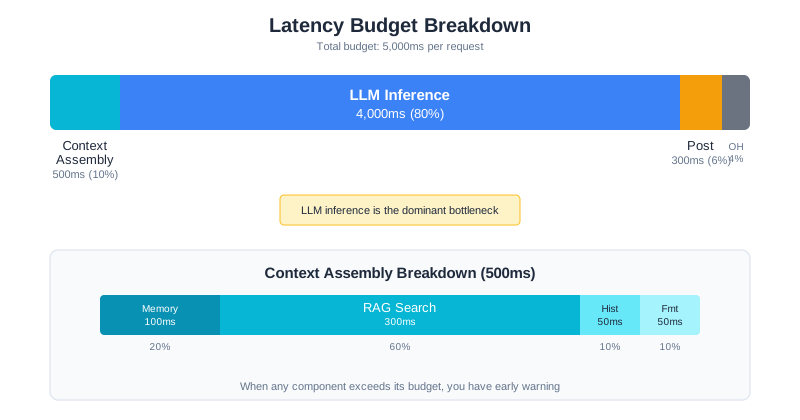
When any component exceeds its budget, you have early warning. If RAG search suddenly takes 800ms instead of 300ms, something has changed—maybe the vector index grew, maybe the database needs optimization. Latency budgets turn vague “the system feels slow” into precise “RAG search is 2.7x over budget.”
Speculative Execution
For predictable queries, start assembling context before the user finishes typing. If your system has an autocomplete or streaming input, you can begin RAG retrieval on partial queries. Even if the final query differs, the context often overlaps significantly.
class SpeculativeContextPreloader:
    """Begin context assembly on partial queries."""

    def __init__(self, assembler: ParallelContextAssembler, min_query_length: int = 20):
        self.assembler = assembler
        self.min_length = min_query_length
        self.preloaded: dict = {}

    async def preload(self, partial_query: str, user_id: str, budget: ContextBudget):
        """Start context retrieval on partial input."""
        if len(partial_query) < self.min_length:
            return

        # Use partial query for initial retrieval
        context = await self.assembler.assemble(partial_query, user_id, budget)
        self.preloaded[user_id] = {
            "context": context,
            "query": partial_query,
            "timestamp": time.time()
        }

    def get_preloaded(self, user_id: str, final_query: str) -> Optional[dict]:
        """Get preloaded context if still relevant."""
        if user_id not in self.preloaded:
            return None

        preloaded = self.preloaded[user_id]

        # Check if preloaded context is still fresh (< 5 seconds old)
        if time.time() - preloaded["timestamp"] > 5:
            return None

        # Check if final query is similar enough to preloaded query
        if self._query_similarity(preloaded["query"], final_query) > 0.7:
            return preloaded["context"]

        return None
This technique is particularly effective for conversational interfaces where users ask follow-up questions. The context from the previous turn is likely relevant to the next turn, so preloading saves the entire context assembly step.
Context Validation: Catch Bad Context Before the LLM Sees It
Garbage in, garbage out applies doubly to LLMs. If your context pipeline injects irrelevant documents, stale data, or contradictory information, the model will confidently produce wrong answers. A validation layer between context assembly and LLM inference catches problems before they reach the model.
class ContextValidator:
    """Validate assembled context before sending to LLM."""

    def __init__(self, max_age_seconds: int = 86400, min_relevance: float = 0.3):
        self.max_age = max_age_seconds
        self.min_relevance = min_relevance

    def validate(self, query: str, context: dict) -> ValidationResult:
        """Check context quality. Returns validated context and warnings."""
        warnings = []
        validated = {}

        for component, content in context.items():
            if component in ("system_prompt", "user_query"):
                validated[component] = content
                continue

            # Check freshness
            age = self._get_age(content)
            if age and age > self.max_age:
                warnings.append(f"{component} is {age // 3600}h old (max: {self.max_age // 3600}h)")
                validated[component] = self._mark_stale(content)
                continue

            # Filter irrelevant RAG results
            if component == "rag_results" and isinstance(content, list):
                relevant = [
                    chunk for chunk in content
                    if self._score_relevance(query, chunk) >= self.min_relevance
                ]
                filtered_count = len(content) - len(relevant)
                if filtered_count > 0:
                    warnings.append(
                        f"Filtered {filtered_count}/{len(content)} irrelevant RAG chunks"
                    )
                validated[component] = relevant
                continue

            # Remove contradictory memories
            if component == "memory" and isinstance(content, list):
                deduplicated = self._remove_contradictions(content)
                if len(deduplicated) < len(content):
                    warnings.append(
                        f"Removed {len(content) - len(deduplicated)} contradictory memories"
                    )
                validated[component] = deduplicated
                continue

            validated[component] = content

        return ValidationResult(
            context=validated,
            warnings=warnings,
            valid=len(warnings) == 0
        )
Validation catches the problems that are invisible in development but rampant in production: stale RAG results from an outdated index, contradictory memory entries (the user said they prefer Python in January but switched to Rust in March), and irrelevant retrieval results from ambiguous queries. Without validation, these problems silently degrade answer quality. With it, you catch and handle them before the model sees them—or at minimum, you log warnings so you can investigate.
The Validation Pipeline in Practice
Context validation is a pipeline, not a single check. In CodebaseAI, validation runs in three stages:
Stage 1: Source validation (before context assembly). Is the RAG index fresh? Is the memory store reachable? Are embeddings consistent? This catches infrastructure problems before you waste time retrieving bad data.
Stage 2: Content validation (after assembly, before LLM call). Are the retrieved chunks relevant to the query? Does the memory contradict itself? Is the total context within budget? This catches data quality problems.
Stage 3: Output validation (after LLM response). Does the response reference the provided context? Does it hallucinate claims not supported by context? Is it within the expected format? This catches model behavior problems.
Each stage can short-circuit. If Stage 1 detects that the RAG index is stale, you might skip RAG entirely and rely on conversation history and memory. If Stage 2 finds zero relevant chunks, you might reformulate the query or ask the user to be more specific. If Stage 3 detects hallucination, you might re-run with stricter instructions or flag the response as low-confidence.
The key insight: validation adds latency (typically 50-100ms per stage), but the cost of serving wrong answers is far higher than the cost of checking. Users who get confident wrong answers lose trust in the system permanently. Users who get slightly slower but more accurate answers stay.
Rate Limiting and Quotas
Without rate limiting, one aggressive user can exhaust your API quota, spike your costs, and degrade service for everyone else. Rate limiting isn’t about being stingy—it’s about sustainable service.
Note: The examples use in-memory storage for rate limiting, but production systems typically use Redis or a similar distributed store. Choose based on your infrastructure and scale requirements.
Token-Based Rate Limiting
Request-count limits are crude. A user sending 100 small queries uses fewer resources than a user sending 10 massive ones. Token-based limiting is fairer:
class TokenRateLimiter:
    """Rate limit by tokens consumed, not just request count."""

    def __init__(
        self,
        tokens_per_minute: int,
        tokens_per_day: int,
        storage: RateLimitStorage
    ):
        self.minute_limit = tokens_per_minute
        self.day_limit = tokens_per_day
        self.storage = storage

    def check_and_consume(self, user_id: str, tokens: int) -> RateLimitResult:
        """Check limits and consume tokens if allowed."""
        minute_key = f"{user_id}:minute:{self._current_minute()}"
        day_key = f"{user_id}:day:{self._current_day()}"

        minute_used = self.storage.get(minute_key, default=0)
        day_used = self.storage.get(day_key, default=0)

        # Check minute limit
        if minute_used + tokens > self.minute_limit:
            return RateLimitResult(
                allowed=False,
                reason="minute_limit_exceeded",
                retry_after_seconds=60 - self._seconds_into_minute(),
                limit=self.minute_limit,
                used=minute_used
            )

        # Check daily limit
        if day_used + tokens > self.day_limit:
            return RateLimitResult(
                allowed=False,
                reason="daily_limit_exceeded",
                retry_after_seconds=self._seconds_until_midnight(),
                limit=self.day_limit,
                used=day_used
            )

        # Consume tokens
        self.storage.increment(minute_key, tokens, ttl_seconds=60)
        self.storage.increment(day_key, tokens, ttl_seconds=86400)

        return RateLimitResult(
            allowed=True,
            remaining_minute=self.minute_limit - minute_used - tokens,
            remaining_day=self.day_limit - day_used - tokens
        )

    @staticmethod
    def _seconds_into_minute() -> int:
        """Seconds elapsed in current minute."""
        now = datetime.utcnow()
        return now.second

    @staticmethod
    def _seconds_until_midnight() -> int:
        """Seconds remaining until midnight UTC."""
        now = datetime.utcnow()
        midnight = now.replace(
            hour=0, minute=0, second=0, microsecond=0
        ) + timedelta(days=1)
        return int((midnight - now).total_seconds())
Tiered Limits
Different users warrant different limits:
RATE_LIMIT_TIERS = {
    "free": {
        "tokens_per_minute": 10_000,
        "tokens_per_day": 100_000,
        "max_context_size": 8_000,
        "models_allowed": ["budget"],
    },
    "pro": {
        "tokens_per_minute": 50_000,
        "tokens_per_day": 500_000,
        "max_context_size": 32_000,
        "models_allowed": ["budget", "standard"],
    },
    "enterprise": {
        "tokens_per_minute": 200_000,
        "tokens_per_day": 5_000_000,
        "max_context_size": 128_000,
        "models_allowed": ["budget", "standard", "premium"],
    }
}
The tier structure serves two purposes: it protects your system from abuse, and it creates natural upgrade incentives. Users who hit limits regularly become paying customers.
Communicating Limits
Rate limits frustrate users less when they’re transparent. Return limit information with every response:
@dataclass
class RateLimitHeaders:
    """Information to include in API responses."""
    limit_minute: int
    remaining_minute: int
    limit_day: int
    remaining_day: int
    reset_minute: int  # Unix timestamp
    reset_day: int     # Unix timestamp

# Include in response headers:
# X-RateLimit-Limit-Minute: 10000
# X-RateLimit-Remaining-Minute: 7500
# X-RateLimit-Reset-Minute: 1706745660
Graceful Degradation
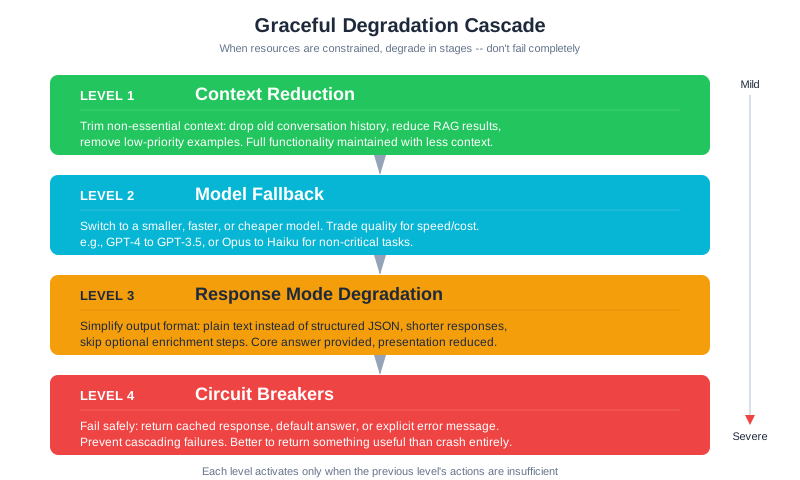
When resources are constrained—rate limits approaching, latency spiking, costs escalating—don’t fail completely. Degrade gracefully. Return something useful, even if it’s not the full experience.
Strategy 1: Context Reduction
When you need to reduce costs or latency, shrink context intelligently:
class GracefulContextBuilder:
    """Build context with graceful degradation under constraints."""

    # Priority order: what to cut first when constrained
    DEGRADATION_ORDER = [
        "conversation_history",  # Cut first: oldest context
        "rag_results",           # Cut second: reduce retrieval
        "memory",                # Cut third: reduce personalization
        # Never cut: system_prompt, user_query
    ]

    def build(
        self,
        query: str,
        budget: ContextBudget,
        constraint_level: str = "normal"
    ) -> ContextResult:
        """Build context, applying degradation if constrained."""

        # Start with full context
        components = {
            "system_prompt": self.system_prompt,
            "user_query": query,
            "memory": self.memory_store.retrieve(query, limit=5),
            "rag_results": self.rag.retrieve(query, top_k=10),
            "conversation_history": self.history.recent(limit=10),
        }

        # Apply constraint-based degradation
        if constraint_level == "tight":
            # Reduce optional components by 50%
            components["memory"] = self.memory_store.retrieve(query, limit=2)
            components["rag_results"] = self.rag.retrieve(query, top_k=3)
            components["conversation_history"] = self.history.recent(limit=3)

        elif constraint_level == "minimal":
            # Only essentials
            components["memory"] = ""
            components["rag_results"] = self.rag.retrieve(query, top_k=1)
            components["conversation_history"] = ""

        # Apply token budgets
        allocated = budget.allocate(components)

        return ContextResult(
            components=allocated,
            degraded=constraint_level != "normal",
            degradation_level=constraint_level
        )
Strategy 2: Model Fallback
When your preferred model is slow or rate-limited, fall back to alternatives:
class ModelFallbackChain:
    """Try models in order until one succeeds."""

    def __init__(self):
        self.chain = [
            ModelConfig("claude-3-5-sonnet", timeout=30, tier="premium"),
            ModelConfig("gpt-4o-mini", timeout=15, tier="budget"),
            ModelConfig("claude-3-haiku", timeout=10, tier="fast"),
        ]

    async def execute(self, context: str, preferred_tier: str = "premium") -> ModelResult:
        """Execute query with automatic fallback."""

        # Start from preferred tier
        start_idx = next(
            (i for i, m in enumerate(self.chain) if m.tier == preferred_tier),
            0
        )

        errors = []
        for model in self.chain[start_idx:]:
            try:
                response = await self._call_with_timeout(
                    model.name,
                    context,
                    model.timeout
                )
                return ModelResult(
                    response=response,
                    model_used=model.name,
                    fallback_used=model.tier != preferred_tier
                )
            except RateLimitError as e:
                errors.append(f"{model.name}: rate limited")
                continue
            except TimeoutError as e:
                errors.append(f"{model.name}: timeout after {model.timeout}s")
                continue

        raise AllModelsFailed(errors)
Strategy 3: Response Mode Degradation
When time or budget is limited, simplify what you ask the model to produce:
RESPONSE_MODES = {
    "full": {
        "instructions": "Provide a detailed explanation with code examples.",
        "max_tokens": 2000,
        "include_examples": True,
    },
    "standard": {
        "instructions": "Provide a clear explanation with one code example.",
        "max_tokens": 1000,
        "include_examples": True,
    },
    "concise": {
        "instructions": "Provide a brief, direct answer.",
        "max_tokens": 300,
        "include_examples": False,
    }
}

def select_response_mode(
    remaining_budget: int,
    latency_target: float,
    current_latency: float
) -> str:
    """Select response mode based on constraints."""
    if remaining_budget < 1000 or current_latency > latency_target * 0.8:
        return "concise"
    elif remaining_budget < 5000:
        return "standard"
    return "full"
Strategy 4: Circuit Breakers for Context Services
Context retrieval depends on external services—vector databases, memory stores, embedding APIs. When any of these services degrade, naive retry logic creates “retry storms” that compound the problem. A circuit breaker detects sustained failures and fails fast, redirecting to a fallback instead of hammering an already-struggling service.
The pattern has three states. In the closed state, requests flow normally. When failures exceed a threshold, the circuit opens: subsequent requests skip the failing service entirely and use a fallback. Periodically, the circuit enters a half-open state to test whether the service has recovered.
class ContextCircuitBreaker:
    """Circuit breaker for context retrieval services."""

    def __init__(
        self,
        failure_threshold: int = 5,
        recovery_timeout: int = 30,
        half_open_max_calls: int = 3
    ):
        self.failure_threshold = failure_threshold
        self.recovery_timeout = recovery_timeout
        self.half_open_max_calls = half_open_max_calls

        self.state = "closed"  # closed | open | half_open
        self.failure_count = 0
        self.last_failure_time = 0
        self.half_open_successes = 0

    def allow_request(self) -> bool:
        """Should we attempt the real service?"""
        if self.state == "closed":
            return True

        if self.state == "open":
            # Check if recovery timeout has elapsed
            if time.time() - self.last_failure_time > self.recovery_timeout:
                self.state = "half_open"
                self.half_open_successes = 0
                return True
            return False

        if self.state == "half_open":
            return True

        return False

    def record_success(self):
        """Record successful call."""
        if self.state == "half_open":
            self.half_open_successes += 1
            if self.half_open_successes >= self.half_open_max_calls:
                self.state = "closed"
                self.failure_count = 0
        elif self.state == "closed":
            self.failure_count = 0

    def record_failure(self):
        """Record failed call."""
        self.failure_count += 1
        self.last_failure_time = time.time()

        if self.state == "half_open":
            self.state = "open"
        elif self.failure_count >= self.failure_threshold:
            self.state = "open"
In CodebaseAI, each context service gets its own circuit breaker. When the vector database circuit opens, RAG falls back to keyword search or cached results. When the memory store circuit opens, the system operates without personalization. The system degrades in capability but never stops responding.
This matters because LLM applications chain multiple context sources. If your RAG service is slow, every request through the orchestrator stalls. A circuit breaker on the RAG service means your system notices the problem within seconds and switches strategies, instead of queueing hundreds of requests that will all eventually timeout.
Context Quality at Scale
Running an LLM system in production is like flying an airplane: you need instruments. But the instruments for context engineering are different from traditional software monitoring. You’re not just measuring uptime and latency—you’re measuring whether the information you’re feeding the model is actually useful.
Measuring What Matters
Traditional software metrics tell you if the system is running. Context quality metrics tell you if the system is thinking well. The distinction is critical: a system can have 99.9% uptime, sub-second latency, and zero errors—and still give terrible answers because the context is stale, irrelevant, or overwhelming the model.
Four metrics define context health in production:
Context relevance: what fraction of retrieved context actually relates to the user’s query? If you’re retrieving 10 RAG chunks but only 3 are relevant, you’re wasting 70% of your context budget on noise. Measure this by sampling production queries and using an LLM-as-judge to score relevance, or by tracking whether the model’s response actually references the provided context.
Context utilization: how much of the context window are you actually using, and how much of what you provide does the model reference? A system that fills 90% of the context window but only references 20% of it is overloading the model’s attention. Track the ratio of referenced context to total context—this is your signal-to-noise ratio.
Groundedness: does the model’s response stay faithful to the provided context, or does it hallucinate? In a well-engineered system, the model should be generating answers grounded in the context you provide, not making things up. Track the rate of claims that can’t be traced back to the context.
Context freshness: how old is the context when it reaches the model? If your RAG index was last updated three days ago but the codebase changed significantly yesterday, your context is stale. Track the age of retrieved documents and set alerts when freshness exceeds your tolerance.
class ContextQualityMonitor:
    """Track context quality metrics in production."""

    def __init__(self):
        self.metrics = {
            "relevance_scores": [],
            "utilization_scores": [],
            "groundedness_scores": [],
            "freshness_ages": [],
        }

    def record_query(
        self,
        retrieved_chunks: int,
        relevant_chunks: int,
        context_tokens: int,
        referenced_tokens: int,
        response_grounded: bool,
        context_age_seconds: float
    ):
        """Record context quality for a single query."""
        self.metrics["relevance_scores"].append(
            relevant_chunks / max(retrieved_chunks, 1)
        )
        self.metrics["utilization_scores"].append(
            referenced_tokens / max(context_tokens, 1)
        )
        self.metrics["groundedness_scores"].append(1.0 if response_grounded else 0.0)
        self.metrics["freshness_ages"].append(context_age_seconds)

    def get_summary(self) -> dict:
        """Summarize context quality over recent window."""
        def avg(lst):
            return sum(lst[-100:]) / max(len(lst[-100:]), 1)

        return {
            "avg_relevance": round(avg(self.metrics["relevance_scores"]), 3),
            "avg_utilization": round(avg(self.metrics["utilization_scores"]), 3),
            "groundedness_rate": round(avg(self.metrics["groundedness_scores"]), 3),
            "avg_freshness_minutes": round(avg(self.metrics["freshness_ages"]) / 60, 1),
        }
Context Drift Detection
Context quality doesn’t fail suddenly—it drifts. The codebase evolves, user patterns shift, new edge cases appear. The model’s answers slowly become less relevant, and nobody notices until users complain.
Detect drift by comparing current metrics against a baseline. When you first deploy, establish baseline scores for relevance, utilization, and groundedness. Then monitor for sustained deviation:
class DriftDetector:
    """Detect when context quality is degrading over time."""

    def __init__(self, baseline: dict, alert_threshold: float = 0.15):
        self.baseline = baseline
        self.threshold = alert_threshold

    def check(self, current: dict) -> list:
        """Compare current metrics against baseline. Return alerts."""
        alerts = []
        for metric, baseline_value in self.baseline.items():
            current_value = current.get(metric, 0)
            drift = baseline_value - current_value

            if drift > self.threshold:
                alerts.append({
                    "metric": metric,
                    "baseline": baseline_value,
                    "current": current_value,
                    "drift": round(drift, 3),
                    "severity": "critical" if drift > self.threshold * 2 else "warning"
                })
        return alerts
Common causes of context drift: the vector index hasn’t been rebuilt after significant code changes; memory stores accumulate contradictory information (Chapter 9’s “false memories” problem); new users have different query patterns than your original test population; or the model provider updated their model and it responds differently to the same context.
Production-Specific Context Failures
Beyond drift, production surfaces failure modes that never appear in development. Understanding these patterns helps you design defenses proactively rather than discovering them through user complaints.
Context rot happens when the gap between your indexed knowledge and reality grows. Your RAG pipeline retrieves documentation for API v2, but the codebase has been upgraded to v3. The model generates confident instructions for an API that no longer exists. Research from Redis Labs describes how retrieval quality degrades as source material ages—accuracy dropping from 75% to below 55% when retrieved context becomes stale. The fix is monitoring context freshness and triggering re-indexing on source changes, not on a fixed schedule.
Attention collapse occurs when you stuff too much into the context window. Models don’t process all tokens equally—attention concentrates on the beginning and end, while information in the middle becomes unreliable. The NoLiMa benchmark demonstrated that at 32K tokens, most models dropped below 50% of their short-context performance. The practical implication: retrieving 30 RAG chunks “for safety” actively hurts performance compared to retrieving 5 highly relevant ones. More context isn’t better context.
Memory poisoning is the persistent variant of bad input. If a user provides incorrect information that gets stored in long-term memory (Chapter 9), every future query for that user is contaminated. In CodebaseAI, if a user says “we use PostgreSQL” but the codebase actually uses MySQL, memory injects wrong context into every database-related query. The defense: memory validation (Chapter 9’s contradiction detection) and periodic memory audits.
Context contamination through injection is a security concern where untrusted data in the context—user input, retrieved documents, or tool outputs—contains instructions that the model interprets as commands rather than data. This is covered in depth in Chapter 14, but the production engineering implication is clear: validate and sanitize all context sources, especially RAG results from user-contributed content.
Cascading context failures happen when one context source’s failure degrades another. If the memory store is down, the system might compensate by retrieving more RAG chunks—but if the vector database is also under pressure, this compensation overloads it. Circuit breakers (discussed earlier in this chapter) prevent these cascades, but only if each context source has independent failure handling.
These failure modes share a common theme: they’re invisible in development because development uses controlled, current, clean data with one user at a time. Detecting them requires the monitoring and validation infrastructure described in this chapter.
Prompt Versioning in Production
In development, your system prompt lives in a Python string that you edit directly. In production, this is a liability. Changing a system prompt means redeploying code. You can’t A/B test two prompts without deploying two versions of your application. You can’t roll back a bad prompt change without a full redeploy. And you can’t track which prompt version produced which responses.
Extract, Version, Deploy
The first step to production maturity: extract prompts from your application code into a versioned prompt registry.
class PromptRegistry:
    """Manage versioned prompts outside of application code."""

    def __init__(self, storage_path: str):
        self.storage_path = storage_path
        self.prompts: dict = {}

    def register(self, name: str, content: str, metadata: dict = None) -> str:
        """Register a new prompt version. Returns version ID."""
        version_id = self._next_version(name)
        self.prompts[f"{name}:{version_id}"] = {
            "content": content,
            "version": version_id,
            "created_at": datetime.utcnow().isoformat(),
            "metadata": metadata or {},
            "status": "draft"
        }
        return version_id

    def promote(self, name: str, version_id: str):
        """Mark a prompt version as the active production version."""
        key = f"{name}:{version_id}"
        if key not in self.prompts:
            raise ValueError(f"Prompt {key} not found")

        # Demote current production version
        for k, v in self.prompts.items():
            if k.startswith(f"{name}:") and v["status"] == "production":
                v["status"] = "archived"

        self.prompts[key]["status"] = "production"

    def get_active(self, name: str) -> dict:
        """Get the current production version of a prompt."""
        for k, v in self.prompts.items():
            if k.startswith(f"{name}:") and v["status"] == "production":
                return v
        raise ValueError(f"No production version found for {name}")

    def rollback(self, name: str) -> str:
        """Revert to the previous production version."""
        versions = sorted(
            [(k, v) for k, v in self.prompts.items()
             if k.startswith(f"{name}:") and v["status"] in ("production", "archived")],
            key=lambda x: x[1]["created_at"],
            reverse=True
        )

        if len(versions) < 2:
            raise ValueError("No previous version to rollback to")

        # Demote current, promote previous
        versions[0][1]["status"] = "rolled_back"
        versions[1][1]["status"] = "production"
        return versions[1][0]
Once prompts are extracted, you can change them without redeploying. This matters more than it sounds. In production, you’ll discover edge cases that require prompt adjustments weekly or even daily. A prompt registry lets you push a fix in minutes instead of waiting for a deployment cycle.
The Migration Path
Moving from hardcoded prompts to a registry is a progressive migration, not a big-bang rewrite:
Step 1: Extract and duplicate. Copy your current system prompt into the registry. Keep the hardcoded version as a fallback. The application tries the registry first, falls back to the hardcoded version if the registry is unavailable.
def get_system_prompt(registry: PromptRegistry) -> str:
    """Get system prompt with fallback to hardcoded version."""
    try:
        prompt = registry.get_active("codebase_ai_system")
        return prompt["content"]
    except Exception:
        # Fallback: hardcoded prompt (remove after registry is proven stable)
        return HARDCODED_SYSTEM_PROMPT
Step 2: Add observability. Log which prompt version is used for every request. This creates the audit trail you need to correlate prompt changes with quality changes.
Step 3: Remove the fallback. Once the registry has been stable for a week and you’ve verified the observability, remove the hardcoded prompt. The registry is now the source of truth.
Step 4: Enable hot updates. Configure the application to poll the registry for changes (every 30-60 seconds) or subscribe to change events. Now prompt changes take effect in under a minute without any deployment.
This four-step migration takes a few hours of engineering but transforms your ability to iterate. Teams that extract prompts consistently report being able to respond to production quality issues in minutes rather than hours, because prompt fixes don’t require a deploy pipeline.
Semantic Versioning for Prompts
Borrow semantic versioning from software: major.minor.patch.
A patch change (1.0.0 → 1.0.1) refines wording without changing behavior. “Explain the code” becomes “Explain the code clearly and concisely.” Rollback risk: low.
A minor change (1.0.0 → 1.1.0) adds capabilities. You add a new instruction section for handling error messages. Rollback risk: medium—new behavior might be relied upon.
A major change (1.0.0 → 2.0.0) fundamentally alters behavior. You restructure the output format from prose to JSON. Rollback risk: high—downstream systems may depend on the format.
Version discipline prevents the most common prompt regression: someone “improves” a prompt that fixes one edge case but breaks ten others. With versioning, you can compare before and after, and roll back in seconds if quality drops.
A/B Testing Context Strategies
You’ve built your system with a specific context strategy: retrieve 10 RAG chunks, include 5 memory items, keep 10 turns of conversation history. But is that optimal? Maybe 5 RAG chunks with better reranking outperforms 10 without it. Maybe summarized conversation history works better than raw message history. You won’t know without testing.
What to Test
A/B testing for context engineering isolates specific variables:
Retrieval depth: 5 chunks vs. 10 chunks vs. 3 chunks with reranking. More isn’t always better—research shows model accuracy can drop after 15-20 retrieved documents as attention disperses.
Context compression: full documents vs. summarized excerpts. Compression reduces tokens (and cost) but might lose critical details.
Memory strategy: include user preferences vs. exclude them. Personalization helps for some queries and hurts for others.
Prompt structure: instructions-first vs. context-first. The order of information in your prompt affects model attention (Chapter 2).
Metrics for Non-Deterministic Systems
A/B testing LLMs is harder than testing a button color. The same input can produce different outputs. You need larger sample sizes and different statistical approaches.
class ContextABTest:
    """A/B test two context strategies in production."""

    def __init__(self, name: str, split_ratio: float = 0.5):
        self.name = name
        self.split_ratio = split_ratio
        self.results_a: list = []
        self.results_b: list = []

    def assign_variant(self, user_id: str) -> str:
        """Deterministically assign user to variant A or B."""
        # Hash-based assignment ensures same user always gets same variant
        hash_val = hash(f"{self.name}:{user_id}") % 100
        return "A" if hash_val < (self.split_ratio * 100) else "B"

    def record_result(self, variant: str, metrics: dict):
        """Record outcome metrics for a variant."""
        if variant == "A":
            self.results_a.append(metrics)
        else:
            self.results_b.append(metrics)

    def get_comparison(self) -> dict:
        """Compare variants across key metrics."""
        def summarize(results):
            if not results:
                return {}
            return {
                "count": len(results),
                "avg_quality": sum(r.get("quality", 0) for r in results) / len(results),
                "avg_latency_ms": sum(r.get("latency_ms", 0) for r in results) / len(results),
                "avg_cost": sum(r.get("cost", 0) for r in results) / len(results),
                "avg_relevance": sum(r.get("relevance", 0) for r in results) / len(results),
            }

        return {
            "variant_a": summarize(self.results_a),
            "variant_b": summarize(self.results_b),
            "sample_size": len(self.results_a) + len(self.results_b),
        }
Key metrics for context A/B tests: quality (does the answer actually help the user?), cost per completion (tokens consumed normalized by quality), latency (time to response), and context relevance (how much of the provided context was actually useful). Optimize for the combination, not any single metric. A strategy that’s 5% better on quality but 200% more expensive is rarely the right choice.
Running Safe Experiments
Production A/B tests need guardrails. Use hash-based user assignment so the same user always sees the same variant—switching mid-conversation would be confusing. Start with a small split (5-10% for the experimental variant) and widen only after confirming no degradation. Set automatic rollback triggers: if the experimental variant’s quality score drops below 80% of control, kill the experiment automatically.
Run experiments for at least one full week to capture weekday/weekend patterns. Aim for 500+ data points per variant before drawing conclusions—LLM non-determinism requires larger samples than traditional A/B tests.
Statistical Rigor in A/B Testing
Proper A/B testing requires statistical discipline. Many teams run A/B tests but draw unreliable conclusions because they didn’t account for the math.
Sample size calculations: How many queries per variant do you need to detect a meaningful difference? The calculation depends on three factors:
- Baseline rate: How often does the control variant succeed? If your baseline quality is 0.80, you’re trying to detect changes from there.
- Effect size: What improvement would justify the change? A 5% improvement (0.80 → 0.84) might be meaningful. A 1% improvement probably isn’t.
- Statistical power: How confident do you want to be? 80% power means 80% chance of detecting the effect if it exists (20% risk of missing a real effect).
For a 5% effect size (practical minimum), baseline quality of 0.80, and 80% power, you need approximately 500 queries per variant. With fewer, you risk false negatives (missing real improvements). With 100 per variant, you have only ~30% power—meaning 70% chance you’ll miss an improvement that’s actually there.
Confidence intervals: Beyond the p-value, calculate 95% confidence intervals for your effect size. After your test, the treatment effect isn’t a single number—it’s a range. A 5% improvement with a 95% CI of [2%, 8%] is more informative than a 5% improvement with a 95% CI of [-10%, 20%]. The latter includes zero, suggesting the improvement might not be real.
# Calculate 95% confidence interval for proportion difference
def confidence_interval_for_difference(control_successes, control_total,
                                        treatment_successes, treatment_total,
                                        confidence=0.95):
    """95% confidence interval for difference in proportions."""
    control_rate = control_successes / control_total
    treatment_rate = treatment_successes / treatment_total
    difference = treatment_rate - control_rate

    # Standard error
    se = math.sqrt(
        (control_rate * (1 - control_rate) / control_total) +
        (treatment_rate * (1 - treatment_rate) / treatment_total)
    )

    # 95% CI uses z=1.96
    z = 1.96 if confidence == 0.95 else 2.576  # 99% is 2.576
    margin = z * se

    return {
        "point_estimate": difference,
        "ci_lower": difference - margin,
        "ci_upper": difference + margin,
        "includes_zero": difference - margin <= 0 <= difference + margin
    }
Multiple hypothesis correction: If you’re testing multiple variants (treatment_a vs control, treatment_b vs control, etc.), you multiply your false positive risk. With 3 variants and p < 0.05 threshold for each, your actual false positive rate is closer to 0.14 (14%), not 5%. Use Bonferroni correction: divide your significance threshold by the number of comparisons. For 3 variants, use p < 0.017 instead of p < 0.05.
Common pitfalls:
-
Peeking at results: “Let me just check if we’re significant yet.” If you check p-values multiple times and stop when you hit p < 0.05, you’ve inflated your false positive rate to nearly 50%. The threshold of 0.05 assumes you made one test, not dozens. Solution: pre-commit to sample size before peeking.
-
Stopping when significant: Similar problem. You hit p < 0.05 after 300 samples but planned for 500. Tempting to stop and declare victory. Don’t. You’ve broken the statistical assumptions. Run the full planned sample size.
-
Ignoring effect size: A 0.1% improvement with p < 0.001 is statistically significant with large samples but practically irrelevant. Always report effect size alongside p-value.
-
Confounding variables: Traffic composition changed (more new users than usual). External events affected behavior (holidays, news, competitor launch). These confound your results. Use stratification: analyze results separately for new vs. returning users, weekday vs. weekend, etc. If treatment effect is consistent across strata, you’re more confident it’s real.
A Practical Example: Testing RAG Chunk Count
CodebaseAI currently retrieves 10 RAG chunks per query. Is that optimal? Here’s how you’d test it:
Hypothesis: Retrieving 5 chunks with a reranking step will produce better answers at lower cost than 10 chunks without reranking.
Setup: Variant A (control) retrieves 10 chunks, no reranking. Variant B retrieves 8 candidates, reranks to top 5, sends 5 to the model.
Metrics tracked per query:
# What to measure for each variant
experiment_metrics = {
    "quality_score": 0.0,       # LLM-as-judge: was the answer helpful? (0-1)
    "relevance_score": 0.0,     # What fraction of chunks were referenced? (0-1)
    "cost_cents": 0.0,          # Total cost including reranking step
    "latency_ms": 0,            # End-to-end including reranking
    "context_tokens": 0,        # Total tokens sent to model
    "user_satisfaction": None,   # Thumbs up/down if available
}
Results after 1,200 queries (600 per variant):
| Metric | 10 chunks (A) | 5 reranked (B) | Delta |
|---|---|---|---|
| Quality score | 0.78 | 0.82 | +5.1% |
| Relevance | 0.41 | 0.73 | +78% |
| Cost/query | $0.038 | $0.029 | -24% |
| Latency | 3.2s | 3.5s | +9% |
| Context tokens | 4,200 | 2,400 | -43% |
The reranking variant uses 43% fewer context tokens, costs 24% less, and produces 5% better answers—at the expense of 9% more latency (the reranking step adds 300ms). For CodebaseAI, this tradeoff is clearly worth it. Promote Variant B to production.
This kind of evidence-based optimization is what separates production context engineering from guessing. Without A/B testing, you’d never know that fewer, better-selected chunks outperform more, unfiltered ones.
CodebaseAI v1.0.0: Production Release
Time to wrap CodebaseAI in production infrastructure. Version 1.0.0 adds the safeguards needed for real deployment.
"""
CodebaseAI v1.0.0 - Production Release

Changelog from v0.9.0:
- Added token-based rate limiting per user
- Added cost tracking and budget enforcement
- Added graceful degradation under load
- Added model fallback chain
- Added context caching (prefix + semantic)
- Added context quality monitoring
- Added prompt versioning
- Added comprehensive metrics collection
- Production-ready error handling and logging
"""

from dataclasses import dataclass
from typing import Optional
import time
import logging

logger = logging.getLogger(__name__)


@dataclass
class ProductionConfig:
    """Configuration for production deployment."""
    # Rate limits
    free_tokens_per_minute: int = 10_000
    free_tokens_per_day: int = 100_000
    pro_tokens_per_minute: int = 50_000
    pro_tokens_per_day: int = 500_000

    # Cost tracking
    budget_alert_threshold: float = 100.0  # Alert at $100/day
    budget_hard_limit: float = 500.0       # Stop at $500/day

    # Degradation thresholds
    latency_target_ms: int = 5000
    degradation_latency_ms: int = 10000

    # Caching
    cache_ttl_seconds: int = 3600
    semantic_cache_threshold: float = 0.92


class CodebaseAI:
    """
    CodebaseAI v1.0.0: Production-ready deployment.

    Wraps the core functionality from previous versions with:
    - Rate limiting to prevent abuse
    - Cost tracking for budget management
    - Context caching for efficiency
    - Graceful degradation under load
    - Context quality monitoring
    - Comprehensive observability
    """

    def __init__(self, config: ProductionConfig):
        self.config = config

        # Core components (from previous versions)
        self.memory_store = MemoryStore(config.db_path)
        self.rag = RAGPipeline(config.index_path)
        self.orchestrator = Orchestrator(config.llm_client)
        self.classifier = ComplexityClassifier(config.llm_client)

        # Production infrastructure (new in v1.0.0)
        self.rate_limiter = TokenRateLimiter(
            tokens_per_minute=config.free_tokens_per_minute,
            tokens_per_day=config.free_tokens_per_day,
            storage=RedisStorage(config.redis_url)
        )
        self.cost_tracker = CostTracker(config.pricing)
        self.context_builder = GracefulContextBuilder(
            self.memory_store, self.rag
        )
        self.model_chain = ModelFallbackChain()
        self.metrics = MetricsCollector()

        # New in v1.0.0: caching and quality
        self.context_cache = ContextCache(config.cache_ttl_seconds)
        self.semantic_cache = SemanticCache(config.semantic_cache_threshold)
        self.quality_monitor = ContextQualityMonitor()
        self.rag_circuit = ContextCircuitBreaker()
        self.memory_circuit = ContextCircuitBreaker()

    async def query(
        self,
        user_id: str,
        question: str,
        tier: str = "free"
    ) -> ProductionResponse:
        """Handle a query with full production safeguards."""

        request_id = generate_request_id()
        start_time = time.time()

        try:
            # 1. Check semantic cache first (cheapest path)
            context_hash = self._compute_context_hash(user_id)
            cached_response = self.semantic_cache.get(question, context_hash)
            if cached_response:
                self.metrics.record_cache_hit(request_id)
                return ProductionResponse(
                    success=True,
                    response=cached_response,
                    model_used="cache",
                    cost=0.0,
                    request_id=request_id
                )

            # 2. Estimate token usage
            estimated_tokens = self._estimate_tokens(question, tier)

            # 3. Check rate limits
            tier_limits = RATE_LIMIT_TIERS[tier]
            self.rate_limiter.minute_limit = tier_limits["tokens_per_minute"]
            self.rate_limiter.day_limit = tier_limits["tokens_per_day"]

            limit_check = self.rate_limiter.check_and_consume(
                user_id, estimated_tokens
            )

            if not limit_check.allowed:
                logger.info(f"Rate limited: user={user_id}, reason={limit_check.reason}")
                return ProductionResponse(
                    success=False,
                    error_code="RATE_LIMITED",
                    error_message=f"Rate limit exceeded. Retry after {limit_check.retry_after_seconds}s",
                    retry_after=limit_check.retry_after_seconds,
                    request_id=request_id
                )

            # 4. Determine constraint level
            constraint = self._assess_constraints(
                remaining_tokens=limit_check.remaining_minute,
                current_load=self.metrics.current_latency_p95()
            )

            # 5. Build context with appropriate degradation
            context_result = self.context_builder.build(
                query=question,
                budget=ContextBudget(max_context=tier_limits["max_context_size"]),
                constraint_level=constraint
            )

            # 6. Execute with model fallback
            preferred_model = self._tier_to_model(tier)
            model_result = await self.model_chain.execute(
                context=self._format_context(context_result),
                preferred_tier=preferred_model
            )

            # 7. Track costs
            actual_tokens = context_result.total_tokens + len(model_result.response.split())
            cost = self.cost_tracker.record(
                user_id=user_id,
                input_tokens=context_result.total_tokens,
                output_tokens=len(model_result.response.split()) * 1.3,
                model=model_result.model_used
            )

            # 8. Cache the response for future similar queries
            self.semantic_cache.put(question, context_hash, model_result.response)

            # 9. Record context quality metrics
            self.quality_monitor.record_query(
                retrieved_chunks=context_result.retrieved_count,
                relevant_chunks=context_result.relevant_count,
                context_tokens=context_result.total_tokens,
                referenced_tokens=context_result.referenced_tokens,
                response_grounded=True,  # Checked by output validator
                context_age_seconds=context_result.avg_age
            )

            # 10. Record request metrics
            latency = time.time() - start_time
            self.metrics.record(
                request_id=request_id,
                user_id=user_id,
                latency=latency,
                tokens=actual_tokens,
                cost=cost,
                model=model_result.model_used,
                degraded=context_result.degraded or model_result.fallback_used
            )

            return ProductionResponse(
                success=True,
                response=model_result.response,
                model_used=model_result.model_used,
                tokens_used=actual_tokens,
                cost=cost,
                degraded=context_result.degraded,
                latency_ms=int(latency * 1000),
                request_id=request_id
            )

        except Exception as e:
            logger.exception(f"Query failed: request_id={request_id}")
            self.metrics.record_error(request_id, type(e).__name__)
            return ProductionResponse(
                success=False,
                error_code="INTERNAL_ERROR",
                error_message="An error occurred processing your request",
                request_id=request_id
            )

    def _assess_constraints(self, remaining_tokens: int, current_load: float) -> str:
        """Determine constraint level based on current conditions."""
        if remaining_tokens < 2000 or current_load > self.config.degradation_latency_ms:
            return "minimal"
        elif remaining_tokens < 10000 or current_load > self.config.latency_target_ms:
            return "tight"
        return "normal"
Study the query flow in that code carefully. It illustrates the production mindset: every step has a fallback, every operation has a cost, and every outcome gets recorded. The ten-step sequence—cache check, token estimation, rate limiting, constraint assessment, context building, model execution, cost tracking, response caching, quality monitoring, metrics recording—is not over-engineering. Each step exists because of a real production problem: users who hit rate limits need clear retry guidance (step 3), cost tracking prevents bill surprises (step 7), and quality monitoring catches context degradation before users notice (step 9).
The critical detail is the ordering. Checking the semantic cache first (step 1) is the cheapest possible path—if a similar query was recently answered, you skip everything else and return the cached response at zero token cost. Rate limiting comes before context building (step 3 before step 5) because there’s no point assembling expensive context for a request you’re going to reject. Each step is ordered to fail as cheaply as possible.
Cost Tracking
Track costs per user, per model, and globally:
class CostTracker:
    """Track LLM costs for budget management."""

    def __init__(self, pricing: dict, storage: CostStorage):
        self.pricing = pricing
        self.storage = storage

    def record(
        self,
        user_id: str,
        input_tokens: int,
        output_tokens: int,
        model: str
    ) -> float:
        """Record cost for a request. Returns cost in dollars."""
        model_price = self.pricing.get(model, self.pricing["default"])

        input_cost = (input_tokens / 1_000_000) * model_price["input"]
        output_cost = (output_tokens / 1_000_000) * model_price["output"]
        total = input_cost + output_cost

        # Record by user
        self.storage.add(f"user:{user_id}:daily", total)
        self.storage.add(f"user:{user_id}:monthly", total)

        # Record by model
        self.storage.add(f"model:{model}:daily", total)

        # Record global
        self.storage.add("global:daily", total)

        return total

    def get_daily_spend(self, user_id: str = None) -> float:
        """Get today's spend, optionally filtered by user."""
        if user_id:
            return self.storage.get(f"user:{user_id}:daily", 0)
        return self.storage.get("global:daily", 0)

    def check_budget(self, threshold: float) -> BudgetStatus:
        """Check if approaching or exceeding budget."""
        daily = self.get_daily_spend()

        if daily >= threshold:
            return BudgetStatus.EXCEEDED
        elif daily >= threshold * 0.8:
            return BudgetStatus.WARNING
        return BudgetStatus.OK
When Production Fails
Production systems fail in ways development never reveals. Knowing the patterns helps you debug faster.
“It worked in testing but breaks in production”
Symptom: Queries that worked perfectly in development fail, timeout, or return garbage in production.
Investigation checklist:
-
Input variance: Development queries are clean and reasonable. Production users submit unexpected inputs—enormous codebases, queries in unexpected languages, adversarial prompts.
-
Concurrent load: Development is single-threaded. Production means dozens of simultaneous requests competing for the same resources.
-
Context accumulation: Development starts fresh each time. Production users have accumulated memory, long conversation histories, growing state.
-
External dependencies: Development uses local mocks. Production depends on actual APIs that rate-limit, timeout, or fail.
-
Context rot: Your RAG index was built last week. The codebase was refactored yesterday. The context your system retrieves is accurate to a version of reality that no longer exists. Research consistently shows that LLM accuracy drops significantly with stale or irrelevant context—Stanford research found accuracy falling from 70-75% to 55-60% with just 20 retrieved documents, many of which were noise.
def diagnose_production_failure(request_id: str, metrics: MetricsCollector) -> DiagnosisReport:
    """Analyze why a production request failed."""
    data = metrics.get_request_data(request_id)
    report = DiagnosisReport(request_id)

    # Check input size
    if data.input_tokens > 50_000:
        report.add_finding(
            "large_input",
            f"Input was {data.input_tokens} tokens (typical: 5K-10K)",
            "Consider input size limits or summarization"
        )

    # Check context composition
    if data.rag_tokens > data.total_tokens * 0.5:
        report.add_finding(
            "rag_heavy",
            f"RAG consumed {data.rag_tokens} of {data.total_tokens} tokens",
            "Reduce top-k or implement better relevance filtering"
        )

    # Check latency breakdown
    if data.model_latency > data.total_latency * 0.9:
        report.add_finding(
            "model_bottleneck",
            f"Model took {data.model_latency}s of {data.total_latency}s total",
            "Consider smaller model or context reduction"
        )

    # Check for fallback
    if data.fallback_used:
        report.add_finding(
            "fallback_triggered",
            f"Fell back from {data.preferred_model} to {data.actual_model}",
            "Primary model may be overloaded or rate-limited"
        )

    # Check context quality
    if data.context_relevance < 0.5:
        report.add_finding(
            "low_relevance",
            f"Context relevance score: {data.context_relevance:.2f}",
            "RAG retrieval is returning irrelevant results; check index freshness"
        )

    return report
“Costs are higher than expected”
Symptom: Monthly bill is 3x your projection despite similar query volume.
Common causes:
-
Memory bloat: Power users accumulate huge memory stores. Each query retrieves and injects excessive history.
-
RAG over-retrieval: Retrieving too many chunks per query, or chunks that are too large.
-
Retry storms: Transient errors trigger retries. Each retry costs tokens. Without circuit breakers, a failing context service can triple your token consumption as the system retries repeatedly.
-
Output verbosity: Model generates longer responses than expected. Output tokens cost more than input.
-
Cache misses: Poor cache key design or too-short TTL means you’re recomputing context that could have been reused. Check your semantic cache hit rate—below 20% suggests the threshold is too high or the cache isn’t being populated effectively.
def analyze_cost_drivers(tracker: CostTracker, period: str = "week") -> CostAnalysis:
    """Identify what's driving costs."""

    analysis = CostAnalysis()

    # By user
    user_costs = tracker.get_costs_by_user(period)
    top_users = sorted(user_costs.items(), key=lambda x: -x[1])[:10]
    analysis.top_users = top_users

    # Top user concentration
    total = sum(user_costs.values())
    top_10_share = sum(c for _, c in top_users) / total if total > 0 else 0
    analysis.top_10_concentration = top_10_share

    # By model
    model_costs = tracker.get_costs_by_model(period)
    analysis.model_breakdown = model_costs

    # By context component
    component_costs = tracker.get_costs_by_component(period)
    analysis.component_breakdown = component_costs

    # Identify anomalies
    if top_10_share > 0.5:
        analysis.add_flag("concentration", "Top 10 users account for >50% of costs")

    if model_costs.get("premium", 0) > total * 0.8:
        analysis.add_flag("premium_heavy", "80%+ costs from premium model")

    return analysis
The Production Readiness Checklist
Before deploying your context engineering system, verify each layer:
Context layer: Every context source has a token budget. Budgets are enforced by truncation, not by error. Context validation rejects stale or irrelevant results before they reach the model. All context sources can fail independently without crashing the system.
Cost layer: Per-user cost tracking is active. Budget alerts fire at 80% of limit. Hard limits prevent runaway costs. Cost breakdowns by model, user, and context component are available.
Resilience layer: Rate limits are configured per tier. Graceful degradation is tested at every level (tight, minimal). Model fallback chain is configured and tested. Circuit breakers are set up for each external dependency.
Observability layer: Every request logs: tokens used, model called, latency, cost, degradation level, cache hit/miss, and context quality scores. Dashboard shows real-time system health. Alerts are configured for error rate, latency, cost, and context quality drift.
Experimentation layer: Prompts are versioned and managed outside application code. A/B testing infrastructure is ready for context strategy experiments. Rollback capability is tested and works within minutes.
Missing any of these layers means you’re shipping with a gap that production will find. It’s better to ship with reduced features (skip memory, skip multi-agent) than to ship without cost tracking or rate limiting.
The Production Dashboard
You can’t manage what you can’t see. Build a dashboard that shows system health at a glance:
┌─────────────────────────────────────────────────────────────────┐
│                 CodebaseAI Production Dashboard                  │
├─────────────────────────────────────────────────────────────────┤
│                                                                  │
│  REQUEST METRICS (last hour)                                    │
│  ────────────────────────────                                   │
│  Total: 1,247       Success: 1,198 (96.1%)    Errors: 49 (3.9%)│
│  Avg latency: 2.3s  P95: 8.1s                 P99: 15.2s       │
│                                                                  │
│  COST METRICS (today)                                           │
│  ────────────────────                                           │
│  Total: $47.23      Input: $32.15             Output: $15.08   │
│  Per request: $0.038                          Projected: $1,416/mo│
│                                                                  │
│  CONTEXT QUALITY (last hour)                                    │
│  ──────────────────────────                                     │
│  Relevance: 0.82    Utilization: 0.64         Groundedness: 0.91│
│  Freshness: 12min   Cache hit: 34%            Drift: none       │
│                                                                  │
│  CONTEXT BREAKDOWN (avg per request)                            │
│  ────────────────────────────────────                           │
│  System: 500        Memory: 312               RAG: 1,847       │
│  History: 892       Query: 156                Total: 3,707     │
│                                                                  │
│  DEGRADATION                                                    │
│  ───────────                                                    │
│  Normal: 88%        Tight: 9%                 Minimal: 3%      │
│  Fallbacks: 7%      Rate limited: 2%          Circuit open: 0  │
│                                                                  │
│  ALERTS                                                         │
│  ──────                                                         │
│  ⚠️  P95 latency above target (8.1s > 5s target)               │
│  ✓  Cost within budget                                         │
│  ✓  Context quality stable                                     │
│  ✓  All circuits closed                                        │
│                                                                  │
└─────────────────────────────────────────────────────────────────┘
Alert Thresholds
Set alerts before problems become crises:
ALERT_CONFIG = {
    "error_rate": {
        "warning": 0.05,    # 5%
        "critical": 0.10,   # 10%
        "window": "5m"
    },
    "p95_latency_ms": {
        "warning": 10_000,  # 10 seconds
        "critical": 30_000, # 30 seconds
        "window": "5m"
    },
    "daily_cost": {
        "warning": 100,     # $100
        "critical": 500,    # $500
        "window": "1d"
    },
    "degradation_rate": {
        "warning": 0.20,    # 20% of requests degraded
        "critical": 0.50,   # 50% of requests degraded
        "window": "1h"
    },
    "context_relevance": {
        "warning": 0.60,    # Average relevance below 60%
        "critical": 0.40,   # Average relevance below 40%
        "window": "1h"
    },
    "cache_hit_rate": {
        "warning": 0.15,    # Cache hit rate below 15%
        "critical": 0.05,   # Cache hit rate below 5%
        "window": "1h"
    }
}
What to Monitor First
If you’re deploying for the first time and can’t build the complete dashboard immediately, prioritize these five metrics in order:
1. Daily cost (most important). Set a hard budget limit and alert at 80%. Without this, a traffic spike or a bug in your context assembly can generate a $5,000 bill overnight. This is the metric most likely to cause real-world damage if ignored.
2. Error rate. Track the percentage of requests that fail with exceptions (not rate limiting—that’s a feature, not a failure). A sudden spike in errors usually means a dependency is down or a code change broke something.
3. P95 latency. Track the 95th percentile, not the average. A 2-second average can hide the fact that 5% of users are waiting 30 seconds. Latency targets should be set based on your user experience goals, not your infrastructure capabilities.
4. Context relevance (if you can measure it). Sample 1-5% of production queries and use an LLM-as-judge to score whether the retrieved context was relevant. This is your early warning system for RAG degradation. Even manual spot-checking of 10 queries per day is better than nothing.
5. Cache hit rate. If your cache hit rate drops suddenly, something changed—maybe your cache was flushed, maybe query patterns shifted, or maybe a deployment reset the cache. This metric is cheap to collect and reveals problems quickly.
Everything else—context utilization, groundedness, drift detection, per-component latency—adds value but can wait until your monitoring foundation is solid.
Worked Example: The Traffic Spike
CodebaseAI launches on a popular developer forum. Within an hour, traffic jumps from 100 queries/hour to 5,000 queries/hour.
What Breaks
Hour 0-1: Chaos
- Rate limits trigger across 80% of users (all free tier)
- Costs spike to $180/hour (projected $4,300/day)
- P95 latency hits 45 seconds
- Error rate reaches 12% (timeouts and rate limit errors)
- Context relevance drops to 0.55 as vector DB struggles under load
The Response
Hour 1: Emergency Degradation
# Immediate: Reduce context to cut costs and latency
production_config.rag_max_tokens = 500      # Was 2000
production_config.memory_max_tokens = 100   # Was 400
production_config.history_max_turns = 0     # Was 10

# Result: Per-query cost drops ~60%, latency drops ~40%
Hour 2: Model Rerouting + Cache Activation
# Route 90% of traffic to budget model
production_config.default_model = "gpt-4o-mini"  # Was claude-3-5-sonnet
production_config.premium_model_threshold = "enterprise_only"

# Lower semantic cache threshold to serve more cached responses
production_config.semantic_cache_threshold = 0.85  # Was 0.92

# Result: Per-query cost drops another ~80%, cache hit rate jumps to 28%
Hour 3: Rate Limit Adjustment
# Tighter per-user limits to spread capacity
RATE_LIMIT_TIERS["free"]["tokens_per_minute"] = 5_000   # Was 10_000
RATE_LIMIT_TIERS["free"]["tokens_per_day"] = 30_000     # Was 100_000

# Result: More users get some service vs. few users getting full service
The Results
| Metric | Before | After |
|---|---|---|
| Cost/hour | $180 | $35 |
| P95 latency | 45s | 6s |
| Error rate | 12% | 2% |
| Users served | 20% | 85% |
| Cache hit rate | 3% | 28% |
| Quality | Full | Degraded |
The Lesson
Production systems need knobs you can turn quickly. Before you launch:
- Know your degradation levers: Which components can you cut? In what order?
- Pre-configure fallback settings: Don’t figure out new config values during an incident
- Test degraded modes: Verify your system actually works with reduced context
- Monitor in real-time: You can’t respond to what you can’t see
- Cache aggressively under pressure: When load spikes, caching is your best friend
The Engineering Habit
Test in production conditions, not ideal conditions.
Your development environment lies to you. You test with clean, well-formatted queries. Users submit messy, ambiguous, sometimes adversarial inputs. You test with reasonably-sized codebases. Users paste entire monorepos. You test with one request at a time. Production means hundreds of concurrent users.
The context engineering techniques from this book—RAG, memory, multi-agent orchestration—all behave differently under production pressure. RAG that retrieved perfect results in testing retrieves garbage when users submit unexpected queries. Memory that worked beautifully grows unbounded when users have hundreds of sessions. Multi-agent coordination that was snappy in development times out when APIs are slow.
Before you deploy, ask the hard questions: What happens at 10x load? What happens when the LLM API is slow? What happens when a user submits a 500K token codebase? What happens when your costs hit your budget limit? If you don’t have answers—and the code to handle them—you’re not ready for production.
Context Engineering Beyond AI Apps
The production gap affects all AI-assisted software, not just AI products. The “Speed at the Cost of Quality” study (He, Miller, Agarwal, Kästner, and Vasilescu, MSR ’26, arXiv:2511.04427) found that Cursor adoption creates “a substantial and persistent increase in static analysis warnings and code complexity”—increases that are “major factors driving long-term velocity slowdown.” This mirrors the exact production challenges from this chapter: the initial speed advantage of AI tools erodes when accumulated technical debt catches up.
The solutions are the same too. Cost awareness means understanding the total cost of AI-assisted development—not just API tokens, but the maintenance burden of code you didn’t fully review. Graceful degradation means having fallback strategies when AI tools produce suboptimal code—strong test suites, static analysis, code review processes. Monitoring means tracking code quality metrics over time, not just deployment metrics. Anthropic’s own experience—with 90% of Claude Code output being written by Claude Code—demonstrates that production engineering discipline is exactly what enables sustainable AI-driven development.
The teams that successfully ship AI-assisted code at scale apply the same production engineering practices from this chapter to their AI-generated code. Rate limits prevent bill surprises. Cost tracking ensures sustainable usage. Graceful degradation lets work continue even when API limits are approached. Context budgeting ensures the tool has the information it needs without overwhelming it. These aren’t nice-to-have optimizations—they’re what makes AI-driven development viable as a long-term practice.
Production context engineering requires designing for constraints that don’t exist in development: cost limits, rate limits, concurrent users, and unpredictable inputs.
Cost is a constraint. Every token costs money. Budget each context component. Track costs per user, per model, and globally. Set alerts before bills surprise you.
Caching is your highest-ROI optimization. Structure context from most-static to most-dynamic for prefix caching. Use semantic caching for similar queries. A two-tier cache can cut costs by 60% or more.
Rate limiting protects everyone. Token-based limits are fairer than request counts. Tier your limits. Communicate limits transparently to users.
Graceful degradation beats complete failure. When constrained, reduce context before failing. Fall back to cheaper models. Simplify responses. Use circuit breakers to detect failing services. Something useful is better than an error.
Context quality matters as much as system uptime. Monitor relevance, utilization, groundedness, and freshness. Detect drift before users complain. Version your prompts and A/B test your context strategies.
Monitoring is mandatory. Track latency, cost, error rate, context quality, and degradation. Build dashboards you’ll actually watch. Set alerts at warning levels, not just critical.
New Concepts Introduced
- Production context budgeting
- Prefix caching and semantic caching
- Cache invalidation strategies for context
- Token-based rate limiting
- Tiered user limits
- Graceful degradation strategies (context reduction, model fallback, response mode)
- Circuit breakers for context services
- Context quality metrics (relevance, utilization, groundedness, freshness)
- Context drift detection
- Prompt versioning and semantic versioning
- A/B testing context strategies
- Model fallback chains
- Cost tracking and budget enforcement
- Production monitoring and alerting
CodebaseAI Evolution
Version 1.0.0 (Production Release):
- Token-based rate limiting per user
- Cost tracking with budget alerts
- Context caching (prefix + semantic)
- Graceful context degradation under load
- Circuit breakers for context services
- Context quality monitoring
- Prompt versioning
- Model fallback chain
- Comprehensive metrics and monitoring
- Production-ready error handling
The Engineering Habit
Test in production conditions, not ideal conditions.
Try it yourself: Complete, runnable versions of this chapter’s code examples are available in the companion repository.
CodebaseAI is deployed and running in production. But how do you know if it’s actually good? Users might be getting answers, but are the answers correct? Are they helpful? Chapter 12 tackles testing AI systems: building evaluation datasets, measuring quality, and catching regressions before your users do.