Chapter 12: Testing AI Systems
CodebaseAI v1.0.0 is deployed. Users are asking questions about their codebases. Responses are being generated. The rate limiting works. The cost tracking works. The graceful degradation works.
But are the answers any good?
You make what seems like an obvious improvement—retrieve more RAG chunks to give the model more context. Quality feels better when you try a few queries. You deploy the change. A week later, users start complaining about incorrect line number references. Was it your change? Was it always happening? You check the logs and see requests and responses, but nothing tells you whether those responses were right. You’re flying blind, making changes based on intuition, hoping they help.
This is the gap between having a working system and having a tested system. Chapter 3 introduced the engineering mindset—the idea that testing AI systems means asking “how well does this work?” not just “does it work?” This chapter teaches you how to build the evaluation infrastructure that answers that question. You’ll learn to construct evaluation datasets, build automated evaluation pipelines, catch regressions before they reach users, and know—with data, not intuition—whether your system is getting better or worse.
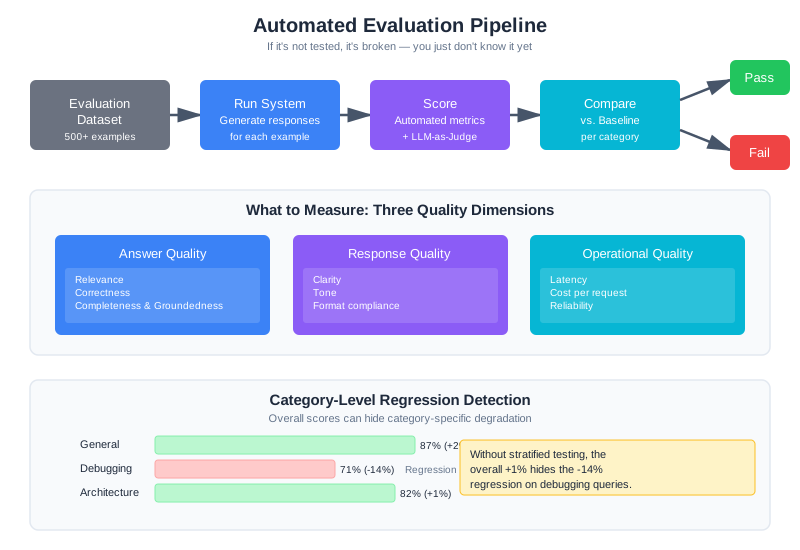
The core practice: If it’s not tested, it’s broken—you just don’t know it yet. Every prompt change, every RAG tweak, every context modification affects quality in ways you can’t predict. Without evaluation, you’re guessing. With evaluation, you’re engineering.
The software engineering principle underlying this chapter is verification through systematic testing. In traditional software, tests verify that code does what it’s supposed to do—clear pass/fail against defined expectations. For AI systems, verification means measuring quality distributions and tracking how they change over time. Context engineering applies this by building evaluation infrastructure specifically for prompt changes, retrieval modifications, and context composition strategies. The same discipline that makes traditional software reliable—baseline metrics, regression gates, automated test suites—is what separates production AI systems from fragile demos.
How to Read This Chapter
Core path (recommended for all readers): Why AI Testing Is Different, What to Measure, Building Evaluation Datasets, and Automated Evaluation Pipelines. This gives you a working evaluation pipeline you can apply immediately.
Going deeper: LLM-as-Judge automates subjective evaluation — useful when you have too many test cases for manual review. A/B Testing Context Changes helps you compare system configurations with statistical rigor. Both are powerful but not required to get started.
Why AI Testing Is Different
Traditional software testing has clear pass/fail criteria: the function returns the expected value or it doesn’t. The test is deterministic—same inputs always produce same outputs.
AI testing operates in a fundamentally different world. Your system doesn’t simply “work” or “not work.” It works with some quality level, on some percentage of inputs, for some definition of “good.” A response might be mostly correct but miss a key detail. It might be technically accurate but unhelpfully verbose. It might work beautifully for one type of query and fail completely for another.
This means AI testing requires different approaches:
Measuring distributions, not binaries. Instead of pass/fail, you measure accuracy rates, quality scores, latency percentiles. Your system might be 87% accurate on general questions and 71% accurate on debugging questions—and both numbers matter.
Defining “correct” for subjective outputs. What makes a code explanation “good”? Correctness, clarity, completeness, helpfulness—all of which are judgment calls. You need to operationalize these judgments into measurable criteria.
Testing against representative data. A handful of test cases won’t reveal how your system behaves across the full distribution of real queries. You need evaluation datasets that capture the breadth and edge cases of actual usage.
Catching regressions in quality distributions. A change might improve average quality while degrading quality for a specific category of queries. Without stratified testing, you’ll miss these category-specific regressions.
None of this is impossible. It just requires building evaluation infrastructure that traditional software testing doesn’t need. That’s what this chapter teaches.
What to Measure
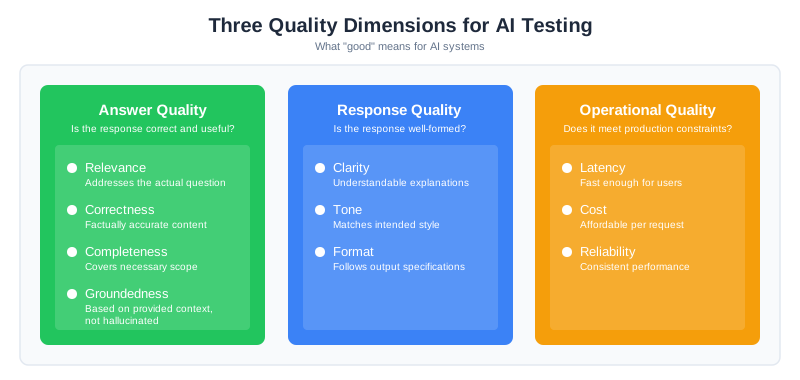
Before you can test, you need to decide what “good” means. For AI systems, quality breaks down into three dimensions.
Answer Quality
This is what users care about most: is the response correct and useful?
Relevance: Does the response actually address the question asked? A technically accurate response about the wrong topic is useless. Relevance measures whether the response is on-target.
Correctness: Is the factual content accurate? For CodebaseAI, this means: are the code references real? Are the explanations technically correct? Do the line numbers actually point to what the response claims?
Completeness: Does the response cover what’s needed? A correct but incomplete answer that misses important caveats can mislead users.
Groundedness: Is the response based on the provided context, or is it hallucinated? This is especially critical for RAG systems. A response that sounds authoritative but invents facts that aren’t in the retrieved documents is worse than admitting uncertainty.
Response Quality
Beyond being correct, is the response well-formed?
Clarity: Is the explanation understandable? Technical accuracy buried in incomprehensible prose doesn’t help users.
Tone: Does the response match the intended style? A customer support bot should sound different from a technical documentation assistant.
Format: Does the response follow output specifications? If you asked for JSON, did you get valid JSON? If you asked for code with comments, are the comments there?
Operational Quality
Production systems have constraints beyond just answer quality.
Latency: Is it fast enough? A perfect answer that takes 30 seconds may be worse than a good answer in 2 seconds.
Cost: Is it affordable? A response that costs $0.50 in tokens might be unacceptable even if the quality is excellent.
Reliability: Does it work consistently? A system that’s brilliant 80% of the time and crashes 20% of the time has a reliability problem.
Domain-Specific Metrics
Generic metrics don’t capture everything. Build metrics that reflect what “good” means for your specific application.
For CodebaseAI, domain-specific metrics include:
class CodebaseAIMetrics:
    """Evaluation metrics specific to code Q&A systems."""

    def code_reference_accuracy(self, response: str, codebase: Codebase) -> float:
        """
        Do the files and functions referenced in the response actually exist?
        A response that confidently describes 'utils.py' when no such file exists
        is hallucinating, regardless of how plausible it sounds.
        """
        references = extract_code_references(response)
        if not references:
            return 1.0  # No references to verify

        valid = sum(1 for ref in references if codebase.exists(ref))
        return valid / len(references)

    def line_number_accuracy(self, response: str, codebase: Codebase) -> float:
        """
        When the response cites specific line numbers, are they correct?
        'The bug is on line 47' is only useful if line 47 actually contains
        what the response claims.
        """
        citations = extract_line_citations(response)
        if not citations:
            return 1.0

        correct = sum(1 for c in citations if codebase.verify_line_content(c))
        return correct / len(citations)

    def explanation_addresses_question(self, question: str, response: str) -> float:
        """
        Does the explanation actually address what was asked?
        Uses embedding similarity as a proxy for topical relevance.
        """
        q_embedding = self.embedder.embed(question)
        r_embedding = self.embedder.embed(response)
        return cosine_similarity(q_embedding, r_embedding)
The insight here: your metrics should measure what your users actually care about. For a code assistant, getting line numbers right matters more than prose style. For a customer service bot, tone might matter more than technical precision. Define metrics that reflect your domain’s definition of success.
Building Evaluation Datasets
The evaluation dataset is the foundation. Every metric you compute, every regression you detect, every A/B test you run—all of it depends on having a dataset that actually represents how your system is used.
Bad dataset means meaningless metrics. This is where teams often cut corners, and it’s where that corner-cutting costs them.
What Makes a Good Dataset
Representative: The dataset must reflect actual usage patterns. If 40% of your real queries are about debugging, 40% of your evaluation examples should be debugging queries. If users frequently ask about specific frameworks, those frameworks should appear in your test cases.
Labeled: Every example needs ground truth—what counts as a correct response. For some queries this is straightforward (there’s one right answer). For others you need multiple valid reference answers that capture different acceptable ways to respond.
Diverse: Cover not just common cases but edge cases, failure modes, and the weird queries that real users submit. The queries that break your system in production are rarely the obvious ones.
Maintained: Usage patterns change. New features get added. User populations shift. A dataset that was representative six months ago may no longer reflect current usage. Plan for regular refresh.
Practical Dataset Construction
class EvaluationDataset:
    """Build and maintain evaluation datasets for AI systems."""

    def __init__(self, name: str, version: str):
        self.name = name
        self.version = version
        self.examples = []
        self.metadata = {
            "created": datetime.utcnow().isoformat(),
            "categories": {},
            "sources": {"production": 0, "synthetic": 0, "expert": 0}
        }

    def add_example(
        self,
        query: str,
        context: str,
        reference_answers: list[str],
        category: str,
        difficulty: str,
        source: str,
    ):
        """
        Add a labeled example to the dataset.

        Args:
            query: The user question
            context: The context that should be provided (codebase, documents)
            reference_answers: List of acceptable answers (multiple for ambiguous queries)
            category: Query type for stratified analysis
            difficulty: easy/medium/hard for balanced sampling
            source: Where this example came from (production/synthetic/expert)
        """
        example = {
            "id": str(uuid.uuid4()),
            "query": query,
            "context": context,
            "reference_answers": reference_answers,
            "category": category,
            "difficulty": difficulty,
            "source": source,
            "added": datetime.utcnow().isoformat(),
        }
        self.examples.append(example)
        self.metadata["categories"][category] = self.metadata["categories"].get(category, 0) + 1
        self.metadata["sources"][source] += 1

    def sample_stratified(self, n: int) -> list:
        """
        Sample n examples with balanced representation across categories.
        Ensures evaluation covers all query types, not just the common ones.
        """
        samples = []
        categories = list(self.metadata["categories"].keys())
        per_category = max(1, n // len(categories))

        for category in categories:
            category_examples = [e for e in self.examples if e["category"] == category]
            sample_size = min(per_category, len(category_examples))
            samples.extend(random.sample(category_examples, sample_size))

        # Fill remaining slots randomly if needed
        if len(samples) < n:
            remaining = [e for e in self.examples if e not in samples]
            samples.extend(random.sample(remaining, min(n - len(samples), len(remaining))))

        return samples[:n]

    def get_category_distribution(self) -> dict:
        """Show how examples are distributed across categories."""
        total = len(self.examples)
        return {
            cat: {"count": count, "percentage": count / total * 100}
            for cat, count in self.metadata["categories"].items()
        }
Where Examples Come From
The best evaluation examples come from three sources:
Production queries (anonymized): Real questions from real users. These are the gold standard for representativeness because they are actual usage. Sample from production logs, remove PII, have humans create reference answers.
Expert-created examples: Domain experts write examples specifically to test known edge cases, failure modes, and important capabilities. These catch problems that random production sampling might miss.
Synthetic examples: Programmatically generated variations to increase coverage. Useful for testing format variations, edge cases in input handling, and scaling up dataset size. But synthetic examples alone aren’t enough—they often miss the weird things real users do.
A good dataset mixes all three: production queries for representativeness, expert examples for edge case coverage, synthetic examples for scale.
The 100/500/1000 Guideline
How big should your dataset be? The answer depends on what you need to detect and how confident you want to be.
100 examples: Minimum viable evaluation
With 100 examples, you can detect failure rates above approximately 5% with reasonable confidence. If your system fails catastrophically on 5% of inputs (always refusing certain categories, hallucinating on ambiguous queries), 100 examples will catch it via a 5% failure rate showing up consistently.
Statistical reasoning: With 100 examples, a 95% confidence interval around a measured 95% success rate is roughly [91%, 99%]. If the true failure rate is 7%, you have about 75% power to detect it. This means you’ll catch obvious systematic failures but might miss subtle regressions.
Use case: Smoke testing after major changes. Catching regressions that affect 5%+ of queries. Early-stage system development.
500 examples: Production baseline
500 examples is the inflection point where statistics become meaningful. You can reliably detect a 5% quality degradation (0.85 → 0.80). A 95% confidence interval on a measured 85% quality score is approximately [82%, 88%]—narrow enough that you can confidently distinguish “85% accuracy” from “80% accuracy.”
Statistical reasoning: At 500 samples per variant in an A/B test, with a baseline quality of 0.80, you have approximately 80% power to detect a 5% absolute change (5 percentage points). The sample size formula for proportions: n = (Z_alpha/2 + Z_beta)^2 * p(1-p) / delta^2, where delta is the effect size. For alpha=0.05 (two-sided), beta=0.20 (80% power), p=0.80, delta=0.05, this gives n ≈ 500.
Use case: Production baseline for ongoing monitoring. A/B testing changes. Mature systems tracking regressions.
1000+ examples: Comprehensive production coverage
1000+ examples supports fine-grained analysis and high-stakes decisions. You can detect small quality changes (2-3%), analyze results stratified by category and difficulty without loss of statistical power, and have confidence intervals tight enough to compare variants.
Statistical reasoning: With 1000 samples, a 2% effect size (0.80 → 0.82) is detectable with ~90% power. Category-level analysis remains meaningful: you can split 1000 examples across 5 categories (200 each) and still detect 5% effects within categories.
Use case: High-stakes applications (medical, legal, financial). Systems with long-tail distributions needing rare failure detection. Mature production systems where small improvements compound.
Practical progression:
Start with 100: builds quickly, catches gross failures. You test it, understand what matters, learn which categories are important.
Grow to 500: invest effort proportional to product maturity. At 500 examples, your metrics start converging. You can run A/B tests and trust the results.
Reach 1000+: only for production-critical systems or when you need to detect rare failure modes. Don’t over-invest in dataset size for early-stage projects—use the insights from 100 examples to build a smarter 500-example set.
Example: Statistical Justification for CodebaseAI
CodebaseAI’s evaluation dataset has 500 examples across 5 categories (100 each):
- Architecture questions (100 examples): General system design. Tested at 100 examples because these queries are relatively stable and failure modes are predictable.
- Debugging questions (100 examples): “Why is X failing?” More variable, higher stakes. Elevated to 100 because the team noticed regressions in this category early, so they added more examples specifically for precision.
- Refactoring queries (100 examples): Code reorganization. Standard 100 examples.
- Explanation queries (100 examples): “How does this code work?” Standard 100 examples.
- General questions (100 examples): Everything else. Standard 100 examples.
With 100 examples per category, the team can detect a 5% category-level regression (75% power). If debugging questions’ quality drops from 0.80 → 0.75, the team’s evaluation catches it. If it drops to 0.79, they might miss it—but a 1% degradation per category is acceptable operational noise.
At 500 total examples, CodebaseAI can detect 5% overall quality changes with 80% power across all categories combined. This satisfies their production requirement: “catch regressions that affect significant user populations.”
If CodebaseAI’s business model required detecting rare failure modes (users in specific industries, specific frameworks), they’d expand the dataset to 1000+ examples and add strata for those edge cases.
Automated Evaluation Pipelines
Manual evaluation doesn’t scale. You need automation that runs on every change, compares to baseline, and catches regressions before deployment.
The Evaluation Pipeline
Every prompt change, every RAG modification, every context engineering tweak should trigger automated evaluation:
class EvaluationPipeline:
    """
    Automated evaluation that runs on every code change.
    Compares current system to baseline and detects regressions.
    """

    def __init__(
        self,
        dataset: EvaluationDataset,
        baseline_results: dict,
        metrics: MetricsCalculator
    ):
        self.dataset = dataset
        self.baseline = baseline_results
        self.metrics = metrics

    def evaluate(self, system) -> EvaluationResult:
        """Run full evaluation and compare to baseline."""
        results = []

        for example in self.dataset.examples:
            # Get system response
            start_time = time.time()
            response = system.query(example["query"], example["context"])
            latency_ms = (time.time() - start_time) * 1000

            # Calculate all metrics
            scores = {
                "relevance": self.metrics.relevance(
                    response.text, example["reference_answers"]
                ),
                "groundedness": self.metrics.groundedness(
                    response.text, example["context"]
                ),
                "code_accuracy": self.metrics.code_reference_accuracy(
                    response.text, example["context"]
                ),
                "format_compliance": self.metrics.format_check(response.text),
            }

            results.append({
                "example_id": example["id"],
                "category": example["category"],
                "scores": scores,
                "latency_ms": latency_ms,
                "token_count": response.token_count,
            })

        # Aggregate and compare
        aggregate = self._compute_aggregates(results)
        comparison = self._compare_to_baseline(aggregate)
        regressions = self._detect_regressions(comparison)

        return EvaluationResult(
            results=results,
            aggregate=aggregate,
            comparison=comparison,
            regressions=regressions,
            passed=len(regressions) == 0
        )

    def _compute_aggregates(self, results: list) -> dict:
        """Compute aggregate metrics across all examples."""
        aggregates = {}

        # Overall metrics
        for metric in ["relevance", "groundedness", "code_accuracy", "format_compliance"]:
            values = [r["scores"][metric] for r in results]
            aggregates[f"mean_{metric}"] = statistics.mean(values)
            aggregates[f"p10_{metric}"] = sorted(values)[len(values) // 10]

        # Latency percentiles
        latencies = [r["latency_ms"] for r in results]
        aggregates["p50_latency"] = statistics.median(latencies)
        aggregates["p95_latency"] = sorted(latencies)[int(len(latencies) * 0.95)]

        # Per-category breakdown
        categories = set(r["category"] for r in results)
        for category in categories:
            cat_results = [r for r in results if r["category"] == category]
            for metric in ["relevance", "groundedness", "code_accuracy"]:
                values = [r["scores"][metric] for r in cat_results]
                aggregates[f"{category}_{metric}"] = statistics.mean(values)

        return aggregates

    def _compare_to_baseline(self, current: dict) -> dict:
        """Compare current metrics to baseline."""
        comparison = {}
        for metric, value in current.items():
            baseline_value = self.baseline.get(metric)
            if baseline_value is not None:
                delta = value - baseline_value
                comparison[metric] = {
                    "current": value,
                    "baseline": baseline_value,
                    "delta": delta,
                    "delta_percent": (delta / baseline_value * 100) if baseline_value != 0 else 0
                }
        return comparison

    def _detect_regressions(self, comparison: dict) -> list:
        """Identify metrics that have regressed beyond acceptable thresholds."""
        regressions = []

        for metric, data in comparison.items():
            # Latency: higher is worse
            if "latency" in metric:
                if data["delta_percent"] > 20:  # 20% slower
                    regressions.append({
                        "metric": metric,
                        "type": "latency_regression",
                        "baseline": data["baseline"],
                        "current": data["current"],
                        "delta_percent": data["delta_percent"]
                    })
            # Quality metrics: lower is worse
            else:
                if data["delta_percent"] < -5:  # 5% quality drop
                    regressions.append({
                        "metric": metric,
                        "type": "quality_regression",
                        "baseline": data["baseline"],
                        "current": data["current"],
                        "delta_percent": data["delta_percent"]
                    })

        return regressions
CI Integration
Wire the evaluation pipeline into your CI system:
# .github/workflows/evaluate.yml
name: Evaluation Pipeline

on:
  push:
    paths:
      - 'prompts/**'
      - 'src/rag/**'
      - 'src/context/**'

jobs:
  evaluate:
    runs-on: ubuntu-latest
    steps:
      - uses: actions/checkout@v3

      - name: Set up Python
        uses: actions/setup-python@v4
        with:
          python-version: '3.11'

      - name: Install dependencies
        run: pip install -r requirements.txt

      - name: Run evaluation
        run: python -m evaluation.run_pipeline
        env:
          OPENAI_API_KEY: ${{ secrets.OPENAI_API_KEY }}

      - name: Check for regressions
        run: python -m evaluation.check_regressions --fail-on-regression

      - name: Upload results
        uses: actions/upload-artifact@v3
        with:
          name: evaluation-results
          path: evaluation_results.json

      - name: Comment on PR
        if: github.event_name == 'pull_request'
        run: python -m evaluation.post_pr_comment
The key insight: block deployment on regressions. If the evaluation pipeline detects a quality drop, the PR doesn’t merge. This is the automated guardrail that prevents shipping broken changes.
LLM-as-Judge
Some qualities are hard to measure with automated metrics. Is this explanation actually helpful? Does this code suggestion follow idiomatic patterns? Is this response appropriately detailed for the question?
For these subjective qualities, you can use an LLM to evaluate LLM outputs.
The Pattern
class LLMJudge:
    """Use an LLM to evaluate response quality on subjective dimensions."""

    JUDGE_PROMPT = """You are evaluating an AI assistant's response to a coding question.

Question: {question}
Context provided to the assistant:
{context}

Assistant's response:
{response}

Evaluate the response on these criteria, using a 1-5 scale:

1. **Correctness** (1-5): Is the technical information accurate?
   - 1: Major factual errors
   - 3: Mostly correct with minor issues
   - 5: Completely accurate

2. **Helpfulness** (1-5): Does it actually help answer the question?
   - 1: Doesn't address the question
   - 3: Partially addresses the question
   - 5: Fully addresses the question with useful detail

3. **Clarity** (1-5): Is it easy to understand?
   - 1: Confusing or poorly organized
   - 3: Understandable but could be clearer
   - 5: Crystal clear and well-organized

Provide your evaluation as JSON:
{{"correctness": {{"score": N, "reason": "one sentence"}}, "helpfulness": {{"score": N, "reason": "one sentence"}}, "clarity": {{"score": N, "reason": "one sentence"}}}}"""

    def __init__(self, model: str = "gpt-4o-mini"):
        self.model = model
        self.client = OpenAI()

    def evaluate(self, question: str, context: str, response: str) -> dict:
        """Get LLM evaluation of a response."""
        prompt = self.JUDGE_PROMPT.format(
            question=question,
            context=context[:2000],  # Truncate for judge context
            response=response
        )

        result = self.client.chat.completions.create(
            model=self.model,
            messages=[{"role": "user", "content": prompt}],
            response_format={"type": "json_object"}
        )

        return json.loads(result.choices[0].message.content)
Calibrating the Judge
LLM judges have known biases that require calibration. Zheng et al. (“Judging LLM-as-a-Judge with MT-Bench and Chatbot Arena,” NeurIPS 2023) found that while GPT-4 judges achieve over 80% agreement with human evaluators, they exhibit systematic biases you need to account for:
Positivity bias: LLMs tend to be generous graders. A response that a human would rate 3/5 might get 4/5 from an LLM judge.
Verbosity bias: Longer, more detailed responses often score higher even when brevity would be more appropriate.
Self-enhancement bias: LLM judges tend to favor responses written in a style similar to their own, which can skew results when evaluating outputs from the same model family.
Inconsistency: The same response evaluated twice might get different scores.
Solutions:
def calibrated_evaluation(
    judge: LLMJudge,
    question: str,
    context: str,
    response: str,
    n_evaluations: int = 3
) -> dict:
    """
    Run multiple evaluations and aggregate for consistency.
    Takes median score across evaluations to reduce noise.
    """
    evaluations = []

    for _ in range(n_evaluations):
        eval_result = judge.evaluate(question, context, response)
        evaluations.append(eval_result)

    # Aggregate by taking median of each criterion
    calibrated = {}
    for criterion in ["correctness", "helpfulness", "clarity"]:
        scores = [e[criterion]["score"] for e in evaluations]
        calibrated[criterion] = {
            "score": statistics.median(scores),
            "variance": statistics.variance(scores) if len(scores) > 1 else 0,
            "raw_scores": scores
        }

    return calibrated
Additionally, periodically validate LLM judge scores against human judgment. If the correlation drops below 0.7, your judge needs recalibration—either through better prompting or switching to a different model.
A/B Testing Context Changes
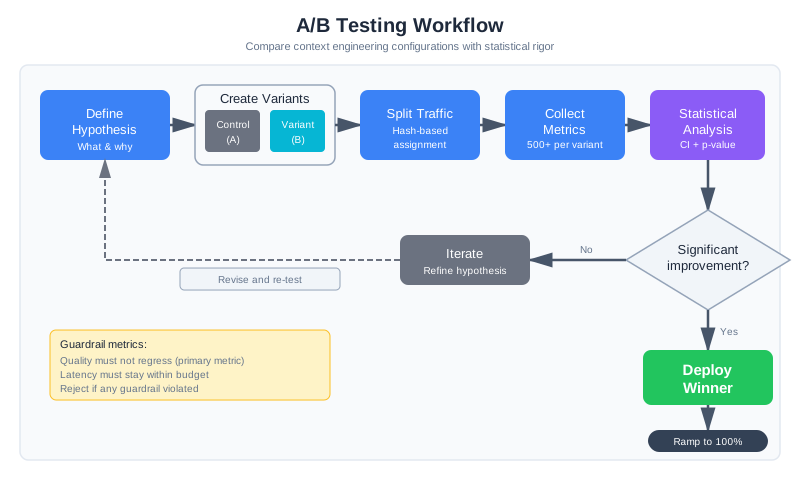
Offline evaluation tells you if something is better in general. A/B testing tells you if it’s better for your actual users in production.
When to A/B Test
A/B testing is appropriate for changes where you’re uncertain about production impact:
- RAG retrieval parameters (top-k, similarity threshold)
- System prompt variations
- Context ordering (RAG before or after conversation history)
- Memory retrieval strategies
- Compression approaches
Statistical Foundations for A/B Testing
Before running an A/B test, commit to a statistical plan. This isn’t bureaucracy—it’s the difference between detecting real improvements and chasing noise.
Sample Size Requirements
How many queries per variant do you need? The answer depends on:
- Baseline metric: What’s the control variant’s performance? If you’re testing quality and control is 0.80, that’s your baseline.
- Minimum detectable effect: What improvement would justify the change? If you’d deploy for a 5% improvement (0.80 → 0.85), that’s your target effect size.
- Statistical power: What’s your tolerance for missing real effects? 80% power means 80% chance of detecting the effect if it exists. 90% power is more conservative.
For a typical A/B test in context engineering:
- Baseline: 0.80 quality score
- Effect size: 5% improvement (5 percentage points)
- Power: 80%
- Significance level: 0.05 (two-sided)
This requires approximately 500 queries per variant. The formula: n ≈ (Z_alpha/2 + Z_beta)^2 * p(1-p) / delta^2
With fewer samples (100 per variant), you have only ~30% power—you’ll miss real improvements 70% of the time. With more samples (1000+), you can detect smaller effects but need more user traffic.
Confidence Intervals Over P-values
Report 95% confidence intervals, not just p-values. After your test, the true effect isn’t a single number—it’s a range. A 5% improvement with a 95% CI of [2%, 8%] tells a different story than a 5% improvement with a 95% CI of [-10%, 20%].
import scipy.stats

def analyze_ab_test_with_ci(control_successes, control_total,
                             treatment_successes, treatment_total):
    """A/B test analysis with 95% confidence intervals."""
    control_rate = control_successes / control_total
    treatment_rate = treatment_successes / treatment_total
    difference = treatment_rate - control_rate

    # Standard error of the difference
    se = math.sqrt(
        (control_rate * (1 - control_rate) / control_total) +
        (treatment_rate * (1 - treatment_rate) / treatment_total)
    )

    # 95% CI (z = 1.96)
    ci_lower = difference - 1.96 * se
    ci_upper = difference + 1.96 * se

    # T-test for p-value
    control_outcomes = [1] * control_successes + [0] * (control_total - control_successes)
    treatment_outcomes = [1] * treatment_successes + [0] * (treatment_total - treatment_successes)
    t_stat, p_value = scipy.stats.ttest_ind(treatment_outcomes, control_outcomes)

    return {
        "control_rate": control_rate,
        "treatment_rate": treatment_rate,
        "difference": difference,
        "ci_lower": ci_lower,
        "ci_upper": ci_upper,
        "ci_includes_zero": ci_lower <= 0 <= ci_upper,
        "p_value": p_value,
        "significant": p_value < 0.05,
        "interpretation": (
            f"With 95% confidence, the treatment effect is between "
            f"{ci_lower:.1%} and {ci_upper:.1%}. "
            f"{'The CI includes zero, so the effect may not be real.' if ci_lower <= 0 <= ci_upper else 'The CI excludes zero, suggesting a real effect.'}"
        )
    }
Multiple Hypothesis Testing Correction
If you’re testing multiple variants or multiple metrics, you need to adjust your significance threshold. Testing 3 variants with p < 0.05 for each inflates your false positive rate to ~14%, not 5%.
Use Bonferroni correction: divide your p-value threshold by the number of comparisons. For 3 variants, use p < 0.017 (0.05/3). For 5 metrics, use p < 0.01 (0.05/5).
Common Pitfalls to Avoid
-
Peeking at results early: If you check p-values multiple times and stop when you hit significance, you’ve invalidated the statistical test. Solution: pre-commit to sample size before starting the test.
-
Stopping when significant but under-powered: You hit p < 0.05 after 300 samples but planned for 500. Tempting to declare victory and ship. Don’t. You’ve broken the assumptions. Run the full planned sample.
-
Ignoring effect size for statistical significance: A 0.5% improvement with p < 0.001 is statistically significant with massive sample sizes but practically irrelevant. Report effect sizes alongside p-values.
-
Ignoring segment differences: Overall results might hide category-level problems. Treatment helps architecture questions but hurts debugging questions. Always analyze results stratified by category, difficulty, user segment, etc.
Implementation
class ContextABTest:
    """A/B test different context engineering configurations."""

    def __init__(self, test_name: str, control_config: dict, treatment_config: dict):
        self.test_name = test_name
        self.variants = {
            "control": control_config,
            "treatment": treatment_config
        }
        self.assignments = {}  # user_id -> variant
        self.results = {"control": [], "treatment": []}

    def get_variant(self, user_id: str) -> str:
        """
        Assign user to variant consistently.
        Same user always gets same variant for duration of test.
        """
        if user_id not in self.assignments:
            # Hash for consistent assignment
            hash_val = int(hashlib.md5(f"{self.test_name}:{user_id}".encode()).hexdigest(), 16)
            self.assignments[user_id] = "treatment" if hash_val % 100 < 50 else "control"
        return self.assignments[user_id]

    def get_config(self, user_id: str) -> dict:
        """Get the context config for this user's variant."""
        variant = self.get_variant(user_id)
        return self.variants[variant]

    def record_outcome(self, user_id: str, metrics: dict):
        """Record outcome metrics for analysis."""
        variant = self.get_variant(user_id)
        self.results[variant].append({
            "user_id": user_id,
            "timestamp": datetime.utcnow().isoformat(),
            **metrics
        })

    def analyze(self) -> dict:
        """Statistical analysis of test results."""
        control_satisfaction = [r["user_satisfaction"] for r in self.results["control"] if "user_satisfaction" in r]
        treatment_satisfaction = [r["user_satisfaction"] for r in self.results["treatment"] if "user_satisfaction" in r]

        if len(control_satisfaction) < 30 or len(treatment_satisfaction) < 30:
            return {"status": "insufficient_data", "control_n": len(control_satisfaction), "treatment_n": len(treatment_satisfaction)}

        control_mean = statistics.mean(control_satisfaction)
        treatment_mean = statistics.mean(treatment_satisfaction)

        # T-test for significance
        t_stat, p_value = scipy.stats.ttest_ind(control_satisfaction, treatment_satisfaction)

        return {
            "status": "complete",
            "control": {"mean": control_mean, "n": len(control_satisfaction)},
            "treatment": {"mean": treatment_mean, "n": len(treatment_satisfaction)},
            "lift": (treatment_mean - control_mean) / control_mean,
            "p_value": p_value,
            "significant": p_value < 0.05,
            "recommendation": "deploy_treatment" if p_value < 0.05 and treatment_mean > control_mean else "keep_control"
        }
Worked Example: A/B Testing System Prompt Versions
Theory is useful. A concrete example of A/B testing in practice is better.
The Hypothesis
The CodebaseAI team notices that users sometimes ask questions that would benefit from explicit code citations: “Show me where this function is called.” Current responses often explain the answer but don’t systematically cite file and line references. The hypothesis: Adding explicit citation instructions to the system prompt will increase the rate at which responses cite specific files without reducing answer quality.
This is a perfect A/B test scenario. The change is focused (system prompt only), the metric is clear (citation rate), and the impact is uncertain (better citations might make responses verbose or hallucinated).
Test Design
class SystemPromptABTest:
    """
    A/B test comparing system prompt v2.3 (control) vs v2.4 (with citation instructions).
    """

    # Prompt v2.3 (control) - current baseline
    SYSTEM_PROMPT_V23 = """You are CodebaseAI, an expert at answering questions about codebases.

Answer questions about the provided codebase clearly and accurately. Provide code examples
when relevant. If you reference specific code, try to be precise about locations."""

    # Prompt v2.4 (treatment) - with explicit citation instructions
    SYSTEM_PROMPT_V24 = """You are CodebaseAI, an expert at answering questions about codebases.

Answer questions about the provided codebase clearly and accurately. Provide code examples
when relevant.

**Citation Requirements**: When referencing specific code:
1. Always include the filename (e.g., "src/utils/parser.py")
2. Include line numbers when possible (e.g., "lines 45-52")
3. Quote the specific code snippet being referenced
4. Format citations as: "In `filename.ext` (lines X-Y): [code snippet]"

For example, instead of "The function checks for null here," write: "In `UserService.java` (lines 47-49): The function checks `if (user == null)` before processing."

This precision helps users locate and understand code changes quickly."""

    def __init__(self, test_name: str = "prompt_v24_citation_test"):
        self.test_name = test_name
        self.variants = {
            "control": self.SYSTEM_PROMPT_V23,
            "treatment": self.SYSTEM_PROMPT_V24
        }
        self.results = {"control": [], "treatment": []}

    def get_variant_for_user(self, user_id: str) -> str:
        """
        Deterministically assign user to variant using hash.
        Same user always gets same variant for test duration.
        """
        hash_val = int(
            hashlib.md5(f"{self.test_name}:{user_id}".encode()).hexdigest(),
            16
        )
        return "treatment" if (hash_val % 100) < 50 else "control"

    def get_system_prompt(self, user_id: str) -> str:
        """Get the system prompt for this user's assigned variant."""
        variant = self.get_variant_for_user(user_id)
        return self.variants[variant]

    def record_query_result(
        self,
        user_id: str,
        query: str,
        response: str,
        latency_ms: float,
        cost: float,
        token_count: int
    ):
        """Record metrics from a query in the assigned variant."""
        variant = self.get_variant_for_user(user_id)

        # Calculate whether response contains explicit citations
        citations = self._extract_citations(response)
        citation_rate = 1.0 if citations else 0.0

        # Use LLM-as-judge for quality (quick eval)
        quality_score = self._evaluate_quality(query, response)

        self.results[variant].append({
            "timestamp": datetime.utcnow().isoformat(),
            "user_id": user_id,
            "query": query,
            "response": response,
            "citation_rate": citation_rate,
            "num_citations": len(citations),
            "quality_score": quality_score,
            "latency_ms": latency_ms,
            "cost": cost,
            "token_count": token_count,
        })

    def _extract_citations(self, response: str) -> list[dict]:
        """
        Parse citations from response.
        Looks for pattern: "In `filename` (lines X-Y): ..." or similar.
        """
        citations = []
        # Regex to match "In `filename` (lines X-Y):" or "In filename (lines X-Y):"
        pattern = r'In [`]?([a-zA-Z0-9_\-./]+\.\w+)[`]?\s*\(lines?\s*(\d+)(?:-(\d+))?\)'
        matches = re.findall(pattern, response)

        for filename, start_line, end_line in matches:
            citations.append({
                "filename": filename,
                "start_line": int(start_line),
                "end_line": int(end_line) if end_line else int(start_line)
            })

        return citations

    def _evaluate_quality(self, query: str, response: str) -> float:
        """
        Quick quality score (0-1) using embedding similarity.
        More rigorous eval would use LLM-as-judge, but this is fast for ongoing test.
        """
        query_embedding = embed(query)
        response_embedding = embed(response)
        return cosine_similarity(query_embedding, response_embedding)

    def analyze(self) -> dict:
        """Statistical analysis of A/B test results."""
        if len(self.results["control"]) < 100 or len(self.results["treatment"]) < 100:
            return {
                "status": "insufficient_data",
                "control_n": len(self.results["control"]),
                "treatment_n": len(self.results["treatment"]),
                "message": "Need at least 100 results per variant to analyze"
            }

        control_citations = [r["citation_rate"] for r in self.results["control"]]
        treatment_citations = [r["citation_rate"] for r in self.results["treatment"]]
        control_quality = [r["quality_score"] for r in self.results["control"]]
        treatment_quality = [r["quality_score"] for r in self.results["treatment"]]
        control_latency = [r["latency_ms"] for r in self.results["control"]]
        treatment_latency = [r["latency_ms"] for r in self.results["treatment"]]
        control_cost = [r["cost"] for r in self.results["control"]]
        treatment_cost = [r["cost"] for r in self.results["treatment"]]

        # Statistical tests
        citation_t_stat, citation_p = scipy.stats.ttest_ind(control_citations, treatment_citations)
        quality_t_stat, quality_p = scipy.stats.ttest_ind(control_quality, treatment_quality)
        latency_t_stat, latency_p = scipy.stats.ttest_ind(control_latency, treatment_latency)
        cost_t_stat, cost_p = scipy.stats.ttest_ind(control_cost, treatment_cost)

        return {
            "status": "complete",
            "sample_sizes": {
                "control": len(control_citations),
                "treatment": len(treatment_citations)
            },
            "primary_metric_citation_rate": {
                "control_mean": statistics.mean(control_citations),
                "treatment_mean": statistics.mean(treatment_citations),
                "improvement": (statistics.mean(treatment_citations) - statistics.mean(control_citations)) / statistics.mean(control_citations) * 100,
                "p_value": citation_p,
                "significant": citation_p < 0.05
            },
            "guardrail_quality_score": {
                "control_mean": statistics.mean(control_quality),
                "treatment_mean": statistics.mean(treatment_quality),
                "difference": statistics.mean(treatment_quality) - statistics.mean(control_quality),
                "p_value": quality_p,
                "significant": quality_p < 0.05
            },
            "guardrail_latency_ms": {
                "control_mean": statistics.mean(control_latency),
                "treatment_mean": statistics.mean(treatment_latency),
                "increase_percent": (statistics.mean(treatment_latency) - statistics.mean(control_latency)) / statistics.mean(control_latency) * 100,
                "p_value": latency_p,
                "significant": latency_p < 0.05
            },
            "informational_cost_per_query": {
                "control_mean": statistics.mean(control_cost),
                "treatment_mean": statistics.mean(treatment_cost),
                "increase_percent": (statistics.mean(treatment_cost) - statistics.mean(control_cost)) / statistics.mean(control_cost) * 100,
            },
            "recommendation": self._make_recommendation(
                citation_p < 0.05 and statistics.mean(treatment_citations) > statistics.mean(control_citations),
                quality_p < 0.05 and statistics.mean(treatment_quality) < statistics.mean(control_quality),
                latency_p < 0.05 and statistics.mean(treatment_latency) > statistics.mean(control_latency) * 1.1,
            )
        }

    def _make_recommendation(self, citation_improved: bool, quality_regressed: bool, latency_regressed: bool) -> str:
        """Decision logic for A/B test outcome."""
        if quality_regressed or latency_regressed:
            return "REJECT_TREATMENT: Guardrail metric violated"
        if citation_improved:
            return "DEPLOY_TREATMENT: Primary metric improved significantly, guardrails passed"
        return "INCONCLUSIVE: No significant improvement detected"
Sample Results
After running the test for one week with 500 queries per variant:
=== CodebaseAI System Prompt A/B Test Results ===
Test Duration: 7 days
Control: v2.3 (current baseline)
Treatment: v2.4 (citation instructions)

PRIMARY METRIC: Citation Rate
  Control:   64% of responses contained citations (mean=0.64)
  Treatment: 89% of responses contained citations (mean=0.89)
  Improvement: +25 percentage points
  P-value: 0.00003 (highly significant)
  Result: ✓ PASSED - Treatment significantly improved citation rate

GUARDRAIL: Quality Score (must not decrease >5%)
  Control:   0.83 (LLM-as-judge evaluation)
  Treatment: 0.84
  Difference: +0.01
  P-value: 0.31 (not significant, change is within noise)
  Result: ✓ PASSED - Quality held steady

GUARDRAIL: Latency (must not increase >20%)
  Control:   920 ms median
  Treatment: 928 ms median
  Increase: +0.87%
  P-value: 0.68 (not significant)
  Result: ✓ PASSED - Latency unchanged

INFORMATIONAL: Cost per Query
  Control:   $0.0034 mean
  Treatment: $0.0035 mean
  Increase: +2.9%
  (Additional cost due to longer responses with citations)

STATISTICAL POWER:
  Sample size per variant: 500
  Effect size (citation rate): 0.25 (large)
  Statistical power: 0.99
  This improvement would be detectable 99% of the time.

DECISION: DEPLOY TREATMENT (v2.4)
Why This Result Works
Citation improvement is substantial: A 25-point improvement in citation rate is large. It’s not a statistical fluke—it’s a meaningful shift in behavior. With 500 samples per variant and p < 0.001, we’re certain this isn’t random variation.
Quality guardrail held: The 0.01-point quality increase is within measurement noise (p = 0.31). The treatment didn’t make answers worse; it just made them more explicit.
Latency impact is negligible: 8ms increase on 920ms baseline is <1% and within natural variation. The longer response text (due to explicit citations) didn’t slow down the model significantly.
Cost increase is acceptable: +2.9% ($0.0001 per query) is minimal given the benefit. Users get better citations for virtually the same price.
Statistical Interpretation
With 500 queries per variant and a 25-point effect size in citation rate, this improvement is statistically significant (p < 0.001). The 95% confidence interval for the treatment effect is approximately [20, 30] percentage points—even the conservative bound shows a substantial improvement.
For the quality score, the 0.01-point difference has a p-value of 0.31, meaning there’s a 31% probability of seeing this difference by chance if there’s truly no effect. This passes the guardrail: quality didn’t regress.
Decision and Deployment
Action: Deploy v2.4 to 100% of traffic.
Rationale: The citation improvement is significant and aligns with user needs (questions often ask for specific code locations). The guardrails held: quality didn’t degrade, latency didn’t increase, and cost impact is negligible. The risk of deploying is lower than the benefit of maintaining the status quo.
Post-deployment monitoring: Track citation rate in production for regression. Set up alert if citation rate drops below 85% (leaves buffer from 89% baseline). If production metrics differ significantly from test results, investigate dataset shift or real-world usage patterns not captured in evaluation.
The Traffic Splitting Code
Here’s the hash-based router that deterministically assigns users to variants:
import hashlib
from typing import Literal

class VariantRouter:
    """
    Deterministic, consistent traffic splitting for A/B tests.
    Uses hash-based assignment so same user always sees same variant.
    """

    def __init__(self, test_id: str, control_percentage: int = 50):
        """
        Args:
            test_id: Unique identifier for this test (e.g., "prompt_citation_v1")
            control_percentage: Percentage of traffic to control (0-100)
        """
        self.test_id = test_id
        self.control_percentage = control_percentage

    def assign_variant(self, user_id: str) -> Literal["control", "treatment"]:
        """
        Assign user to variant based on hash of (test_id, user_id).
        This ensures:
        - Same user always gets same variant (deterministic)
        - Uniform distribution across variants
        - No overlap between different tests
        """
        hash_input = f"{self.test_id}:{user_id}"
        hash_value = int(
            hashlib.md5(hash_input.encode()).hexdigest(),
            16
        )

        # Map hash to 0-100 range
        bucket = hash_value % 100

        return "control" if bucket < self.control_percentage else "treatment"

    def should_include_in_test(self, user_id: str, inclusion_percentage: int = 100) -> bool:
        """
        Optionally ramp test to subset of users (e.g., 10% rollout before 100%).
        """
        hash_input = f"{self.test_id}:inclusion:{user_id}"
        hash_value = int(
            hashlib.md5(hash_input.encode()).hexdigest(),
            16
        )
        return (hash_value % 100) < inclusion_percentage

# Usage example
router = VariantRouter(test_id="prompt_citation_v1", control_percentage=50)

# Assign user consistently
variant = router.assign_variant("user_12345")  # Always returns same variant
system_prompt = PROMPTS[variant]

# Optionally ramp test to 10% of users first, then 50%, then 100%
if router.should_include_in_test("user_12345", inclusion_percentage=10):
    # User is in the 10% rollout cohort
    pass
Why This Pattern Works in Production
Deterministic: Same user always gets same variant. User won’t see variant A for one query and variant B for the next. This is crucial for user experience and result validity.
Scalable: Uses fast hashing, no centralized state. Can split millions of requests without a database lookup.
Test-aware: The test_id in the hash means different tests don’t interfere. Test_a might assign user_x to treatment, but test_b might assign the same user to control. This allows running multiple overlapping experiments.
Ramping support: Built-in inclusion_percentage allows gradual rollout (1% → 10% → 50% → 100%) before full deployment. Catch problems early with small cohorts.
This is the pattern used by Stripe, GitHub, and other companies running A/B tests at scale.
Interpreting Results
A/B test results require careful interpretation:
Statistical significance: A p-value < 0.05 suggests the difference isn’t due to chance. But significance doesn’t mean the effect is large—a statistically significant 0.5% improvement might not be worth the complexity.
Practical significance: Even with p < 0.05, ask whether the improvement matters. A 2% lift in satisfaction might justify a simple change; it probably doesn’t justify a complex architectural shift.
Segment effects: Overall results might hide segment differences. Treatment might help power users but hurt newcomers. Check segment-level results before declaring a winner.
Cost-Effective Evaluation
Full evaluation is expensive. Running LLM-as-judge on every example of a 1000-example dataset costs real money. Human evaluation at scale requires real labor. Evaluating every commit multiplies these costs.
The solution is tiered evaluation: cheap methods for frequent checks, expensive methods for periodic deep dives.
The Match Rate Pattern
Stripe’s approach to evaluating their AI systems offers a practical model: compare LLM responses to what humans actually did. Rather than relying solely on LLM-as-judge evaluations, they measure how closely the AI’s output aligns with actual human decisions—such as whether a fraud classifier would have flagged the same transactions as a human reviewer. This “match rate” principle, documented in Stripe’s engineering blog and the OpenAI Cookbook case study, generalizes well: if you have historical human decisions, you have a free evaluation baseline.
class MatchRateEvaluator:
    """
    Cost-effective evaluation by comparing LLM output to human behavior.
    No LLM calls required for evaluation—just embedding similarity.
    """

    def __init__(self, embedder):
        self.embedder = embedder

    def match_rate(self, llm_response: str, human_response: str) -> float:
        """
        Calculate similarity between LLM and human response.
        High match rate suggests LLM is producing human-quality output.
        """
        # Quick check for exact match
        if llm_response.strip().lower() == human_response.strip().lower():
            return 1.0

        # Embedding similarity for semantic match
        llm_embedding = self.embedder.embed(llm_response)
        human_embedding = self.embedder.embed(human_response)

        return cosine_similarity(llm_embedding, human_embedding)

    def evaluate_batch(self, pairs: list[tuple[str, str]]) -> dict:
        """Evaluate a batch of (llm_response, human_response) pairs."""
        scores = [self.match_rate(llm, human) for llm, human in pairs]

        return {
            "mean_match_rate": statistics.mean(scores),
            "median_match_rate": statistics.median(scores),
            "p10_match_rate": sorted(scores)[len(scores) // 10],
            "high_match_count": sum(1 for s in scores if s > 0.8),
            "low_match_count": sum(1 for s in scores if s < 0.5),
        }
Benefits of match rate:
- Cheap: Embedding computation is fast and inexpensive
- Fast: Can evaluate thousands of responses per hour
- Validated: Correlates with actual quality when calibrated against human judgment
Tiered Evaluation Strategy
Combine different evaluation methods at different frequencies:
class TieredEvaluation:
    """
    Multi-tier evaluation strategy balancing cost and depth.

    Tier 1 (every commit): Cheap automated metrics
    Tier 2 (weekly): LLM-as-judge on samples
    Tier 3 (monthly): Human evaluation on focused sets
    """

    def tier1_evaluation(self, system, dataset: EvaluationDataset) -> dict:
        """
        Fast, cheap evaluation for every commit.
        Catches obvious regressions without expensive LLM calls.
        """
        results = []
        for example in dataset.examples:
            response = system.query(example["query"], example["context"])
            results.append({
                "latency_ms": response.latency_ms,
                "token_count": response.token_count,
                "format_valid": self.check_format(response.text),
                "has_code_refs": bool(extract_code_references(response.text)),
                "response_length": len(response.text),
            })

        return {
            "p95_latency": percentile([r["latency_ms"] for r in results], 95),
            "mean_tokens": statistics.mean([r["token_count"] for r in results]),
            "format_compliance": sum(r["format_valid"] for r in results) / len(results),
        }

    def tier2_evaluation(self, system, dataset: EvaluationDataset, sample_size: int = 100) -> dict:
        """
        Weekly LLM-as-judge evaluation on a sample.
        Provides quality scores without full dataset cost.
        """
        sample = dataset.sample_stratified(sample_size)
        judge = LLMJudge()

        scores = []
        for example in sample:
            response = system.query(example["query"], example["context"])
            judgment = calibrated_evaluation(judge, example["query"], example["context"], response.text)
            scores.append(judgment)

        return {
            "mean_correctness": statistics.mean([s["correctness"]["score"] for s in scores]),
            "mean_helpfulness": statistics.mean([s["helpfulness"]["score"] for s in scores]),
            "mean_clarity": statistics.mean([s["clarity"]["score"] for s in scores]),
        }

    def tier3_evaluation(self, results_to_review: list, reviewers: list) -> dict:
        """
        Monthly human evaluation on selected examples.
        Focuses on failures, edge cases, and calibration.
        """
        # Select examples for review:
        # - All examples where LLM-as-judge gave low scores
        # - Random sample of high-scored examples (for calibration)
        # - Recent production failures

        review_assignments = self.assign_to_reviewers(results_to_review, reviewers)

        # Returns structured human judgments for calibration
        return {"assignments": review_assignments, "status": "pending_review"}
The key insight: you don’t need expensive evaluation on every commit. Cheap automated checks catch most regressions. Reserve expensive methods for periodic deep dives and calibration.
CodebaseAI v1.1.0: The Test Suite
Time to add evaluation infrastructure to CodebaseAI. Version 1.1.0 transforms it from a system that might work to a system we know works—with data to prove it.
"""
CodebaseAI v1.1.0 - Test Suite Release

Changelog from v1.0.0:
- Added evaluation dataset (500 examples across 5 categories)
- Added automated evaluation pipeline with regression detection
- Added LLM-as-judge for subjective quality assessment
- Added domain-specific metrics (code reference accuracy, line number accuracy)
- Added CI integration for evaluation on every PR
"""

class CodebaseAITestSuite:
    """Comprehensive evaluation suite for CodebaseAI."""

    def __init__(self, system: CodebaseAI, dataset_path: str):
        self.system = system
        self.dataset = EvaluationDataset.load(dataset_path)
        self.baseline = self._load_baseline()
        self.metrics = CodebaseAIMetrics()
        self.judge = LLMJudge()

    def run_ci_evaluation(self) -> CIResult:
        """
        Evaluation suite for CI/CD pipeline.
        Returns pass/fail with detailed breakdown.
        """
        # Tier 1: Fast automated metrics
        automated_results = self._run_automated_evaluation()

        # Check for regressions against baseline
        regressions = self._detect_regressions(automated_results)

        # Tier 2: LLM-as-judge on sample (only if automated passes)
        judge_results = None
        if not regressions:
            judge_results = self._run_judge_evaluation(sample_size=50)

        return CIResult(
            passed=len(regressions) == 0,
            automated_metrics=automated_results,
            judge_metrics=judge_results,
            regressions=regressions,
            timestamp=datetime.utcnow().isoformat()
        )

    def _run_automated_evaluation(self) -> dict:
        """Run automated metrics on full dataset."""
        results = []

        for example in self.dataset.examples:
            response = self.system.query(
                question=example["query"],
                codebase_context=example["context"]
            )

            scores = {
                "relevance": self.metrics.relevance(
                    response.text,
                    example["reference_answers"]
                ),
                "groundedness": self.metrics.groundedness(
                    response.text,
                    example["context"]
                ),
                "code_ref_accuracy": self.metrics.code_reference_accuracy(
                    response.text,
                    example["context"]
                ),
                "line_num_accuracy": self.metrics.line_number_accuracy(
                    response.text,
                    example["context"]
                ),
            }

            results.append({
                "example_id": example["id"],
                "category": example["category"],
                "scores": scores,
                "latency_ms": response.latency_ms,
                "cost": response.cost,
            })

        # Aggregate overall
        aggregates = {
            "mean_relevance": statistics.mean([r["scores"]["relevance"] for r in results]),
            "mean_groundedness": statistics.mean([r["scores"]["groundedness"] for r in results]),
            "mean_code_accuracy": statistics.mean([r["scores"]["code_ref_accuracy"] for r in results]),
            "mean_line_accuracy": statistics.mean([r["scores"]["line_num_accuracy"] for r in results]),
            "p95_latency": percentile([r["latency_ms"] for r in results], 95),
            "mean_cost": statistics.mean([r["cost"] for r in results]),
        }

        # Aggregate by category
        for category in self.dataset.get_categories():
            cat_results = [r for r in results if r["category"] == category]
            aggregates[f"{category}_relevance"] = statistics.mean(
                [r["scores"]["relevance"] for r in cat_results]
            )

        return aggregates

    def _run_judge_evaluation(self, sample_size: int) -> dict:
        """Run LLM-as-judge on a stratified sample."""
        sample = self.dataset.sample_stratified(sample_size)
        scores = []

        for example in sample:
            response = self.system.query(
                question=example["query"],
                codebase_context=example["context"]
            )

            judgment = calibrated_evaluation(
                self.judge,
                example["query"],
                example["context"],
                response.text
            )
            scores.append(judgment)

        return {
            "mean_correctness": statistics.mean([s["correctness"]["score"] for s in scores]),
            "mean_helpfulness": statistics.mean([s["helpfulness"]["score"] for s in scores]),
            "mean_clarity": statistics.mean([s["clarity"]["score"] for s in scores]),
        }

    def _detect_regressions(self, current: dict) -> list:
        """Check for regressions against stored baseline."""
        regressions = []

        regression_thresholds = {
            "mean_relevance": 0.05,      # 5% drop
            "mean_groundedness": 0.05,
            "mean_code_accuracy": 0.05,
            "mean_line_accuracy": 0.05,
            "p95_latency": -0.20,         # 20% increase (negative because higher is worse)
            "mean_cost": -0.15,           # 15% increase
        }

        for metric, threshold in regression_thresholds.items():
            current_val = current.get(metric)
            baseline_val = self.baseline.get(metric)

            if current_val is None or baseline_val is None:
                continue

            if "latency" in metric or "cost" in metric:
                # Higher is worse
                change = (current_val - baseline_val) / baseline_val
                if change > abs(threshold):
                    regressions.append({
                        "metric": metric,
                        "baseline": baseline_val,
                        "current": current_val,
                        "change_percent": change * 100
                    })
            else:
                # Lower is worse
                change = (current_val - baseline_val) / baseline_val
                if change < -threshold:
                    regressions.append({
                        "metric": metric,
                        "baseline": baseline_val,
                        "current": current_val,
                        "change_percent": change * 100
                    })

        # Also check category-level regressions
        for category in self.dataset.get_categories():
            metric = f"{category}_relevance"
            current_val = current.get(metric)
            baseline_val = self.baseline.get(metric)

            if current_val and baseline_val:
                change = (current_val - baseline_val) / baseline_val
                if change < -0.10:  # 10% category-level drop
                    regressions.append({
                        "metric": metric,
                        "baseline": baseline_val,
                        "current": current_val,
                        "change_percent": change * 100
                    })

        return regressions

    def update_baseline(self, results: dict):
        """Update baseline after verified successful deployment."""
        self.baseline = results
        self._save_baseline(results)
Debugging Focus: Tests Pass But Users Complain
A common frustration: your evaluation metrics look healthy—85% relevance, 4.2/5 from LLM-as-judge—but users are reporting bad experiences. What’s going wrong?
Diagnosis Checklist
1. Dataset drift: Is your test set still representative?
Your evaluation dataset was built six months ago. Usage patterns have changed. New features were added. The queries users ask today aren’t the queries in your test set.
Check: Compare recent production query distribution to your dataset category distribution. If production has 30% debugging queries and your dataset has 10%, you’re under-testing what users actually do.
Fix: Refresh dataset quarterly. Sample recent production queries and add them.
2. Metric mismatch: Are you measuring what users care about?
Your relevance metric uses embedding similarity. But users don’t care about embedding similarity—they care about whether the answer helps them solve their problem. These aren’t the same thing.
Check: Correlate your automated metrics with actual user satisfaction signals (ratings, retry rate, session completion). If correlation is below 0.6, your metrics don’t capture what users value.
Fix: Add metrics that directly measure user-valued outcomes. For CodebaseAI, maybe “did the user successfully make the code change suggested?”
3. Distribution blindness: Are you looking at averages when outliers matter?
Mean relevance is 0.85. But the 10th percentile is 0.45. One in ten responses is terrible. Users remember the terrible responses.
Check: Look at the full distribution, not just means. What’s your p10? How many responses score below 0.5?
Fix: Set thresholds for tail quality, not just average quality. Block deployment if p10 drops below acceptable level.
4. Category gaps: Are you missing entire query types?
Your dataset has 5 categories, but users discovered a 6th use case you didn’t anticipate. You’re not testing it at all, and that’s where the complaints originate.
Check: Cluster recent production queries and compare to dataset categories. Look for clusters that don’t map to any existing category.
Fix: Add new categories as usage evolves. Evaluation datasets must grow with the product.
def diagnose_user_metric_mismatch(
    eval_results: dict,
    user_feedback: list[dict],
    production_queries: list[dict]
) -> list[str]:
    """Find why good metrics don't match user experience."""
    findings = []

    # Check dataset freshness
    dataset_age_days = (datetime.utcnow() - eval_results["dataset_last_updated"]).days
    if dataset_age_days > 90:
        findings.append(f"Dataset is {dataset_age_days} days old—may not reflect current usage")

    # Check metric correlation with user satisfaction
    if user_feedback:
        automated_scores = [eval_results["per_example_scores"].get(f["example_id"], {}).get("relevance") for f in user_feedback]
        user_scores = [f["satisfaction"] for f in user_feedback]
        correlation = calculate_correlation(automated_scores, user_scores)
        if correlation < 0.6:
            findings.append(f"Low correlation ({correlation:.2f}) between relevance metric and user satisfaction")

    # Check distribution tail
    relevance_scores = list(eval_results["per_example_scores"].values())
    p10 = percentile(relevance_scores, 10)
    if p10 < 0.5:
        findings.append(f"10th percentile relevance is {p10:.2f}—significant tail of poor responses")

    # Check category coverage
    production_categories = set(q["detected_category"] for q in production_queries)
    dataset_categories = set(eval_results["categories"])
    missing = production_categories - dataset_categories
    if missing:
        findings.append(f"Production has query types not in dataset: {missing}")

    return findings
Worked Example: The Evaluation That Saved the Launch
The CodebaseAI team is preparing a major update: a new RAG chunking strategy that uses larger chunks with more overlap. Initial spot checks look great—responses seem more coherent. They’re ready to deploy.
The Evaluation Catches Something
The CI evaluation pipeline runs on the PR:
=== CodebaseAI Evaluation Report ===
Comparing: feature/new-chunking vs main

OVERALL METRICS:
  mean_relevance:     0.84 → 0.87  (+3.6%)  ✓
  mean_groundedness:  0.81 → 0.83  (+2.5%)  ✓
  mean_code_accuracy: 0.89 → 0.91  (+2.2%)  ✓
  mean_line_accuracy: 0.85 → 0.72  (-15.3%) ✗ REGRESSION
  p95_latency:        920ms → 1050ms (+14.1%) ⚠️

BY CATEGORY:
  architecture_questions: 0.82 → 0.88  (+7.3%)  ✓
  debugging_questions:    0.79 → 0.68  (-13.9%) ✗ REGRESSION
  explanation_questions:  0.86 → 0.91  (+5.8%)  ✓
  refactoring_questions:  0.81 → 0.84  (+3.7%)  ✓
  general_questions:      0.88 → 0.90  (+2.3%)  ✓

REGRESSIONS DETECTED: 2
  - mean_line_accuracy: dropped 15.3% (threshold: 5%)
  - debugging_questions_relevance: dropped 13.9% (threshold: 10%)

STATUS: FAILED
Overall metrics improved. But two specific issues emerged: line number accuracy dropped significantly, and debugging questions—14% of production queries—regressed badly.
The Investigation
The team digs into the failing examples:
# What's different about debugging queries that failed?
failed_debugging = [
    e for e in eval_results["per_example"]
    if e["category"] == "debugging_questions"
    and e["scores"]["relevance"] < 0.6
]

for example in failed_debugging[:5]:
    print(f"Query: {example['query'][:80]}...")
    print(f"Old response line refs: {extract_line_refs(example['old_response'])}")
    print(f"New response line refs: {extract_line_refs(example['new_response'])}")
    print(f"Actual lines in context: {example['context_line_count']}")
    print("---")
Output:
Query: Why is there a null pointer exception on line 47 of UserService.java?...
Old response line refs: [47, 23, 89]
New response line refs: [45-55, 20-30]  # Ranges, not specific lines!
Actual lines in context: 156
---
Query: The test on line 203 is failing. What's wrong with the assertion?...
Old response line refs: [203, 198, 201]
New response line refs: [200-210, 195-205]  # Again, ranges
Actual lines in context: 340
The pattern is clear: with larger chunks, the model loses line-level precision. It’s giving ranges instead of specific line numbers. For general questions, this doesn’t matter. For debugging questions where users ask about specific lines, it’s a significant regression.
The Fix
Instead of reverting entirely, the team implements adaptive chunking:
def get_chunk_config(query_type: str) -> ChunkConfig:
    """Use different chunking strategies for different query types."""
    if query_type in ["debugging", "line_reference"]:
        # Small chunks preserve line-level precision
        return ChunkConfig(size=150, overlap=30)
    else:
        # Larger chunks provide better context
        return ChunkConfig(size=400, overlap=100)
They also add a query classifier that detects line-reference queries and routes them appropriately.
Re-evaluation
After the fix:
=== CodebaseAI Evaluation Report ===
Comparing: feature/new-chunking-v2 vs main

OVERALL METRICS:
  mean_relevance:     0.84 → 0.86  (+2.4%)  ✓
  mean_groundedness:  0.81 → 0.83  (+2.5%)  ✓
  mean_code_accuracy: 0.89 → 0.90  (+1.1%)  ✓
  mean_line_accuracy: 0.85 → 0.84  (-1.2%)  ✓
  p95_latency:        920ms → 980ms (+6.5%)  ✓

BY CATEGORY:
  debugging_questions: 0.79 → 0.81  (+2.5%)  ✓

REGRESSIONS DETECTED: 0

STATUS: PASSED
The new chunking strategy improves overall quality while maintaining precision for debugging queries.
The Lesson
Without the evaluation pipeline, they would have shipped a change that degraded debugging queries—14% of production traffic—by nearly 14%. The overall numbers would have hidden it. Users would have complained about “the AI doesn’t understand line numbers anymore,” and the team would have spent days investigating.
The evaluation pipeline caught it in CI. The category-level breakdown revealed the problem. The team fixed it before any user was affected.
That’s the value of evaluation infrastructure: problems found before deployment instead of after.
The Engineering Habit
If it’s not tested, it’s broken—you just don’t know it yet.
Every prompt change affects quality in ways you can’t predict. A “simple improvement” might degrade one category while helping another. A cost optimization might hurt latency. A latency fix might reduce quality.
Without evaluation, you discover these tradeoffs from user complaints weeks after deployment. With evaluation, you discover them in CI before the code merges.
Building evaluation infrastructure takes effort. You have to construct datasets, implement metrics, integrate with CI, interpret results. It feels like overhead when you’re trying to ship features.
But teams that invest in evaluation ship faster in the long run. They make changes confidently because they know whether those changes help or hurt. They catch regressions before users do. They have data to guide optimization instead of intuition to second-guess.
The teams that skip evaluation ship faster initially—and then slow down as they fight fires, investigate complaints, and try to understand why quality degraded. They make changes tentatively because they don’t know what might break. They’re always reacting instead of engineering.
If it’s not tested, it’s broken. You just don’t know it yet.
Context Engineering Beyond AI Apps
Testing AI-generated code is one of the most consequential applications of the principles in this chapter—and the evidence shows it’s where most AI-assisted development falls short. The “Is Vibe Coding Safe?” study (arXiv 2512.03262) found that while 61% of AI agent-generated solutions were functionally correct, only 10.5% were secure. The “Vibe Coding in Practice” grey literature review (arXiv 2510.00328), covering 101 practitioner sources and 518 firsthand accounts, found that “QA practices are frequently overlooked, with many skipping testing, relying on the model’s outputs without modification, or delegating checks back to the AI.” This is exactly the testing gap that separates prototypes from production.
Test suites serve double duty in AI-driven development. They validate your software—catching the security vulnerabilities, logic errors, and performance problems that AI tools frequently introduce. And they provide context for AI tools—research shows that providing test example files improves AI test generation quality significantly, and that developers using AI for tests report confidence jumping from 27% to 61% when they have strong test suites to guide the process.
Consider a concrete example: a team using AI to generate API endpoint handlers. Without evaluation infrastructure, they’d merge generated code that passes basic lint checks but introduces subtle bugs—unhandled edge cases, SQL injection vulnerabilities, race conditions under load. With the evaluation methodology from this chapter, they build a regression suite of known-good API behaviors, run every generated handler through it, and catch problems before they ship. The team’s velocity actually increases because they can accept more AI-generated code with confidence rather than manually reviewing every line.
The evaluation methodology from this chapter—building datasets, measuring quality across dimensions, running regression tests—applies directly to validating AI-generated code as much as validating AI product outputs. For development teams using AI tools, the question isn’t whether AI can help you write code. It’s whether you have the testing discipline to ensure that code works reliably. The teams shipping successful AI-assisted code at scale are the ones treating generated code with the same rigor as any critical codebase.
Summary
Testing AI systems requires measuring quality distributions, not just pass/fail. Build evaluation infrastructure that answers “how well?” and catches regressions before deployment.
What to measure: Answer quality (correctness, relevance, groundedness), response quality (clarity, format), and operational quality (latency, cost). Build domain-specific metrics that reflect what your users actually care about.
Building datasets: Representative, labeled, maintained. Start with 100 examples, grow to 500 for statistical reliability, aim for 1000+ for production-grade confidence.
Automated pipelines: Every change triggers evaluation. Compare to baseline. Block deployment on regressions. This is the guardrail that prevents shipping broken changes.
LLM-as-judge: For subjective qualities hard to measure automatically. Calibrate with multiple evaluations and periodic human validation.
Cost-effective strategies: Tiered evaluation—cheap automated metrics on every commit, LLM-as-judge weekly on samples, human evaluation monthly on focused sets.
Concepts Introduced
- Evaluation dataset construction
- Automated evaluation pipelines
- Regression detection and CI integration
- LLM-as-judge pattern with calibration
- Match rate evaluation
- A/B testing context engineering changes
- Tiered evaluation strategy
- Category-level analysis for hidden regressions
CodebaseAI Status
Version 1.1.0 adds:
- 500-example evaluation dataset across 5 categories
- Automated evaluation pipeline with baseline comparison
- Regression detection integrated into CI
- Domain-specific metrics: code reference accuracy, line number accuracy
- LLM-as-judge for subjective quality assessment
Engineering Habit
If it’s not tested, it’s broken—you just don’t know it yet.
Try it yourself: Complete, runnable versions of this chapter’s code examples are available in the companion repository.
CodebaseAI has production infrastructure (Ch11) and evaluation infrastructure (Ch12). But evaluation tells you something is wrong—it doesn’t tell you why. When a regression appears, when a user reports a strange failure, when quality drifts for no apparent reason—how do you find the root cause? Chapter 13 goes deep on debugging and observability: tracing requests through complex pipelines, understanding non-deterministic failures, and building the logging infrastructure that makes AI systems debuggable.