Chapter 13: Debugging and Observability
It’s 3 AM. Your phone buzzes with an alert: “CodebaseAI quality_score_p50 dropped below threshold.” You open the dashboard and see the metrics are ugly—response quality has dropped 20% in the last hour. Users are already complaining on social media.
You have logging. Every request is recorded. You open the log viewer and see… thousands of entries. Which ones matter? The test suite passed yesterday. Nothing was deployed overnight. What changed? Is it the model? The data? Some edge case that’s suddenly common? You can see that something is wrong, but you can’t see what or why.
This is the difference between logging and observability. Logging records what happened. Observability lets you understand why. Chapter 3 introduced the engineering mindset—systematic debugging instead of random tweaking. This chapter builds the infrastructure that makes systematic debugging possible at production scale. You’ll learn to trace requests through complex pipelines, detect and diagnose AI-specific failure patterns, respond to incidents methodically, and learn from failures through post-mortems.
The core practice: Good logs are how you understand systems you didn’t write. Six months from now, you won’t remember why that prompt was worded that way or what edge case motivated that filter. Your observability infrastructure is how future-you—or the engineer on call at 3 AM—will understand what happened and fix it.
How to Read This Chapter
Core path (recommended for all readers): Beyond Basic Logging (the structured logging foundation), AI Failure Patterns (the six patterns you’ll encounter most), and Incident Response. These give you the tools to diagnose and fix production issues.
Going deeper: The OpenTelemetry implementation and Prometheus metrics sections build production-grade infrastructure — valuable but not required if you’re just getting started. Drift Analysis uses statistical methods to detect gradual quality degradation and assumes comfort with basic statistics.
Start Here: Your First Observability Layer
Before diving into distributed tracing and OpenTelemetry, let’s establish the foundation. If your AI system has no observability at all, start here.
Level 1: Print Debugging (Where Everyone Starts)
When something goes wrong, the instinct is to add print statements:
def query(self, question: str, context: str) -> str:
    print(f"Query received: {question[:50]}...")
    results = self.retrieve(question)
    print(f"Retrieved {len(results)} documents")
    prompt = self.assemble(question, results)
    print(f"Prompt size: {len(prompt)} chars")
    response = self.llm.complete(prompt)
    print(f"Response: {response[:100]}...")
    return response
This works for local debugging. It doesn’t work in production because print statements aren’t searchable, don’t include timestamps, don’t tell you which request produced which output, and disappear when the process restarts.
Level 2: Structured Logging (The First Real Step)
Replace print statements with structured logs that machines can parse:
import structlog

logger = structlog.get_logger()

def query(self, question: str, context: str) -> str:
    request_id = generate_request_id()
    log = logger.bind(request_id=request_id)

    log.info("query_received", question_length=len(question))

    results = self.retrieve(question)
    log.info("retrieval_complete",
             doc_count=len(results),
             top_score=results[0].score if results else 0)

    prompt = self.assemble(question, results)
    log.info("prompt_assembled",
             token_count=count_tokens(prompt),
             sections=len(prompt.sections))

    response = self.llm.complete(prompt)
    log.info("inference_complete",
             output_tokens=response.usage.output_tokens,
             latency_ms=response.latency_ms,
             finish_reason=response.finish_reason)

    return response.text
The request_id is the critical addition. It binds every log entry for a single request together, so when you search for request_id=abc123, you see the complete story of that request from arrival to response. This is the correlation ID pattern, and it’s non-negotiable for any system handling more than a handful of requests.
Level 3: What to Log for AI Systems
Traditional web applications log request paths, response codes, and errors. AI systems need additional signals because the failure modes are different—a 200 OK response can still be a terrible answer. A study of production GenAI incidents found that performance issues accounted for 50% of all incidents, and 38.3% of those incidents were detected by humans rather than automated monitors (arXiv:2504.08865). The gap exists because most teams only monitor traditional metrics.
For AI systems, log at minimum:
Context composition: Token counts per section (system prompt, history, RAG results, user query). Content hashes for verification. Whether compression was applied.
Retrieval decisions: Documents retrieved, relevance scores, filtering or reranking applied, what was included versus discarded.
Model interaction: Model name and version, parameters (temperature, max tokens), finish reason. The finish reason is particularly important—length means the response was truncated, content_filter means it was blocked.
Decision points: For systems with routing or branching, which path was taken and why. “Used cached response because query matched recent request.” “Routed to specialized agent because query contained code.”
Timing breakdown: Not just total latency, but time per stage. Retrieval, assembly, inference, post-processing. This is how you find bottlenecks.
Cost: Estimated cost per request based on token usage and model pricing. In production, token economics are a first-class observability concern—a prompt injection that causes 10x token usage is both a security and cost issue.
These are the signals that let you answer “why did my AI give a bad answer?” rather than just “did my AI give a bad answer?”
Beyond Basic Logging: The Observability Stack
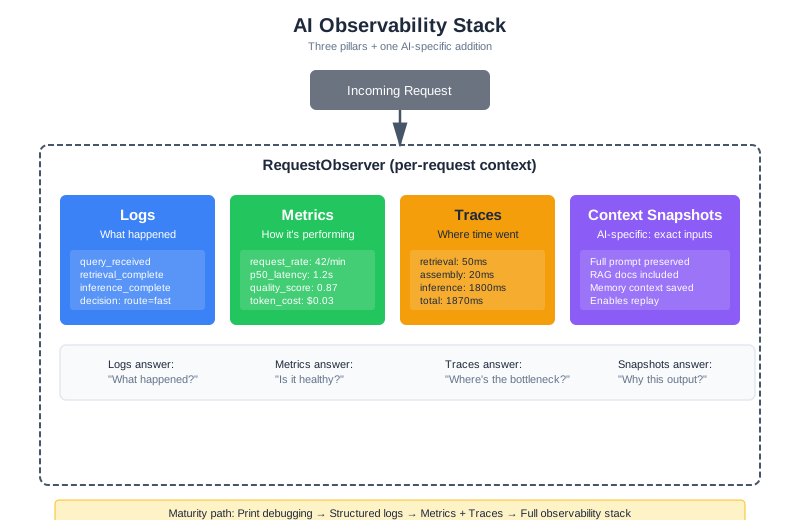
Structured logging is the foundation. But as your system grows—handling thousands of requests across multiple services—you need a complete observability stack. An empirical study of GenAI production incidents found that incidents detected by automated monitoring resolved significantly faster than those reported by humans (arXiv:2504.08865). The investment in observability pays for itself in incident response time.
Production observability requires three complementary signals, plus one AI-specific addition:
Logs record discrete events. “Request received.” “Retrieved 5 documents.” “Model returned response.” Logs tell you what happened. Use structured JSON format so they’re machine-parseable—you’ll be searching through millions of these.
Metrics aggregate measurements over time. Request rate, error rate, latency percentiles, quality scores, token usage, estimated cost. Metrics tell you how the system is performing overall and alert you when something changes. For AI systems, quality score is as important as error rate—a system can return 200 OK on every request and still be giving terrible answers.
Traces connect events across a request’s journey. A trace shows that request abc123 spent 50ms in retrieval, 20ms in assembly, and 1800ms in inference. Traces tell you where time and effort went. OpenTelemetry has emerged as the industry standard for distributed tracing, and its GenAI Semantic Conventions (the gen_ai namespace, published in 2024) define standard attributes specifically for LLM systems: gen_ai.system, gen_ai.request.model, gen_ai.usage.input_tokens, gen_ai.usage.output_tokens, gen_ai.response.finish_reason, and more. This standardization matters because it means your traces work with any backend—Jaeger, Datadog, Grafana Tempo—without vendor lock-in.
For AI systems, add a fourth signal:
Context snapshots preserve the exact inputs to the model. When you need to reproduce a failure or understand why the model behaved a certain way, you need the full context—not just a summary, but the actual tokens that were sent. This is what makes AI debugging possible despite non-determinism: if you have the exact context, you can replay the request.
The Observability Stack
class AIObservabilityStack:
    """
    Complete observability for AI systems.
    Coordinates logs, metrics, traces, and context snapshots.
    """

    def __init__(self, service_name: str, config: ObservabilityConfig):
        self.service_name = service_name

        # The three pillars
        self.logger = StructuredLogger(service_name)
        self.metrics = MetricsCollector(service_name)
        self.tracer = DistributedTracer(service_name)

        # AI-specific: context preservation
        self.context_store = ContextSnapshotStore(
            retention_days=config.snapshot_retention_days
        )

    def start_request(self, request_id: str) -> RequestObserver:
        """
        Begin observing a request.
        Returns a context manager that handles all observability concerns.
        """
        return RequestObserver(
            request_id=request_id,
            logger=self.logger,
            metrics=self.metrics,
            tracer=self.tracer,
            context_store=self.context_store,
        )


class RequestObserver:
    """Observability context for a single request."""

    def __init__(self, request_id: str, logger, metrics, tracer, context_store):
        self.request_id = request_id
        self.logger = logger
        self.metrics = metrics
        self.tracer = tracer
        self.context_store = context_store
        self.span = None

    def __enter__(self):
        self.span = self.tracer.start_span("request", self.request_id)
        self.metrics.increment("requests_started")
        self.logger.info("request_started", {"request_id": self.request_id})
        return self

    def __exit__(self, exc_type, exc_val, exc_tb):
        if exc_type:
            self.metrics.increment("requests_failed", {"error": exc_type.__name__})
            self.logger.error("request_failed", {
                "request_id": self.request_id,
                "error": str(exc_val)
            })
        else:
            self.metrics.increment("requests_succeeded")

        self.span.end()
        self.metrics.histogram("request_duration_ms", self.span.duration_ms)

    def stage(self, name: str):
        """Create a child span for a processing stage."""
        return self.tracer.start_child_span(self.span, name)

    def save_context(self, context: dict):
        """Preserve full context for reproduction."""
        self.context_store.save(self.request_id, context)

    def record_decision(self, decision_type: str, decision: str, reason: str):
        """Record a decision point for debugging."""
        self.logger.info("decision", {
            "request_id": self.request_id,
            "type": decision_type,
            "decision": decision,
            "reason": reason,
        })
Distributed Tracing for AI Pipelines
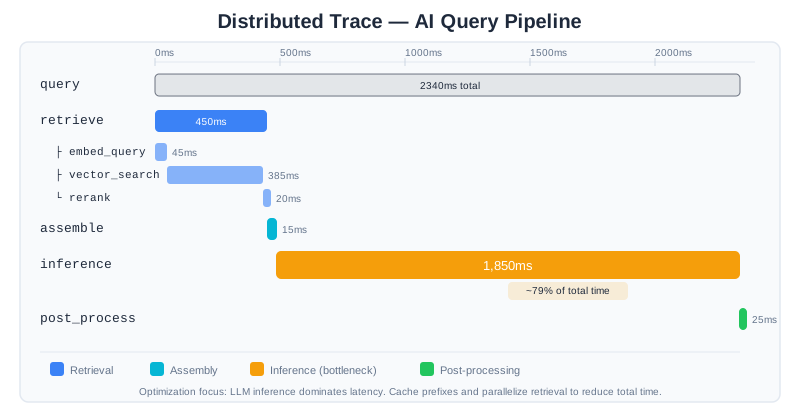
A single query to CodebaseAI touches multiple components: the API receives the request, the retriever searches the vector database, the context assembler builds the prompt, the LLM generates a response, and the post-processor formats the output. When something goes wrong or something is slow, which component is responsible?
Distributed tracing answers this by connecting all the steps of a request into a single trace.
Implementing Traces with OpenTelemetry
OpenTelemetry is the industry standard for observability instrumentation. Its vendor-neutral approach means the same instrumentation code works with Jaeger, Datadog, Grafana Tempo, New Relic, or any OTLP-compatible backend. For AI systems, the GenAI Semantic Conventions define a gen_ai attribute namespace that standardizes how LLM interactions are recorded—model name, token counts, temperature, finish reason—so your traces are portable and comparable across tools.
Projects like OpenLLMetry (Traceloop) take this further with auto-instrumentation that patches LLM providers, vector databases, and frameworks like LangChain and LlamaIndex automatically. But understanding manual instrumentation teaches you what these tools do under the hood.
from opentelemetry import trace
from opentelemetry.trace import Status, StatusCode

class TracedCodebaseAI:
    """CodebaseAI with distributed tracing."""

    def __init__(self, config: Config):
        self.config = config
        self.tracer = trace.get_tracer("codebaseai", "1.2.0")

    def query(self, question: str, codebase_context: str) -> Response:
        """Execute a query with full tracing."""

        with self.tracer.start_as_current_span("query") as root:
            root.set_attribute("question.length", len(question))
            root.set_attribute("codebase.size", len(codebase_context))

            try:
                # Each stage gets its own span
                with self.tracer.start_as_current_span("retrieve") as span:
                    span.set_attribute("stage", "retrieval")
                    retrieved = self._retrieve_relevant_code(question, codebase_context)
                    span.set_attribute("documents.count", len(retrieved))
                    span.set_attribute("documents.tokens", sum(d.token_count for d in retrieved))

                with self.tracer.start_as_current_span("assemble") as span:
                    span.set_attribute("stage", "assembly")
                    prompt = self._assemble_prompt(question, retrieved)
                    span.set_attribute("prompt.tokens", prompt.token_count)

                with self.tracer.start_as_current_span("inference") as span:
                    span.set_attribute("stage", "inference")
                    span.set_attribute("model", self.config.model)
                    response = self._call_llm(prompt)
                    span.set_attribute("response.tokens", response.output_tokens)
                    span.set_attribute("finish_reason", response.finish_reason)

                with self.tracer.start_as_current_span("post_process") as span:
                    span.set_attribute("stage", "post_processing")
                    final = self._post_process(response)

                root.set_status(Status(StatusCode.OK))
                return final

            except Exception as e:
                root.set_status(Status(StatusCode.ERROR, str(e)))
                root.record_exception(e)
                raise
Reading Traces
A trace visualization tells a story. Here’s what a normal trace looks like:
[query] total=2340ms
├── [retrieve] 450ms
│   ├── [embed_query] 45ms
│   ├── [vector_search] 385ms
│   └── [rerank] 20ms
├── [assemble] 15ms
├── [inference] 1850ms
└── [post_process] 25ms
And here’s a problematic one:
[query] total=8450ms ← Way too slow!
├── [retrieve] 6200ms ← Here's the problem
│   ├── [embed_query] 50ms
│   ├── [vector_search] 6120ms ← Vector DB is struggling
│   └── [rerank] 30ms
├── [assemble] 20ms
├── [inference] 2200ms
└── [post_process] 30ms
The trace immediately shows that vector search took 6 seconds—something is wrong with the vector database, not with the model or the prompt.
Trace Attributes for Debugging
Include attributes that help with debugging:
def _retrieve_relevant_code(self, question: str, codebase: str) -> list:
    with self.tracer.start_as_current_span("retrieve") as span:
        # Record the query
        span.set_attribute("query.text", question[:200])
        span.set_attribute("query.tokens", count_tokens(question))

        # Embed
        with self.tracer.start_as_current_span("embed"):
            embedding = self.embedder.embed(question)

        # Search
        with self.tracer.start_as_current_span("vector_search") as search_span:
            results = self.vector_db.search(embedding, top_k=20)
            search_span.set_attribute("results.count", len(results))
            search_span.set_attribute("results.top_score", results[0].score if results else 0)
            search_span.set_attribute("results.min_score", results[-1].score if results else 0)

        # Rerank
        with self.tracer.start_as_current_span("rerank") as rerank_span:
            reranked = self.reranker.rerank(question, results, top_k=5)
            rerank_span.set_attribute("reranked.count", len(reranked))
            rerank_span.set_attribute("reranked.top_score", reranked[0].score if reranked else 0)

        # Record what we're returning
        span.set_attribute("final.count", len(reranked))
        span.set_attribute("final.tokens", sum(r.token_count for r in reranked))

        return reranked
When you’re debugging “why didn’t the system retrieve the right document?”, these attributes tell you: was it not in the initial vector search results (embedding issue)? Was it filtered out by reranking (relevance scoring issue)? Was the top score low (vocabulary mismatch)?
Debugging Non-Deterministic Behavior
Traditional software debugging relies on reproducibility: same input produces same output. AI systems break this assumption. The same query might produce different responses due to temperature settings, model updates, or subtle changes in context assembly.
Sources of Non-Determinism
Intentional randomness: Temperature > 0 introduces sampling variation. This is usually desirable for creative tasks but makes debugging harder.
Model updates: API providers update models without notice. Yesterday’s prompt might behave differently today because the underlying model changed.
Context variation: RAG retrieval might return different documents if the knowledge base was updated, if scores are close and ordering varies, or if there are race conditions in async retrieval.
Time-dependent factors: Queries involving “today,” “recent,” or “current” produce different contexts at different times.
Infrastructure variation: Network latency, caching behavior, and load balancing can all introduce subtle differences.
These sources compound. A request might fail because the model’s randomness happened to explore a bad reasoning path and the retrieval returned slightly different documents and the knowledge base was refreshed an hour ago. Reproducing this exact combination without infrastructure support is nearly impossible.
Strategy 1: Deterministic Replay with Context Snapshots
The most powerful debugging technique is exact reproduction—what some teams call “deterministic replay.” The idea is simple: if you’ve saved the full context that was sent to the model, you can replay the request with temperature=0 and see exactly what the model does with that input. This transforms debugging from “we can’t recreate the problem” into “let’s step through what happened.”
Some frameworks like LangGraph implement this with checkpoint-based state persistence, capturing every state transition so engineers can re-execute from any point. You don’t need a framework to get the core benefit—context snapshots are enough:
class ContextReproducer:
    """Reproduce requests exactly as they happened."""

    def __init__(self, context_store: ContextSnapshotStore):
        self.context_store = context_store

    def reproduce(self, request_id: str, deterministic: bool = True) -> ReproductionResult:
        """
        Replay a request using the saved context.

        Args:
            request_id: The original request to reproduce
            deterministic: If True, use temperature=0 for exact reproduction
        """
        snapshot = self.context_store.load(request_id)
        if not snapshot:
            raise ValueError(f"No snapshot found for {request_id}")

        # Rebuild the exact messages that were sent
        messages = snapshot["messages"]

        # Call with same or deterministic settings
        temperature = 0 if deterministic else snapshot.get("temperature", 1.0)

        response = self.llm.complete(
            messages=messages,
            model=snapshot["model"],
            temperature=temperature,
            max_tokens=snapshot["max_tokens"],
        )

        return ReproductionResult(
            original_response=snapshot["response"],
            reproduced_response=response.text,
            match=self._compare(snapshot["response"], response.text),
            snapshot=snapshot,
        )

    def _compare(self, original: str, reproduced: str) -> ComparisonResult:
        """Compare original and reproduced responses."""
        exact_match = original.strip() == reproduced.strip()
        semantic_similarity = compute_similarity(original, reproduced)

        return ComparisonResult(
            exact_match=exact_match,
            semantic_similarity=semantic_similarity,
            character_diff=len(original) - len(reproduced),
        )
Strategy 2: Statistical Debugging
For intermittent failures, run the same request multiple times to understand the failure distribution:
def investigate_intermittent_failure(
    system,
    query: str,
    context: str,
    n_trials: int = 20
) -> IntermittentAnalysis:
    """
    Run a failing query multiple times to understand failure patterns.
    Useful when failures are probabilistic rather than deterministic.
    """
    results = []

    for i in range(n_trials):
        response = system.query(query, context)
        quality = evaluate_response_quality(response)

        results.append({
            "trial": i,
            "response": response.text,
            "quality_score": quality.score,
            "passed": quality.score > 0.7,
            "failure_reasons": quality.issues,
        })

    # Analyze the distribution
    failure_rate = sum(1 for r in results if not r["passed"]) / n_trials
    failures = [r for r in results if not r["passed"]]

    # Cluster failure reasons
    failure_patterns = {}
    for f in failures:
        for reason in f["failure_reasons"]:
            failure_patterns[reason] = failure_patterns.get(reason, 0) + 1

    return IntermittentAnalysis(
        total_trials=n_trials,
        failure_rate=failure_rate,
        failure_patterns=failure_patterns,
        sample_failures=failures[:3],
        sample_successes=[r for r in results if r["passed"]][:3],
    )
If the failure rate is 100%, it’s a deterministic bug. If it’s 15%, you have a probabilistic issue—possibly temperature-related randomness, possibly retrieval variation. The failure pattern distribution tells you what’s going wrong.
Strategy 3: Diff Analysis for Model Drift
When behavior changes over time without any deployment, suspect model drift:
def detect_model_drift(
    baseline_date: str,
    test_queries: list[dict],
    similarity_threshold: float = 0.85
) -> DriftReport:
    """
    Compare current model behavior to historical baseline.
    Detects when model updates have changed behavior.
    """
    drifts = []

    for query_data in test_queries:
        # Load historical response
        baseline_response = load_historical_response(
            query_data["query"],
            baseline_date
        )

        # Get current response (deterministic)
        current_response = system.query(
            query_data["query"],
            query_data["context"],
            temperature=0
        )

        # Compare
        similarity = compute_semantic_similarity(
            baseline_response,
            current_response.text
        )

        if similarity < similarity_threshold:
            drifts.append({
                "query": query_data["query"],
                "baseline": baseline_response,
                "current": current_response.text,
                "similarity": similarity,
                "drift_magnitude": 1 - similarity,
            })

    return DriftReport(
        baseline_date=baseline_date,
        queries_tested=len(test_queries),
        drifts_detected=len(drifts),
        drift_rate=len(drifts) / len(test_queries),
        significant_drifts=drifts,
    )
If drift is detected, you have several options: update your prompts to work with the new model behavior, pin to a specific model version if available, or adjust your evaluation criteria.
Common AI Failure Patterns
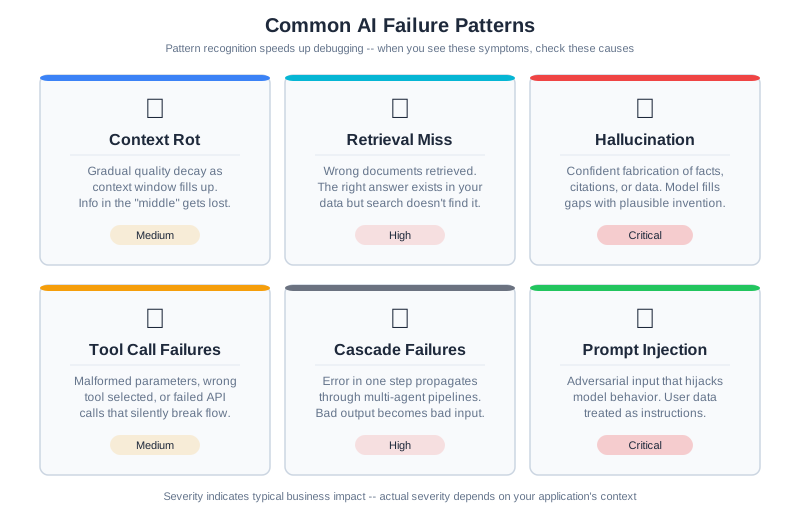
Pattern recognition speeds up debugging. When you see certain symptoms, you can immediately form hypotheses about likely causes. Here’s a catalog of common AI failure patterns.
Pattern 1: Context Rot (Lost in the Middle)
Symptoms: The model ignores information that’s clearly present in the context. Users say “I told it X but it acted like it didn’t know.”
Diagnostic walkthrough: Start by checking context length. If it’s above 50% of the model’s context window, attention is spread thin. Next, check where the critical information sits—research consistently shows that models perform worst on information in the middle of long contexts (Chapter 7 covers this in depth). Finally, check signal-to-noise ratio: is the important fact buried in 2,000 tokens of verbose surrounding text?
How to confirm: Pull the context snapshot for the failing request. Search for the information the user says was ignored. Note its position. Then create a test case with the same information moved to the beginning or end of the context. If the model now uses the information, you’ve confirmed context rot.
Common causes: Context too long with attention spread thin. Important information in the “lost in the middle” zone. Critical facts buried in low-signal-density content.
Fixes: Summarize or compress older context. Repeat critical information near the query. Restructure context to put important information at start or end. Consider Chapter 7’s compression techniques.
Pattern 2: Retrieval Miss
Symptoms: Response lacks information that exists in the knowledge base. “The answer is in our docs, but the AI didn’t mention it.”
Diagnostic walkthrough: This is the most common pattern in RAG systems. Start with the retrieval logs. Look at what was actually retrieved and the relevance scores. If the correct document wasn’t in the top-k results at all, it’s an embedding or search problem. If it was retrieved but filtered out by reranking, the reranker’s threshold might be wrong. If it was retrieved and included but the model still didn’t use it, you’re actually looking at Pattern 1 (context rot).
How to confirm: Take the user’s query and run it directly against your vector database. Check the top 20 results (not just top 5). If the relevant document appears at position 6 and your top-k is 5, you’ve found the issue. If it doesn’t appear at all, compute the embedding similarity manually—a low score indicates vocabulary mismatch between query language and document language.
Common causes: Vocabulary mismatch (user says “get my money back,” docs say “refund policy”). Top-k too low. Embedding model doesn’t capture domain semantics.
Fixes: Implement query expansion or reformulation. Use hybrid search combining vector and keyword matching. Increase top-k with reranking to filter later. Fine-tune embeddings for your domain (Chapter 6).
Pattern 3: Hallucination Despite Grounding
Symptoms: Model confidently states facts that aren’t in the provided context. “It made up a function that doesn’t exist in the codebase.”
Diagnostic walkthrough: First, check if the hallucinated content is a plausible extension of what’s in the context—the model might be pattern-matching from similar code it’s seen in training, not from your context. Second, check your prompt: does it say “be helpful” without also saying “only use provided context”? The helpfulness instruction often overrides grounding constraints. Third, check if the context is simply incomplete on the topic—if the user asks about authentication and your context has no authentication docs, the model will fill the gap with training knowledge.
How to confirm: Search the full context snapshot for every factual claim in the model’s response. Flag any claim that can’t be traced to a specific passage. These are hallucinations. Then check: is the context actually complete enough to answer the question? If not, the fix is better retrieval, not better grounding instructions.
Common causes: “Be helpful” instructions overriding grounding constraints. Context incomplete on the topic. Model over-generalizes from patterns in context.
Fixes: Add explicit “only use information from the provided context” instruction. Add “say ‘I don’t know’ if the context doesn’t contain the answer.” Implement post-generation fact verification against context. Make grounding instructions more prominent in the system prompt.
Pattern 4: Tool Call Failures
Symptoms: Agent calls the wrong tool, uses wrong arguments, or ignores available tools entirely. Users report “it tried to search when it should have calculated” or “it used the wrong API.”
Diagnostic walkthrough: Start by examining the tool definitions the model received. Are any two tools similar enough that a reasonable person might confuse them? (“search_documents” and “find_documents” sound interchangeable.) Next, count the tools—if there are more than 15-20, the model may be experiencing decision overload. Then check the model’s reasoning: did it explain why it chose that tool? If the reasoning is plausible but wrong, the tool descriptions are ambiguous. If the reasoning is nonsensical, the model may be hallucinating tool capabilities.
How to confirm: Create a test case with the same query but only the correct tool available. If the model uses it correctly when there’s no ambiguity, the problem is tool selection, not tool execution. Then gradually add tools back to find the confusion threshold.
Common causes: Ambiguous tool descriptions where two tools sound similar. Overlapping capabilities with unclear boundaries. Too many tools causing decision overload (Chapter 8 covers the token cost of tool definitions). Missing examples in tool definitions—models perform significantly better when definitions include a concrete “when to use this” example.
Fixes: Clarify tool descriptions with specific use cases and explicit boundaries. Add examples of when to use each tool. Reduce tool count or implement tool routing that selects a relevant subset based on the query type. Add explicit selection criteria (“use search_code when the query mentions files, functions, or classes”).
Pattern 5: Cascade Failures in Multi-Agent Systems
Symptoms: One bad decision early in a pipeline causes everything downstream to fail. “The planner made a bad plan and all the workers executed garbage.” Output quality collapses rather than degrades gracefully.
Diagnostic walkthrough: Cascade failures are the most frustrating to debug because the symptom is far from the cause. Start by examining the trace—you need to find the originating step, not just the step that produced the visible error. Walk backward through the pipeline: was the final output bad because the post-processor received bad input? Was that input bad because the model received bad context? Was the context bad because retrieval failed? Each step upstream gets you closer to the root cause. The key question at each boundary is: did this stage validate its input, or did it blindly trust what it received?
How to confirm: Isolate each stage by feeding it known-good input. If stage 3 produces good output with good input but bad output with the input it received from stage 2, the problem is either stage 2’s output or stage 3’s handling of unexpected input. A systematic study of seven multi-agent frameworks found failure rates between 41% and 86.7% across 1,600+ annotated execution traces (Cemri, Pan, Yang et al., “Why Do Multi-Agent LLM Systems Fail?,” NeurIPS 2025 Spotlight, arXiv:2503.13657; see also Chapter 10). Cascading errors across agent boundaries are the most common multi-agent failure mode, not the edge case.
Common causes: No validation of intermediate outputs at agent handoff points. Downstream agents that assume upstream output is correct. Missing error handling between pipeline stages. Absence of confidence thresholds that would stop propagation early.
Fixes: Validate outputs at each stage before passing downstream. Implement confidence thresholds—reject low-confidence outputs rather than propagating them. Add fallback paths when validation fails. Consider having downstream agents sanity-check their inputs with a quick consistency verification before processing.
Pattern 6: Prompt Injection Symptoms
Symptoms: Model suddenly behaves differently—ignores system instructions, reveals system prompt, follows user instructions it shouldn’t. May produce responses in a different format, language, or tone than expected. OWASP’s 2025 Top 10 for LLM Applications lists prompt injection as the most prevalent vulnerability, affecting 73% of assessed applications.
Diagnostic walkthrough: Prompt injection is uniquely tricky because it can enter through multiple channels. Start with the user input: does it contain instruction-like language (“ignore previous instructions,” “you are now,” “system: override”)? Next, check RAG results—this is the vector that teams most often miss. A document in your knowledge base could contain embedded instructions that the model follows when that document is retrieved. Third, check tool outputs: if a tool fetched web content or read a file, that content might contain instructions the model interpreted as commands.
How to confirm: Take the context snapshot for the suspicious request. Search it for instruction-like content outside the system prompt. Look for imperatives (“do this,” “ignore that”), role reassignments (“you are a,” “act as”), and delimiter manipulation (attempts to close the system prompt section and start a new one). If you find such content in the user input or retrieved documents, you’ve confirmed injection. If the model is behaving strangely without any visible injection, check whether a model update changed how it handles instruction hierarchy—this is a subtler form of the same problem.
Common causes: Malicious user input containing embedded instructions. RAG-retrieved documents with injected content (indirect injection). Tool outputs that contain instruction-like text the model follows. Weak instruction hierarchy where user-level text can override system-level constraints.
Fixes (full coverage in Chapter 14): Input sanitization and pattern detection for known injection patterns. Clear delimiter-based separation of untrusted content from system instructions. Output validation that detects unexpected behavioral shifts. Instruction hierarchy design where system-level instructions are structurally privileged over user-level content.
Alert Design for AI Systems
Observability is useless if nobody looks at the dashboards. Alerts bridge this gap—they tell you when something needs human attention. But AI systems need different alerting strategies than traditional software, because the failure modes are different.
What to Alert On
Traditional services alert on error rates and latency. AI systems need additional alert dimensions:
Quality score degradation: The most important AI-specific alert. Monitor your quality evaluation metric (whatever you use from Chapter 12) and alert when it drops below threshold. A 10% quality drop affecting 20% of users is invisible in error rate metrics—everything returns 200 OK—but devastating to user experience.
Token usage anomalies: Alert when token consumption spikes more than 3 standard deviations above the rolling average. Token spikes can indicate prompt injection (an attacker expanding your context), infinite tool call loops, or retrieval returning far too much content. A token spike is both a quality signal and a cost signal.
Retrieval score drops: Monitor the distribution of retrieval relevance scores. If the median score drops, your knowledge base may have been corrupted, your embeddings may have drifted, or a data pipeline change may have altered document quality (exactly what happened in our 3 AM worked example).
Model response characteristics: Alert on shifts in finish reason distribution. A sudden increase in length finish reasons means responses are being truncated. An increase in content_filter reasons may indicate prompt injection attempts.
Cost per request: Set budget thresholds at the request level. If a single request consumes $5 of tokens when the average is $0.05, something has gone wrong—likely an agentic loop that didn’t terminate or a retrieval that returned the entire knowledge base.
Avoiding Alert Fatigue
The danger with alerting is too many alerts. When engineers get paged 20 times a week for false positives, they start ignoring alerts—and then miss the real incidents. Studies show that AI-driven alert aggregation can reduce noise by 40-60%, but even without sophisticated tooling, you can reduce fatigue with these patterns:
Dynamic thresholds: Instead of “alert if latency > 2 seconds,” use “alert if latency is 2x the rolling 7-day average.” This adapts to your system’s actual behavior rather than an arbitrary fixed number.
Tiered severity: Not every anomaly needs to wake someone up. Route alerts by severity: critical (pages on-call immediately), warning (Slack notification to the team), informational (dashboard only). Reserve critical for user-facing impact.
Correlation windows: If the same metric triggers 5 alerts in 10 minutes, that’s one incident, not five. Group related alerts into a single notification with context about the pattern.
Actionable context in alerts: Every alert should include enough context to start investigating. Include: which metric, current value vs threshold, time of onset, affected user percentage, and a link to the relevant dashboard. An alert that says “quality_score low” is less useful than one that says “quality_score_p50 dropped from 0.78 to 0.62, started 02:47 UTC, affecting ~18% of API documentation queries.”
Privacy Considerations for Context Snapshot Storage
Context snapshots preserve the exact inputs to the model for reproduction and debugging—but they often contain sensitive information that users shared during conversation. This data creates compliance obligations and privacy risks that you must design for from the start.
GDPR Right to Deletion
Under GDPR, users have the right to request deletion of their personal data. If you store context snapshots containing user data (names, emails, preferences, conversation history), you must be able to delete them on request. This isn’t just a feature—it’s a legal requirement for any system serving European users.
Design implications: Don’t store snapshots in immutable logs. Use a searchable storage system where you can identify and delete snapshots by user ID. Implement a deletion workflow that removes snapshots and updates any derived data (metrics, reports) that might reference them. Test your deletion process regularly—you don’t want to discover on a user request that deletion doesn’t actually work.
CCPA and California Requirements
California’s Consumer Privacy Act grants users the right to know what personal information you’ve collected and to request deletion. Like GDPR, this requires deletion capability—but it also requires disclosure. You must be able to tell users what data you’ve stored about them.
Design implications: Maintain searchable metadata about what’s stored. When a user requests their data, you should be able to quickly compile what you have. Make deletion straightforward and fast—the legal clock starts when the request is made.
PII in Context Snapshots
The core problem: users share personal information during conversation, and that information ends up in your context snapshots. A conversation about authentication might include email addresses. A debugging session might reveal internal tool names or architecture. A support conversation might include customer names or transaction IDs.
Examples of PII that appears in contexts:
- User names, email addresses, phone numbers
- Company names, department information, internal tools
- Authentication tokens or temporary credentials (in test data)
- Customer data or internal IDs
- Preferences and behavioral patterns
Even information that seems generic—“I work at a fintech startup” or “I’m debugging a mobile app”—can combine with other data to identify individuals.
Retention Policies
Balance debugging utility against privacy risk. You need snapshots recent enough to be useful for investigation, but not so old that you’re storing stale sensitive data indefinitely.
Recommended retention tiers:
- Active debugging (7 days): Store full context snapshots. This window covers incident response and immediate post-mortems.
- Verification and trend analysis (30 days): Store snapshots with sensitive data redacted, or store only aggregated metadata (chunk names, token counts, but not full content). This lets you track patterns without preserving full conversations.
- Long-term (90 days+): Delete all snapshots. Retain only aggregate metrics and logs. If you need longer retention for compliance, consult legal counsel about what personally identifiable content must be removed before archival.
Implement this automatically: Don’t rely on manual deletion. Write a scheduled job that:
- Deletes full snapshots after 7 days
- Redacts sensitive data from remaining snapshots after 14 days
- Deletes all request snapshots after 30 days
- Archives only metrics and summary data
Anonymization Strategies
For long-term analysis or debugging, replace PII with consistent pseudonyms before storage. This preserves traceability for incident investigation while removing individual identity.
Example approach:
def anonymize_snapshot(snapshot: dict, user_id: str) -> dict:
    """Replace PII with pseudonyms for long-term storage."""
    # Create a deterministic but non-identifiable user hash
    user_hash = hashlib.sha256(user_id.encode()).hexdigest()[:8]

    # Replace specific PII patterns
    anonymized = snapshot.copy()
    anonymized["user_id"] = user_hash  # Not their real ID

    # Replace email domains but keep pattern for debugging
    anonymized["question"] = re.sub(
        r'[\w\.-]+@[\w\.-]+\.\w+',
        '[REDACTED_EMAIL]',
        snapshot.get("question", "")
    )

    # Keep enough structure to trace conversations without exposing identity
    # If session_id is present, hash it consistently
    if "session_id" in snapshot:
        session_hash = hashlib.sha256(
            (user_id + snapshot["session_id"]).encode()
        ).hexdigest()[:8]
        anonymized["session_id"] = session_hash

    return anonymized
With anonymization, you can still trace conversation patterns (“this user called the retrieval endpoint 5 times before asking the real question”) without knowing who the user was.
Practical Implementation
Here’s a complete privacy-aware snapshot storage system:
from datetime import datetime, timedelta
from dataclasses import dataclass

@dataclass
class SnapshotRetentionPolicy:
    """Define how long to keep snapshots in different forms."""
    full_retention_days: int = 7
    redacted_retention_days: int = 30
    metadata_only_retention_days: int = 90

class PrivacyAwareSnapshotStore:
    """
    Store context snapshots with privacy-by-design principles.

    Automatically handles retention, anonymization, and deletion.
    """

    def __init__(
        self,
        storage,
        policy: SnapshotRetentionPolicy
    ):
        self.storage = storage
        self.policy = policy

    def save(self, request_id: str, user_id: str, snapshot: dict) -> None:
        """Save snapshot with retention metadata."""
        now = datetime.utcnow()

        # Store with clear metadata about retention
        stored = {
            "request_id": request_id,
            "user_id": user_id,
            "timestamp": now.isoformat(),
            "retention_tier": "full",  # Will be updated by cleanup jobs
            "content": snapshot,
        }

        self.storage.save(request_id, stored)

    def get_user_data(self, user_id: str) -> list[dict]:
        """Return all data stored about a user (for CCPA requests)."""
        return self.storage.query_by_user(user_id)

    def delete_user_data(self, user_id: str) -> int:
        """Delete all snapshots for a user (for GDPR requests)."""
        deleted = self.storage.delete_by_user(user_id)
        self._log_deletion_event(user_id, deleted)
        return deleted

    def cleanup_old_snapshots(self) -> dict:
        """
        Run periodically to manage retention tiers.
        Returns counts of what was deleted/redacted.
        """
        now = datetime.utcnow()
        full_cutoff = now - timedelta(days=self.policy.full_retention_days)
        redacted_cutoff = now - timedelta(
            days=self.policy.redacted_retention_days
        )

        stats = {
            "full_snapshots_deleted": 0,
            "snapshots_redacted": 0,
            "metadata_only_deleted": 0,
        }

        # Snapshots older than full_retention_days: delete entirely
        for snapshot in self.storage.get_older_than(full_cutoff):
            self.storage.delete(snapshot["request_id"])
            stats["full_snapshots_deleted"] += 1

        # Snapshots older than redacted_cutoff: redact sensitive content
        for snapshot in self.storage.get_between(
            full_cutoff, redacted_cutoff
        ):
            redacted = self._redact_snapshot(snapshot)
            self.storage.update(snapshot["request_id"], redacted)
            stats["snapshots_redacted"] += 1

        return stats

    def _redact_snapshot(self, snapshot: dict) -> dict:
        """Replace PII with [REDACTED] markers."""
        redacted = snapshot.copy()
        content = snapshot.get("content", {})

        # Redact question/user input
        if "question" in content:
            content["question"] = self._redact_text(content["question"])

        # Redact response if present
        if "response" in content:
            content["response"] = self._redact_text(content["response"])

        # Keep metadata for trending (token counts, scores) but not content
        redacted["content"] = {
            k: v for k, v in content.items()
            if k in ["token_count", "score", "latency_ms", "finish_reason"]
        }

        redacted["retention_tier"] = "redacted"
        return redacted

    def _redact_text(self, text: str) -> str:
        """Replace PII patterns in text."""
        patterns = {
            r'[\w\.-]+@[\w\.-]+\.\w+': '[REDACTED_EMAIL]',
            r'\b\d{3}-\d{2}-\d{4}\b': '[REDACTED_SSN]',
            r'\bAPIK_[\w]+\b': '[REDACTED_API_KEY]',
            r'(?:password|passwd)\s*[:=]\s*\S+': '[REDACTED_PASSWORD]',
        }

        redacted = text
        for pattern, replacement in patterns.items():
            redacted = re.sub(pattern, replacement, redacted, flags=re.IGNORECASE)

        return redacted

    def _log_deletion_event(self, user_id: str, count: int) -> None:
        """Log deletion events for audit trail."""
        self.storage.log_event({
            "event_type": "user_data_deletion",
            "user_id": user_id,
            "snapshots_deleted": count,
            "timestamp": datetime.utcnow().isoformat(),
        })
This approach ensures that you can fulfill deletion requests, manage retention policies, and still preserve the debugging capability that snapshots provide—but only for as long as legally and ethically necessary.
The Cost of Observability
Observability infrastructure isn’t free. Storing context snapshots for every request, retaining traces for 30 days, and running continuous quality evaluations all consume storage, compute, and money. As your system scales, you need a strategy.
Sampling for traces: You don’t need to trace every request. Head-based sampling (trace 10% of requests randomly) reduces volume. Tail-based sampling (always trace requests that are errors, slow, or low-quality) ensures you capture the interesting ones. A common production pattern: sample 5% of successful requests but 100% of errors and 100% of requests below quality threshold.
Tiered retention for snapshots: Store full context snapshots for 7 days, summarized snapshots (metadata only, no full context) for 30 days, and aggregate metrics indefinitely. This gives you reproduction capability for recent incidents while keeping storage manageable.
Budget your observability: A reasonable starting point is 5-10% of your LLM API costs for observability infrastructure. If you’re spending $10,000/month on model API calls, budget $500-1,000 for the logging, storage, and monitoring infrastructure to understand those calls. The open-source ecosystem offers strong options here—platforms like Langfuse (LLM-native observability with trace, generation, and evaluation tracking) and proxy-based gateways like Helicone (one-line integration with built-in caching and cost tracking) can provide production-grade observability without the cost of commercial APM platforms. The key decision is whether you need LLM-specific features (prompt versioning, evaluation integration, context visualization) or whether general-purpose observability tools with custom dashboards are sufficient for your use case.
Root Cause Analysis
When something fails, finding the root cause—not just the proximate cause—prevents the same class of failures from recurring.
The “5 Whys” for AI Systems
The classic technique adapts well to AI debugging:
Example: “User got wrong refund policy information”
-
Why did the user get wrong information? → The response said “30-day refund policy” instead of “60-day”
-
Why did the response have the wrong policy? → The correct policy wasn’t in the context sent to the model
-
Why wasn’t the correct policy in the context? → RAG didn’t retrieve the refund policy document
-
Why didn’t RAG retrieve the policy document? → User asked “can I get my money back”—low similarity to “refund policy”
-
Why is there low similarity between those phrases? → Pure vector search doesn’t handle vocabulary mismatch
Root cause: Retrieval relies solely on vector similarity, which fails on vocabulary mismatch
Fix: Implement hybrid search combining vector and keyword matching, or add query expansion to normalize vocabulary
Stage-by-Stage Investigation
For complex pipelines, investigate each stage systematically:
class PipelineInvestigator:
    """Systematic investigation of pipeline failures."""

    STAGES = [
        "input_validation",
        "context_retrieval",
        "context_assembly",
        "prompt_construction",
        "model_inference",
        "output_parsing",
        "post_processing",
    ]

    def investigate(self, request_id: str) -> Investigation:
        """Walk through each stage looking for anomalies."""
        snapshot = self.load_snapshot(request_id)
        findings = []

        for stage in self.STAGES:
            stage_data = snapshot.get(stage)
            if stage_data:
                anomalies = self._check_stage(stage, stage_data)
                if anomalies:
                    findings.append(StageFindings(stage=stage, anomalies=anomalies))

        return Investigation(
            request_id=request_id,
            findings=findings,
            likely_root_cause=self._identify_root_cause(findings),
        )

    def _check_stage(self, stage: str, data: dict) -> list[str]:
        """Check a stage for known anomaly patterns."""
        anomalies = []

        if stage == "context_retrieval":
            if data.get("top_score", 1.0) < 0.5:
                anomalies.append(f"Low retrieval confidence: {data['top_score']:.2f}")
            if data.get("result_count", 1) == 0:
                anomalies.append("No documents retrieved")

        elif stage == "context_assembly":
            if data.get("total_tokens", 0) > data.get("token_limit", 100000) * 0.9:
                anomalies.append(f"Near token limit: {data['total_tokens']}/{data['token_limit']}")

        elif stage == "model_inference":
            if data.get("finish_reason") == "length":
                anomalies.append("Response truncated due to length limit")
            if data.get("latency_ms", 0) > 10000:
                anomalies.append(f"Unusually slow inference: {data['latency_ms']}ms")

        return anomalies
Incident Response
When something goes wrong in production, a systematic response minimizes user impact and speeds resolution.
The Incident Response Flow
1. Detect and Alert
Automated monitoring catches the problem:
[ALERT] quality_score_p50 dropped from 0.78 to 0.62
Started: 02:47 UTC
Affected: ~18% of requests
2. Triage: Assess Impact
Before diving into debugging, understand the scope:
- How many users are affected?
- What’s the failure rate?
- Is it getting worse, stable, or recovering?
- Is there a pattern (specific query types, user segments, time of day)?
3. Classify: What Type of Failure?
Categorizing helps direct investigation:
| Category | Examples | First Steps |
|---|---|---|
| Model-side | Provider outage, model update, rate limiting | Check provider status, try backup model |
| Context-side | Retrieval failure, assembly bug | Check retrieval metrics, review recent context changes |
| Data-side | Corrupted embeddings, stale knowledge base | Check data freshness, verify embedding integrity |
| Infrastructure | Network, database, cache | Check service health dashboards |
| Security | Prompt injection, abuse | Check for suspicious patterns in inputs |
4. Mitigate: Stop the Bleeding
Before finding root cause, reduce user impact:
# Example mitigation actions
class IncidentMitigation:
    """Quick actions to reduce incident impact."""

    def fallback_to_simple_mode(self):
        """Disable complex features, use reliable fallback."""
        self.config.use_rag = False
        self.config.use_multi_agent = False
        # Simpler system more likely to work

    def switch_to_backup_model(self):
        """If primary model is problematic, use backup."""
        self.config.model = self.config.backup_model

    def enable_cached_responses(self):
        """For repeated queries, serve cached known-good responses."""
        self.config.cache_mode = "aggressive"

    def reduce_traffic(self):
        """If system is overwhelmed, reduce load."""
        self.rate_limiter.set_limit(self.config.emergency_limit)
5. Investigate: Find Root Cause
Now dig in systematically:
- Pull traces for affected requests
- Compare to successful requests from the same period
- Check for recent changes (deployments, data updates, config changes)
- Apply the root cause analysis framework
6. Fix and Verify
Once you know the cause:
- Implement fix in staging environment
- Run evaluation suite to verify fix works
- Check for regressions in other areas
- Gradual rollout with monitoring
- Confirm metrics return to baseline
On-Call Runbook
For a complete runbook template for AI systems, see Appendix C.
Post-Mortems
Every significant incident is a learning opportunity. Post-mortems capture that learning so you don’t repeat the same mistakes.
The Post-Mortem Process
1. Gather data while it’s fresh: Within 24-48 hours of the incident, collect logs, metrics, timelines, and notes from everyone involved.
2. Write the post-mortem document: A structured record of what happened, why, and what to do about it.
3. Review with the team: Share the post-mortem, discuss findings, agree on action items.
4. Track action items to completion: Post-mortems without follow-through are just documentation of repeated failures.
Post-Mortem Template
# Post-Mortem: [Descriptive Title]

## Summary
- **Date**: 2026-01-15
- **Duration**: 2 hours 15 minutes (02:47 - 05:02 UTC)
- **Impact**: ~15% of queries returned degraded responses
- **Detection**: Automated quality alert

## Timeline
- 02:30 - Knowledge base refresh job completed
- 02:47 - Quality alert fires (p50 dropped below threshold)
- 03:05 - On-call acknowledges, begins investigation
- 03:25 - Identifies KB refresh as potential cause
- 03:45 - Confirms retrieval scores dropped for API queries
- 04:00 - Initiates rollback of KB to previous version
- 04:30 - Rollback complete
- 05:02 - Metrics return to baseline, incident resolved

## Root Cause
The knowledge base refresh used new chunking parameters that split API documentation
into fragments too small to be semantically coherent. Queries about API authentication
were retrieving unrelated configuration documentation instead.

Specifically: chunk size was reduced from 500 tokens to 100 tokens without adjusting
the overlap, causing mid-section splits that broke semantic coherence.

## What Went Well
- Alert fired within 17 minutes of degradation starting
- On-call had runbook for KB-related issues
- Rollback procedure worked smoothly
- Total user-facing impact was ~2 hours

## What Went Poorly
- No preview/validation step for KB updates
- Chunking change wasn't flagged for review
- Took 40 minutes to connect KB refresh to quality drop
- No automated smoke test on KB update completion

## Action Items
| Action | Owner | Due Date | Status |
|--------|-------|----------|--------|
| Add retrieval smoke test to KB update pipeline | Alice | 01/20 | Open |
| Require review for chunking parameter changes | Bob | 01/18 | Open |
| Add KB version to quality alert context | Carol | 01/19 | Open |
| Create alert for retrieval score drops | Dave | 01/22 | Open |
| Document chunking requirements | Alice | 01/25 | Open |

## Lessons Learned
1. Data pipeline changes can have significant downstream effects
2. Chunking parameters need semantic validation, not just syntactic
3. Correlation between data updates and quality issues should be surfaced automatically
Why Post-Mortems Matter: The Data
There’s a measurable reason to invest in post-mortems and the runbooks they produce. An empirical study of production GenAI incidents (arXiv:2504.08865) found that incidents with existing troubleshooting guides—documents produced by previous post-mortems—resolved significantly faster than incidents without them. The difference between a 2-hour incident and a 4-hour incident is real money, real user impact, and real engineer sleep.
Post-mortems produce three outputs that compound over time: updated runbooks for the on-call team, detection improvements that catch similar incidents earlier, and architectural changes that prevent recurrence. The first post-mortem for a new failure class is the most expensive; each subsequent one is faster because the runbook exists.
Blameless Culture
The point of a post-mortem is to improve the system, not to assign blame. Focus on: what conditions allowed the failure to happen, what would have prevented it or caught it earlier, and what you can change in the system or process.
Never: “Bob made a mistake.” Always: “The system allowed a chunking change to deploy without semantic validation.”
People make mistakes. Systems should be designed to catch mistakes before they cause incidents.
CodebaseAI v1.2.0: Observability Infrastructure
CodebaseAI v1.1.0 has testing. v1.2.0 adds the observability infrastructure that makes production debugging possible.
"""
CodebaseAI v1.2.0 - Observability Release

Changelog from v1.1.0:
- Added distributed tracing with OpenTelemetry
- Added context snapshot storage for reproduction
- Added metrics collection with Prometheus
- Added structured logging with correlation IDs
- Added alerting integration
- Added debug reproduction capability
"""

from opentelemetry import trace
from prometheus_client import Counter, Histogram, Gauge
import structlog

class CodebaseAI:
    VERSION = "1.2.0"

    # Metrics
    requests_total = Counter("codebaseai_requests_total", "Total requests", ["status"])
    request_duration = Histogram("codebaseai_request_duration_seconds", "Request duration")
    context_tokens = Histogram("codebaseai_context_tokens", "Context size in tokens")
    quality_score = Gauge("codebaseai_quality_score", "Estimated response quality")

    def __init__(self, config: Config):
        self.config = config
        self.tracer = trace.get_tracer("codebaseai", self.VERSION)
        self.logger = structlog.get_logger("codebaseai")
        self.context_store = ContextSnapshotStore(config.snapshot_retention_days)
        self.alerting = AlertingClient(config.alert_webhook)

    def query(self, question: str, codebase_context: str) -> Response:
        """Execute query with full observability."""
        request_id = generate_request_id()
        logger = self.logger.bind(request_id=request_id)

        with self.tracer.start_as_current_span("query") as span:
            span.set_attribute("request_id", request_id)
            logger.info("request_started", question_length=len(question))

            try:
                # Build and save context snapshot
                with self.tracer.start_as_current_span("retrieve"):
                    retrieved = self._retrieve_relevant_code(question, codebase_context)
                    logger.info("retrieval_complete",
                               doc_count=len(retrieved),
                               top_score=retrieved[0].score if retrieved else 0)

                with self.tracer.start_as_current_span("assemble"):
                    prompt = self._assemble_prompt(question, retrieved)
                    self.context_tokens.observe(prompt.token_count)

                # Save snapshot for reproduction
                snapshot = {
                    "request_id": request_id,
                    "timestamp": datetime.utcnow().isoformat(),
                    "question": question,
                    "retrieved_docs": [d.to_dict() for d in retrieved],
                    "prompt": prompt.to_dict(),
                    "config": {
                        "model": self.config.model,
                        "temperature": self.config.temperature,
                        "max_tokens": self.config.max_tokens,
                    }
                }
                self.context_store.save(request_id, snapshot)

                with self.tracer.start_as_current_span("inference"):
                    response = self._call_llm(prompt)
                    logger.info("inference_complete",
                               output_tokens=response.output_tokens,
                               latency_ms=response.latency_ms)

                with self.tracer.start_as_current_span("post_process"):
                    final = self._post_process(response)

                # Update snapshot with response
                snapshot["response"] = final.text
                snapshot["metrics"] = {
                    "latency_ms": response.latency_ms,
                    "input_tokens": response.input_tokens,
                    "output_tokens": response.output_tokens,
                }
                self.context_store.update(request_id, snapshot)

                # Record success metrics
                self.requests_total.labels(status="success").inc()
                self.request_duration.observe(response.latency_ms / 1000)

                logger.info("request_complete", status="success")
                return final

            except Exception as e:
                self.requests_total.labels(status="error").inc()
                span.record_exception(e)
                logger.error("request_failed", error=str(e), error_type=type(e).__name__)

                # Alert on error spike
                self._check_error_rate_alert()
                raise

    def debug_request(self, request_id: str) -> DebugReport:
        """Reproduce and analyze a request for debugging."""
        snapshot = self.context_store.load(request_id)
        if not snapshot:
            raise ValueError(f"No snapshot for request {request_id}")

        # Reproduce with deterministic settings
        reproduced = self._reproduce_deterministic(snapshot)

        # Analyze
        comparison = self._compare_responses(
            snapshot.get("response", ""),
            reproduced
        )

        # Check for known failure patterns
        patterns = self._detect_failure_patterns(snapshot)

        return DebugReport(
            request_id=request_id,
            timestamp=snapshot["timestamp"],
            original_response=snapshot.get("response"),
            reproduced_response=reproduced,
            comparison=comparison,
            detected_patterns=patterns,
            snapshot=snapshot,
        )

    def _detect_failure_patterns(self, snapshot: dict) -> list[str]:
        """Check for common failure patterns."""
        patterns = []

        # Check retrieval quality
        docs = snapshot.get("retrieved_docs", [])
        if docs and docs[0].get("score", 1.0) < 0.5:
            patterns.append("retrieval_low_confidence")
        if not docs:
            patterns.append("retrieval_no_results")

        # Check context size
        prompt_data = snapshot.get("prompt", {})
        token_count = prompt_data.get("token_count", 0)
        max_tokens = snapshot.get("config", {}).get("max_context", 100000)
        if token_count > max_tokens * 0.8:
            patterns.append("context_near_limit")

        return patterns

    def _check_error_rate_alert(self):
        """Fire alert if error rate exceeds threshold."""
        # In production, this would query Prometheus
        # Simplified for illustration
        error_rate = self._get_recent_error_rate()
        if error_rate > self.config.error_rate_threshold:
            self.alerting.fire(
                alert_name="elevated_error_rate",
                severity="critical",
                message=f"Error rate {error_rate:.1%} exceeds threshold"
            )
Worked Example: The 3 AM Alert
Let’s walk through a complete incident from alert to resolution.
The Alert Arrives
[CRITICAL] codebaseai_quality_score_p50 < 0.65
Current value: 0.62 (threshold: 0.75)
Started: 2026-01-15 02:47 UTC
Dashboard: https://grafana.internal/codebaseai
The on-call engineer wakes up, acknowledges the alert, and opens the dashboard.
Initial Assessment
Quality score p50 dropped from 0.78 to 0.62 over 15 minutes. Error rate is normal—requests aren’t failing, they’re just returning poor quality responses. About 18% of requests are affected.
Quick checks:
- Provider status page: All green
- Recent deployments: None in 12 hours
- Infrastructure health: All services healthy
Something changed, but it wasn’t code or infrastructure.
Digging Deeper
The engineer pulls a sample of low-quality requests:
low_quality = query_logs(
    "quality_score < 0.5",
    time_range="02:47-03:00 UTC",
    limit=20
)

for req in low_quality:
    print(f"Query: {req.question[:60]}...")
    print(f"Quality: {req.quality_score:.2f}")
    print(f"Category: {req.detected_category}")
    print("---")
A pattern emerges: almost all failing queries are about API documentation. Other categories (architecture questions, debugging help) are unaffected.
Investigating the Pattern
# Compare retrieval scores for API queries
api_queries = query_logs(
    "detected_category = 'api_documentation'",
    time_range="last_2_hours"
)

before_incident = [q for q in api_queries if q.timestamp < "02:47"]
during_incident = [q for q in api_queries if q.timestamp >= "02:47"]

print(f"Before: avg retrieval score = {mean(q.top_retrieval_score for q in before_incident):.2f}")
print(f"During: avg retrieval score = {mean(q.top_retrieval_score for q in during_incident):.2f}")
Output:
Before: avg retrieval score = 0.78
During: avg retrieval score = 0.41
Retrieval quality collapsed for API queries specifically.
Finding the Cause
What could affect retrieval for one category but not others?
# Check recent data changes
kb_events = query_system_logs(
    "service = 'knowledge_base'",
    time_range="02:00-03:00 UTC"
)

for event in kb_events:
    print(f"{event.timestamp}: {event.action}")
Output:
02:30:15: kb_refresh_started
02:32:47: kb_refresh_completed (category=api_documentation)
02:32:48: embeddings_updated (count=847)
The knowledge base for API documentation was refreshed at 02:30, right before quality dropped.
Root Cause Identified
Examining the refresh job:
refresh_config = load_kb_refresh_config("api_documentation")
print(f"Chunk size: {refresh_config.chunk_size}")
print(f"Chunk overlap: {refresh_config.chunk_overlap}")
Output:
Chunk size: 100  # Was 500!
Chunk overlap: 20
Someone changed the chunk size from 500 to 100 tokens without adjusting overlap. This split API documentation into fragments too small to be semantically meaningful.
Resolution
# Immediate fix: rollback to previous KB version
knowledge_base.rollback("api_documentation", version="2026-01-14")

# Verify
test_query = "How do I authenticate API requests?"
result = codebaseai.query(test_query, test_codebase)
print(f"Quality score: {evaluate_quality(result):.2f}")
# Output: Quality score: 0.81
Metrics recover over the next 30 minutes as the rollback propagates.
Post-Incident
The engineer writes up the post-mortem, identifying action items:
- Add semantic validation step to KB refresh pipeline
- Require review for chunking parameter changes
- Add retrieval score monitoring with category breakdown
- Create alert that correlates KB updates with quality drops
Total incident duration: 2 hours 15 minutes. Root cause: configuration change without validation.
The Engineering Habit
Good logs are how you understand systems you didn’t write.
Six months from now, when something breaks at 3 AM, you won’t remember why the retrieval uses that similarity threshold or what edge case motivated that timeout value. The engineer debugging the system might not be you—it might be someone who’s never seen the code before.
Good observability is how that future engineer—or future you—will understand what happened. Not just what went wrong, but why the system was built this way, what trade-offs were made, and how to investigate when things behave unexpectedly.
This means:
- Log decision points, not just outcomes
- Preserve enough context to reproduce issues exactly
- Build traces that tell the story of a request’s journey
- Create runbooks so on-call engineers don’t have to figure everything out from scratch
- Write post-mortems so the same failures don’t recur
The systems that are debuggable in production are the systems that get better over time. The systems that aren’t debuggable stay broken in ways nobody understands.
Build for the engineer at 3 AM.
Context Engineering Beyond AI Apps
Debugging AI-generated code requires the same observability mindset this chapter teaches—and it’s a skill most AI-assisted developers haven’t developed yet. The “Vibe Coding in Practice” study found that most developers either skip QA entirely or delegate quality checks back to AI tools. When Cursor or Claude Code generates code that fails subtly—a race condition, a security vulnerability, a performance bottleneck—the debugging approach can’t be “ask the AI to fix it.” The AI generated the bug; it may not recognize the bug.
You need the same systematic approach from this chapter: reproduce the issue, isolate the component, trace the execution, identify the root cause. The instinct to paste the error back into the AI and ask for a fix is the AI equivalent of “have you tried turning it off and on again?” It sometimes works, but it doesn’t build understanding. When the same class of bug appears again—and it will—you’ll be starting from scratch.
The observability practices transfer directly. Logging matters as much in AI-generated code as in AI products—perhaps more, because you may not fully understand the code’s logic when it was generated. Traces help you follow execution through code you didn’t write yourself. Context snapshots let you reproduce the exact state that produced a bug. Metrics let you detect quality degradation before your users do.
Static analysis tools become a form of automated observability for AI-generated code. The GitClear study found code clones rose from 8.3% in 2021 to 12.3% in 2024 as AI assistance increased, while refactoring lines dropped from 25% to under 10%. These metrics are signals—the same kind of signals this chapter teaches you to monitor for any system. The engineering habit applies both ways: good logs and metrics are how you understand systems you didn’t write, whether those systems are AI products or AI-assisted code.
Summary
Production AI systems require observability infrastructure beyond basic logging. Traces connect events across complex pipelines. Metrics detect problems. Context snapshots enable reproduction. Systematic frameworks guide root cause analysis.
Start with structured logging: Before sophisticated tooling, establish structured JSON logs with correlation IDs. This foundation makes everything else possible.
The observability stack: Logs record events, metrics aggregate measurements, traces connect flows, context snapshots preserve exact inputs for reproduction. OpenTelemetry’s gen_ai namespace standardizes the AI-specific attributes.
Distributed tracing: Follow requests through retrieval, assembly, inference, and post-processing. Traces show where time goes and where failures originate.
Deterministic replay: Save context snapshots so you can reproduce any request exactly. This is the single most valuable debugging technique for non-deterministic AI systems.
Failure patterns: Recognize common patterns (context rot, retrieval miss, hallucination, tool failures, cascade failures) to speed diagnosis. Each pattern has a specific diagnostic walkthrough.
Alert design: Monitor quality scores, token usage anomalies, retrieval score drops, and cost per request. Use dynamic thresholds and tiered severity to avoid alert fatigue.
Root cause analysis: Apply the “5 Whys.” Investigate stage-by-stage. Find the underlying cause, not just the proximate one.
Incident response: Triage impact, classify failure type, mitigate immediately, investigate systematically, fix and verify with monitoring. Incidents with runbooks resolve significantly faster (arXiv:2504.08865).
Post-mortems: Blameless learning from failures. Produce runbooks, detection improvements, and architectural changes that compound over time.
Cost management: Sample traces, tier snapshot retention, and budget observability at 5-10% of LLM API costs.
Concepts Introduced
- Observability maturity levels (print debugging → structured logging → full stack)
- AI observability stack (logs, metrics, traces, context snapshots)
- OpenTelemetry GenAI Semantic Conventions (
gen_ainamespace) - Deterministic replay with context snapshots
- Non-deterministic debugging strategies (statistical analysis, drift detection)
- Common AI failure pattern catalog with diagnostic walkthroughs
- Alert design for AI systems (quality scores, token anomalies, dynamic thresholds)
- Root cause analysis framework
- Incident response playbook
- Post-mortem methodology and runbook value
- Observability cost management (sampling, tiered retention)
CodebaseAI Status
Version 1.2.0 adds:
- Distributed tracing with OpenTelemetry
- Context snapshot storage for reproduction
- Prometheus metrics integration
- Structured logging with correlation IDs
- Alerting integration
- Debug reproduction capability
Engineering Habit
Good logs are how you understand systems you didn’t write.
Try it yourself: Complete, runnable versions of this chapter’s code examples are available in the companion repository.
CodebaseAI has production infrastructure (Ch11), testing infrastructure (Ch12), and observability infrastructure (Ch13). But there’s a category of problems we haven’t addressed: what happens when users—or attackers—try to make the system behave badly? Chapter 14 tackles security and safety: prompt injection, output validation, data leakage, and the guardrails that protect both users and systems.